
Spring Cloud Zuul 网关的分布式系统中整合Swagger(转)和 zuul跨域访问问题
首先恭喜自己终于找对了努力的方向,很荣幸能在公司接触到微服务架构,也很高兴公司一个大佬哥们愿意带我,他技术确实很牛逼,我也很佩服他,前后端通吃,干了六年能有这样的水平。最近跟着在搞微服务架构,给我分配了很多相关的任务,希望我能尽快上手。同时,我也很努力地学习,希望能早点掌握相关技术,和大佬看齐,定个目标:希望来年年底自己工资来涨5K左右。
首先感谢该博主的文章,让我顺利部署起来了。(https://blog.csdn.net/qq6492178/article/details/78863935)
不过还有一个问题就是局域网访问不了其他电脑的swagger实例,都是500错误。
server:

  port:  10000

spring:

  application:

    name: ****-demo2333-service

eureka:

  client:

    serviceUrl:

      defaultZone: http://192.168.1.161:9001/eureka/,http://192.168.1.161:9002/eureka/

  instance:

    prefer-ip-address: true #没有这行你休想访问不同电脑的swagger接口

management:

  security:

    enabled: false
如果你的系统也是用zuul作为分布式系统的网关,同时使用swagger生成文档,想把整个系统的文档整合在同一个页面上,可以参考本文。
项目结构
eureka-server:eureka服务注册中心,端口8080,
zuul-server:zuul网关,端口8081
payment-server:支付系统,端口8082
order-server:订单系统,端口8083
order-server1:订单系统,端口8084
order-server2:订单系统,端口8085
其中order-server、order-server1、order-server2组成订单系统集群。 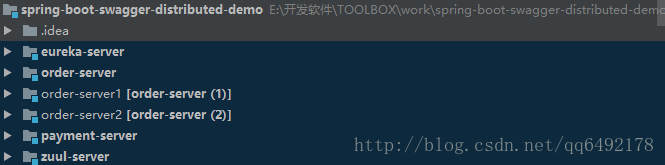
下面是运行后的效果图:
打开zuul的swagger首页http://localhost:8081/swagger-ui.html 
实现方法
zuul-server
路由配置
zuul:

  routes:

    payment-server:

      path: /pay/**

    order-server:

path: /order/**- 1
- 2
- 3
- 4
- 5
- 6
swagger配置类SwaggerConfig
@Configuration

@EnableSwagger2

public class SwaggerConfig {

    @Bean

    public Docket createRestApi() {

        return new Docket(DocumentationType.SWAGGER_2)

                .apiInfo(apiInfo());

    }

    private ApiInfo apiInfo() {

        return new ApiInfoBuilder()

                .title("分布式购物系统")

                .description("购物系统接口文档说明")

                .termsOfServiceUrl("http://localhost:8081")

                .contact(new Contact("vker", "", "6492178@gmail.com"))

                .version("1.0")

                .build();

    }

    @Bean

    UiConfiguration uiConfig() {

        return new UiConfiguration(null, "list", "alpha", "schema",

                UiConfiguration.Constants.DEFAULT_SUBMIT_METHODS, false, true, 60000L);

    }

}- 1
- 2
- 3
- 4
- 5
- 6
- 7
- 8
- 9
- 10
- 11
- 12
- 13
- 14
- 15
- 16
- 17
- 18
- 19
- 20
- 21
- 22
- 23
- 24
- 25
- 26
重点:swagger文档资源配置类DocumentationConfig
@Component

@Primary

public class DocumentationConfig implements SwaggerResourcesProvider {

    @Override

    public List<SwaggerResource> get() {

        List resources = new ArrayList<>();

        resources.add(swaggerResource("订单系统", "/order/v2/api-docs", "2.0"));

        resources.add(swaggerResource("支付系统", "/pay/v2/api-docs", "2.0"));

        return resources;

    }

    private SwaggerResource swaggerResource(String name, String location, String version) {

        SwaggerResource swaggerResource = new SwaggerResource();

        swaggerResource.setName(name);

        swaggerResource.setLocation(location);

        swaggerResource.setSwaggerVersion(version);

        return swaggerResource;

    }

}- 1
- 2
- 3
- 4
- 5
- 6
- 7
- 8
- 9
- 10
- 11
- 12
- 13
- 14
- 15
- 16
- 17
- 18
- 19
可以看出来实现的重点就在DocumentationConfig中,通过配置文档资源,当在首页下拉框选择订单系统时,会请求http://localhost:8081/order/v2/api-docs获取文档详情,而根据zuul的路由配置,zuul会将/order/**请求路由到serviceId为order-server的系统上。而且由于order-server是一个集群,就算其中一台服务挂掉,也不会影响到文档的获取。
order-server
swagger配置类SwaggerConfig,order-server、payment-serverswagger配置基本相同。
@Configuration

@EnableSwagger2

public class SwaggerConfig {

    @Bean

    public Docket createRestApi() {

        return new Docket(DocumentationType.SWAGGER_2)

                .apiInfo(apiInfo())

                .select()

                .apis(RequestHandlerSelectors.basePackage("w.m.vker.demo"))

                .apis(RequestHandlerSelectors.withClassAnnotation(Api.class))

                .apis(RequestHandlerSelectors.withMethodAnnotation(ApiOperation.class))

                .paths(PathSelectors.any())

                .build();

    }

    private ApiInfo apiInfo() {

        return new ApiInfoBuilder()

                .title("订单系统api")

                .description("订单系统接口文档说明")

                .contact(new Contact("vker", "", "6492178@gmail.com"))

                .version("1.0")

                .build();

    }

    @Bean

    UiConfiguration uiConfig() {

        return new UiConfiguration(null, "list", "alpha", "schema",

                UiConfiguration.Constants.DEFAULT_SUBMIT_METHODS, false, true, 60000L);

    }

}- 1
- 2
- 3
- 4
- 5
- 6
- 7
- 8
- 9
- 10
- 11
- 12
- 13
- 14
- 15
- 16
- 17
- 18
- 19
- 20
- 21
- 22
- 23
- 24
- 25
- 26
- 27
- 28
- 29
- 30
- 31
swagger整合xrebel
xrebel是一款web调试工具,可以参考教程XRebel使用教程。
xrebel的工作原理是追踪页面的各种请求分析整个请求的流程和消耗时间,而swagger则提供了页面在线接口调试功能,将两则结合起来,可以快速调试接口的同时分析接口的流程和缺陷,可谓是如虎添翼。
如图: 
点击swagger的try it out时 左下角的xrebel工具栏会记录发起的请求详情。
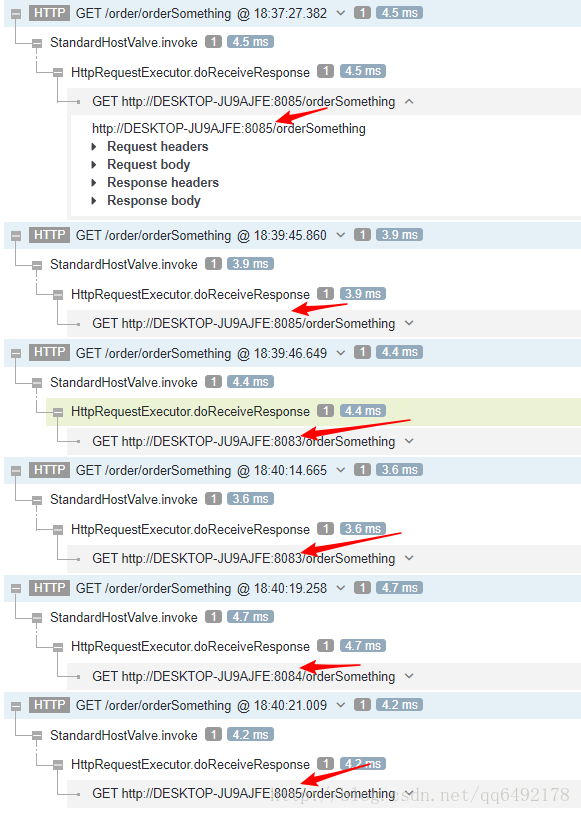
当我多次调用订单系统接口的时候,xrebel甚至可以显示zuul将这个请求通过负载均衡分发到哪一个服务上,如图:
实现方法
将xrebel集成到zuul-server启动的vm options参数中,在zuul其中成功后,打开http://localhost:8081/xrebel页面,想页面正下方中央的文本框内的js代码
<script>

  window.XREBEL_SERVERS = ['http://localhost:8081'];

  (function() {

    const script = document.createElement('script');

    script.src = window.XREBEL_SERVERS[0] + '/a65f4bf22bdd793dca6963ffe7fa0c62/resources/init.min.js';

    document.body.appendChild(script);

  }());

</script>- 1
- 2
- 3
- 4
- 5
- 6
- 7
- 8
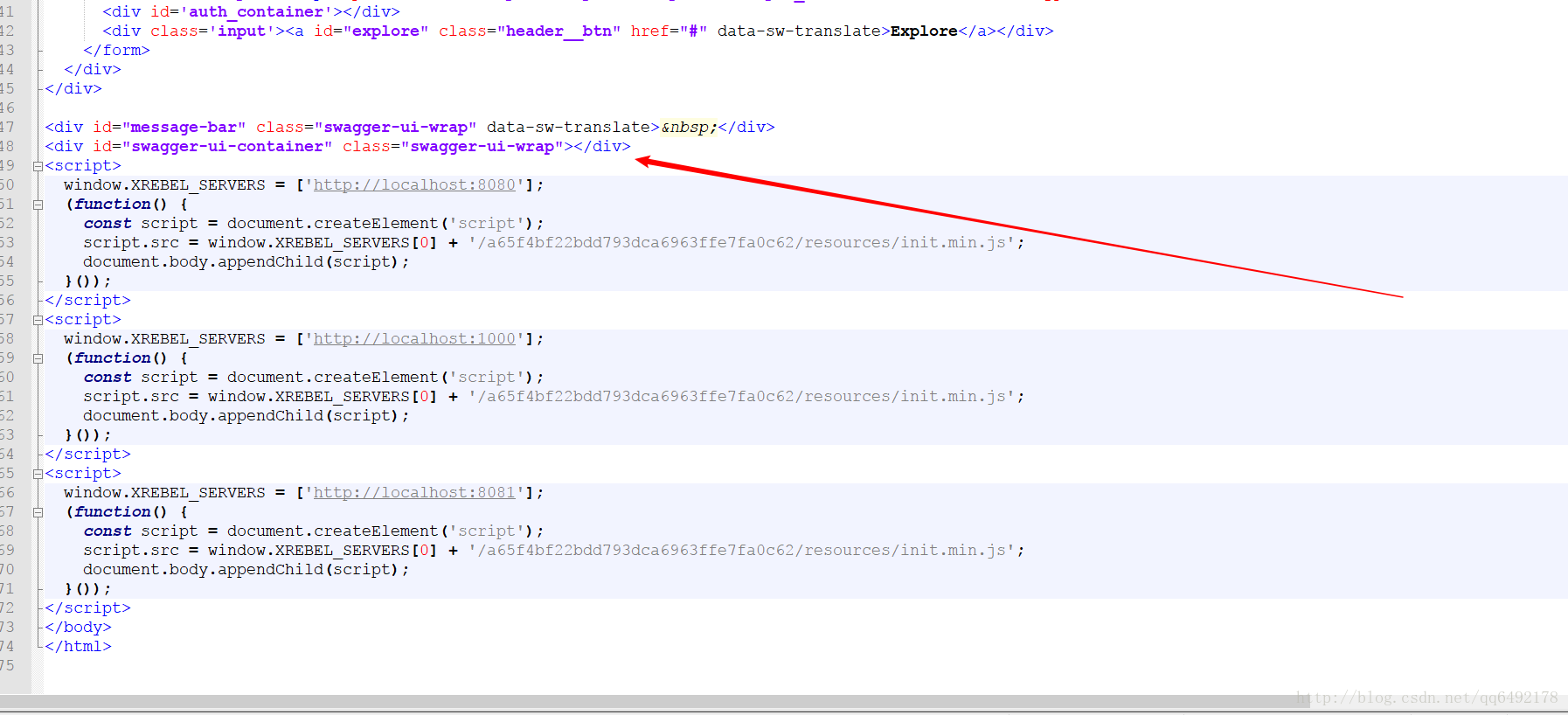
复制出来。然后找到springfox-swagger-ui依赖的jar包,如果使用maven管理,则jar包的位置在maven仓库路径\io\springfox\springfox-swagger-ui\版本号 的文件夹下,将jar包用解压后找到swagger-ui.html文件,将之前的复制的js文件粘贴到里面,然后运行zuul-server,就可以在swagger首页http://localhost:8081/swagger-ui.html看到左下角出现这个可爱的工具栏啦。
最后附上代码地址:https://github.com/91wangmeng/spring-boot-swagger-distributed-demo.git
server:
  port:  10000
spring:
  application:
    name: scbp-demo2333-service
eureka:
  client:
    serviceUrl:
      defaultZone: http://192.168.1.161:9001/eureka/,http://192.168.1.161:9002/eureka/
  instance:
    prefer-ip-address: true
management:
  security:
    enabled: false
Spring Cloud Zuul 网关的分布式系统中整合Swagger(转)和 zuul跨域访问问题的更多相关文章
- 如何Spring Cloud Zuul作为网关的分布式系统中整合Swagger文档在同一个页面上
本文不涉及技术,只是单纯的一个小技巧. 阅读本文前,你需要对spring-cloud-zuul.spring-cloud-eureka.以及swagger的配置和使用有所了解. 如果你的系统也是用zu ...
- Java Web中实现设置多个域名跨域访问
添加以下设置可允许所有域名跨域访问: response.setHeader("Access-Control-Allow-Origin","*"); 但在实际应用 ...
- springcloud中通过Filter实现微服务跨域访问允许
import org.slf4j.Logger; import org.slf4j.LoggerFactory; import org.springframework.beans.factory.an ...
- Spring Boot 2中对于CORS跨域访问的快速支持
原文:https://www.jianshu.com/p/840b4f83c3b5 目前的程序开发,大部分都采用前后台分离.这样一来,就都会碰到跨域资源共享CORS的问题.Spring Boot 2 ...
- Spring Cloud alibaba网关 sentinel zuul 四 限流熔断
spring cloud alibaba 集成了 他内部开源的 Sentinel 熔断限流框架 Sentinel 介绍 官方网址 随着微服务的流行,服务和服务之间的稳定性变得越来越重要.Sentine ...
- Spring Cloud 服务网关Zuul
Spring Cloud 服务网关Zuul 服务网关是分布式架构中不可缺少的组成部分,是外部网络和内部服务之间的屏障,例如权限控制之类的逻辑应该在这里实现,而不是放在每个服务单元. Spring Cl ...
- Spring Cloud Alibaba | Sentinel:分布式系统的流量防卫兵进阶实战
Spring Cloud Alibaba | Sentinel:分布式系统的流量防卫兵进阶实战 在阅读本文前,建议先阅读<Spring Cloud Alibaba | Sentinel:分布式系 ...
- Spring Cloud之网关
接口的分类: 开放接口:可以授权一些接口口OAuth2.0协议方式 第三方联合登录 内部接口: 一般只能在局域网中进行访问,服务与服务之间关系都在同一个微服务系统中.目的是为了保证安全问题 接口设 ...
- .net core下,Ocelot网关与Spring Cloud Gateway网关的对比测试
有感于 myzony 发布的 针对 Ocelot 网关的性能测试 ,并且公司下一步也需要对.net和java的应用做一定的整合,于是对Ocelot网关.Spring Cloud Gateway网关做个 ...
随机推荐
- #422 Div2 D
#422 Div2 D 题意 假设有 n 个人比赛,每次比赛进行分组,每组人数必须相同,如果一组有 x 人,则那一组要比赛 $ \frac{x * (x - 1)}{2}$次,最终一人获胜,其它人淘汰 ...
- linux tail指令
http://www.cnblogs.com/peida/archive/2012/11/07/2758084.html tail -f file, check the log file tail ...
- androd 获得wifi列表
AndroidManifest.xml <?xml version="1.0" encoding="utf-8"?> <manifest xm ...
- BP神经网络(手写数字识别)
1实验环境 实验环境:CPU i7-3770@3.40GHz,内存8G,windows10 64位操作系统 实现语言:python 实验数据:Mnist数据集 程序使用的数据库是mnist手写数字数据 ...
- hive启动报错:system:java.io.tmpdir等
解决方法:在hive-site.xml中添加 <property> <name>system:java.io.tmpdir</name> <val ...
- awk使用记录
awk是一个强大的文本分析工具,相对于grep的查找,sed的编辑,awk在其对数据分析并生成报告时,显得尤为强大.简单来说awk就是把文件逐行的读入,以空格为默认分隔符将每行切片,切开的部分再进行各 ...
- MySQL实现删除数据左右空格trim() 左空格ltrim() 右空格rtrim()
2017-03-23 select trim(字段) from 表 删除左右空格 select ltrim(字段) from 表 删除左空格 select rtrim(字 ...
- 通过脚本发送zabbix邮件报警
zabbix原生的报警媒介类型中,邮件报警是我们常用的方式.当我们在CentOS6上面安装zabbix3.0并配置邮件报警的时候,在邮件配置正确的前提下,不管触发器如何触发,邮件总是发送不出去,但是在 ...
- hdu 1030 Delta-wave(数学题+找规律)
题目链接:http://acm.hdu.edu.cn/showproblem.php?pid=1030 Delta-wave Time Limit: 2000/1000 MS (Java/Others ...
- Intellij output 中文乱码
使用intellij有一段时间了,intellij output中文乱码,每次使用这两点解决,就可以解决乱码问题. 1.修改启动参数 修改安装Intellij目录下的C:\Program Files ...