
MFC 将 '当前工作路径' 改为 'exe所在路径'(转)
原文转自 https://blog.csdn.net/morewindows/article/details/8683519
调整进程当前目录为程序可执行文件所在目录是个非常实用的方法。为了更加的让代码复用,本文将调整进程当前目录为程序可执行文件所在目录这一功能封装为三个实用函数——
1.SplitPathFileName
这个函数将文件全名(带路径)分解成路径名,文件名,后缀名。
2.GetProcessPathNameAndFileName
得到当前进程可执行文件的路径名,文件名,后缀名。
3.AdjustProcessCurrentDirectory
调整进程当前目录为程序可执行文件所在目录
各函数使用示范可以参见如下程序:
//调整进程当前目录为程序可执行文件所在目录

//http://blog.csdn.net/morewindows/article/details/8683519

//By MoreWindows( http://blog.csdn.net/MoreWindows )

#include <windows.h>

#include <stdio.h>

#include <conio.h>

//将文件全名(带路径)分解成路径名,文件名,后缀名

//C:\test\test.exe -> "C:\test\", "test", ".exe"

//By MoreWindows( http://blog.csdn.net/MoreWindows )

void SplitPathFileName(const char *pstrPathFileName, char *pstrPath, char *pstrFileName, char *pstrExtName)

{

    if (pstrPath != NULL)

    {

        char szTemp[MAX_PATH];

        _splitpath(pstrPathFileName, pstrPath, szTemp, pstrFileName, pstrExtName);

        strcat(pstrPath, szTemp);

    }

    else

    {

        _splitpath(pstrPathFileName, NULL, NULL, pstrFileName, pstrExtName);

    }

}

//得到当前进程可执行文件的路径名,文件名,后缀名

//如运行C:\test\test.exe 得到 "C:\test\", "test", ".exe"

//By MoreWindows( http://blog.csdn.net/MoreWindows )

BOOL GetProcessPathNameAndFileName(char *pstrPath, char *pstrFileName, char *pstrExtName)

{

    char szExeFilePathFileName[MAX_PATH];

    if (GetModuleFileName(NULL, szExeFilePathFileName, MAX_PATH) == )

        return FALSE;

    SplitPathFileName(szExeFilePathFileName, pstrPath, pstrFileName,pstrExtName);

    return TRUE;

}

//调整进程当前目录为程序可执行文件所在目录

//By MoreWindows( http://blog.csdn.net/MoreWindows )

BOOL AdjustProcessCurrentDirectory()

{

    char szPathName[MAX_PATH];

    GetProcessPathNameAndFileName(szPathName, NULL, NULL);

    return SetCurrentDirectory(szPathName);

}

int main()

{

    printf("    调整进程当前目录为程序可执行文件所在目录 \n");

    printf(" - http://blog.csdn.net/morewindows/article/details/8683519 -\n");

    printf(" -- By MoreWindows( http://blog.csdn.net/MoreWindows ) --\n\n");

    char szCurrentDirectory[MAX_PATH];

    GetCurrentDirectory(MAX_PATH, szCurrentDirectory);

    printf("进程当前目录为: \n%s\n", szCurrentDirectory);

    AdjustProcessCurrentDirectory();

    GetCurrentDirectory(MAX_PATH, szCurrentDirectory);

    printf("\n调整后,进程当前目录为: \n%s\n", szCurrentDirectory);

    getch();

    return ;

}
通过CMD来调用这个程序看看。
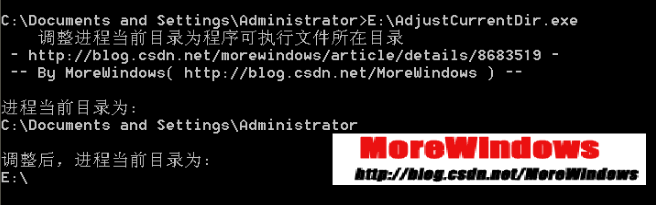
由图可以看出,程序的当前目录已经被调整到程序可执行文件所在目录了。
附1:得到程序所在目录还可以使用PathRemoveFileSpec函数。20130507
本文配套程序下载地址为:http://download.csdn.net/detail/morewindows/5165721
欢迎关注微博:http://weibo.com/MoreWindows
MFC 将 '当前工作路径' 改为 'exe所在路径'(转)的更多相关文章
- exe所在路径
procedure TForm1.btn1Click(Sender: TObject); begin //完整路径 E:\UsrSoft\Desktop\FileNameDemo\Project1.e ...
- Qt5_当前exe所在路径
可以通过以下方式来获取: 1. #include <QDir>#include <QDebug> QDir dir; qDebug() << "curre ...
- C# 获取当前执行DLL 所在路径
有的时候,当前执行的DLL 和启动的EXE 所在路径并不一致,这时我们想要获得当前执行DLL 所在路径可以使用下面的方法. // Summary: // Gets the path or UNC lo ...
- Visual Studio 2017 调试器的工作进程(msvsmon.exe)意外退出 调试将终止
开发环境: Windows 10 in Parallels Desktop Visual Studio 15.6 场景还原: 使用 Visual Studio 15.6 (即 Visual Studi ...
- 关于富文本编辑器—UEditor(java版)的使用,以及如何将UEditor的文件/图片上传路径改成绝对路径
突然发现好久没写博客了,感觉变懒了,是要让自己养成经常写文章的习惯才行.既可以分享自己的所学,和所想,和大家一起讨论,发现自己的不足的问题. 大家可能经常会用到富文本编辑器,今天我要说的是UEdito ...
- 织梦dedecms5.7二级域名文章图片不显示修改方法.相对路径改为绝对路径的方法
dedecms升级到5.7SP1后,开启二级域名,你会发现,在二级域名下的文章,上传的图片地址都是:二级域名+图片地址,这是相对路径.但是你的图片是默认上传在uploads里面的.应该使用绝对路径.这 ...
- 中文Ubuntu里用户目录里的路径改成英文
(附注:转载于http://www.linuxdiyf.com/linux/201105/56.html) 为了使用起来方便,装了Ubuntu中文版,自然在home文件里用户目录的"桌面&q ...
- 得到本地应用程序的EXE的路径
实现效果: 知识运用: Application类的ExecutablePath属性 //获取启动了应用程序的可执行文件的路径和可执行文件的名称 public static string Exec ...
- dedecms5.7二级域名文章图片不显示修改方法.相对路径改为绝对路径的方法
dedecms5.7(织梦CMS5.7)二级域名文章图片不显示修改方法.相对路径改为绝对路径的方法 dedecms升级到5.7SP1后,开启二级域名,你会发现,在二级域名下的文章,上传的图片地址都是: ...
随机推荐
- OC中block作方法参数时的用法
方式一.在传参时直接声明block回调方法. 1. 定义方法: - (int)doTest:(NSString *)name para1:(int)temp1 para2:(int)temp2 suc ...
- Gold Balanced Lineup POJ - 3274
Description Farmer John's N cows (1 ≤ N ≤ 100,000) share many similarities. In fact, FJ has been abl ...
- MySQLSyntaxErrorException: You have an error in your SQL syntax; check the manual that corresponds to your MySQL server version for the right syntax to use near ':ge
数据库表里命名有这个字段,可怎么就是报错呢,大神的解释: 加上之后立马好用!!!
- [Jenkins]持续集成环境下fingbug插件的安装使用与配置
参考:https://wiki.jenkins.io/display/JENKINS/FindBugs+Plugin 突然,天降杂事.我是想安安静静的做个美丽的测试...但是事与愿违,项目经理叫我帮忙 ...
- Android webview 加载https网页显示空白
http://www.2cto.com/kf/201110/108836.html 这个网址讲的不错. 设置webview支持https的方法: webView.setWebViewClient(ne ...
- Android字体大小怎么自适应不同分辨率?
今天有人问我,android系统不同分辨率,不同大小的手机,字体大小怎么去适应呢?其实字体的适应和图片的适应是一个道理的. 一. 原理如下: 假设需要适应320x240,480x320分辨率.在res ...
- 孤荷凌寒自学python第五十三天使用python写入和修改Firebase数据库中记录
孤荷凌寒自学python第五十三天使用python写入和修改Firebase数据库中记录 (完整学习过程屏幕记录视频地址在文末) 今天继续研究Firebase数据库,利用google免费提供的这个数 ...
- heat launch an instance
在包含Orchestration服务的环境中,可以创建启动实例的堆栈 创建yam文件 heat_template_version: 2015-10-15 description: Launch a b ...
- OpenCV_1.0安装包下载
OpenCV_1.0安装包下载 点击下载
- Android记事本05
昨天: intentFilter 今天: URL和logcat 问题: ADK更新后无法打开布局文件.xml