
ping 中的“TTL"是什么意思
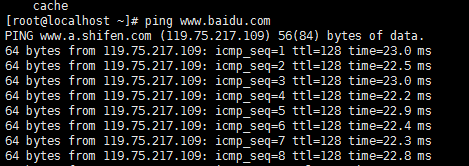
简单来说就是表示一个数据包在网络中可以跳跃的结点数据,当该数据为零时本数据包将被抛弃
详细解释看以下引用:
TTL (although named as "time" to live) is actually refering to the number of hops a packet can go thru before it "dies" off. How? Why?
  Well, let's go back to some basics (help me out if I am wrong here okay?)

- data is sent thru the internet in form of packets (ie small packages/group of bits collected in the binary form)

- besides the data, there are many more other information that is packed into the same package (for many purposes like indification,
  error correction, etc and also the TTL info)

- a packet will travel thru the networks to go from the sender to reach the destination using any connections of the network, it will
   go thru lots of connection points (routers or hops) and it will keep on traveling (even though in loops) thru-out this network until
   it reaches its destination

- just imagine lots of packets traveling in loops in a certain network but never manages to reach its destination... well, they will
  keep on going around in the network to try to reach the destination... basically the network will be congested!

- so to ensure that a data will not "live" forever to clogg the network, the TTL is introduced. It is a backward counter (basically a
  number) and will start from a value assigned by (probably) the sender's computer system and this number will be decremented by one
  whenever it reaches a hop until the value of TTL equals to zero (which means it will die off  ) where the packet will be discarded by
  the router (hop).

- TTL is a small (8-bits) data that is being attached at the end of this package (I think it is 8-bit, therefore "255")

- so strictly speaking TTL refers to the number of hops a packet can make before it will be discarded; but of course, indirectly, it
  also shows you the "time" of how long a packet's life is left.

- when you ping TTL=243 it means that the data had traveled 12 hops that's it... (if the initial is set to 255 of course, and in this
  case, I think so)

- a packet does not contain any timing information as far as I know...

- the way of knowing how fast a server connection is has been given by the time=323ms

My guess is:

- a high starting/initial TTL number would indicate that a packet is important/ it might need to travel far (many hops) ?? Am I right?

- a high TTL number you see when you ping shows that the data only needs to travel less hops to reach it's destination from YOUR computer
ping 中的“TTL"是什么意思的更多相关文章
- 介绍ping中的TTL是什么意思
ping是icmp报文的一种应用.用来测试网络中各设备的连通性.在这几天的实验课上,我又用到了这个非常常用的命令,但是这次我发现了一些以前没有太注意的地方,那就是我在Ping不同的地址时所返回的TTL ...
- 通过PING命令中的TTL来判断对方操作系统
---恢复内容开始--- 通过PING命令中的TTL来判断对方操作系统简单来说,TTL全程Time to Live,意思就是生存周期.首先要说明ping命令是使用的网络层协议ICMP,所以TTL指的是 ...
- ping 返回的TTL数值代表什么?
ping 返回的TTL数值代表什么? 1 [root@standby ~]# dig @202.106.0.20 www.iqiyi.com 2 3 ; <<>> DiG 9. ...
- [TCP/IP] ping traceroute和TTL
1.Time To Live是生存时间的意思,就是说这个ping的数据包能在网络上存在多少时间.当我们对网络上的主机进行ping操作的时候,我们本地机器会发出一个数据包,数据包经过一定数量的路由器传送 ...
- 虚拟机 与 主机 Ping 中的设置
这段时间是学习华清远见的Linux A8 关于Linux移植,遇到虚拟机与主机Ping不通.经查阅后总结出以下 VM中设置. “虚拟机设置-->硬件--> 网络适配器--> 桥接模式 ...
- HBase中的TTL与MinVersion的关系
HBase版本:1.3.1 TTL(Time-To-Live):每个Cell的数据超时时间(当前时间 - 最后更新的时间) MinVersion:如果当前存储的所有时间版本都早于TTL,至少MIN_V ...
- Ping++中的AlipaySDK和AlicloudUTDID冲突解决方案
今天维护一个老项目发现阿里框架冲突 问题截图: 解决方案: 去阿里文档中心 https://docs.open.alipay.com/54/104509 重新下载没有UTDID冲突的库 下载SDK解压 ...
- linux ping 命令解析
不管在windows平台,还是在linux平台,ping都是非常常用的网络命令:ping命令通过ICMP(Internet控制消息协议)工作:ping可以用来测试本机与目标主机是否联通.联通速度如何. ...
- ttl传输中过期
上renren时遇到一问题,突然间就无法登陆,看了下网络,正常呀,别的网站完全ok,就这不成,所以就ping了一下做以校验:如下图示:传输中过期ttl,这问题少见,新鲜呀:赶紧查了查:原来可能是产生了 ...
随机推荐
- CentOS配置TFTP服务器
服务器端 软件包 tftp-server 启动脚本 /usr/sbin/in.tftpd 启动服务 /usr/lib/systemd/system/tftp.service 配置文件 /etc/xin ...
- Mac OS X 10.10.5 中 VirtualBox 5.0 里的 Win7 虚拟机无法使用 USB 3.0 设备的解决办法(补充说明)
上一篇文章中,我说到了如何在Mac OS X 10.10.5 中让 VirtualBox 5.0 里的 Win7 虚拟机使用 USB 3.0.最近碰巧升级 MacBook Pro 为最新的 15 吋 ...
- hdu3315 /最大权最佳匹配(最大权下尽量不改变次序)(有权田忌赛马类问题)/费用流
题意:2个人比赛,每场比赛有得分,每场每人派一支圣兽( brute ,字典翻译为畜生,感觉这里不太符╮(╯▽╰)╭),有攻击力和血条...一堆规则... 合理安排,让1号人获得最大分数,并尽量不要改变 ...
- foobar2000播放APE格式音乐的解决办法
要使foobar2000能播放APE格式的音乐需要安装Monkey's Audio Decoder的插件.操作如下: 1.登录官方插件列表,找到Monkey's Audio Decoder插件 官方插 ...
- Maven实现多个项目关联自动化构建(maven-invoker-plugin插件的使用)
以下内容引用自https://ayayui.gitbooks.io/tutorialspoint-maven/content/book/maven_build_automation.html: 注意: ...
- 基于源码学习-fighting
今天逛着逛着,看到个培训网站,点进去和客服人员聊了一下.接着,看了看他们的培训课程,想了解一下 嵌入式开发的. (人就是要放空自己,把自己当做什么都不会,当着个婴儿[小学生]一般认真,要学什么知识就是 ...
- javascript 在线文本编辑器
javascript 在线文本编辑器实现代码. 效果例如以下: watermark/2/text/aHR0cDovL2Jsb2cuY3Nkbi5uZXQvcGhwZmVuZ2h1bw==/font/5 ...
- mongodb+php通过_id查询
在php中通过_id 在mongodb中查找特定记录: <?php $conn=new Mongo("127.0.0.1:27017"); #连接指定端口远程主机 $db=$ ...
- nginx 配置nginx.conf,负载均衡,逻辑分流
nginx 最重要的配置文件nginx.conf: 一般的配置我不做解释,网上到处都是,主要对主要的几点进行注释(如下) worker_processes ; error_log /data/logs ...
- python 字符串前缀
普通字符串 一般字符串都是已unicode编码,且和C类似,可以使用\来转义,比如 a = "test\ntest" print(a) 输出 test test 前面加r 在字符串 ...