
基于.net core webapi和mongodb的日志系统
开发环境vs2017,.NET Core2.1, 数据写入到mongodb。思路就是1.提供接口写入日志,2.基于接口封装类库。3.引入类库使用
源码在最后
为什么要写它
很多开源项目像nlog、log4net、elk、exceptionless等都挺好的。就是除了引入所需类库,还要在项目中添加配置,不喜欢。elk在分布式海量数据收集和检索方面可能更能发挥它的优势,单纯记日志也可以,exceptionless就是基于elk的。就想着写一个简单易用的、可以发邮件报警的,直接引入类库就能用的一个记日志工具,所有的配置信息和入库都交给web api。这是当时问的问题,https://q.cnblogs.com/q/109489/。干脆就实现了先
接下里的代码可能有很多可以优化的地方,如果有些地方觉得不妥或者可以用更好的方式实现或组织代码,请告诉说,我改。另外实现完的接口没有加访问限制,先默认内网使用,当然有热心网友给出实现的话就更好了,像ip限制或者签名等等(已改,http basic Authorization进行认证)
一、实现Web Api
- 新建.net core web api项目 【LogWebApi】
因为要发邮件和写入mongodb,先改配置文件appsettings.json
{

  "ConnectionStrings": {

    "ConnectionString": "mongodb://yourmongoserver",

    "Database": "logdb",

    "LogCollection": "logdata"

  },

  "AllowedHosts": "*",

  "AppSettings": {

    "SendMailInfo": {

      "SMTPServerName": "smtp.qiye.163.com",

      "SendEmailAdress": "发送人邮箱",

      "SendEmailPwd": "",

      "SiteName": "邮件主题",

      "SendEmailPort": "123"

    }

  }

}
- 实现依赖注入获取配置文件信息
创建目录结构如下图

AppSettings类
public class AppSettings

    {

        public SendMailInfo SendMailInfo { get; set; }

    }

    public class SendMailInfo

    {

        public string SMTPServerName { get; set; }

        public string SendEmailAdress { get; set; }

        public string SendEmailPwd { get; set; }

        public string SiteName { get; set; }

        public string SendEmailPort { get; set; }

    }
DBSettings类
/// <summary>

    /// 数据库配置信息

    /// </summary>

    public class DBSettings

    {

        /// <summary>

        /// mongodb connectionstring

        /// </summary>

        public string ConnectionString { get; set; }

        /// <summary>

        /// mongodb database

        /// </summary>

        public string Database { get; set; }

        /// <summary>

        /// 日志collection

        /// </summary>

        public string LogCollection { get; set; }

    }
接下来Here is how we modify Startup.cs to inject Settings in the Options accessor model:
public void ConfigureServices(IServiceCollection services)

        {

            services.AddMvc().SetCompatibilityVersion(CompatibilityVersion.Version_2_1);

            services.Configure<DBSettings>(Configuration.GetSection("ConnectionStrings"));//数据库连接信息

            services.Configure<AppSettings>(Configuration.GetSection("AppSettings"));//其他配置信息

        }
在项目中将通过IOptions 接口来获取配置信息,后面看代码吧
IOptions<AppSettings>

IOptions<DBSettings>
配置文件信息获取算是准备完了
- 创建日志信息Model
在Model文件夹下创建类LogEventData,也就是存到mongodb的信息
public class LogEventData

    {

        [BsonId]

        public ObjectId Id { get; set; }

        /// <summary>

        /// 时间

        /// </summary>

        [BsonDateTimeOptions(Representation = BsonType.DateTime, Kind = DateTimeKind.Local)]

        public DateTime Date { get; set; }

        /// <summary>

        /// 错误级别

        /// </summary>

        public string Level { get; set; }

        /// <summary>

        /// 日志来源

        /// </summary>

        public string LogSource { get; set; }

        /// <summary>

        /// 日志信息

        /// </summary>

        public string Message { get; set; }

        /// <summary>

        /// 类名

        /// </summary>

        public string ClassName { get; set; }

        /// <summary>

        /// 方法名

        /// </summary>

        public string MethodName { get; set; }

        /// <summary>

        /// 完整信息

        /// </summary>

        public string FullInfo { get; set; }

        /// <summary>

        /// 行号

        /// </summary>

        public string LineNumber { get; set; }

        /// <summary>

        /// 文件名

        /// </summary>

        public string FileName { get; set; }

        /// <summary>

        /// ip

        /// </summary>

        public string IP { get; set; }

        /// <summary>

        /// 是否发送邮件,不为空则发送邮件,多个接收人用英文逗号隔开

        /// </summary>

        [JsonIgnore]

        public string Emails { get; set; }

        public override string ToString()

        {

            return JsonConvert.SerializeObject(this);

        }

    }
- 定义database Context
站点根目录新建文件夹Context和类,别忘了引用 MongoDB.Driver nuget包

public class MongoContext

    {

        private readonly IMongoDatabase _database = null;

        private readonly string _logCollection;

        public MongoContext(IOptions<DBSettings> settings)

        {

            var client = new MongoClient(settings.Value.ConnectionString);

            if (client != null)

                _database = client.GetDatabase(settings.Value.Database);

            _logCollection = settings.Value.LogCollection;

        }

        public IMongoCollection<LogEventData> LogEventDatas

        {

            get

            {

                return _database.GetCollection<LogEventData>(_logCollection);

            }

        }

    }
- 添加Repository
别纠结为什么叫这个名了,就是数据访问类,像是常用的DAL,创建目录如下,之后可以通过依赖注入来访问具体实现

IRepository类
public interface IRepository<T> where T:class

    {

        Task<IEnumerable<T>> GetAll();

        Task<T> Get(string id);

        Task Add(T item);

        Task<bool> Remove(string id);

        Task<bool> Update(string id, string body);

    }
LogRepository类
public class LogRepository : IRepository<LogEventData>

    {

        private readonly MongoContext _context = null;

        public LogRepository(IOptions<DBSettings> settings)

        {

            _context = new MongoContext(settings);

        }

        public async Task Add(LogEventData item)

        {

            await _context.LogEventDatas.InsertOneAsync(item);

        }

        public async Task<IEnumerable<LogEventData>> GetList(QueryLogModel model)

        {

            var builder = Builders<LogEventData>.Filter;

            FilterDefinition<LogEventData> filter = builder.Empty;

            if (!string.IsNullOrEmpty(model.Level))

            {

                filter = builder.Eq("Level", model.Level);

            }

            if (!string.IsNullOrEmpty(model.LogSource))

            {

                filter = filter & builder.Eq("LogSource", model.LogSource);

            }

            if (!string.IsNullOrEmpty(model.Message))

            {

                filter = filter & builder.Regex("Message", new BsonRegularExpression(new Regex(model.Message)));

            }

            if (DateTime.MinValue != model.StartTime)

            {

                filter = filter & builder.Gte("Date", model.StartTime);

            }

            if(DateTime.MinValue != model.EndTime)

            {

                filter = filter & builder.Lte("Date", model.EndTime);

            }

            return await _context.LogEventDatas.Find(filter)

                 .SortByDescending(log => log.Date)

                 .Skip((model.PageIndex - ) * model.PageSize)

                 .Limit(model.PageSize).ToListAsync();

        }

        #region 未实现方法

        public async Task<LogEventData> Get(string id)

        {

            throw new NotImplementedException();

        }

        public async Task<IEnumerable<LogEventData>> GetAll()

        {

            throw new NotImplementedException();

        }

        public Task<bool> Remove(string id)

        {

            throw new NotImplementedException();

        }

        public Task<bool> Update(string id, string body)

        {

            throw new NotImplementedException();

        }

        #endregion

    }
为了通过DI model来访问LogRepository,修改Startup.cs ,ConfigureServices添加如下代码
services.AddTransient<IRepository<LogEventData>, LogRepository>();//数据访问
到这基本的数据写入和查询算是写完了,下面来实现Controller
- 创建LogController

[Route("api/[controller]")]

    [ApiController]

    public class LogController : ControllerBase

    {

        private readonly LogRepository _logRepository;

        IOptions<AppSettings> _appsettings;

        public LogController(IRepository<LogEventData> logRepository,IOptions<AppSettings> appsettings)

        {

            _logRepository = (LogRepository)logRepository;

            _appsettings = appsettings;

        }

        [Route("trace")]

        [HttpPost]

        public void Trace([FromBody] LogEventData value)

        {

            Add(value);

        }

        [Route("debug")]

        [HttpPost]

        public void Debug([FromBody] LogEventData value)

        {

            Add(value);

        }

        [Route("info")]

        [HttpPost]

        public void Info([FromBody] LogEventData value)

        {

            Add(value);

        }

        [Route("warn")]

        [HttpPost]

        public void Warn([FromBody] LogEventData value)

        {

            Add(value);

        }

        [Route("error")]

        [HttpPost]

        public void Error([FromBody] LogEventData value)

        {

            Add(value);

        }

        [Route("fatal")]

        [HttpPost]

        public void Fatal([FromBody] LogEventData value)

        {

            Add(value);

        }

        private async void Add(LogEventData data)

        {

            if (data != null)

            {

                await _logRepository.Add(data);

                if (!string.IsNullOrEmpty(data.Emails))

                {

                    new EmailHelpers(_appsettings).SendMailAsync(data.Emails, "监测邮件", data.ToString());

                }

            }

        }

        [HttpGet("getlist")]

        public async Task<ResponseModel<IEnumerable<LogEventData>>> GetList([FromQuery] QueryLogModel model)

        {

            ResponseModel<IEnumerable<LogEventData>> resp = new ResponseModel<IEnumerable<LogEventData>>();

            resp.Data = await _logRepository.GetList(model);

            return resp;

        }

    }
控制器里整个逻辑很简单,除了向外提供不同日志级别的写入接口,也实现了日志查询接口给日志查看站点用,基本上够用了。到这编译的话会报错,有一些类还没加上,稍后加上。在Add方法内部,用到了new EmailHelpers。讲道理按.net core 对依赖注入的使用 ,这个 new是不应该出现在这的,就先这么着吧,下面补类:
先创建Model文件夹下的两个类,很简单就不解释了
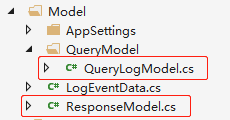
QueryLogModel类
public class QueryLogModel

    {

        private int _pageindex = ;

        private int _pagesize = ;

        public int PageIndex

        {

            get { return _pageindex; }

            set { _pageindex = value; }

        }

        public int PageSize

        {

            get { return _pagesize; }

            set { _pagesize = value; }

        }

        public string Level { get; set; }

        public string LogSource { get; set; }

        public string Message { get; set; }

        public DateTime StartTime { get; set; }

        public DateTime EndTime { get; set; }

    }
ResponseModel类
public class ResponseModel<T>

    {

        private HttpStatusCode _resultCode = HttpStatusCode.OK;

        private string _message = "请求成功";

        private T _data = default(T);

        /// <summary>

        /// 返回码

        /// </summary>

        public HttpStatusCode ResultCode

        {

            get { return this._resultCode; }

            set { this._resultCode = value; }

        }

        /// <summary>

        /// 结果说明

        /// </summary>

        public string Message

        {

            get { return this._message; }

            set { this._message = value; }

        }

        /// <summary>

        /// 返回的数据

        /// </summary>

        public T Data

        {

            get { return this._data; }

            set { this._data = value; }

        }

    }
创建EmailHelpers类
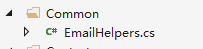
public class EmailHelpers

    {

        private SendMailInfo _mailinfo;

        public EmailHelpers(IOptions<AppSettings> appsettings)

        {

            _mailinfo = appsettings.Value.SendMailInfo;

        }

        /// <summary>

        /// 异步发送邮件

        /// </summary>

        /// <param name="emails">email地址</param>

        /// <param name="subject">邮件标题</param>

        /// <param name="content">邮件内容</param>

        public void SendMailAsync(string emails, string subject, string content)

        {

            Task.Factory.StartNew(() =>

            {

                SendEmail(emails, subject, content);

            });

        }

        /// <summary>

        /// 邮件发送方法

        /// </summary>

        /// <param name="emails">email地址</param>

        /// <param name="subject">邮件标题</param>

        /// <param name="content">邮件内容</param>

        /// <returns></returns>

        public void SendEmail(string emails, string subject, string content)

        {

            string[] emailArray = emails.Split(new char[] { ';' }, StringSplitOptions.RemoveEmptyEntries);

            string fromSMTP = _mailinfo.SMTPServerName;        //邮件服务器

            string fromEmail = _mailinfo.SendEmailAdress;      //发送方邮件地址

            string fromEmailPwd = _mailinfo.SendEmailPwd;//发送方邮件地址密码

            string fromEmailName = _mailinfo.SiteName;   //发送方称呼

            try

            {

                //新建一个MailMessage对象

                MailMessage aMessage = new MailMessage();

                aMessage.From = new MailAddress(fromEmail, fromEmailName);

                foreach (var item in emailArray)

                {

                    aMessage.To.Add(item);

                }

                aMessage.Subject = subject;

                aMessage.Body = content;

                System.Text.Encoding.RegisterProvider(System.Text.CodePagesEncodingProvider.Instance);

                aMessage.BodyEncoding = Encoding.GetEncoding("utf-8");

                aMessage.IsBodyHtml = true;

                aMessage.Priority = MailPriority.High;

                aMessage.ReplyToList.Add(new MailAddress(fromEmail, fromEmailName));

                SmtpClient smtp = new SmtpClient();

                smtp.Host = fromSMTP;

                smtp.Timeout = ;

                smtp.UseDefaultCredentials = false;

                smtp.EnableSsl = true;

                smtp.DeliveryMethod = SmtpDeliveryMethod.Network;

                smtp.Credentials = new NetworkCredential(fromEmail, fromEmailPwd); //发邮件的EMIAL和密码

                smtp.Port = int.Parse(_mailinfo.SendEmailPort);

                smtp.Send(aMessage);

            }

            catch (Exception ex)

            {

                throw ex;

            }

        }

    }
此类里需要引用nuget:System.Text.Encoding.CodePages, 那行报错的代码如果不想引用删掉就行
到这接口基本上就可以用了。
但是再加三个东西
- 扩展
添加全局异常捕获服务

ExceptionMiddlewareExtensions类
/// <summary>

    /// 全局异常处理中间件

    /// </summary>

    public static class ExceptionMiddlewareExtensions

    {

        public static void ConfigureExceptionHandler(this IApplicationBuilder app, IOptions<DBSettings> settings)

        {

            LogRepository _repository = new LogRepository(settings);

            app.UseExceptionHandler(appError =>

            {

                appError.Run(async context =>

                {

                    context.Response.StatusCode = (int)HttpStatusCode.InternalServerError;

                    context.Response.ContentType = "application/json";

                    var contextFeature = context.Features.Get<IExceptionHandlerFeature>();

                    if (contextFeature != null)

                    {

                        await _repository.Add(new LogEventData

                        {

                            Message= contextFeature.Error.ToString(),

                            Date=DateTime.Now,

                            Level="Fatal",

                            LogSource= "LogWebApi"

                        });

                        await context.Response.WriteAsync(context.Response.StatusCode + "-Internal Server Error.");

                    }

                });

            });

        }

    }
修改Startup.cs
public void Configure(IApplicationBuilder app, IHostingEnvironment env,IOptions<DBSettings> settings)

        {

            app.ConfigureExceptionHandler(settings);

        }
添加MessagePack扩展
messagepack可以让我们在post数据的时候序列化数据,“压缩”数据传输大小,这个会结合针对接口封装的类库配合使用。
引用nuget: MessagePack和WebApiContrib.Core.Formatter.MessagePack
在ConfigureServices添加代码
services.AddMvcCore().AddMessagePackFormatters();

services.AddMvc().AddMessagePackFormatters();
扩展了media type,用以支持"application/x-msgpack", "application/msgpack",在接下来封装的类库中会使用"application/x-msgpack",在web api来引入这个东西就是为了能解析从客户端传过来的数据
添加Swagger支持
引用nuget:Swashbuckle.AspNetCore
修改ConfigureServices
services.AddSwaggerGen(c =>

            {

                c.SwaggerDoc("v1", new Info { Title = "My API", Version = "v1" });

            });
修改Configure
// Enable middleware to serve generated Swagger as a JSON endpoint.

            app.UseSwagger();

            // Enable middleware to serve swagger-ui (HTML, JS, CSS, etc.),

            // specifying the Swagger JSON endpoint.

            app.UseSwaggerUI(c =>

            {

                c.SwaggerEndpoint("/swagger/v1/swagger.json", "My API V1");

                c.RoutePrefix = string.Empty;//在应用的根 (http://localhost:<port>/) 处提供 Swagger UI

            });
到这整个web api站点算是写完了,编译不出错就ok了。
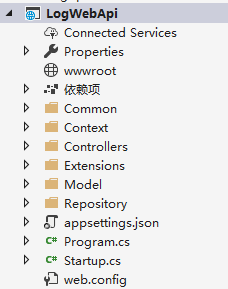
二、实现类库
类库整体目录结构如下
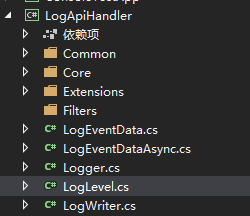
1.新建类库LogApiHandler
2.实现
- 创建日志信息类,和WebApi那个对应,LogEventData
/// <summary>

    /// 日志数据

    /// post到日志接口的数据

    /// </summary>

    public class LogEventData

    {

        /// <summary>

        /// 时间

        /// </summary>

        public DateTime Date { get; set; }

        /// <summary>

        /// 错误级别

        /// </summary>

        public string Level { get; set; }

        /// <summary>

        /// 日志来源

        /// </summary>

        public string LogSource { get; set; }

        /// <summary>

        /// 日志信息

        /// </summary>

        public string Message { get; set; }

        /// <summary>

        /// 类名

        /// </summary>

        public string ClassName { get; set; }

        /// <summary>

        /// 方法名

        /// </summary>

        public string MethodName { get; set; }

        /// <summary>

        /// 完整信息

        /// </summary>

        public string FullInfo { get; set; }

        /// <summary>

        /// 行号

        /// </summary>

        public string LineNumber { get; set; }

        /// <summary>

        /// 文件名

        /// </summary>

        public string FileName { get; set; }

        /// <summary>

        /// ip

        /// </summary>

        public string IP { get; set; }

        /// <summary>

        /// 不为空则发送邮件,多个接收人用英文分号 ; 隔开

        /// </summary>

        public string Emails { get; set; }

    }
- 创建日志级别类,就是其他开源项目常见的Level
internal class LogLevel

    {

        /// <summary>

        /// Trace log level.

        /// </summary>

        public static readonly LogLevel Trace = new LogLevel("Trace", );

        /// <summary>

        /// Debug log level.

        /// </summary>

        public static readonly LogLevel Debug = new LogLevel("Debug", );

        /// <summary>

        /// Info log level.

        /// </summary>

        public static readonly LogLevel Info = new LogLevel("Info", );

        /// <summary>

        /// Warn log level.

        /// </summary>

        public static readonly LogLevel Warn = new LogLevel("Warn", );

        /// <summary>

        /// Error log level.

        /// </summary>

        public static readonly LogLevel Error = new LogLevel("Error", );

        /// <summary>

        /// Fatal log level.

        /// </summary>

        public static readonly LogLevel Fatal = new LogLevel("Fatal", );

        private readonly int _ordinal;

        private readonly string _name;

        /// <summary>

        /// Initializes a new instance of <see cref="LogLevel"/>.

        /// </summary>

        /// <param name="name">The log level name.</param>

        /// <param name="ordinal">The log level ordinal number.</param>

        private LogLevel(string name, int ordinal)

        {

            _name = name;

            _ordinal = ordinal;

        }

        /// <summary>

        /// Gets the name of the log level.

        /// </summary>

        public string Name => _name;

        /// <summary>

        /// Gets the ordinal of the log level.

        /// </summary>

        public int Ordinal => _ordinal;

        /// <summary>

        /// 请求地址

        /// </summary>

        public string LogApi

        {

            get

            {

                switch (_name)

                {

                    case "Trace":

                        return "http://localhost:56503/api/log/trace";

                    case "Debug":

                        return "http://localhost:56503/api/log/debug";

                    case "Info":

                        return "http://localhost:56503/api/log/info";

                    case "Warn":

                        return "http://localhost:56503/api/log/warn";

                    case "Error":

                        return "http://localhost:56503/api/log/error";

                    case "Fatal":

                        return "http://localhost:56503/api/log/fatal";

                    default:

                        return "";

                }

            }

        }

        /// <summary>

        /// Returns the <see cref="T:NLog.LogLevel"/> that corresponds to the supplied <see langword="string" />.

        /// </summary>

        /// <param name="levelName">The textual representation of the log level.</param>

        /// <returns>The enumeration value.</returns>

        public static LogLevel FromString(string levelName)

        {

            if (levelName == null)

            {

                throw new ArgumentNullException(nameof(levelName));

            }

            if (levelName.Equals("Trace", StringComparison.OrdinalIgnoreCase))

            {

                return Trace;

            }

            if (levelName.Equals("Debug", StringComparison.OrdinalIgnoreCase))

            {

                return Debug;

            }

            if (levelName.Equals("Info", StringComparison.OrdinalIgnoreCase))

            {

                return Info;

            }

            if (levelName.Equals("Warn", StringComparison.OrdinalIgnoreCase))

            {

                return Warn;

            }

            if (levelName.Equals("Error", StringComparison.OrdinalIgnoreCase))

            {

                return Error;

            }

            if (levelName.Equals("Fatal", StringComparison.OrdinalIgnoreCase))

            {

                return Fatal;

            }

            throw new ArgumentException($"Unknown log level: {levelName}");

        }

    }
上面代码是NLog Level源码,修改了一下,因为这个项目并不复杂,也不需要读配置。类里面有个LogApi属性会根据级别返回相应的日志接口,生产环境得在部署完WebApi站点以后,将里面的接口信息替换掉然后编译发布再用。
- 创建日志追踪信息类,行号、类名、文件等等
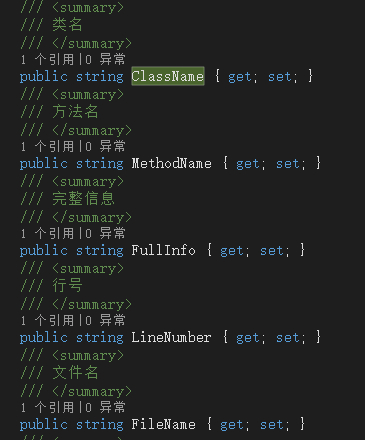
LogEventData类中有几个属性如下图,接下来创建的类就是为了获取它们
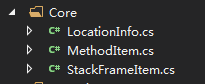
在项目中创建文件夹Core,结构如下,创建顺序为MethodItem、StackFrameItem、LocationInfo,它们层层相扣,最终由LocationInfo提供所需信息
MethodItem类
internal class MethodItem

    {

        #region Public Instance Constructors

        /// <summary>

        /// constructs a method item for an unknown method.

        /// </summary>

        public MethodItem()

        {

            m_name = NA;

            m_parameters = new string[];

        }

        /// <summary>

        /// constructs a method item from the name of the method.

        /// </summary>

        /// <param name="name"></param>

        public MethodItem(string name)

            : this()

        {

            m_name = name;

        }

        /// <summary>

        /// constructs a method item from the name of the method and its parameters.

        /// </summary>

        /// <param name="name"></param>

        /// <param name="parameters"></param>

        public MethodItem(string name, string[] parameters)

            : this(name)

        {

            m_parameters = parameters;

        }

        /// <summary>

        /// constructs a method item from a method base by determining the method name and its parameters.

        /// </summary>

        /// <param name="methodBase"></param>

        public MethodItem(System.Reflection.MethodBase methodBase)

            : this(methodBase.Name, GetMethodParameterNames(methodBase))

        {

        }

        #endregion

        private static string[] GetMethodParameterNames(System.Reflection.MethodBase methodBase)

        {

            ArrayList methodParameterNames = new ArrayList();

            try

            {

                System.Reflection.ParameterInfo[] methodBaseGetParameters = methodBase.GetParameters();

                int methodBaseGetParametersCount = methodBaseGetParameters.GetUpperBound();

                for (int i = ; i <= methodBaseGetParametersCount; i++)

                {

                    methodParameterNames.Add(methodBaseGetParameters[i].ParameterType + " " + methodBaseGetParameters[i].Name);

                }

            }

            catch (Exception ex)

            {

                //LogLog.Error(declaringType, "An exception ocurred while retreiving method parameters.", ex);

            }

            return (string[])methodParameterNames.ToArray(typeof(string));

        }

        #region Public Instance Properties

        /// <summary>

        /// Gets the method name of the caller making the logging

        /// request.

        /// </summary>

        /// <value>

        /// The method name of the caller making the logging

        /// request.

        /// </value>

        /// <remarks>

        /// <para>

        /// Gets the method name of the caller making the logging

        /// request.

        /// </para>

        /// </remarks>

        public string Name

        {

            get { return m_name; }

        }

        /// <summary>

        /// Gets the method parameters of the caller making

        /// the logging request.

        /// </summary>

        /// <value>

        /// The method parameters of the caller making

        /// the logging request

        /// </value>

        /// <remarks>

        /// <para>

        /// Gets the method parameters of the caller making

        /// the logging request.

        /// </para>

        /// </remarks>

        public string[] Parameters

        {

            get { return m_parameters; }

        }

        #endregion

        #region Private Instance Fields

        private readonly string m_name;

        private readonly string[] m_parameters;

        #endregion

        #region Private Static Fields

        /// <summary>

        /// The fully qualified type of the StackFrameItem class.

        /// </summary>

        /// <remarks>

        /// Used by the internal logger to record the Type of the

        /// log message.

        /// </remarks>

        private readonly static Type declaringType = typeof(MethodItem);

        /// <summary>

        /// When location information is not available the constant

        /// <c>NA</c> is returned. Current value of this string

        /// constant is <b>?</b>.

        /// </summary>

        private const string NA = "?";

        #endregion Private Static Fields

    }
StackFrameItem类
internal class StackFrameItem

    {

        #region Public Instance Constructors

        /// <summary>

        /// returns a stack frame item from a stack frame. This

        /// </summary>

        /// <param name="frame"></param>

        /// <returns></returns>

        public StackFrameItem(StackFrame frame)

        {

            // set default values

            m_lineNumber = NA;

            m_fileName = NA;

            m_method = new MethodItem();

            m_className = NA;

            try

            {

                // get frame values

                m_lineNumber = frame.GetFileLineNumber().ToString(System.Globalization.NumberFormatInfo.InvariantInfo);

                m_fileName = frame.GetFileName();

                // get method values

                MethodBase method = frame.GetMethod();

                if (method != null)

                {

                    if (method.DeclaringType != null)

                        m_className = method.DeclaringType.FullName;

                    m_method = new MethodItem(method);

                }

            }

            catch (Exception ex)

            {

            }

            // set full info

            m_fullInfo = m_className + '.' + m_method.Name + '(' + m_fileName + ':' + m_lineNumber + ')';

        }

        #endregion

        #region Public Instance Properties

        /// <summary>

        /// Gets the fully qualified class name of the caller making the logging

        /// request.

        /// </summary>

        /// <value>

        /// The fully qualified class name of the caller making the logging

        /// request.

        /// </value>

        /// <remarks>

        /// <para>

        /// Gets the fully qualified class name of the caller making the logging

        /// request.

        /// </para>

        /// </remarks>

        public string ClassName

        {

            get { return m_className; }

        }

        /// <summary>

        /// Gets the file name of the caller.

        /// </summary>

        /// <value>

        /// The file name of the caller.

        /// </value>

        /// <remarks>

        /// <para>

        /// Gets the file name of the caller.

        /// </para>

        /// </remarks>

        public string FileName

        {

            get { return m_fileName; }

        }

        /// <summary>

        /// Gets the line number of the caller.

        /// </summary>

        /// <value>

        /// The line number of the caller.

        /// </value>

        /// <remarks>

        /// <para>

        /// Gets the line number of the caller.

        /// </para>

        /// </remarks>

        public string LineNumber

        {

            get { return m_lineNumber; }

        }

        /// <summary>

        /// Gets the method name of the caller.

        /// </summary>

        /// <value>

        /// The method name of the caller.

        /// </value>

        /// <remarks>

        /// <para>

        /// Gets the method name of the caller.

        /// </para>

        /// </remarks>

        public MethodItem Method

        {

            get { return m_method; }

        }

        /// <summary>

        /// Gets all available caller information

        /// </summary>

        /// <value>

        /// All available caller information, in the format

        /// <c>fully.qualified.classname.of.caller.methodName(Filename:line)</c>

        /// </value>

        /// <remarks>

        /// <para>

        /// Gets all available caller information, in the format

        /// <c>fully.qualified.classname.of.caller.methodName(Filename:line)</c>

        /// </para>

        /// </remarks>

        public string FullInfo

        {

            get { return m_fullInfo; }

        }

        #endregion Public Instance Properties

        #region Private Instance Fields

        private readonly string m_lineNumber;

        private readonly string m_fileName;

        private readonly string m_className;

        private readonly string m_fullInfo;

        private readonly MethodItem m_method;

        #endregion

        #region Private Static Fields

        /// <summary>

        /// The fully qualified type of the StackFrameItem class.

        /// </summary>

        /// <remarks>

        /// Used by the internal logger to record the Type of the

        /// log message.

        /// </remarks>

        private readonly static Type declaringType = typeof(StackFrameItem);

        /// <summary>

        /// When location information is not available the constant

        /// <c>NA</c> is returned. Current value of this string

        /// constant is <b>?</b>.

        /// </summary>

        private const string NA = "?";

        #endregion Private Static Fields
LocationInfo类
internal class LocationInfo

    {

        #region Public Instance Constructors

        /// <summary>

        /// Constructor

        /// </summary>

        /// <param name="callerStackBoundaryDeclaringType">The declaring type of the method that is

        /// the stack boundary into the logging system for this call.</param>

        /// <remarks>

        /// <para>

        /// Initializes a new instance of the <see cref="LocationInfo" />

        /// class based on the current thread.

        /// </para>

        /// </remarks>

        public LocationInfo(Type callerStackBoundaryDeclaringType)

        {

            // Initialize all fields

            m_className = NA;

            m_fileName = NA;

            m_lineNumber = NA;

            m_methodName = NA;

            m_fullInfo = NA;

#if !(NETCF || NETSTANDARD1_3) // StackTrace isn't fully implemented for NETSTANDARD1_3 https://github.com/dotnet/corefx/issues/1797

            if (callerStackBoundaryDeclaringType != null)

            {

                try

                {

                    StackTrace st = new StackTrace(true);

                    int frameIndex = ;

                    // skip frames not from fqnOfCallingClass

                    while (frameIndex < st.FrameCount)

                    {

                        StackFrame frame = st.GetFrame(frameIndex);

                        if (frame != null && frame.GetMethod().DeclaringType == callerStackBoundaryDeclaringType)

                        {

                            break;

                        }

                        frameIndex++;

                    }

                    // skip frames from fqnOfCallingClass

                    while (frameIndex < st.FrameCount)

                    {

                        StackFrame frame = st.GetFrame(frameIndex);

                        if (frame != null && frame.GetMethod().DeclaringType != callerStackBoundaryDeclaringType)

                        {

                            break;

                        }

                        frameIndex++;

                    }

                    if (frameIndex < st.FrameCount)

                    {

                        // take into account the frames we skip above

                        int adjustedFrameCount = st.FrameCount - frameIndex;

                        ArrayList stackFramesList = new ArrayList(adjustedFrameCount);

                        m_stackFrames = new StackFrameItem[adjustedFrameCount];

                        for (int i = frameIndex; i < st.FrameCount; i++)

                        {

                            stackFramesList.Add(new StackFrameItem(st.GetFrame(i)));

                        }

                        stackFramesList.CopyTo(m_stackFrames, );

                        // now frameIndex is the first 'user' caller frame

                        StackFrame locationFrame = st.GetFrame(frameIndex);

                        if (locationFrame != null)

                        {

                            System.Reflection.MethodBase method = locationFrame.GetMethod();

                            if (method != null)

                            {

                                m_methodName = method.Name;

                                if (method.DeclaringType != null)

                                {

                                    m_className = method.DeclaringType.FullName;

                                }

                            }

                            m_fileName = locationFrame.GetFileName();

                            m_lineNumber = locationFrame.GetFileLineNumber().ToString(System.Globalization.NumberFormatInfo.InvariantInfo);

                            // Combine all location info

                            m_fullInfo = m_className + '.' + m_methodName + '(' + m_fileName + ':' + m_lineNumber + ')';

                        }

                    }

                }

                catch (System.Security.SecurityException)

                {

                    // This security exception will occur if the caller does not have

                    // some undefined set of SecurityPermission flags.

                    //LogLog.Debug(declaringType, "Security exception while trying to get caller stack frame. Error Ignored. Location Information Not Available.");

                }

            }

#endif

        }

        /// <summary>

        /// 自定义获取位置信息,异步线程内获取期望值

        /// </summary>

        /// <param name="callerStackBoundaryDeclaringType"></param>

        /// <param name="st"></param>

        public LocationInfo(Type callerStackBoundaryDeclaringType,StackTrace st)

        {

            // Initialize all fields

            m_className = NA;

            m_fileName = NA;

            m_lineNumber = NA;

            m_methodName = NA;

            m_fullInfo = NA;

#if !(NETCF || NETSTANDARD1_3) // StackTrace isn't fully implemented for NETSTANDARD1_3 https://github.com/dotnet/corefx/issues/1797

            if (callerStackBoundaryDeclaringType != null)

            {

                try

                {

                    //StackTrace st = new StackTrace(true);

                    int frameIndex = ;

                    // skip frames not from fqnOfCallingClass

                    while (frameIndex < st.FrameCount)

                    {

                        StackFrame frame = st.GetFrame(frameIndex);

                        if (frame != null && frame.GetMethod().DeclaringType == callerStackBoundaryDeclaringType)

                        {

                            break;

                        }

                        frameIndex++;

                    }

                    // skip frames from fqnOfCallingClass

                    while (frameIndex < st.FrameCount)

                    {

                        StackFrame frame = st.GetFrame(frameIndex);

                        if (frame != null && frame.GetMethod().DeclaringType != callerStackBoundaryDeclaringType)

                        {

                            break;

                        }

                        frameIndex++;

                    }

                    if (frameIndex < st.FrameCount)

                    {

                        // take into account the frames we skip above

                        int adjustedFrameCount = st.FrameCount - frameIndex;

                        ArrayList stackFramesList = new ArrayList(adjustedFrameCount);

                        m_stackFrames = new StackFrameItem[adjustedFrameCount];

                        for (int i = frameIndex; i < st.FrameCount; i++)

                        {

                            stackFramesList.Add(new StackFrameItem(st.GetFrame(i)));

                        }

                        stackFramesList.CopyTo(m_stackFrames, );

                        // now frameIndex is the first 'user' caller frame

                        StackFrame locationFrame = st.GetFrame(frameIndex);

                        if (locationFrame != null)

                        {

                            System.Reflection.MethodBase method = locationFrame.GetMethod();

                            if (method != null)

                            {

                                m_methodName = method.Name;

                                if (method.DeclaringType != null)

                                {

                                    m_className = method.DeclaringType.FullName;

                                }

                            }

                            m_fileName = locationFrame.GetFileName();

                            m_lineNumber = locationFrame.GetFileLineNumber().ToString(System.Globalization.NumberFormatInfo.InvariantInfo);

                            // Combine all location info

                            m_fullInfo = m_className + '.' + m_methodName + '(' + m_fileName + ':' + m_lineNumber + ')';

                        }

                    }

                }

                catch (System.Security.SecurityException)

                {

                    // This security exception will occur if the caller does not have

                    // some undefined set of SecurityPermission flags.

                    //LogLog.Debug(declaringType, "Security exception while trying to get caller stack frame. Error Ignored. Location Information Not Available.");

                }

            }

#endif

        }

        /// <summary>

        /// Constructor

        /// </summary>

        /// <param name="className">The fully qualified class name.</param>

        /// <param name="methodName">The method name.</param>

        /// <param name="fileName">The file name.</param>

        /// <param name="lineNumber">The line number of the method within the file.</param>

        /// <remarks>

        /// <para>

        /// Initializes a new instance of the <see cref="LocationInfo" />

        /// class with the specified data.

        /// </para>

        /// </remarks>

        public LocationInfo(string className, string methodName, string fileName, string lineNumber)

        {

            m_className = className;

            m_fileName = fileName;

            m_lineNumber = lineNumber;

            m_methodName = methodName;

            m_fullInfo = m_className + '.' + m_methodName + '(' + m_fileName +

                ':' + m_lineNumber + ')';

        }

        #endregion Public Instance Constructors

        #region Public Instance Properties

        /// <summary>

        /// Gets the fully qualified class name of the caller making the logging

        /// request.

        /// </summary>

        /// <value>

        /// The fully qualified class name of the caller making the logging

        /// request.

        /// </value>

        /// <remarks>

        /// <para>

        /// Gets the fully qualified class name of the caller making the logging

        /// request.

        /// </para>

        /// </remarks>

        public string ClassName

        {

            get { return m_className; }

        }

        /// <summary>

        /// Gets the file name of the caller.

        /// </summary>

        /// <value>

        /// The file name of the caller.

        /// </value>

        /// <remarks>

        /// <para>

        /// Gets the file name of the caller.

        /// </para>

        /// </remarks>

        public string FileName

        {

            get { return m_fileName; }

        }

        /// <summary>

        /// Gets the line number of the caller.

        /// </summary>

        /// <value>

        /// The line number of the caller.

        /// </value>

        /// <remarks>

        /// <para>

        /// Gets the line number of the caller.

        /// </para>

        /// </remarks>

        public string LineNumber

        {

            get { return m_lineNumber; }

        }

        /// <summary>

        /// Gets the method name of the caller.

        /// </summary>

        /// <value>

        /// The method name of the caller.

        /// </value>

        /// <remarks>

        /// <para>

        /// Gets the method name of the caller.

        /// </para>

        /// </remarks>

        public string MethodName

        {

            get { return m_methodName; }

        }

        /// <summary>

        /// Gets all available caller information

        /// </summary>

        /// <value>

        /// All available caller information, in the format

        /// <c>fully.qualified.classname.of.caller.methodName(Filename:line)</c>

        /// </value>

        /// <remarks>

        /// <para>

        /// Gets all available caller information, in the format

        /// <c>fully.qualified.classname.of.caller.methodName(Filename:line)</c>

        /// </para>

        /// </remarks>

        public string FullInfo

        {

            get { return m_fullInfo; }

        }

#if !(NETCF || NETSTANDARD1_3)

        /// <summary>

        /// Gets the stack frames from the stack trace of the caller making the log request

        /// </summary>

        public StackFrameItem[] StackFrames

        {

            get { return m_stackFrames; }

        }

#endif

        #endregion Public Instance Properties

        #region Private Instance Fields

        private readonly string m_className;

        private readonly string m_fileName;

        private readonly string m_lineNumber;

        private readonly string m_methodName;

        private readonly string m_fullInfo;

#if !(NETCF || NETSTANDARD1_3)

        private readonly StackFrameItem[] m_stackFrames;

#endif

        #endregion Private Instance Fields

        #region Private Static Fields

        /// <summary>

        /// The fully qualified type of the LocationInfo class.

        /// </summary>

        /// <remarks>

        /// Used by the internal logger to record the Type of the

        /// log message.

        /// </remarks>

        private readonly static Type declaringType = typeof(LocationInfo);

        /// <summary>

        /// When location information is not available the constant

        /// <c>NA</c> is returned. Current value of this string

        /// constant is <b>?</b>.

        /// </summary>

        private const string NA = "?";

        #endregion Private Static Fields
为什么会有这么多英文注释呢,因为这是copy的log4net源码。。。但是LocationInfo中重载了构造函数

我需要先获取调用日志方法的StackTrace,然后传入构造方法,主要因为写入日志用到异步,如果在异步线程内用LocationInfo(Type callerStackBoundaryDeclaringType),会导致获取不到我们期望的那几个追踪信息,因为StackTrace是在它内部new的,这会导致获取的是异步线程的信息。所以我要在进入异步线程前将StackTrace获取到。
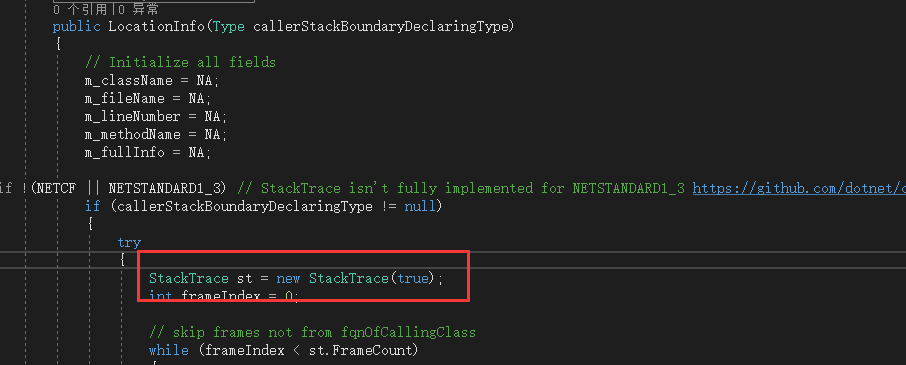
所以也就有了下面这个类(LogEventDataAsync),一个传入异步线程的数据对象,里面保存着一些基本的初始日志信息
- 创建LogEventDataAsync
/// <summary>

    /// 日志数据,传入异步执行方法的数据

    /// 主要为提前获取CallerStackBoundaryDeclaringType和CallerStackTrace,避免Core(log4net源码)下追踪信息在异步线程内与期望不一致

    /// </summary>

    internal class LogEventDataAsync

    {

        public string Message { get; set; }

        /// <summary>

        /// 错误级别

        /// </summary>

        public string Level { get; set; }

        /// <summary>

        /// 日志来源

        /// </summary>

        public string LogSource { get; set; }

        /// <summary>

        /// 调用日志方法实例类型

        /// </summary>

        public Type CallerStackBoundaryDeclaringType { get; set; }

        /// <summary>

        /// StackTrace

        /// </summary>

        public StackTrace CallerStackTrace { get; set; }

        /// <summary>

        /// 不为空则发送邮件,多个接收人用英文逗号隔开

        /// </summary>

        public string Emails { get; set; }

    }
到目前为止日志信息的准备工作就做完了,下面来赋值写入mongodb
先来创建两个帮助类吧,一个用于异步,一个是比较常见的请求类,都很简单
创建Common文件夹,在下面创建两个类
AsyncHelpers(NLog源码)
internal static class AsyncHelpers

    {

        internal static int GetManagedThreadId()

        {

#if NETSTANDARD1_3

            return System.Environment.CurrentManagedThreadId;

#else

            return Thread.CurrentThread.ManagedThreadId;

#endif

        }

        internal static void StartAsyncTask(Action<object> action, object state)

        {

#if NET4_0 || NET4_5 || NETSTANDARD

            System.Threading.Tasks.Task.Factory.StartNew(action, state, CancellationToken.None, System.Threading.Tasks.TaskCreationOptions.None, System.Threading.Tasks.TaskScheduler.Default);

#else

            ThreadPool.QueueUserWorkItem(new WaitCallback(action), state);

#endif

        }

    }
RequestHelpers
internal class RequestHelpers

    {

        /// <summary>

        /// 组装普通文本请求参数。

        /// </summary>

        /// <param name="parameters">Key-Value形式请求参数字典</param>

        /// <returns>URL编码后的请求数据</returns>

        public static String BuildQuery(IDictionary<String, String> parameters)

        {

            StringBuilder postData = new StringBuilder();

            bool hasParam = false;

            IEnumerator<KeyValuePair<String, String>> dem = parameters.GetEnumerator();

            while (dem.MoveNext())

            {

                String name = dem.Current.Key;

                String value = dem.Current.Value;

                // 忽略参数名或参数值为空的参数

                if (!String.IsNullOrEmpty(name) && !String.IsNullOrEmpty(value))

                {

                    if (hasParam)

                    {

                        postData.Append("&");

                    }

                    postData.Append(name);

                    postData.Append("=");

                    postData.Append(HttpUtility.UrlEncode(value));

                    hasParam = true;

                }

            }

            return postData.ToString();

        }

        /// <summary>

        /// 执行HTTP POST请求。

        /// 对参数值执行UrlEncode

        /// </summary>

        /// <param name="url">请求地址</param>

        /// <param name="parameters">请求参数</param>

        /// <returns>HTTP响应</returns>

        public static String DoPost(String url, IDictionary<String, String> parameters)

        {

            HttpWebRequest req = GetWebRequest(url, "POST");

            req.ContentType = "application/x-www-form-urlencoded;charset=utf-8";

            Byte[] postData = Encoding.UTF8.GetBytes(BuildQuery(parameters));

            Stream reqStream = req.GetRequestStream();

            reqStream.Write(postData, , postData.Length);

            reqStream.Close();

            HttpWebResponse rsp = null;

            rsp = (HttpWebResponse)req.GetResponse();

            Encoding encoding = Encoding.GetEncoding(rsp.CharacterSet);

            return GetResponseAsString(rsp, encoding);

        }

        /// <summary>

        /// 执行HTTP POST请求。

        /// 该方法在执行post时不对请求数据进行任何编码(UrlEncode)

        /// </summary>

        /// <param name="url">请求地址</param>

        /// <param name="data">请求数据</param>

        /// <returns>HTTP响应</returns>

        public static String DoPost(String url, string data)

        {

            HttpWebRequest req = GetWebRequest(url, "POST");

            req.ContentType = "application/x-www-form-urlencoded;charset=utf-8";

            Byte[] postData = Encoding.UTF8.GetBytes(data);

            Stream reqStream = req.GetRequestStream();

            reqStream.Write(postData, , postData.Length);

            reqStream.Close();

            HttpWebResponse rsp = null;

            rsp = (HttpWebResponse)req.GetResponse();

            Encoding encoding = Encoding.GetEncoding(rsp.CharacterSet);

            return GetResponseAsString(rsp, encoding);

        }

        /// <summary>

        /// post数据 T messagepack序列化格式 减少传输数据大小

        /// </summary>

        /// <typeparam name="T"></typeparam>

        /// <param name="url"></param>

        /// <param name="model"></param>

        public static void DoPost<T>(String url, T model)

        {

            var client = new HttpClient();

            //MessagePack.Resolvers.CompositeResolver.RegisterAndSetAsDefault(

            //        NativeDateTimeResolver.Instance,

            //        ContractlessStandardResolver.Instance);

            var messagePackMediaTypeFormatter = new MessagePackMediaTypeFormatter(ContractlessStandardResolver.Instance);

            var request = new HttpRequestMessage(HttpMethod.Post, url);

            request.Content = new ObjectContent<T>(

                model,messagePackMediaTypeFormatter);

            request.Content.Headers.ContentType.MediaType = "application/x-msgpack";

            //client.Timeout = new TimeSpan(0,0,5);

            client.SendAsync(request);

        }

        /// <summary>

        /// 执行HTTP POST请求。

        /// 该方法在执行post时不对请求数据进行任何编码(UrlEncode)

        /// </summary>

        /// <param name="url">请求地址</param>

        /// <param name="data">请求数据</param>

        /// <returns>HTTP响应</returns>

        public static String DoPostJson(String url, string data)

        {

            HttpWebRequest req = GetWebRequest(url, "POST");

            req.ContentType = "application/json;charset=UTF-8";

            req.Accept = "application/json";

            Byte[] postData = Encoding.UTF8.GetBytes(data);

            Stream reqStream = req.GetRequestStream();

            reqStream.Write(postData, , postData.Length);

            reqStream.Close();

            HttpWebResponse rsp = null;

            rsp = (HttpWebResponse)req.GetResponse();

            Encoding encoding = Encoding.GetEncoding(rsp.CharacterSet);

            return GetResponseAsString(rsp, encoding);

        }

        /// <summary>

        /// 执行HTTP GET请求。

        /// </summary>

        /// <param name="url">请求地址</param>

        /// <param name="parameters">请求参数</param>

        /// <returns>HTTP响应</returns>

        public static String DoGet(String url, IDictionary<String, String> parameters)

        {

            if (parameters != null && parameters.Count > )

            {

                if (url.Contains("?"))

                {

                    url = url + "&" + BuildQuery(parameters);

                }

                else

                {

                    url = url + "?" + BuildQuery(parameters);

                }

            }

            HttpWebRequest req = GetWebRequest(url, "GET");

            req.ContentType = "application/x-www-form-urlencoded;charset=utf-8";

            HttpWebResponse rsp = null;

            rsp = (HttpWebResponse)req.GetResponse();

            Encoding encoding = Encoding.GetEncoding(rsp.CharacterSet);

            return GetResponseAsString(rsp, encoding);

        }

        public static HttpWebRequest GetWebRequest(String url, String method)

        {

            HttpWebRequest req = (HttpWebRequest)WebRequest.Create(url);

            req.Method = method;

            return req;

        }

        /// <summary>

        /// 把响应流转换为文本。

        /// </summary>

        /// <param name="rsp">响应流对象</param>

        /// <param name="encoding">编码方式</param>

        /// <returns>响应文本</returns>

        public static String GetResponseAsString(HttpWebResponse rsp, Encoding encoding)

        {

            Stream stream = null;

            StreamReader reader = null;

            try

            {

                // 以字符流的方式读取HTTP响应

                stream = rsp.GetResponseStream();

                reader = new StreamReader(stream, encoding);

                return reader.ReadToEnd();

            }

            finally

            {

                // 释放资源

                if (reader != null) reader.Close();

                if (stream != null) stream.Close();

                if (rsp != null) rsp.Close();

            }

        }

        public static string GetUrlData(string url, string encoding, out long logSize)

        {

            logSize = ;

            string return_value = string.Empty;

            try

            {

                HttpWebRequest wq = WebRequest.Create(url) as HttpWebRequest;

                if (wq == null)

                {

                    return return_value;

                }

                wq.Credentials = CredentialCache.DefaultCredentials;

                wq.CookieContainer = new CookieContainer();

                wq.ContentType = "text/html";

                wq.Method = "GET";

                wq.UserAgent = "Mozilla/5.0 (Windows NT 6.1; WOW64; rv:22.0) Gecko/20100101 Firefox/22.0";

                wq.Host = new Uri(url).Host;

                wq.Timeout = ;

                try

                {

                    HttpWebResponse rep = wq.GetResponse() as HttpWebResponse;

                    logSize = rep.ContentLength;

                    Stream responseStream = rep.GetResponseStream();

                    if (rep.ContentEncoding.ToLower().Contains("gzip"))

                    {

                        responseStream = new GZipStream(responseStream, CompressionMode.Decompress);

                    }

                    else if (rep.ContentEncoding.ToLower().Contains("deflate"))

                    {

                        responseStream = new DeflateStream(responseStream, CompressionMode.Decompress);

                    }

                    StreamReader reader = new StreamReader(responseStream, Encoding.GetEncoding(encoding));

                    return_value = reader.ReadToEnd();

                    responseStream.Close();

                    reader.Close();

                    rep.Close();

                }

                catch (Exception)

                {

                    return "nolog";

                }

            }

            catch (WebException ex)

            {

                return_value = "error_error";

            }

            return return_value;

        }

    }
在RequestHelpers中真正用到的是public static void DoPost<T>(String url, T model)方法,里面用到了MessagePack以及扩展的MediaType "application/x-msgpack",所以这里要引用两个nuget包
MessagePack和Sketch7.MessagePack.MediaTypeFormatter
- 创建LogWriter
LogWriter为调用Post方法的类,里面主要提供了异步调用的方法以及创建完整的日志信息功能
internal class LogWriter

    {

        /// <summary>

        /// 私有构造函数

        /// </summary>

        private LogWriter() { }

        /// <summary>

        /// 获取LogWriter实例

        /// </summary>

        /// <returns></returns>

        public static LogWriter GetLogWriter()

        {

            return new LogWriter();

        }

        public void Writer(object logEventDataAsync)

        {

            var led = GetLoggingEventData((LogEventDataAsync)logEventDataAsync);

            var level = LogLevel.FromString(led.Level);

            string logapi = level.LogApi;

            RequestHelpers.DoPost<LogEventData>(logapi, led);//MessagePack进行数据压缩,减小传输数据

        }

        /// <summary>

        /// 获取日志数据

        /// </summary>

        /// <param name="logEventDataAsync"></param>

        /// <returns></returns>

        private LogEventData GetLoggingEventData(LogEventDataAsync logEventDataAsync)

        {

            LocationInfo locationInfo = new LocationInfo(logEventDataAsync.CallerStackBoundaryDeclaringType, logEventDataAsync.CallerStackTrace);

            LogEventData logData = new LogEventData

            {

                Message = logEventDataAsync.Message,

                Date = DateTime.Now,

                Level = logEventDataAsync.Level,

                LogSource = string.IsNullOrEmpty(logEventDataAsync.LogSource) ? locationInfo.ClassName : logEventDataAsync.LogSource,

                ClassName = locationInfo.ClassName,

                MethodName = locationInfo.MethodName,

                LineNumber = locationInfo.LineNumber,

                FileName = locationInfo.FileName,

                IP = "NA",

                Emails = logEventDataAsync.Emails,

                FullInfo=locationInfo.FullInfo

            };

            return logData;

        }

    }
GetLoggingEventData方法中就包含了LocationInfo的实例化,之所以放这里是因为这里异步执行,而获取追踪信息需要各种反射比较耗时,不然也就没有LogEventDataAsync这个类了,获取IP的方法没实现。。。
- 创建Logger类
这个类是真正暴露给开发者使用的类,就像开源项目log.debug这样的方式
public class Logger

    {

        private readonly static Type declaringType = typeof(Logger);

        /// <summary>

        /// 日志写入实例

        /// </summary>

        private LogWriter _logWriter = null;

        /// <summary>

        /// 日志来源

        /// 默认为调用方法所在类

        /// </summary>

        private string _logSource = string.Empty;

        /// <summary>

        /// 私有构造函数

        /// </summary>

        private Logger()

        {

            _logWriter = LogWriter.GetLogWriter();

        }

        /// <summary>

        /// 私有构造函数

        /// </summary>

        /// <param name="logSource">日志来源</param>

        private Logger(string logSource):this()

        {

            _logSource = logSource;

        }

        /// <summary>

        /// 获取Logger实例

        /// 默认日志来源为调用方法所在类:namespace.classname

        /// </summary>

        /// <param name="logSource">日志来源</param>

        /// <returns></returns>

        public static Logger GetLogger(string logSource=null)

        {

            return new Logger(logSource);

        }

        /// <summary>

        /// Trace

        /// </summary>

        /// <param name="message">日志内容</param>

        /// <param name="emails">是否发送邮件,不为空则发送邮件,多个接收人用英文分号;隔开</param>

        public void Trace(string message, string emails = null)

        {

            WriterToTargets(message, LogLevel.Trace, emails);

        }

        /// <summary>

        /// Trace

        /// </summary>

        /// <param name="ex">异常信息</param>

        /// <param name="emails">是否发送邮件,不为空则发送邮件,多个接收人用英文分号;隔开</param>

        public void Trace(Exception ex, string emails = null)

        {

            WriterToTargets(ex.ToString(), LogLevel.Trace, emails);

        }

        /// <summary>

        /// Debug

        /// </summary>

        /// <param name="message">日志内容</param>

        /// <param name="emails">是否发送邮件,不为空则发送邮件,多个接收人用英文分号;隔开</param>

        public void Debug(string message, string emails = null)

        {

            WriterToTargets(message, LogLevel.Debug, emails);

        }

        /// <summary>

        /// Debug

        /// </summary>

        /// <param name="ex">异常信息</param>

        /// <param name="emails">是否发送邮件,不为空则发送邮件,多个接收人用英文分号;隔开</param>

        public void Debug(Exception ex, string emails = null)

        {

            WriterToTargets(ex.ToString(), LogLevel.Debug, emails);

        }

        /// <summary>

        /// Info

        /// </summary>

        /// <param name="message">日志内容</param>

        /// <param name="emails">是否发送邮件,不为空则发送邮件,多个接收人用英文分号;隔开</param>

        public void Info(string message, string emails = null)

        {

            WriterToTargets(message, LogLevel.Info, emails);

        }

        /// <summary>

        /// Info

        /// </summary>

        /// <param name="ex">异常信息</param>

        /// <param name="emails">是否发送邮件,不为空则发送邮件,多个接收人用英文分号;隔开</param>

        public void Info(Exception ex, string emails = null)

        {

            WriterToTargets(ex.ToString(), LogLevel.Info, emails);

        }

        /// <summary>

        /// Warn

        /// </summary>

        /// <param name="message">日志内容</param>

        /// <param name="emails">是否发送邮件,不为空则发送邮件,多个接收人用英文分号;隔开</param>

        public void Warn(string message, string emails = null)

        {

            WriterToTargets(message, LogLevel.Warn, emails);

        }

        /// <summary>

        /// Warn

        /// </summary>

        /// <param name="ex">异常信息</param>

        /// <param name="emails">是否发送邮件,不为空则发送邮件,多个接收人用英文分号;隔开</param>

        public void Warn(Exception ex, string emails = null)

        {

            WriterToTargets(ex.ToString(), LogLevel.Warn, emails);

        }

        /// <summary>

        /// Error

        /// </summary>

        /// <param name="message">日志内容</param>

        /// <param name="emails">是否发送邮件,不为空则发送邮件,多个接收人用英文分号;隔开</param>

        public void Error(string message, string emails = null)

        {

            WriterToTargets(message, LogLevel.Error, emails);

        }

        /// <summary>

        /// Error

        /// </summary>

        /// <param name="ex">异常信息</param>

        /// <param name="emails">是否发送邮件,不为空则发送邮件,多个接收人用英文分号;隔开</param>

        public void Error(Exception ex, string emails = null)

        {

            WriterToTargets(ex.ToString(), LogLevel.Error, emails);

        }

        /// <summary>

        /// Fatal

        /// </summary>

        /// <param name="message">日志内容</param>

        /// <param name="emails">是否发送邮件,不为空则发送邮件,多个接收人用英文分号;隔开</param>

        public void Fatal(string message, string emails = null)

        {

            WriterToTargets(message, LogLevel.Fatal, emails);

        }

        /// <summary>

        /// Fatal

        /// </summary>

        /// <param name="ex">异常信息</param>

        /// <param name="emails">是否发送邮件,不为空则发送邮件,多个接收人用英文分号;隔开</param>

        public void Fatal(Exception ex, string emails = null)

        {

            WriterToTargets(ex.ToString(), LogLevel.Fatal, emails);

        }

        /// <summary>

        /// 写日志

        /// </summary>

        /// <param name="message">日志信息</param>

        /// <param name="level">级别</param>

        /// <param name="emails">是否发送邮件,不为空则发送邮件,多个接收人用英文分号;隔开</param>

        private void WriterToTargets(string message, LogLevel level,string emails=null)

        {

            try

            {

                LogEventDataAsync leda = new LogEventDataAsync

                {

                    LogSource = _logSource,

                    Level = level.Name,

                    CallerStackBoundaryDeclaringType = GetType(),//获取当前实例

                    CallerStackTrace = new StackTrace(true),//获取当前StackTrace

                    Message = message,

                    Emails = emails

                };

                AsyncHelpers.StartAsyncTask(_logWriter.Writer, leda);//执行异步写日志

            }

            catch

            {

            }

        }
代码非常简单,重载了最常用的自定义信息和exception信息,以及邮件联系人。日志来源主要为了分类日志,像不同的服务、站点等等,可以方便入库后查询。到这已经可以编译使用了,但是为了在.net core中可以依赖注入这个Logger,最后添加一个扩展方法
- 创建Extensions文件夹及LoggerServiceExtension类
/// <summary>

    /// 日志服务注入扩展类

    /// </summary>

    public static class LoggerServiceExtension

    {

        /// <summary>

        /// 注入日志服务

        /// </summary>

        /// <param name="service">IServiceCollection</param>

        /// <param name="logSource">日志来源,默认日志来源为调用方法所在类:namespace.classname</param>

        /// <returns></returns>

        public static IServiceCollection AddLoggerService(this IServiceCollection service, string logSource=null)

        {

            return service.AddTransient(factory => Logger.GetLogger(logSource));

        }

    }
三、使用(引入类库)
一般项目使用可以这样,比如控制台
class Program

    {

        static Logger logger = LogApiHandler.Logger.GetLogger("logSource");

        static void Main(string[] args)

        {

            logger.Debug("text");

            Console.ReadLine();

        }

    }
.net core的话比如web项目可以这样用依赖注入
在Startup中,ConfigureServices添加一行代码
services.AddLoggerService("TestApi");
然后在其他类中就可以这么用了,当然也可以用new的方式使用
public class ValuesController : ControllerBase

    {

        private Logger _logger;

        public ValuesController(Logger logger)

        {

            _logger = logger;

        }

        // GET api/values

        [HttpGet]

        public ActionResult<IEnumerable<string>> Get()

        {

            _logger.Error("测试依赖注入logger", "ddd@ddd.com");

            return new string[] { "value1", "value2" };

        }

    }
大体使用方式就是这样了。
最后得需要自己写一个页面来调用web api的api/log/getlist接口查询显示日志
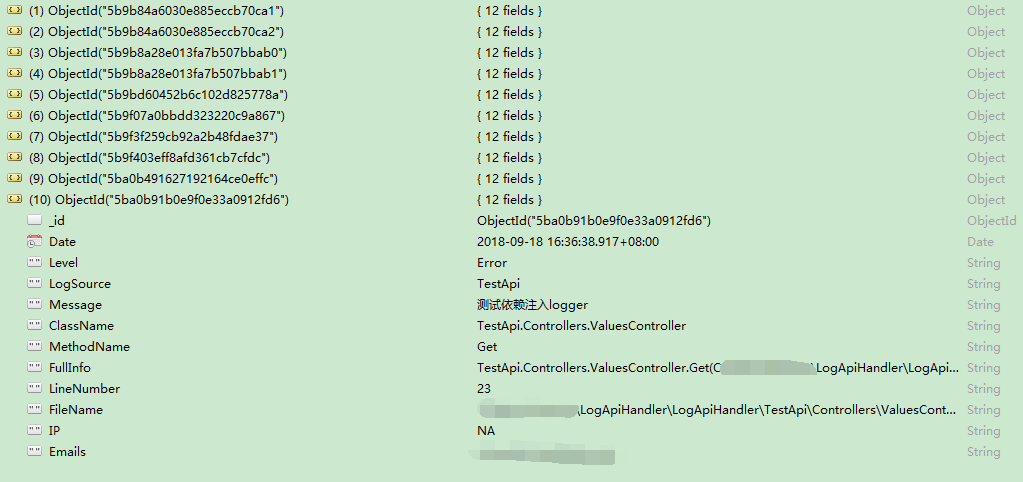
mongodb客户端用的Robo 3T,安装完记得修改Options--Display Dates in--Local Timezone,不然默认utc,存入时的时间少8小时。mongodb存入数据就是下图
更新:
1.LogWriter类Writer方法加try catch,因为异步线程内异常不会被主线程捕获
2.添加请求认证
- LogApiHandler类库修改
LogWriter类新增两个字段:
private readonly string UserName = "UserName";

private readonly string Password = "Password";
RequestHelpers类重载一个请求方法:
/// <summary>

        /// Authorization 认证

        /// post数据 T messagepack序列化格式 减少传输数据大小

        /// </summary>

        /// <typeparam name="T"></typeparam>

        /// <param name="url"></param>

        /// <param name="model"></param>

        /// <param name="username">账户</param>

        /// <param name="password">密码</param>

        public static void DoPost<T>(string url, T model,string username,string password)

        {

            var client = new HttpClient();

            var messagePackMediaTypeFormatter = new MessagePackMediaTypeFormatter(ContractlessStandardResolver.Instance);

            var request = new HttpRequestMessage(HttpMethod.Post, url);

            request.Content = new ObjectContent<T>(

                model, messagePackMediaTypeFormatter);

            request.Content.Headers.ContentType.MediaType = "application/x-msgpack";

            string encoded = Convert.ToBase64String(Encoding.GetEncoding("ISO-8859-1").GetBytes(username + ":" + password));

            request.Headers.Add("Authorization", "Basic " + encoded);

            client.SendAsync(request);

        }
修改LogWriter类Writer方法,将请求改为上面重载的新方法:
RequestHelpers.DoPost<LogEventData>(logapi, led, UserName, Password);
- LogWebApi站点修改
appsettings.json新增配置:
"AppSettings": {

    "RequestAuth": {

      "UserName": "UserName",

      "Password": "Password"

    }

  }
Model--AppSettings下修改AppSettings类
public class AppSettings

    {

        public SendMailInfo SendMailInfo { get; set; }

        public RequestAuth RequestAuth { get; set; }

    }

    public class SendMailInfo

    {

        public string SMTPServerName { get; set; }

        public string SendEmailAdress { get; set; }

        public string SendEmailPwd { get; set; }

        public string SiteName { get; set; }

        public string SendEmailPort { get; set; }

    }

    public class RequestAuth

    {

        public string UserName { get; set; }

        public string Password { get; set; }

    }
Extensions文件夹下新建RequestAuthorizeMiddleware类:
public class RequestAuthorizeMiddleware

    {

        private readonly RequestDelegate _next;

        private readonly IOptions<AppSettings> _appsettings;

        public RequestAuthorizeMiddleware(RequestDelegate next, IOptions<AppSettings> appsettings)

        {

            _next = next;

            _appsettings = appsettings;

        }

        public async Task InvokeAsync(HttpContext context)

        {

            var authHeader = context.Request.Headers["Authorization"].ToString();

            if (authHeader != null && authHeader.StartsWith("basic", StringComparison.OrdinalIgnoreCase))

            {

                var token = authHeader.Substring("Basic ".Length).Trim();

                var credentialstring = Encoding.GetEncoding("ISO-8859-1").GetString(Convert.FromBase64String(token));

                var credentials = credentialstring.Split(':');

                if (credentials[] == _appsettings.Value.RequestAuth.UserName && credentials[] == _appsettings.Value.RequestAuth.Password)

                {

                    await _next(context);

                }

                else

                {

                    context.Response.StatusCode = (int)HttpStatusCode.Unauthorized;

                    return;

                }

            }

            else

            {

                context.Response.StatusCode = (int)HttpStatusCode.Unauthorized;

                return;

            }

        }

    }
Startup.cs Configure添加代码:
app.UseMiddleware(typeof(RequestAuthorizeMiddleware));
基于.net core webapi和mongodb的日志系统的更多相关文章
- [转] 【Monogdb】MongoDB的日志系统
记得前几天有个小伙伴要查看mongodb的日志,从而排查问题,可能总找不到日志放在何处,今天就系统说一下mongodb的日志系统.mongodb中主要有四种日志.分别是系统日志.Journal日志.o ...
- MongoDB的日志系统
mongodb中主要有四种日志.分别是系统日志.Journal日志.oplog主从日志.慢查询日志等.这些 日志记录着Mongodb数据库不同方便的踪迹.下面分别介绍这四种日志: 1.系统日志 系统日 ...
- 基于.NET CORE微服务框架 -谈谈surging API网关
1.前言 对于最近surging更新的API 网关大家也有所关注,也收到了不少反馈提出是否能介绍下Api网关,那么我们将在此篇文章中剥析下surging的Api 网关 开源地址:https://git ...
- .Net core的日志系统
.net core是内置了日志系统的,本文这里简单的介绍一下它的基本用法.如下是一个简单的示例: var service = new ServiceCollection() .AddLogging(l ...
- java项目日志系统的总结
目录 日志系统归类以及关系 日志的三个组件 slf4j的使用 项目中构建日志系统 使用例子 日志系统归类以及关系 常用的日志框架: slf4j.logback .log4j.log4j2.JUL(ja ...
- C#中缓存的使用 ajax请求基于restFul的WebApi(post、get、delete、put) 让 .NET 更方便的导入导出 Excel .net core api +swagger(一个简单的入门demo 使用codefirst+mysql) C# 位运算详解 c# 交错数组 c# 数组协变 C# 添加Excel表单控件(Form Controls) C#串口通信程序
C#中缓存的使用 缓存的概念及优缺点在这里就不多做介绍,主要介绍一下使用的方法. 1.在ASP.NET中页面缓存的使用方法简单,只需要在aspx页的顶部加上一句声明即可: <%@ Outp ...
- .Net Core WebAPI 基于Task的同步&异步编程快速入门
.Net Core WebAPI 基于Task的同步&异步编程快速入门 Task.Result async & await 总结 并行任务(Task)以及基于Task的异步编程(asy ...
- 基于.NET Core 框架搭建WebApi项目
一 什么是.NET Core? 随着2014年 Xamarin和微软发起.NET基金会,微软在2014年11月份开放.NET框架源代码.在.NET开源基金会的统一规划下诞生了.NET Core .也就 ...
- ASP.NET Core WebApi基于JWT实现接口授权验证
一.ASP.Net Core WebApi JWT课程前言 我们知道,http协议本身是一种无状态的协议,而这就意味着如果用户向我们的应用提供了用户名和密码来进行用户认证,那么下一次请求时,用户还要再 ...
随机推荐
- Effective C++ Item 16 Use the same form in corresponding uses of new and delete
1. When you created an array and want to return the memory to system. You need to explicitly add [] ...
- ios 获取设备相关的信息
.获取设备的信息 UIDevice *device = [[UIDevice alloc] int]; NSString *name = device.name; //获取设备所有者的名称 NSStr ...
- osgEarth2.8添加模型
#include <osgEarthDrivers/model_simple/SimpleModelOptions> SimpleModelOptions modelOptions; mo ...
- 详解google Chrome浏览器(理论篇)
注解:各位读者,经博客园工作人员反馈,hosts涉及违规问题,我暂时屏蔽了最新hosts,若已经获取最新hosts的朋友们,注意保密,不要外传.给大家带来麻烦,对此非常抱歉!!! 开篇概述 1.详解g ...
- js中hover事件时候的BUG以及解决方法
hover事件是我们在开发前段时候遇到的稀松平常的问题,但是有没有发现会出现有一个BUg,比如,你移动到一个元素上,让它执行一个方法,然后你快速的移入移出的时候,他会进行亮瞎你眼睛的频闪效果,而且跟得 ...
- JS-元素大小深入学习-offset、client、scroll等学习研究笔记
一些属性和方法,在dom中没有规定如何确定页面中元素大小的情况下诞生... 1.偏移量(offset dimension) 测试代码: <!DOCTYPE html> <html&g ...
- 窗口大小改变绑定resize事件
当为窗口绑定resize事件时,大部分浏览器会在每改变一个像素就触发一次resize事件.这严重影响了网站的性能. 解决方案是:利用settimeout方法为事件发触发的方法设置延迟执行的时间. 实现 ...
- Splay模板 1.0
struct Splay{ int rt,sz; ///根节点,树节点总数 ],fa[N];///值,左右儿子,父亲 void spin(int t){ ///旋转操作 ]==t; son[x][y] ...
- JavaBean入门及简单的例子
不会编写JavaBean就不是一个Java开发人员. 那么,何谓JavaBean呢? JavaBean是符合某种规范的Java组件,也就是Java类. 它必须满足如下规范: 1)必须有一个零参数的默认 ...
- 监控linux流量python版
python版监控linux流量 直接上代码,使用OptionParser来传入参数 #coding:utf-8 #------------- #Author:Hu #Data:20150520 #- ...