
SpringMVC(二) SpringMVC Hello World
准备条件:
STS(集成了Spring相关工具的Eclipse)
Spring软件包 spring-framework-4.3.3.RELEASE-dist.zip。
步骤:
- 加入jar包。
Eclipse中新建一个动态的web工程。选择Tomcat 7.0,在WebContent-->WEB-INF-->lib目录下添加以下jar包。
spring-aop-4.3.3.RELEASE.jar
spring-beans-4.3.3.RELEASE.jar
spring-context-4.3.3.RELEASE.jar
spring-core-4.3.3.RELEASE.jar
pring-expression-4.3.3.RELEASE.jar
spring-web-4.3.3.RELEASE.jar
spring-webmvc-4.3.3.RELEASE.jar
另外还需要commons-logging-1.2.jar文件。
2. 在web.xml中添加dispatcherServlet相关内容(使用快捷键Alt+/,在自动弹出的下拉条中,选择#dispatcherservlet)。web.xml配置文件内容可以参考如下内容:
<?xml version="1.0" encoding="UTF-8"?>

<web-app xmlns:xsi="http://www.w3.org/2001/XMLSchema-instance" xmlns="http://java.sun.com/xml/ns/javaee" xsi:schemaLocation="http://java.sun.com/xml/ns/javaee http://java.sun.com/xml/ns/javaee/web-app_3_0.xsd" version="3.0">

  <display-name>HelloWorld</display-name>

  <welcome-file-list>

    <welcome-file>index.html</welcome-file>

    <welcome-file>index.htm</welcome-file>

    <welcome-file>index.jsp</welcome-file>

    <welcome-file>default.html</welcome-file>

    <welcome-file>default.htm</welcome-file>

    <welcome-file>default.jsp</welcome-file>

  </welcome-file-list>

  <!-- The front controller of this Spring Web application, responsible for handling all application requests -->

<servlet>

<servlet-name>springDispatcherServlet</servlet-name>

<servlet-class>org.springframework.web.servlet.DispatcherServlet</servlet-class>

<!-- 配置dispathcerservlet的一个初始化参数,设置配置文件的名称和位置 -->

<init-param>

<param-name>contextConfigLocation</param-name>

<param-value>classpath:springmvc.xml</param-value>

</init-param>

<load-on-startup>1</load-on-startup>

</servlet>

<!-- Map all requests to the DispatcherServlet for handling -->

<servlet-mapping>

<servlet-name>springDispatcherServlet</servlet-name>

<url-pattern>/</url-pattern>

</servlet-mapping>

</web-app>
3. 加入SpringMVC的配置文件。在src目录下,参照以下关键步骤创建springmvc.xml文件。
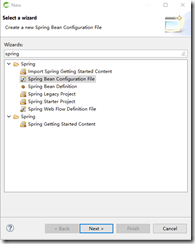
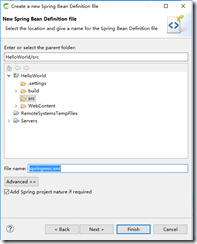
参考如下代码:
<?xml version="1.0" encoding="UTF-8"?>

<beans xmlns="http://www.springframework.org/schema/beans"

xmlns:xsi="http://www.w3.org/2001/XMLSchema-instance"

xmlns:context="http://www.springframework.org/schema/context"

xmlns:mvc="http://www.springframework.org/schema/mvc"

xsi:schemaLocation="http://www.springframework.org/schema/beans http://www.springframework.org/schema/beans/spring-beans.xsd

http://www.springframework.org/schema/context http://www.springframework.org/schema/context/spring-context-4.3.xsd

http://www.springframework.org/schema/mvc http://www.springframework.org/schema/mvc/spring-mvc-4.3.xsd">

<!-- 配置自动扫描包 -->

<context:component-scan base-package="com.tiekui.springmvc.*"></context:component-scan>

<!-- 配置视图解析器:如何把handler方法返回给视图 -->

<bean class="org.springframework.web.servlet.view.InternalResourceViewResolver">

<property name="prefix" value="/WEB-INF/views/"></property>

<property name="suffix" value=".jsp"></property>

</bean>

</beans>
4.编写请求的处理器。参考如下代码:
package com.tiekui.springmvc.handlers;

import org.springframework.stereotype.Controller;

import org.springframework.web.bind.annotation.RequestMapping;

@Controller

public class HelloWorld {

  @RequestMapping("/helloworld")

  public String hello(){

  System.out.println("hello world");

  return "success";

  }

}
5. 编写视图。在WebContent目录下创建index.jsp文件,参考如下代码:
<%@ page language="java" contentType="text/html; charset=ISO-8859-1"

pageEncoding="ISO-8859-1"%>

<!DOCTYPE html PUBLIC "-//W3C//DTD HTML 4.01 Transitional//EN" "http://www.w3.org/TR/html4/loose.dtd">

<html>

  <head>

    <meta http-equiv="Content-Type" content="text/html; charset=ISO-8859-1">

    <title>Insert title here</title>

  </head>

  <body>

    <a href="helloworld">Hello World</a>

  </body>

</html>
在/WEB-INF/views目录下创建success.jsp。内容参考如下代码:
<%@ page language="java" contentType="text/html; charset=ISO-8859-1"

pageEncoding="ISO-8859-1"%>

<!DOCTYPE html PUBLIC "-//W3C//DTD HTML 4.01 Transitional//EN" "http://www.w3.org/TR/html4/loose.dtd">

<html>

  <head>

  <meta http-equiv="Content-Type" content="text/html; charset=ISO-8859-1">

  <title>Insert title here</title>

  </head>

  <body>

    <h1>Hello SpringMVC View</h1>

  </body>


</html>
SpringMVC(二) SpringMVC Hello World的更多相关文章
- Spring+SpringMVC+MyBatis深入学习及搭建(十二)——SpringMVC入门程序(一)
转载请注明出处:http://www.cnblogs.com/Joanna-Yan/p/6999743.html 前面讲到:Spring+SpringMVC+MyBatis深入学习及搭建(十一)——S ...
- (转)SpringMVC学习(十二)——SpringMVC中的拦截器
http://blog.csdn.net/yerenyuan_pku/article/details/72567761 SpringMVC的处理器拦截器类似于Servlet开发中的过滤器Filter, ...
- (二)springMvc原理和手写springMvc框架
我们从两个方面了解springmvc执行原理,首先我们去熟悉springmvc执行的过程,然后知道原理后通过手写springmvc去深入了解代码中执行过程. (一)SpringMVC流程图 (二)Sp ...
- SpringMvc基础知识(二) springmvc和mybatis整合
1 springmvc和mybatis整合 1.1 需求 使用springmvc和mybatis完成商品列表查询. 1.2 整合思路 springmvc+mybaits的系统架构: 第一步:整合dao ...
- (转)SpringMVC学习(二)——SpringMVC架构及组件
http://blog.csdn.net/yerenyuan_pku/article/details/72231385 相信大家通过前文的学习,已经对SpringMVC这个框架多少有些理解了.还记得上 ...
- SpringMVC学习(二)——SpringMVC架构及组件(及其运行原理)-转载
相信大家通过前文的学习,已经对SpringMVC这个框架多少有些理解了.还记得上一篇文章中SpringMVC的处理流程吗? 这个图大致描述了SpringMVC的整个处理流程,这个流程图还是相对来说比 ...
- 零基础学习java------38---------spring中关于通知类型的补充,springmvc,springmvc入门程序,访问保护资源,参数的绑定(简单数据类型,POJO,包装类),返回数据类型,三大组件,注解
一. 通知类型 spring aop通知(advice)分成五类: (1)前置通知[Before advice]:在连接点前面执行,前置通知不会影响连接点的执行,除非此处抛出异常. (2)正常返回通知 ...
- SpringMVC(二)——流程控制
SpringMVC主要就是用来做流程控制的,这篇博客总结一下如何在流程控制添加Interceptor(拦截器),如何将进行流程Mapping映射解析,如何编写Controller(控制器). 一,首先 ...
- Spring+SpringMVC+MyBatis深入学习及搭建(十二)——SpringMVC入门程序
转载请注明出处:http://www.cnblogs.com/Joanna-Yan/p/6999743.html 前面讲到:Spring+SpringMVC+MyBatis深入学习及搭建(十一)--S ...
随机推荐
- myeclipse竖行删除
1.Alt + shift + a
- Windows 下安装 MongoDB
Windows 下安装 MongoDB 的步骤:1.官网www.mongodb.com下载安装包或zip包2.解压下载的文件到文件夹 D:\mongo .3.使用管理员权限打开CMD,导航到目录 D: ...
- RESTful API URI 设计的一些总结
非常赞的四篇文章: Resource Naming Best Practices for Designing a Pragmatic RESTful API 撰写合格的 REST API JSON 风 ...
- SSH正反向隧道
正向隧道 拓扑如下: 说明: CLIENT不能直接访问WEB服务器,AGENT可访问WEB服务器: 在AGENT上通过创建ssh正向隧道,使CLIENT可以通过AGENT间接访问WEB服务器: AGE ...
- mysql基于“报错”的注入
报错是如何转为xss的? mysql语句在页面报错,泄露信息 ===================================================================== ...
- Node.js学习笔记(一)
1.回调函数 node是一个异步事件驱动的平台,所以在代码中我们经常需要使用回调函数. 例: setTimeout(function(){ console.log('callback is calle ...
- java基础知识(六)日期处理
一.日期处理类 在 JDK 1.1 之前,类 Date 有两个其他的函数.它允许把日期解释为年.月.日.小时.分钟和秒值.它也允许格式化和解析日期字符串.不过,这些函数的 API 不易于实现国际化.从 ...
- java常用工具
/** * 将字节数组转换成字符串 * @param array 字节数组 * @return String */ public static String byte2str(byte[] array ...
- 2>&1
经常关注linux脚本的人,一定看到过 2>&1 这样的用法,最初一定不明白其中的含义以及为什么是这样的一种组合.昨天偶然间再次看到了这个 2>&1 的写法,遂下决心搞明白 ...
- C++指针参数引用
粘个代码占位置,以后有时间把指针函数,函数指针都补上 #include <iostream> using namespace std; void freePtr1(int* p1){ /* ...