
批量远程执行linux服务器程序--基于paramiko(多线程版)
批量远程执行linux服务器程序--基于paramiko
paramiko模块是用python语言写的一个模块,遵循SSH2协议,支持以加密和认证的方式,进行远程服务器的连接
具体安装方法这里不写,网上一大把
#!/usr/bin/python

#coding:utf-8

import paramiko

import threading

import os,sys,time

import subprocess

from optparse import OptionParser

import logging

usage='%prog [-h][-f file][-c CMDS][--version]'

parser=OptionParser(usage=usage,version='HuZhiQiang 2.0_20150618')

parser.add_option('-f','--File',dest='server',default='ip.txt',help='The Server Info')

parser.add_option('-c','--CMDS',dest='cmd',default="uptime,top -n 1,df -Ph |awk 'NR == 1 || NR == 6{print $0}',ifconfig |awk 'NR==8'|sed 's/^\s*//g'",help='You wann to execute commands')

(options,args)=parser.parse_args()


#日志记录这里注释了,有需要的可以打开
'''

logging.basicConfig(Level=logging.INFO)

logger=logging.getLogger(__name__)

handler=logging.FileHandler('rem.log')

handler.setLevel(logging.INFO)

formatter=logging.Formatter('%(asctime)s - %(name)s - %(levelname)s - %(message)s')

handler.setFormatter(formatter)

logger.addHandler(handler)

'''

#print options.server,options.cmd

def ssh2(ip,pt,pw,us,comm):

        try:

                ssh = paramiko.SSHClient()

                ssh.load_system_host_keys()

                ssh.set_missing_host_key_policy(paramiko.AutoAddPolicy())

                #logging.INFO( "%s %s %s" % ('*'*50,ip,'*'*50) )

                ssh.connect(ip,port=pt,username=us,password=pw)

                f.write(('='*20 +'%s status' +'='*20 + '\n')% ip)

                for COMM in comm:

                        #print COMM

                        stdin,stdout,stderr = ssh.exec_command(COMM)

                        print "%s The command %s result is:\n" % (time.strftime("%Y%m%d %H:%M:%S"),COMM)

                        read = stdout.read()

                        print read

                        print '-'*60

                        f.write(read)

                ssh.close()

#        except SyntaxError:

#               print "please checking"

#               sys.exit()

        except:

                print "SSH Connection refused"
                print "-" *60

                sys.exit()

if __name__ == '__main__':

        if os.path.exists(options.server):

            filename=options.server

            pass

        else:

            print 'Please check %s and ip.txt is exits' % options.server

            exit(-1)

        print "\033[1;31m ...... 请等待......\033[0m"

        open_ip = open(options.server)

        f = open('Allsystem.log','a')

        paramiko.util.log_to_file('paramiko.log')

        up='uptime'

        df = "df -Ph |awk 'NR == 1 || NR == 6{print $0}'"

        net="ifconfig |awk 'NR==8'|sed 's/^\s*//g'"

        command = []

        command=options.cmd.split(',')

        print command

        #command.append(options.cmd)

        for line in open_ip.readlines():

        #for line in subprocess.Popen('cat ip.txt',shell=True).communicate()[0]:

                ip,user,passwd,port=line.strip().split()

                cmm=['ping','-c','','-w','']

                cmm.extend(ip.split())

                #print cmm

                a=subprocess.Popen(cmm,stdout=subprocess.PIPE)

                a.wait()

                b=a.returncode

                if b==0:

                    print "%s is up" % ip

                    port=int(port)

                    aa = threading.Thread(target=ssh2,args=(ip,port,passwd,user,command))

                    aa.start()

                    aa.join()

                else:print "%s id down" % ip

        open_ip.close()

        f.write('='*20 +'All done' +'='*20 + '\n')

        f.flush()

        f.close()
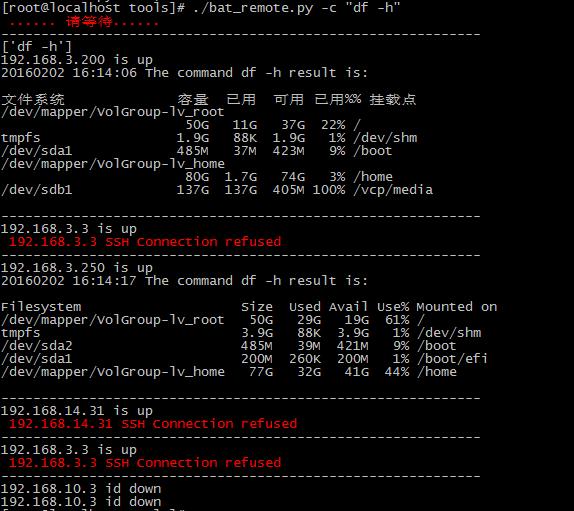
运行结果如下:
批量远程执行linux服务器程序--基于paramiko(多线程版)的更多相关文章
- 批量远程执行linux服务器程序--基于pxpect(多进程、记日志版)
#!/usr/bin/python '''Created on 2015-06-09@author: Administrator''' import pexpect import os,sys fro ...
- java远程执行linux服务器上的shell脚本
业务场景:需要从服务器A中新增的文件同步至本地服务器,服务器A中内存有限,需同步成功之后清除文件. Java调用远程shell脚本,需要和远程服务器建立ssh链接,再调用指定的shell脚本. 1.创 ...
- SecureCRT远程ssh linux服务器,利用X11本地图形化wireshark抓包,
平时学习抓包,使用wireshark很方便,直接图形化界面抓包,近期项目中遇到了需要通过SecureCRT ssh到linux服务器上面,还要在抓包, 1.简单使用网络数据包截获分析工具tcpdump ...
- Linux服务器程序--大数据量高并发系统设计
在Linux服务器程序中,让系统能够提供以更少的资源提供更多的并发和响应效率决定了程序设计价值!怎样去实现这个目标,它其实是这么多年以来一直追逐的东西.最开始写代码时候,省去一个条件语句.用 ...
- Linux 高性能服务器编程——Linux服务器程序规范
问题聚焦: 除了网络通信外,服务器程序通常还必须考虑许多其他细节问题,这些细节问题涉及面逛且零碎,而且基本上是模板式的,所以称之为服务器程序规范. 工欲善其事,必先利其器,这篇主要来探 ...
- java使用Jsch实现远程操作linux服务器进行文件上传、下载,删除和显示目录信息
1.java使用Jsch实现远程操作linux服务器进行文件上传.下载,删除和显示目录信息. 参考链接:https://www.cnblogs.com/longyg/archive/2012/06/2 ...
- widows本地-xshell实现远程连接linux服务器图形界面
本地环境远程连接linux图形界面,常用的实现工具有,VNC.Puty.Xshell等,这里我们用的xshell manager: Xmanager简介:Xmanager是一个运行于 Windows平 ...
- widows终端远程连接Linux服务器
一.前言 为什么不是远程连接Linux服务器? 因为我不会,远程连接window我就用电脑自带的“远程桌面连接”. 以下所述都是在CentOS操作系统下的. 服务器刚换成Linux的时候很迷茫,感觉无 ...
- 利用java实现可远程执行linux命令的小工具
在linux的脚本中,如果不对机器做其他的处理,不能实现在linux的机器上执行命令.为了解决这个问题,写了个小工具来解决这个问题. 后面的代码是利用java实现的可远程执行linux命令的小工具,代 ...
随机推荐
- windows rails new demo时候出错Make sure that `gem install mysql2 -v '0.3.15'` succeeds before bundling.
rails new demo --database=mysql最后报错Gem files will remain installed in D:/BillFiles/rails_dev/Ruby193 ...
- 成员函数后面加const,没有const,以及使用的区别
函数后面加const 编译器会自动给每一个函数加一个this指针.在一个类的函数后面加上const后,就表明这个函数是不能改变类的成员变量的(加了mutable修饰的除外,后面有讲).实际上,也就是对 ...
- 关于Cocos2d-x中文乱码问题的解决
方法一: 1.首先,复制下面的代码,创建一个icov,h的头文件,并放在项目目录下 #include "stdlib.h"#include "string.h" ...
- selenium测试(Java)--浏览器控制(四)
1. 控制浏览器窗口大小 1 package com.test.window; 2 3 import org.openqa.selenium.Dimension; 4 import org.openq ...
- Python3的tcp socket接收不定长数据包接收到的数据不全。
Python Socket API参考出处:http://blog.csdn.net/xiangpingli/article/details/47706707 使用socket.recv(pack_l ...
- 【Java NIO的深入研究2】RandomAccessFile的使用
RandomAccessFile RandomAccessFile是用来访问那些保存数据记录的文件的,你就可以用seek( )方法来访问记录,并进行读写了.这些记录的大小不必相同:但是其大小和位置必须 ...
- java web接口controller测试控制台输出乱码
接口上配置:
- SVN版控系统的安装和使用
SVN是Subversion的简称,是一个开放源代码的版本控制系统,相较于RCS.CVS,它采用了分支管理系统,它的设计目标就是取代CVS.互联网上很多版本控制服务已从CVS迁移到Subversion ...
- 【MFC】OnInitDialog
OnInitDialog OnInitDialog是MFC的面向对象编程语言的类CDialog中的初始化成员函数名(虚函数).相当于对对话框进行初始化处理. 属 性 初始化成员函数名 处 ...
- JavaScript第五天之数组
<script> var a=[1,2,3]; //var a=new Array(1,2,3); //alert(a.length); alert(a[0]); </script& ...