
Request对象介绍(客户端到服务器)
1.处理请求和响应的过程request,response,关于request可以从三个方面着手学习。1:如何获取请求头 行 体 2:请求中文处理 3:请求对象的其它常用方法
1.1:request常用方法:
package com.test;

import java.io.IOException;

import java.io.PrintWriter;

import java.util.Enumeration;

import javax.servlet.ServletException;

import javax.servlet.http.HttpServlet;

import javax.servlet.http.HttpServletRequest;

import javax.servlet.http.HttpServletResponse;

public class UserServlet extends HttpServlet {

    public void doGet(HttpServletRequest request, HttpServletResponse response) throws ServletException, IOException {

//        request.getMethod()方法

        System.out.println("方法:"+request.getMethod());

//        获取请求的路径URI(统一资源标识符)和URL(同一资源定位符)

        System.out.println("URI:"+request.getRequestURI());

        System.out.println("URL:"+request.getRequestURL());

//        获取请求的协议类型

        System.out.println("协议:"+request.getProtocol());

//        获取IP地址

        System.out.println("IP地址:"+request.getRemoteAddr());

//        获取端口号

        System.out.println("服务器端口号:"+request.getLocalPort());

//        获取请求头  头信息都可以获取到

        System.out.println("请求头名称:"+request.getHeader("Accept"));

        System.out.println("请求头名称:"+request.getHeader("Accept-Language"));

        System.out.println();

//        获取所有请求头信息

        Enumeration<String> headerNames = request.getHeaderNames();

        while(headerNames.hasMoreElements()){

            String element = headerNames.nextElement();

            System.out.println(element+"  "+request.getHeader(element));

        }

    }

    public void doPost(HttpServletRequest request, HttpServletResponse response) throws ServletException, IOException {

        doGet(request, response);

    }

}
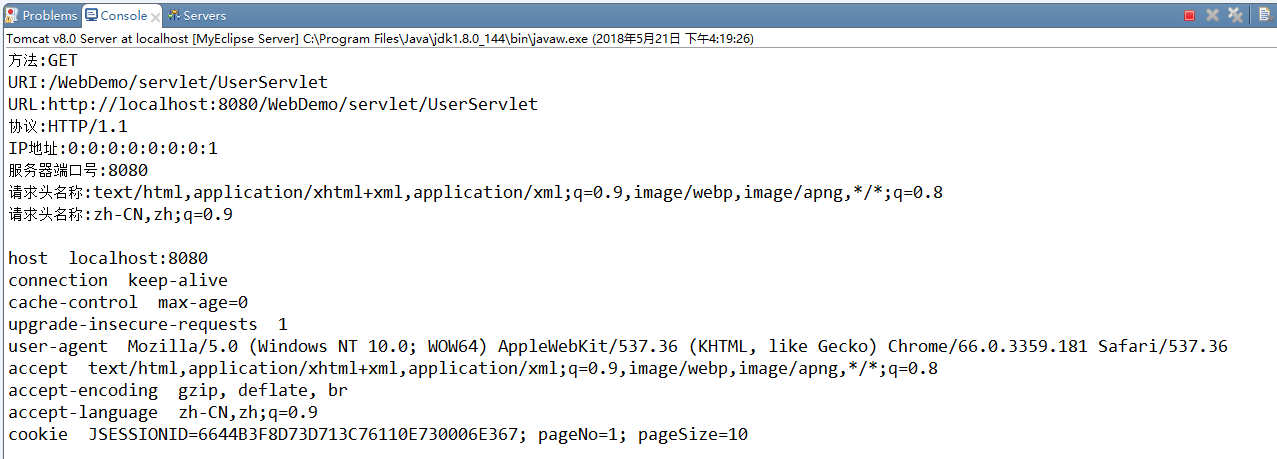
结果:
1.2:request请求中文处理
GET乱码解决:
<%@ page language="java" import="java.util.*" pageEncoding="UTF-8"%>

<%

String path = request.getContextPath();

String basePath = request.getScheme()+"://"+request.getServerName()+":"+request.getServerPort()+path+"/";

%>

<!DOCTYPE HTML PUBLIC "-//W3C//DTD HTML 4.01 Transitional//EN">

<html>

  <head>

    <base href="<%=basePath%>">

    <title>My JSP 'index.jsp' starting page</title>

    <meta http-equiv="pragma" content="no-cache">

    <meta http-equiv="cache-control" content="no-cache">

    <meta http-equiv="expires" content="0">

    <meta http-equiv="keywords" content="keyword1,keyword2,keyword3">

    <meta http-equiv="description" content="This is my page">

    <!--

    <link rel="stylesheet" type="text/css" href="styles.css">

    -->

  </head>

  <body>

    <h1>GET方式</h1>

    <form method="GET" action="servlet/UsersServlet">

        帐号:<input type="text" name="username" /><br />

         <input type="submit"value="提交" />

    </form>

</body>

</html>
Servlet:
package com.test;

import java.io.IOException;

import java.io.PrintWriter;

import javax.servlet.ServletException;

import javax.servlet.http.HttpServlet;

import javax.servlet.http.HttpServletRequest;

import javax.servlet.http.HttpServletResponse;

public class UsersServlet extends HttpServlet {

    public void doGet(HttpServletRequest request, HttpServletResponse response) throws ServletException, IOException {

//        解决GET乱码

        String name = request.getParameter("username");

        name = new String(name.getBytes("iso-8859-1"),"utf-8");

        System.out.println(name);

    }

    public void doPost(HttpServletRequest request, HttpServletResponse response) throws ServletException, IOException {

        doGet(request, response);

    }

}
POST乱码解决:
<%@ page language="java" import="java.util.*" pageEncoding="UTF-8"%>

<%

String path = request.getContextPath();

String basePath = request.getScheme()+"://"+request.getServerName()+":"+request.getServerPort()+path+"/";

%>

<!DOCTYPE HTML PUBLIC "-//W3C//DTD HTML 4.01 Transitional//EN">

<html>

  <head>

    <base href="<%=basePath%>">

    <title>My JSP 'index.jsp' starting page</title>

    <meta http-equiv="pragma" content="no-cache">

    <meta http-equiv="cache-control" content="no-cache">

    <meta http-equiv="expires" content="0">

    <meta http-equiv="keywords" content="keyword1,keyword2,keyword3">

    <meta http-equiv="description" content="This is my page">

    <!--

    <link rel="stylesheet" type="text/css" href="styles.css">

    -->

  </head>

  <body>

<h1>POST方式</h1>

    <form method="POST" action="servlet/UsersServlet">

        帐号:<input type="text" name="username" /><br />

         <input type="submit"value="提交" />

    </form>

</body>

</html>
Servlet:
package com.test;

import java.io.IOException;

import java.io.PrintWriter;

import javax.servlet.ServletException;

import javax.servlet.http.HttpServlet;

import javax.servlet.http.HttpServletRequest;

import javax.servlet.http.HttpServletResponse;

public class UsersServlet extends HttpServlet {

    public void doGet(HttpServletRequest request, HttpServletResponse response) throws ServletException, IOException {

//        解决POST乱码

        request.setCharacterEncoding("UTF-8");

        String name = request.getParameter("username");

        System.out.println(name);

    }

    public void doPost(HttpServletRequest request, HttpServletResponse response) throws ServletException, IOException {

        doGet(request, response);

    }

}
总结要记住得内容:
1 处理get请求乱码 String string = new String(parameter.getBytes("iso-8859-1"),"utf-8");
2 处理post请求乱码 request.setCharacterEncoding("utf-8");
Request容器(存取删)(域对象)和请求转发
总结:
当一个Web资源收到客户端的请求后,如果希望服务器通知另外一个资源处理.
可以通过 转发对象 RequestDispatcher 对象的forward(request,response)方法,将当前请求传递给其他的Web资源进行处理,这种方式称为请求转发。
注:在这些转发的过程中,所有的Servlet共享同一个请求对象。在转发中,客户端是感觉不到服务器内部在跳转。而且客户端的浏览器的地址栏中是不会发生任何变化的。
因为在多个Servlet中可以进行转发,导致多个Servlet之间共享同一个request对象,于是在发出转发的Servlet中,可以把request对象当做一个容器,然后给其中保存数据,在其他的Servlet中可以取出前面的Servlet给request对象中保存的数据。request对象如果当作容器的话,它只是在当前请求中有效。当请求响应结束了,这个容器就消失了。
转发得小结:
1 转发可以调用其他得servlet程序
2 转发可以获取保密路径(WEB-INF)下得资源
另:
1 使用request对象,可以获取请求行
2 使用request对象,可以获取请求头
3 使用request对象,可以处理中文乱码
4 使用request对象,调用下一个servlet(请求转发)
5 使用request对象,在一个请求转发过程中,让两个servlet共享数据,是一个容器。
Request对象介绍(客户端到服务器)的更多相关文章
- 通过request对象获取客户端的相关信息
通过request对象获取客户端的相关信息 制作人:全心全意 通过request对象可以获取客户端的相关信息.例如HTTP报头信息.客户信息提交方式.客户端主机IP地址.端口号等等. request获 ...
- .NET Request对象介绍
Request对象用于检索从浏览器向服务器所发送的请求信息.它提供对当前页请求的访问,包括标题,Cookie,客户端证书等等.它也与HTTP协议的请求消息对应 Request常用的属性 属性 具体内容 ...
- 通过HttpservletRequest对象获取客户端的真实IP地址
这篇文章主要介绍了Java中使用HttpRequest获取用户真实IP地址,使用本文方法可以避免Apache.Squid.nginx等反向代理软件导致的非真实IP地址,需要的朋友可以参考下 在JSP里 ...
- request对象学习
import java.io.IOException; import java.util.Enumeration; import javax.servlet.ServletException; imp ...
- SignalR一个集成的客户端与服务器库。内部的两个对象类:PersistentConnection和Hub
SignalR 将整个交换信息的行为封装得非常漂亮,客户端和服务器全部都使用 JSON 来沟通,在服务器端声明的所有 hub 的信息,都会一般生成 JavaScript 输出到客户端. 它是基于浏览器 ...
- Request对象主要用于获取来自客户端的数据,如用户填入表单的数据、保存在客户端的Cookie等。
1.主要属性 ApplicationPath 获取服务器上asp.net应用程序的虚拟应用程序根路径 Browser 获取有关正在请求的客户端的浏览器功能的信息,该属性值为:HttpBrows ...
- 序列化与反序列化、def的介绍与快速使用、cbv源码分析、APIView与request对象分析
今日内容概要 序列化与反序列化 def介绍和快速使用 cbv源码流程分析 drf之APIView和Request对象分析 内容详细 1.序列化和反序列化 # api接口开发 最核心最常见的一个过程就是 ...
- 介绍一款chrom浏览器插件 DHC是一款使用chrome模拟REST客户端向服务器发送测试数据的谷歌浏览器插件
先打个小广告哈 公司招java架构师,月薪25K以上,负责电商平台架构工作,工作地点在北京 1号线永安里站 附近,如有意向 请把简历发我邮箱jia6235@163.com 可以内部推荐. DHC是一款 ...
- JSP内置对象--request对象
本文主要介绍JSP中的request对象 request对象的主要方法: setAttribute(String name,Object):设置名字为name的request的参数值 getAttri ...
随机推荐
- redis 有序集合数据结构实现 skiplist
Redis使用跳跃表作为有序集合键的的底层实现,如果一个有序集合包含的元素数量比较多,又或者有序集合中元素的成员是比较长的字符串时Redis就会使用跳跃表 来作为有序集合键的底层实现 Redis只在两 ...
- hdu5646(数学)
小学数学,脑补 一开始看到这题,猜了个规律想写但是我是拒绝的. 因为我无法证明. 好吧,主要还是小学数学没学好吧. 要理解这题,首先得搞懂一个重要问题.假设C=A+B,怎样选择两个正整数使得A*B最大 ...
- 《从零开始学Swift》学习笔记(Day 13)——数据类型之整型和浮点型
Swift 2.0学习笔记(Day 13)——数据类型之整型和浮点型 原创文章,欢迎转载.转载请注明:关东升的博客 Swift提供8.16.32.64位形式的有符号及无符号整数.这些整数类型遵循 ...
- 1400 序列分解(dfs)
1400 序列分解 基准时间限制:1 秒 空间限制:131072 KB 分值: 40 难度:4级算法题 小刀和大刀是双胞胎兄弟.今天他们玩一个有意思的游戏. 大刀给小刀准备了一个长度为n的整数序列.小 ...
- N - Broken Keyboard (a.k.a. Beiju Text)(DFS,链表)
N - Broken Keyboard (a.k.a. Beiju Text) Time Limit:1000MS Memory Limit:0KB 64bit IO Format:% ...
- ssm框架整合-过程总结(第二次周总结)
距离上次写博客已经有4.5天的时间了. 这次写博客目的是总结一下项目开始到现在,过程中遇到的问题.和学到的知识.经验. 初略总结下自己从中学到的: Spring :在学习中被反复强调的Ioc(反转控制 ...
- Server Objects Extension(SOE)开发(三)
前言 SOE出现之前,一些复杂.耗时的gis操作,通常都是使用gp服务实现的.前面将gp服务和soe进行了对比分析,为了测试两种的效率,曾经做了个demo,使用soe和gp同时执行相同的业务逻辑,记录 ...
- 【题解】Zap(莫比乌斯反演)
[题解]Zap(莫比乌斯反演) 裸题... 直接化吧 [P3455 POI2007]ZAP-Queries 所有除法默认向下取整 \[ \Sigma_{i=1}^x\Sigma_{j=1}^y[(i, ...
- 【题解】BZOJ3489 A Hard RMQ problem(主席树套主席树)
[题解]A simple RMQ problem 占坑,免得咕咕咕了,争取在2h内写出代码 upd:由于博主太菜而且硬是要用指针写两个主席树,所以延后2hQAQ upd:由于博主太菜而且太懒所以他决定 ...
- 剑指offer 面试3题
面试3题: 题:数组中重复的数字 题目:在一个长度为n的数组里的所有数字都在0到n-1的范围内. 数组中某些数字是重复的,但不知道有几个数字是重复的.也不知道每个数字重复几次.请找出数组中任意一个重复 ...