
基于PCL的屏幕选点、框选点云、单点选取
1. 单点选取
#include <pcl/io/pcd_io.h>

#include <pcl/point_cloud.h>

#include <pcl/point_types.h>

#include <pcl/visualization/pcl_visualizer.h>

typedef pcl::PointXYZRGBA PointT;

typedef pcl::PointCloud<PointT> PointCloudT;

// Mutex: //

boost::mutex cloud_mutex;

struct callback_args

{

	// structure used to pass arguments to the callback function

	PointCloudT::Ptr clicked_points_3d;

	pcl::visualization::PCLVisualizer::Ptr viewerPtr;

};

void pp_callback(const pcl::visualization::PointPickingEvent& event, void* args)

{

	struct callback_args* data = (struct callback_args *)args;

	if (event.getPointIndex() == -1)

		return;

	PointT current_point;

	event.getPoint(current_point.x, current_point.y, current_point.z);

	data->clicked_points_3d->points.push_back(current_point);

	// Draw clicked points in red:

	pcl::visualization::PointCloudColorHandlerCustom<PointT> red(data->clicked_points_3d, 255, 0, 0);

	data->viewerPtr->removePointCloud("clicked_points");

	data->viewerPtr->addPointCloud(data->clicked_points_3d, red, "clicked_points");

	data->viewerPtr->setPointCloudRenderingProperties(pcl::visualization::PCL_VISUALIZER_POINT_SIZE, 10, "clicked_points");

	std::cout << current_point.x << " " << current_point.y << " " << current_point.z << std::endl;

}

void main()

{

	std::string filename("bunny.pcd");

	//visualizer

	pcl::PointCloud<pcl::PointXYZ>::Ptr cloud(new pcl::PointCloud<pcl::PointXYZ>());

	boost::shared_ptr<pcl::visualization::PCLVisualizer> viewer(new pcl::visualization::PCLVisualizer("viewer"));

	if (pcl::io::loadPCDFile(filename, *cloud))

	{

		std::cerr << "ERROR: Cannot open file " << filename << "! Aborting..." << std::endl;

		return;

	}

	std::cout << cloud->points.size() << std::endl;

	//viewer->addPointCloud(cloud, "bunny");

	cloud_mutex.lock();    // for not overwriting the point cloud

	// Display pointcloud:

	viewer->addPointCloud(cloud, "bunny");

	viewer->setCameraPosition(0, 0, -2, 0, -1, 0, 0);

	// Add point picking callback to viewer:

	struct callback_args cb_args;

	PointCloudT::Ptr clicked_points_3d(new PointCloudT);

	cb_args.clicked_points_3d = clicked_points_3d;

	cb_args.viewerPtr = pcl::visualization::PCLVisualizer::Ptr(viewer);

	viewer->registerPointPickingCallback(pp_callback, (void*)&cb_args);

	std::cout << "Shift+click on three floor points, then press 'Q'..." << std::endl;

	// Spin until 'Q' is pressed:

	viewer->spin();

	std::cout << "done." << std::endl;

	cloud_mutex.unlock();

	while (!viewer->wasStopped())

	{

		viewer->spinOnce(100);

		boost::this_thread::sleep(boost::posix_time::microseconds(100000));

	}

}
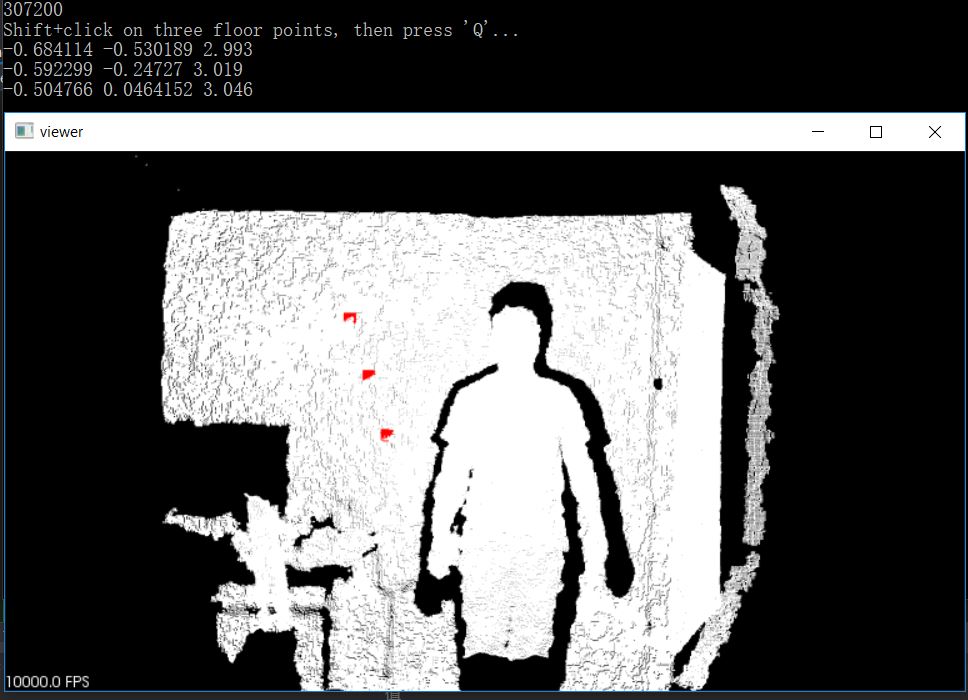
注意:点的选取,需要同时按住shift和鼠标左键
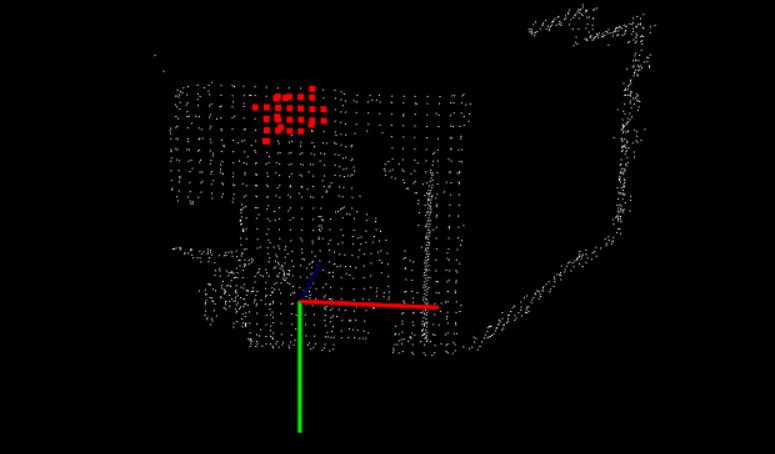
2. 区域选点
#include <pcl/io/pcd_io.h>

#include <pcl/point_cloud.h>

#include <pcl/point_types.h>

#include <pcl/visualization/pcl_visualizer.h>

#include <pcl/filters/voxel_grid.h>

#include <iostream>

#include <vector>

pcl::PointCloud<pcl::PointXYZ>::Ptr cloud(new pcl::PointCloud<pcl::PointXYZ>());

boost::shared_ptr<pcl::visualization::PCLVisualizer> viewer(new pcl::visualization::PCLVisualizer("viewer"));

pcl::PointCloud<pcl::PointXYZ>::Ptr clicked_points_3d(new pcl::PointCloud<pcl::PointXYZ>);

int num = 0;

void pp_callback(const pcl::visualization::AreaPickingEvent& event, void* args)

{

    std::vector< int > indices;

    if (event.getPointsIndices(indices)==-1)

        return;

    for (int i = 0; i < indices.size(); ++i)

    {

        clicked_points_3d->points.push_back(cloud->points.at(indices[i]));

    }

    pcl::visualization::PointCloudColorHandlerCustom<pcl::PointXYZ> red(clicked_points_3d, 255, 0, 0);

    std::stringstream ss;

    std::string cloudName;

    ss << num++;

    ss >> cloudName;

    cloudName += "_cloudName";

    viewer->addPointCloud(clicked_points_3d, red, cloudName);

    viewer->setPointCloudRenderingProperties(pcl::visualization::PCL_VISUALIZER_POINT_SIZE, 10, cloudName);

}

void main()

{

    if (pcl::io::loadPCDFile("bunny.pcd", *cloud))

    {

        std::cerr << "ERROR: Cannot open file " << std::endl;

        return;

    }

    viewer->addPointCloud(cloud, "bunny");

    viewer->setCameraPosition(0, 0, -2, 0, -1, 0, 0);

    viewer->registerAreaPickingCallback(pp_callback, (void*)&cloud);

    //VoxelGrid

    pcl::VoxelGrid<pcl::PointXYZ> vgF;

    vgF.setInputCloud(cloud);

    vgF.setLeafSize(0.1, 0.1, 0.1);

    vgF.filter(*cloud);

    while (!viewer->wasStopped())

    {

        viewer->spinOnce(100);

        boost::this_thread::sleep(boost::posix_time::microseconds(100000));

    }

}
基于PCL的屏幕选点、框选点云、单点选取的更多相关文章
- PCL中outofcore模块---基于核外八叉树的大规模点云的显示
写在前面 最近公众号的活动让更多的人加入交流群,尝试提问更多的我问题,群主也在积极的招募更多的小伙伴与我一起分享,能够相互促进. 这里总结群友经常问,经常提的两个问题,并给出我的回答: (1) ...
- 29 基于PCL的点云平面分割拟合算法技术路线(针对有噪声的点云数据)
0 引言 最近项目中用到了基于PCL开发的基于平面的点云和CAD模型的配准算法,点云平面提取采用的算法如下. 1 基于PCL的点云平面分割拟合算法 2 参数及其意义介绍 (1)点云下采样 1. 参数: ...
- 自己写的基于bootstrap风格的弹框插件
自己写的一款基于bootstrap风格的弹框插件,暂时只有确认框.提示框.后续功能扩展.bug修改再更新. ;(function($){ //默认参数 var PARAMS; var DEFAULTP ...
- 基于CSS3动态背景登录框代码
基于CSS3动态背景登录框代码.这是一款基于jQuery+CSS3实现的带有动画效果的动态背景登陆框特效.效果图如下: 在线预览 源码下载 实现的代码. html代码: <div class ...
- .NET MVC 学习笔记(四)— 基于Bootstarp自定义弹出框
.NET MVC 学习笔记(四)—— 基于Bootstarp自定义弹出框 转载自:https://www.cnblogs.com/nele/p/5327380.html (function ($) { ...
- 7款基于jquery的动画搜索框
无论是电商网站,还是媒体网,还是个人博客,每个网站都有属于自己个性化的搜索框.今天小编给大家带来7款基于jquery的动画搜索框.每个搜索框都采用了动画效果,一起看下效果图吧. 在线预览 源码下载 ...
- 基于jQuery select下拉框美化插件
分享一款基于jQuery select下拉框美化插件.该插件适用浏览器:IE8.360.FireFox.Chrome.Safari.Opera.傲游.搜狗.世界之窗.效果图如下: 在线预览 源码下 ...
- 基于Bootstrap的下拉框插件bootstrap-select
写在前面: 在这次的项目中,没有再使用liger-ui做为前端框架了,改为了Bootstrap,这次也好接触下新的技术,在学习的过程中发现,Bootstrap的一些组件基本都是采用class的形式,就 ...
- 基于xposed逆向微信、支付宝、云闪付来实现个人免签支付功能
我的个人网站如何实现支付功能? 想必很多程序员都有过想开发一个自己的网站来获得一些额外的收入,但做这件事会遇到支付这个问题.目前个人网站通过常规手法是无法实现支付管理的,所有支付渠道都需要以公司的身份 ...
随机推荐
- bzoj 2282 消防
Written with StackEdit. Description 某个国家有\(n\)个城市,这\(n\)个城市中任意两个都连通且有唯一一条路径,每条连通两个城市的道路的长度为\(z_i(z_i ...
- junit学习之junit的基本介绍
Junit目前在一些大的公司或者相对规范的软件中使用的比较多,相当多的小公司并没有把单元测试看的太重要.在大点的公司开发人员每天上班后,第一件事情就是从svn上把自己负责的代码checkout下来,然 ...
- 由于出现操作系统错误 3,进程无法读取文件D:\XXXX\X.pre (源: MSSQL_REPL,错误号: MSSQL_REPL20024)
最近着手做SqlServer2008的订阅发布,起初使用推送订阅很顺利,后来改成请求订阅出现了以下问题,折腾好长时间终于搞定,留下此文备日后查阅,或供遇相同问题的道友参考: 首先阐述以下问题: 1. ...
- 自定义springmvc统一异常处理器(实现HandlerExceptionResolver接口)不起作用的一种情况
ExceptionResolverCustom 这个是自定义的异常处理器类. 在springmvc中注册 在web.xml文件中屏蔽springmvc自动注册的异常处理器 网上的资料就是这么配置的,可 ...
- Windows Communication Foundation (WCF)和Windows CardSpace的示例程序
微软公司昨天发布了一个Windows Communication Foundation (WCF)和Windows CardSpace的示例程序包,内容极为丰富,从最简单的Hello World到复杂 ...
- 讲解JSP自定义标签
一.基本概念 1.标签(Tag) 标签是一种XML元素,通过标签可以使JSP网页变得简洁并且易于维护,还可以方便地实现同一个JSP文件支持多种语言版本.由于标签是XML元素,所以它的名称和属性都是大小 ...
- Ambari和YARN的Capacity调度器,安装过程
用Spark测试YARN的资源池,测试过程中发现很多时候爆资源不够: 于是添加机器,专门用于跑spark:首先是ssh不通,原来错把71的id_psa.put文件拷贝到64上面:后来ssh通了,amb ...
- PHP 操作XML文档
<<<操作符需PHP5.3以上版本才能支持,下面程序在wamp环境下测试完成. <?php // Set the content type to be XML, so that ...
- DHCP(二)
提供阶段:即DHCP服务器向DHCP客户端提供预分配IP地址的阶段.网络中的所有DHCP服务器接收到客户端的DHCP Discover报文后,都会根据自己地址池中IP地址分配的优先次序选出一个IP地址 ...
- 优秀设计师必须知道哪些优秀的UI设计原则
转自:http://www.gamelook.com.cn/2016/01/240359 界面清晰最重要 界面清晰是UI设计的第一步,要想让用户喜欢你设计的UI,首先必须让用户认可它.知道怎么样使用它 ...