
C# 用程序读写另一个控制台程序
一、
using System;

namespace ConsoleApp1

{

    class Program

    {

        static void Main(string[] args)

        {

            Console.Write(args[]);

        }

    }

}
编译生成ConsoleApp1.exe,并放到ConsoleApp2-bin-的Debug文件夹
using System;

using System.Diagnostics;

namespace ConsoleApp2

{

    class Program

    {

        static void Main(string[] args)

        {

            Process p = new Process();

            p.StartInfo.FileName = "ConsoleApp1.exe";

            p.StartInfo.Arguments = "a b c";//用空格来分隔参数,传给cmd.exe 时相当于传了个包含 a,b,c的字符串数组

            p.StartInfo.UseShellExecute = false;    //是否使用操作系统shell启动

            p.StartInfo.RedirectStandardInput = true;//接受来自调用程序的输入信息

            p.StartInfo.RedirectStandardOutput = true;//由调用程序获取输出信息

            p.StartInfo.RedirectStandardError = true;//重定向标准错误输出

            //p.StartInfo.CreateNoWindow = true;//不显示程序窗口?????

            p.Start();

            string output = p.StandardOutput.ReadToEnd();//获取cmd窗口的输出信息

            Console.WriteLine(output);

            Console.ReadLine();

        }

    }

}
修改一下ConsoleApp2
        static void Main(string[] args)

        {

            while ( == )

            {

                Console.Write("输入指令:");

                string str = Console.ReadLine();

                Process p = new Process();

                p.StartInfo.FileName = "ConsoleApp1.exe";

                p.StartInfo.Arguments = str;//用空格来分隔参数,传给cmd.exe 时相当于传了个包含 a,b,c的字符串数组

                p.StartInfo.UseShellExecute = false;    //是否使用操作系统shell启动

                p.StartInfo.RedirectStandardInput = true;//接受来自调用程序的输入信息

                p.StartInfo.RedirectStandardOutput = true;//由调用程序获取输出信息

                p.StartInfo.RedirectStandardError = true;//重定向标准错误输出

                //p.StartInfo.CreateNoWindow = true;//不显示程序窗口?????

                p.Start();

                string output = p.StandardOutput.ReadToEnd();//获取cmd窗口的输出信息

                p.WaitForExit();//等待程序执行完退出进程

                p.Close();

                Console.WriteLine("返回信息:" + output);

                Console.WriteLine("");

            }

        }
就可以和调用的控制台交互了

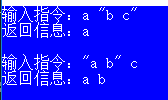
但是有个问题,如果输入的字符串带空格,就会截取到空格前的字符输出
多加上双引号就可以表示成一个字符串
二、调用cmd
官方
        static void Main(string[] args)

        {

            //Console.WriteLine("Ready to sort one or more text lines...");

            using (Process myProcess = new Process())

            {

                myProcess.StartInfo.FileName = "cmd.exe";

                myProcess.StartInfo.UseShellExecute = false;

                myProcess.StartInfo.RedirectStandardInput = true;

                myProcess.Start();

                StreamWriter myStreamWriter = myProcess.StandardInput;

                String inputText;

                do

                {

                    //Console.WriteLine("Enter a line of text (or press the Enter key to stop):");

                    inputText = Console.ReadLine();

                    if (inputText.Length > )

                    {

                        myStreamWriter.WriteLine(inputText);

                    }

                } while (inputText.Length > );

                myStreamWriter.Close();

                myProcess.WaitForExit();

            }

            Console.ReadLine();

        }
C# 用程序读写另一个控制台程序的更多相关文章
- VC2012+QT新建一个控制台程序
1.新建一个项目,选择控制台程序 2.下一步.project setting 可以包含模块,可以再这选择也可以之后选择 3.配置工程属性 1)需要源码的话添加VC++目录里的源目录 2)包含头文件 ...
- android intent隐式调用之一个应用程序启动另一个应用程序
理解Intent的关键之一是理解清楚Intent的两种基本用法:一种是显式的Intent,即在构造Intent对象时就指定接收者,这种方式与普通的函数调用类似:另一种是隐式的Intent,即Inten ...
- Android学习笔记_70_一个应用程序启动另一个应用程序的Activity
第一种(我自己写的) :之前在网上看来一些,很多不是我要的可以启动另外一个应用程序的主Activity. //这些代码是启动另外的一个应用程序的主Activity,当然也可以启动任意一个Activit ...
- iOS 在一个应用程序中调另一个应用程序
在A应用程序中调用B应用程序 1. 首先在B应用程序中生成URL 1)点击targets文件 2)点击Info 3)生成URL ①在Info.plist文件中点击+(新添加一项) ②在Info.pli ...
- C#零基础入门-3-第一个控制台程序
打开VS2017 文件 新建 项目 模板选择Visual C# Windows 控制台应用程序 快速写入Console.WriteLine 输入cw,然后快速按tab键两次即可.
- CreateProcess执行一个控制台程序,隐藏窗口
STARTUPINFO StartupInfo;//创建进程所需的信息结构变量 PROCESS_INFORMATION ProcessInfo; GetStartupInfo(&Sta ...
- [idea]创建一个控制台程序
新建项目时,选择JBoss即可.
- 微信小程序开发2-第一个小程序开发准备
1.首先在官网上注册一个账号( https://mp.weixin.qq.com/ )申请一个AppID(类似于人的身份证,小程序也需要身份证) 注册过程不多说 2.安装开发工具( https://m ...
- qt console 控制台程序 与win console控制台程序是不同的
#include <QtCore/QCoreApplication> int main(int argc, char *argv[]){ QCoreApplication a(argc, ...
随机推荐
- 【bzoj3262】陌上花开 CDQ分治+树状数组
题目描述 有n朵花,每朵花有三个属性:花形(s).颜色(c).气味(m),又三个整数表示.现要对每朵花评级,一朵花的级别是它拥有的美丽能超过的花的数量.定义一朵花A比另一朵花B要美丽,当且仅当Sa&g ...
- C# + ArcEngine 常用方法(不定时更新)
1.Arcengine调用GP服务,抛出异常方法 object sev = null; try { Application.DoEvents(); gp.Execute(gpBuildPyramids ...
- 【转】Visio画用例模型图竟然没有include关系
转自:http://blog.csdn.net/shuixin536/article/details/8289746 由于电脑上没有安装Rose,因此决定用visio来画UML中的用例模型图,在绘制的 ...
- [LOJ#6437][BZOJ5373]「PKUSC2018」PKUSC
[LOJ#6437][BZOJ5373]「PKUSC2018」PKUSC 试题描述 九条可怜是一个爱玩游戏的女孩子. 最近她在玩一个无双割草类的游戏,平面上有 \(n\) 个敌人,每一个敌人的坐标为 ...
- CDQZ 2017 游记
Day0: 提前放了一整天假,颓过去了.老吕让我去给B层的讲课,ppt还没做,只能在飞机上赶了QAQ.然后从上午到了衡水就一直在路上或者天上,到了晚上才到学校,然而ppt还是没有做完.还有,鄂尔多斯真 ...
- 【BZOJ 2756】[SCOI2012]奇怪的游戏 二分+最大流
这道题提醒我,要有将棋盘黑白染色的意识,尤其是看到相邻格子这样的条件的时候,然后就是要用到与其有关的性质与特点以体现其作用,这道题就是用到了黑格子与白格子之间的关系进行的,其出发点是每次一定会给一个黑 ...
- 用HTML5 Canvas做一个画图板
使用HTML5可以非常简单地在canvas上实现画图应用,用支持html5的浏览器便可在下面的区域进行绘画,要看到演示效果,请确保你的浏览器支持HTML5: 功能很简单,原理其实和拖放是类似的,主要是 ...
- notepad++中快速插入当前时间方法
转载自:http://blog.csdn.net/donghustone/article/details/7436483 在notepad++中快速插入当前时间方法: 插件是notepad++的一大优 ...
- 慕课网javascript 进阶篇 第九章 编程练习
把平常撸的码来博客上再撸一遍既可以加深理解,又可以理清思维.还是很纯很纯的小白,各位看官老爷们,不要嫌弃.最近都是晚睡,昨晚也不例外,两点多睡的.故,八点起来的人不是很舒服,脑袋有点晕呼呼,鉴于昨晚看 ...
- AQS同步组件及ReentrantLock和synchronized的区别
AQS同步组件 CountDownLatch(只有一个线程对他进行操作): 主线程必须在启动其它线程后立即调用await()方法.这样主线程的操作就会在这个方法上阻塞,直到其它线程完成各自的任务. S ...