
HTML5 Canvas 绘制库存变化折线 增加超储告罄线
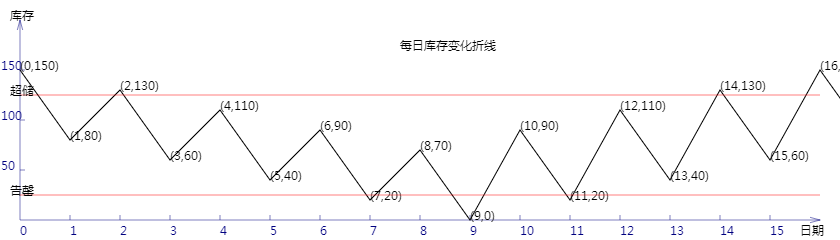
<!DOCTYPE html>
<html lang="utf-8">
<meta http-equiv="Content-Type" content="text/html; charset=utf-8"/>
<head>
     <title>库存曲线</title>
    </head>

     <body onload="draw()">
        <canvas id="myCanvus" width="840px" height="240px" style="border:1px dashed black;">
            出现文字表示你的浏览器不支持HTML5
        </canvas>
     </body>
</html>
<script type="text/javascript">
<!--
    function draw(){
        var canvas=document.getElementById("myCanvus");
        var canvasWidth=840;
        var canvasHeight=240;

        var context=canvas.getContext("2d");

        context.fillStyle = "white";
        context.fillRect(0, 0, canvasWidth, canvasHeight);

        context.strokeStyle = "black";
        context.fillStyle = "black";

        context.save();

        // 进行坐标变换:把原点放在左下角,东方为X轴正向,北方为Y轴正向
        var offset=20;// 偏移值,用来画坐标轴

        context.save();
        context.translate(0+offset,canvasHeight-offset);
        context.rotate(getRad(180));
        context.scale(-1,1);

        drawAxisX(context);
        drawAxisY(context);

        var actualStock=100;
        var inbounds=[50,0,50,0,50,0,50,0,50,0,90,0,90,0,90,0,90,0,];
        var outbounds=[0,70,0,70,0,70,0,70,0,70,0,70,0,70,0,70,0,70,];

        drawStockCurve(context,actualStock,inbounds,outbounds);
        drawBounds(context);

        context.restore();

        context.fillText("每日库存变化折线",400,50);

        context.fillText("库存",10,20);
        context.fillText("日期",800,235);
    }

    function drawBounds(ctx){
        ctx.save();

        ctx.lineWidth=0.5;
        ctx.strokeStyle='red';

        // 画underage
        ctx.beginPath();
        ctx.moveTo(0, 25);
        ctx.lineTo(800, 25);
        ctx.stroke();
        ctx.closePath();

        ctx.save();
        ctx.translate(-10,25);
        ctx.rotate(getRad(180));
        ctx.scale(-1,1);
        ctx.fillText("告罄",0,0);
        ctx.restore();

        ctx.restore();

        ctx.save();

        ctx.lineWidth=0.5;
        ctx.strokeStyle='red';

        // 画underage
        ctx.beginPath();
        ctx.moveTo(0, 125);
        ctx.lineTo(800, 125);
        ctx.stroke();
        ctx.closePath();

        ctx.save();
        ctx.translate(-10,125);
        ctx.rotate(getRad(180));
        ctx.scale(-1,1);
        ctx.fillText("超储",0,0);
        ctx.restore();

        ctx.restore();
    }

    function drawStockCurve(ctx,actualStock,inbounds,outbounds){
        ctx.save();

        ctx.lineWidth=1;
        ctx.strokeStyle='black';
        ctx.fillStyle='black';

        var y=actualStock;
        var x;

        ctx.beginPath();
        for(var i=0;i<inbounds.length;i++){
            y=y+inbounds[i]-outbounds[i];
            x=i*50;
            ctx.lineTo(x, y);

            ctx.save();
            // 因坐标变换会导致文字错位,故采用位移+旋转+缩放的方式恢复
            ctx.translate(x,y);
            ctx.rotate(getRad(180));
            ctx.scale(-1,1);
            ctx.fillText("("+i+","+y+")",0,0);
            ctx.restore();
        }
        ctx.stroke();
        ctx.closePath();

        ctx.restore();
    }

    function drawAxisX(ctx){
        ctx.save();

        ctx.lineWidth=0.5;
        ctx.strokeStyle='navy';
        ctx.fillStyle='navy';

        // 画轴
        ctx.beginPath();
        ctx.moveTo(0, 0);
        ctx.lineTo(800, 0);
        ctx.stroke();
        ctx.closePath();

        ctx.beginPath();
        ctx.moveTo(800-Math.cos(getRad(15))*10, Math.sin(getRad(15))*10);
        ctx.lineTo(800, 0);
        ctx.lineTo(800-Math.cos(getRad(15))*10, -Math.sin(getRad(15))*10);
        ctx.stroke();
        ctx.closePath();

        // 画刻度
        var x,y;
        y=5;
        for(x=50;x<800;x+=50){
            ctx.beginPath();
            ctx.moveTo(x, 0);
            ctx.lineTo(x, y);

            ctx.stroke();
            ctx.closePath();
        }

        // 写文字
        var i=0;
        for(x=0;x<800;x+=50){
            ctx.save();
            ctx.scale(1,-1);
            ctx.fillText(i,x,y+10);
            ctx.restore();

            i++;
        }

        ctx.restore();
    }

    function drawAxisY(ctx){
        ctx.save();

        ctx.lineWidth=0.5;
        ctx.strokeStyle='navy';
        ctx.fillStyle='navy';

        // 画轴
        ctx.beginPath();
        ctx.moveTo(0, 0);
        ctx.lineTo(0, 200);
        ctx.stroke();
        ctx.closePath();

        ctx.beginPath();
        ctx.moveTo(Math.sin(getRad(15))*10, 200-Math.cos(getRad(15))*10);
        ctx.lineTo(0, 200);
        ctx.lineTo(-Math.sin(getRad(15))*10, 200-Math.cos(getRad(15))*10);
        ctx.stroke();
        ctx.closePath();

        // 画刻度
        var x,y;
        x=5;
        for(y=50;y<200;y+=50){
            ctx.beginPath();
            ctx.moveTo(x, y);
            ctx.lineTo(0, y);

            ctx.stroke();
            ctx.closePath();
        }

        // 写文字
        x=-19;
        for(y=50;y<200;y+=50){
            ctx.save();

            ctx.scale(1,-1);
            ctx.translate(0,-200);

            ctx.fillText(200-y,x,y);
            ctx.restore();
        }

        ctx.restore();
    }

    function getRad(degree){
        return degree/180*Math.PI;
    }
//-->
</script>
HTML5 Canvas 绘制库存变化折线 增加超储告罄线的更多相关文章
- HTML5 Canvas 绘制库存变化折线 画入库出库柱状图
代码: <!DOCTYPE html> <html lang="utf-8"> <meta http-equiv="Content-Type ...
- HTML5 Canvas 绘制库存变化折线 计算出库存周转率
<!DOCTYPE html> <html lang="utf-8"> <meta http-equiv="Content-Type&quo ...
- HTML5 Canvas 绘制库存变化折线 计算出最高最低库存
<!DOCTYPE html> <html lang="utf-8"> <meta http-equiv="Content-Type&quo ...
- HTML5 Canvas 绘制库存变化折线
<!DOCTYPE html> <html lang="utf-8"> <meta http-equiv="Content-Type&quo ...
- 使用html5 Canvas绘制线条(直线、折线等)
使用html5 Canvas绘制直线所需的CanvasRenderingContext2D对象的主要属性和方法(有"()"者为方法)如下: 属性或方法 基本描述 strokeSty ...
- html5 Canvas绘制图形入门详解
html5,这个应该就不需要多作介绍了,只要是开发人员应该都不会陌生.html5是「新兴」的网页技术标准,目前,除IE8及其以下版本的IE浏览器之外,几乎所有主流浏览器(FireFox.Chrome. ...
- 怎样用JavaScript和HTML5 Canvas绘制图表
原文:https://code.tutsplus.com/zh-...原作:John Negoita翻译:Stypstive 在这篇教程中,我将展示用JavaScript和canvas作为手段,在饼状 ...
- 学习笔记:HTML5 Canvas绘制简单图形
HTML5 Canvas绘制简单图形 1.添加Canvas标签,添加id供js操作. <canvas id="mycanvas" height="700" ...
- 使用 HTML5 Canvas 绘制出惊艳的水滴效果
HTML5 在不久前正式成为推荐标准,标志着全新的 Web 时代已经来临.在众多 HTML5 特性中,Canvas 元素用于在网页上绘制图形,该元素标签强大之处在于可以直接在 HTML 上进行图形操作 ...
随机推荐
- HTML5初学---坦克大战基础
让小球动起来,根据键盘的W(上),D(右),S(下),A(左):键的点击移动小球 <!DOCTYPE html> <html> <head> <meta ch ...
- 某dp题
[NOI联考by ysy]庆典 2016年6月17日1,1040 [题目描述] 战狂在昌和帝国的首都法法城召开了庆典,向一万名最杰出的士兵分发了用魔法猪做的猪肉饺子,士兵们吃了猪肉饺子后,战斗力大幅提 ...
- 【计算机网络】http状态码
100-199 用于指定客户端应相应的某些动作. 200-299 用于表示请求成功. 300-399 用于已经移动的文件并且常被包含在定位头信息中指定新的地址信息. 400-499 用于指出客户端的错 ...
- 《Java编程思想》笔记 第二十章 注解
1.注解 注解也称元数据,是在代码中添加信息的一种方式添加的信息提供给编译器或者工具类框架使用. SE5引入,可以提供用来完整描述程序所需要的信息,往往这些信息是无法用Java来表达的. 注解可以在编 ...
- MySQL 基础内容
创建数据库 对于表的操作需要先进入库 use 库名: -- 创建一个名为 inana_db 的数据库,数据库字符编码指定为 utf8create database inana_db character ...
- Activiti 6.0 入门篇
从Activiti网站下载Activiti UI WAR文件(或百度云) 将下载的activiti-app.war复制到Tomcat的webapps目录. 启动Tomcat 打开浏览器并转到 http ...
- C++的Public.lib(Public.dll) : fatal error LNK1112: module machine type 'X86' conflicts with target machine type 'x64'
今天开始编译网游服务器,找前辈借来批处理文件,版本控制上拿下代码,库等一系列资源,尼玛啊,编译出错: Public.lib(Public.dll) : fatal error LNK1112: mod ...
- HDU 6324.Problem F. Grab The Tree-博弈(思维) (2018 Multi-University Training Contest 3 1006)
6324.Problem F. Grab The Tree 题目看着好难,但是题解说的很简单,写出来也很简单.能想出来就是简单的,想不出来就难(讲道理,就算是1+1的题目,看不出来就是难的啊). 和后 ...
- HDU 1106 排序(排序)
输入一行数字,如果我们把这行数字中的‘5’都看成空格,那么就得到一行用空格分割的若干非负整数(可能有些整数以‘0’开头,这些头部的‘0’应该被忽略掉,除非这个整数就是由若干个‘0’组成的,这时这个整数 ...
- 【搜索】魔板问题(BFS)
[搜索]魔板问题 时间限制: 1 Sec 内存限制: 64 MB提交: 5 解决: 3[提交][状态][讨论版] 题目描述 据说能使持有者成为世界之主的上古神器隐藏在魔板空间,魔板由8个同样大小的 ...