
可以随着SeekBar滑块滑动显示的Demo
//关于Seek的自定义样式,之前也有总结过,但是,一直做不出随着滑块移动的效果,查询了很多资料终于解决了这个问题,现在把代码写出来有bug的地方
希望大家批评指正。
Step 1 :自定义一个Viewgroup的类:
package com.example.seekbartest;

import android.content.Context;

import android.util.AttributeSet;

import android.view.ViewGroup;

public class TextMoveLayout extends ViewGroup {

    public TextMoveLayout(Context context, AttributeSet attrs) {

        super(context, attrs);

        // TODO Auto-generated constructor stub

    }

    @Override

    protected void onLayout(boolean changed, int l, int t, int r, int b) {

        // TODO Auto-generated method stub

    }

    public TextMoveLayout(Context context, AttributeSet attrs, int defStyle) {

        super(context, attrs, defStyle);

        // TODO Auto-generated constructor stub

    }

    public TextMoveLayout(Context context) {

        super(context);

        // TODO Auto-generated constructor stub

    }

}
Step 2 : 在布局文件中放置简单的布局文件
<LinearLayout xmlns:android="http://schemas.android.com/apk/res/android"

    android:layout_width="fill_parent"

    android:layout_height="fill_parent"

    android:orientation="vertical" >

    <com.example.seekbartest.TextMoveLayout

        android:id="@+id/textLayout"

        android:layout_width="match_parent"

        android:layout_height="50dp"

        />

    <SeekBar

        android:id="@+id/seekBar1"

        android:layout_width="match_parent"

        android:layout_height="wrap_content" />

</LinearLayout>
Step 3 :在MainActivity中进行业务逻辑的操作
package com.example.seekbartest;

import android.support.v7.app.ActionBarActivity;

import android.annotation.SuppressLint;

import android.graphics.Color;

import android.os.Bundle;

import android.view.Menu;

import android.view.MenuItem;

import android.view.ViewGroup;

import android.widget.SeekBar;

import android.widget.SeekBar.OnSeekBarChangeListener;

import android.widget.TextView;

@SuppressLint("NewApi") public class MainActivity extends ActionBarActivity {

    private SeekBar sb;

    private int step;

    private TextMoveLayout textLayout;

    private TextView text;

    private int screenWidth;

    private ViewGroup.LayoutParams params;

    @Override

    protected void onCreate(Bundle savedInstanceState) {

        super.onCreate(savedInstanceState);

        setContentView(R.layout.activity_main);

        sb = (SeekBar)findViewById(R.id.seekBar1);

        text = new TextView(this);

        textLayout = (TextMoveLayout)findViewById(R.id.textLayout);

        screenWidth = getWindowManager().getDefaultDisplay().getWidth();

   /*     screenWidth = getWindowManager().getDefaultDisplay().getWidth();

                text = new TextView(this);

                text.setBackgroundColor(Color.rgb(245, 245, 245));

                text.setTextColor(Color.rgb(0, 161, 229));

                text.setTextSize(16);

                layoutParams = new ViewGroup.LayoutParams(screenWidth, 50);

                textMoveLayout = (TextMoveLayout) findViewById(R.id.textLayout);

                textMoveLayout.addView(text, layoutParams);

                text.layout(0, 20, screenWidth, 80);*/

        text.setBackgroundColor(Color.rgb(240, 240, 240));

        text.setTextColor(Color.rgb(0, 161,229));

        text.setTextSize(12);

        params = new ViewGroup.LayoutParams(screenWidth, 50);

        textLayout.addView(text, params);

        text.layout(0, 20, screenWidth, 80);

        sb.setOnSeekBarChangeListener(new OnSeekBarChangeListener() {

            @Override

            public void onStopTrackingTouch(SeekBar seekBar) {

                // TODO Auto-generated method stub

                hideText();

            }

            @Override

            public void onStartTrackingTouch(SeekBar seekBar) {

                // TODO Auto-generated method stub

                showText();

            }

            @Override

            public void onProgressChanged(SeekBar seekBar, int progress,

                    boolean fromUser) {

                // TODO Auto-generated method stub

/*                text.layout((int) (progress * moveStep), 20, screenWidth, 80);

                text.setText(getCheckTimeBySeconds(progress, startTimeStr));*/

                showText();

                text.layout((int)progress*sb.getWidth()/sb.getMax(), 20, screenWidth, 80);

                text.setText(progress+"%");

            }

        });

    }

    public void hideText(){

        text.setAlpha(0);

    }

    public void showText(){

        text.setAlpha(1);

    }

    @Override

    public boolean onCreateOptionsMenu(Menu menu) {

        // Inflate the menu; this adds items to the action bar if it is present.

        getMenuInflater().inflate(R.menu.main, menu);

        return true;

    }

    @Override

    public boolean onOptionsItemSelected(MenuItem item) {

        // Handle action bar item clicks here. The action bar will

        // automatically handle clicks on the Home/Up button, so long

        // as you specify a parent activity in AndroidManifest.xml.

        int id = item.getItemId();

        if (id == R.id.action_settings) {

            return true;

        }

        return super.onOptionsItemSelected(item);

    }

}
Step :效果图
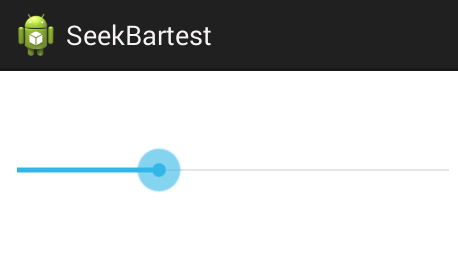
不拖动滑块时的效果:
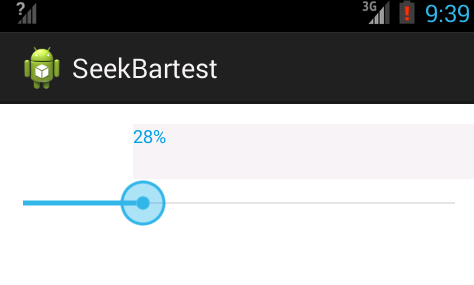
拖动滑块时的效果
可以随着SeekBar滑块滑动显示的Demo的更多相关文章
- tableviewcell滑动显示多个按钮UITableViewRowAction(转载)
demo截图 ios8 新的属性 typedef NS_ENUM(NSInteger, UITableViewRowActionStyle) { UITableViewRowActionStyleDe ...
- duilib : 滑动显示的窗口实现以及 悬浮窗 (转载)
1. vc 判断窗口是否显示 BOOL IsWindowVisible(HWND hWnd); 2.悬浮窗 http://blog.csdn.net/lincyang/article/details ...
- jQuery hover事件鼠标滑过图片半透明标题文字滑动显示隐藏
1.效果及功能说明 hover事件制作产品图片鼠标滑过图片半透明,标题文字从左到右滑动动画移动显示隐藏 2.实现原理 首先把效果都隐藏,然后定义一个伪类来触发所有的效果,接下来当触发伪类后会有一个遍历 ...
- Android自定义滑动显示隐藏布局
方式一:上下左右滑动显示隐藏布局 总结代码地址: http://git.oschina.net/anan9303/customView参考例子: http://www.jianshu.com/p/fc ...
- fullpage中大的图片超过一屏怎么在手机端滑动显示?
fullpage中大的图片超过一屏怎么在手机端滑动显示?(设置overflow电脑端是会出现滚动条的,但是在手机端不出现滚动条,图片也不可左右滑动显示) var $window = $(window) ...
- JS实现可用滑块滑动的缓动图
尝试模仿京东的"发现好货"模块的可用滑块滑动的缓动图 JS代码 function $(id) { return document.getElementById(id); } //缓 ...
- 【转】 为SeekBar滑块设置固定值以及自定义Seekbar,progressbar样式--不错
原文网址:http://blog.csdn.net/jdsjlzx/article/details/7804080 最近在项目中使用到了seekbar和progressbar,且必须按照设计要求来进行 ...
- js做通讯录的索引滑动显示效果和滑动显示锚点效果
只做实现..完全没考虑性能优化.所以我实现了以后特别卡. 第一个是在通讯录右边的索引条上进行滑动,滑动到相应字母就跳转到相应字母的锚点上. 思路:监听touchmove事件,获取clientX和cli ...
- QQ左侧滑动显示之按钮切换
上一篇为大家介绍了关于自定义属性设置方法,本篇我将为大家介绍一下如何通过按钮来控制Menu的显示和隐藏,为了达到这个效果我们需要在SlidingMenu中添加三个方法,用来达到实现上述效果的目的. 我 ...
随机推荐
- UGUI防止点击穿透
if (!IsPointerOverGameObject(Input.mousePosition)) { } public static bool IsPointerOverGameObject(Ve ...
- gcc扩展语法一:在表达式中的语句和声明
在GNU C中包含在括号中的复合语句可以作为一个表达式.这就允许你在表达式中使用循环,switch和局部变量. 以前复合语句是包含在大括号中语句序列.在这种构造中,圆括号包围在大括号中.如下面的例子: ...
- Object Detection with Discriminatively Trained Part Based Models
P. Felzenszwalb, R. Girshick, D. McAllester, D. RamananObject Detection with Discriminatively Traine ...
- JDBC连接数据库时错误提示的解决方案汇总
今天在连接JDBC时,出现了错误 最开始的URL是这样写的 Connection conn = DriverManager.getConnection("jdbc:mysql://local ...
- Linux/Mac scp命令笔记
scp命令用于Linux之间复制文件和目录. 参数说明: -1: 强制scp命令使用协议ssh1-2: 强制scp命令使用协议ssh2-4: 强制scp命令只使用IPv4寻址-6: 强制scp命令只使 ...
- vue入门:实现图片点击切换
1.实现功能 2.目录结构 3.代码 <!DOCTYPE html> <html lang="en"> <head> <meta char ...
- JavaScript 基础(三) 对象 条件判断
JavaScript的对象是一种无序的集合数据类型,它是由若干键对组成. var guagua = { name:'瓜瓜', birth:1988, school:'No.1 Middle Schoo ...
- 重新格式化hadoop的namenode导致datanode无法启动的最简单解决办法
一般namenode只格式化一次,重新格式化不仅会导致之前的数据都不可用,而且datanode也会无法启动.在datanode日志中会有类似如下的报错信息: java.io.IOException: ...
- MYSQL 版本5.7.24 sql_mode=only_full_group_by问题
具体出错提示: [Err] 1055 - Expression #1 of ORDER BY clause is not in GROUP BY clause and contains nonaggr ...
- jQuery(四)--HTTP请求
<!DOCTYPE html> <html> <head> <meta charset="utf-8"> <title> ...