
在richtextbox中获取最真实的字符串像素大小
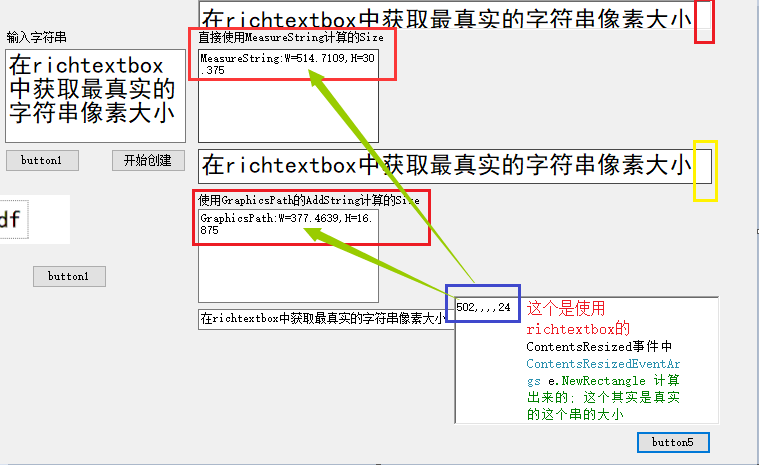
设计器:
 partial class Form1

    {

        /// <summary>

        /// 必需的设计器变量。

        /// </summary>

        private System.ComponentModel.IContainer components = null;

        /// <summary>

        /// 清理所有正在使用的资源。

        /// </summary>

        /// <param name="disposing">如果应释放托管资源,为 true;否则为 false。</param>

        protected override void Dispose(bool disposing)

        {

            if (disposing && (components != null))

            {

                components.Dispose();

            }

            base.Dispose(disposing);

        }

        #region Windows 窗体设计器生成的代码

        /// <summary>

        /// 设计器支持所需的方法 - 不要修改

        /// 使用代码编辑器修改此方法的内容。

        /// </summary>

        private void InitializeComponent()

        {

            this.textBox1 = new System.Windows.Forms.TextBox();

            this.button1 = new System.Windows.Forms.Button();

            this.textBox2 = new System.Windows.Forms.TextBox();

            this.textBox3 = new System.Windows.Forms.TextBox();

            this.label1 = new System.Windows.Forms.Label();

            this.label2 = new System.Windows.Forms.Label();

            this.label3 = new System.Windows.Forms.Label();

            this.txtGraphicsPath = new System.Windows.Forms.TextBox();

            this.txtMeasureString = new System.Windows.Forms.TextBox();

            this.button2 = new System.Windows.Forms.Button();

            this.pictureBox1 = new System.Windows.Forms.PictureBox();

            this.button3 = new System.Windows.Forms.Button();

            this.button4 = new System.Windows.Forms.Button();

            this.richTextBox1 = new System.Windows.Forms.RichTextBox();

            this.button5 = new System.Windows.Forms.Button();

            this.richTextBox2 = new System.Windows.Forms.RichTextBox();

            ((System.ComponentModel.ISupportInitialize)(this.pictureBox1)).BeginInit();

            this.SuspendLayout();

            //

            // textBox1

            //

            this.textBox1.Font = new System.Drawing.Font("黑体", 18F, System.Drawing.FontStyle.Regular, System.Drawing.GraphicsUnit.Point, ((byte)(134)));

            this.textBox1.Location = new System.Drawing.Point(134, 49);

            this.textBox1.Multiline = true;

            this.textBox1.Name = "textBox1";

            this.textBox1.Size = new System.Drawing.Size(181, 94);

            this.textBox1.TabIndex = 0;

            //

            // button1

            //

            this.button1.Location = new System.Drawing.Point(134, 149);

            this.button1.Name = "button1";

            this.button1.Size = new System.Drawing.Size(75, 23);

            this.button1.TabIndex = 1;

            this.button1.Text = "button1";

            this.button1.UseVisualStyleBackColor = true;

            this.button1.Click += new System.EventHandler(this.button1_Click);

            //

            // textBox2

            //

            this.textBox2.Location = new System.Drawing.Point(327, 49);

            this.textBox2.Multiline = true;

            this.textBox2.Name = "textBox2";

            this.textBox2.Size = new System.Drawing.Size(181, 94);

            this.textBox2.TabIndex = 0;

            //

            // textBox3

            //

            this.textBox3.Location = new System.Drawing.Point(327, 209);

            this.textBox3.Multiline = true;

            this.textBox3.Name = "textBox3";

            this.textBox3.Size = new System.Drawing.Size(181, 94);

            this.textBox3.TabIndex = 0;

            //

            // label1

            //

            this.label1.AutoSize = true;

            this.label1.Location = new System.Drawing.Point(134, 31);

            this.label1.Name = "label1";

            this.label1.Size = new System.Drawing.Size(65, 12);

            this.label1.TabIndex = 2;

            this.label1.Text = "输入字符串";

            //

            // label2

            //

            this.label2.AutoSize = true;

            this.label2.Location = new System.Drawing.Point(325, 31);

            this.label2.Name = "label2";

            this.label2.Size = new System.Drawing.Size(191, 12);

            this.label2.TabIndex = 2;

            this.label2.Text = "直接使用MeasureString计算的Size";

            //

            // label3

            //

            this.label3.AutoSize = true;

            this.label3.Location = new System.Drawing.Point(325, 194);

            this.label3.Name = "label3";

            this.label3.Size = new System.Drawing.Size(227, 12);

            this.label3.TabIndex = 2;

            this.label3.Text = "使用GraphicsPath的AddString计算的Size";

            //

            // txtGraphicsPath

            //

            this.txtGraphicsPath.Location = new System.Drawing.Point(327, 309);

            this.txtGraphicsPath.Name = "txtGraphicsPath";

            this.txtGraphicsPath.Size = new System.Drawing.Size(147, 21);

            this.txtGraphicsPath.TabIndex = 3;

            //

            // txtMeasureString

            //

            this.txtMeasureString.Location = new System.Drawing.Point(327, 149);

            this.txtMeasureString.Name = "txtMeasureString";

            this.txtMeasureString.Size = new System.Drawing.Size(147, 21);

            this.txtMeasureString.TabIndex = 4;

            this.txtMeasureString.TextChanged += new System.EventHandler(this.txtMeasureString_TextChanged);

            //

            // button2

            //

            this.button2.Location = new System.Drawing.Point(55, 265);

            this.button2.Name = "button2";

            this.button2.Size = new System.Drawing.Size(75, 23);

            this.button2.TabIndex = 1;

            this.button2.Text = "button1";

            this.button2.UseVisualStyleBackColor = true;

            this.button2.Click += new System.EventHandler(this.button2_Click);

            //

            // pictureBox1

            //

            this.pictureBox1.Image = global::_20171016_算出字符串的真实宽度.Properties.Resources.abc;

            this.pictureBox1.Location = new System.Drawing.Point(57, 193);

            this.pictureBox1.Name = "pictureBox1";

            this.pictureBox1.Size = new System.Drawing.Size(142, 53);

            this.pictureBox1.SizeMode = System.Windows.Forms.PictureBoxSizeMode.Zoom;

            this.pictureBox1.TabIndex = 5;

            this.pictureBox1.TabStop = false;

            //

            // button3

            //

            this.button3.Location = new System.Drawing.Point(161, 265);

            this.button3.Name = "button3";

            this.button3.Size = new System.Drawing.Size(75, 23);

            this.button3.TabIndex = 1;

            this.button3.Text = "button1";

            this.button3.UseVisualStyleBackColor = true;

            //

            // button4

            //

            this.button4.Location = new System.Drawing.Point(240, 149);

            this.button4.Name = "button4";

            this.button4.Size = new System.Drawing.Size(75, 23);

            this.button4.TabIndex = 6;

            this.button4.Text = "开始创建";

            this.button4.UseVisualStyleBackColor = true;

            this.button4.Click += new System.EventHandler(this.button4_Click);

            //

            // richTextBox1

            //

            this.richTextBox1.Location = new System.Drawing.Point(327, 0);

            this.richTextBox1.Name = "richTextBox1";

            this.richTextBox1.ScrollBars = System.Windows.Forms.RichTextBoxScrollBars.None;

            this.richTextBox1.Size = new System.Drawing.Size(266, 28);

            this.richTextBox1.TabIndex = 7;

            this.richTextBox1.Text = "";

            //

            // button5

            //

            this.button5.Location = new System.Drawing.Point(765, 431);

            this.button5.Name = "button5";

            this.button5.Size = new System.Drawing.Size(75, 23);

            this.button5.TabIndex = 8;

            this.button5.Text = "button5";

            this.button5.UseVisualStyleBackColor = true;

            this.button5.Click += new System.EventHandler(this.button5_Click);

            //

            // richTextBox2

            //

            this.richTextBox2.Location = new System.Drawing.Point(583, 296);

            this.richTextBox2.Name = "richTextBox2";

            this.richTextBox2.ScrollBars = System.Windows.Forms.RichTextBoxScrollBars.None;

            this.richTextBox2.Size = new System.Drawing.Size(266, 129);

            this.richTextBox2.TabIndex = 7;

            this.richTextBox2.Text = "";

            //

            // Form1

            //

            this.AutoScaleDimensions = new System.Drawing.SizeF(6F, 12F);

            this.AutoScaleMode = System.Windows.Forms.AutoScaleMode.Font;

            this.ClientSize = new System.Drawing.Size(965, 523);

            this.Controls.Add(this.button5);

            this.Controls.Add(this.richTextBox2);

            this.Controls.Add(this.richTextBox1);

            this.Controls.Add(this.button4);

            this.Controls.Add(this.pictureBox1);

            this.Controls.Add(this.txtMeasureString);

            this.Controls.Add(this.txtGraphicsPath);

            this.Controls.Add(this.label3);

            this.Controls.Add(this.label2);

            this.Controls.Add(this.label1);

            this.Controls.Add(this.button3);

            this.Controls.Add(this.button2);

            this.Controls.Add(this.button1);

            this.Controls.Add(this.textBox3);

            this.Controls.Add(this.textBox2);

            this.Controls.Add(this.textBox1);

            this.Name = "Form1";

            this.Text = "Form1";

            this.Paint += new System.Windows.Forms.PaintEventHandler(this.Form1_Paint);

            ((System.ComponentModel.ISupportInitialize)(this.pictureBox1)).EndInit();

            this.ResumeLayout(false);

            this.PerformLayout();

        }

        #endregion

        private System.Windows.Forms.TextBox textBox1;

        private System.Windows.Forms.Button button1;

        private System.Windows.Forms.TextBox textBox2;

        private System.Windows.Forms.TextBox textBox3;

        private System.Windows.Forms.Label label1;

        private System.Windows.Forms.Label label2;

        private System.Windows.Forms.Label label3;

        private System.Windows.Forms.TextBox txtGraphicsPath;

        private System.Windows.Forms.TextBox txtMeasureString;

        private System.Windows.Forms.Button button2;

        private System.Windows.Forms.PictureBox pictureBox1;

        private System.Windows.Forms.Button button3;

        private System.Windows.Forms.Button button4;

        private System.Windows.Forms.RichTextBox richTextBox1;

        private System.Windows.Forms.Button button5;

        private System.Windows.Forms.RichTextBox richTextBox2;

    }
测试:
public partial class Form1:Form

    {

        public Form1()

        {

            InitializeComponent();

        }

        private void button1_Click(object sender, EventArgs e)

        {

            this.txtGraphicsPath.Text = FontStyle.Bold.ToString();

            Graphics graphics =  this.textBox1.CreateGraphics();

            float f = 0f;

            StringFormat sf = StringFormat.GenericDefault;

            sf.FormatFlags |= StringFormatFlags.MeasureTrailingSpaces;

            SizeF sizeF = graphics.MeasureString(this.textBox1.Text, this.textBox1.Font,0, sf);

            this.textBox2.Text =  "MeasureString:W=" + sizeF.Width + ",H=" + sizeF.Height;

            this.txtMeasureString.Text = this.textBox1.Text;

            this.txtMeasureString.Size = new Size((int)sizeF.Width, (int)sizeF.Height);

            this.richTextBox1.Text = this.textBox1.Text;

            this.richTextBox1.Size = new Size((int)sizeF.Width, (int)sizeF.Height);

            // StringFormat sf = StringFormat.GenericTypographic;

            // sf.FormatFlags |= StringFormatFlags.MeasureTrailingSpaces;

            System.Drawing.Drawing2D.GraphicsPath g = new System.Drawing.Drawing2D.GraphicsPath(); 这里测试的不真实, g没有实际对应的设备

          //  StringFormat sf = new StringFormat(StringFormatFlags.DirectionVertical);

            g.AddString(this.textBox1.Text, this.textBox1.Font.FontFamily, (int)this.textBox1.Font.Style, this.textBox1.Font.Size, new Point(0, this.textBox1.Text.Length), StringFormat.GenericDefault);

            //Bitmap b = new Bitmap(

            //graphics.DrawString(str, font, Brushes.Red, -1, -1);

            RectangleF rf = g.GetBounds();

            this.textBox3.Text = "GraphicsPath:W=" + rf.Width + ",H=" + rf.Height;

            this.txtGraphicsPath.Size = new Size((int)rf.Width, (int)rf.Height);

            this.txtGraphicsPath.Text = this.textBox1.Text;

            // graphics.MeasureString("", font);

            this.txtMeasureString.Font = this.textBox1.Font;

            this.richTextBox1.Font = this.textBox1.Font;

        }

        private void button2_Click(object sender, EventArgs e)

        {

            //旋转前后宽高会变

            Image image = this.pictureBox1.Image;

            MessageBox.Show("旋转前的宽高分别是:" + image.Width + "," + image.Height);

            image.RotateFlip(RotateFlipType.Rotate90FlipNone);

            this.pictureBox1.Image = image;

            MessageBox.Show("旋转后的宽高分别是:" + this.pictureBox1.Image.Width + "," + this.pictureBox1.Image.Height);

        }

        private void button4_Click(object sender, EventArgs e)

        {

        }

        private void txtMeasureString_TextChanged(object sender, EventArgs e)

        {

        }

        private void Form1_Paint(object sender, PaintEventArgs e)

        {

            StringFormat format3= new StringFormat();

            string quote = "Not everything that can be counted counts, and not everything that counts can be counted.";

            format3.Trimming = StringTrimming.EllipsisWord;

            e.Graphics.DrawString(quote, this.Font, Brushes.Black,

                new RectangleF(10.0F, 10.0F, 90.0F, 50.0F), format3);

            return; ;

            // Construct a new Rectangle .

            Rectangle displayRectangle =

                new Rectangle(new Point(40, 40), new Size(80, 80));

            // Construct 2 new StringFormat objects

            StringFormat format1 = new StringFormat(StringFormatFlags.NoClip);

            StringFormat format2 = new StringFormat(format1);

            // Set the LineAlignment and Alignment properties for

            // both StringFormat objects to different values.

            format1.LineAlignment = StringAlignment.Near;

            format1.Alignment = StringAlignment.Center;

            format2.LineAlignment = StringAlignment.Center;

            format2.Alignment = StringAlignment.Far;

            // Draw the bounding rectangle and a string for each

            // StringFormat object.

            e.Graphics.DrawRectangle(Pens.Black, displayRectangle);

            e.Graphics.DrawString("Showing Format1", this.Font,

                Brushes.Red, (RectangleF)displayRectangle, format1);

            e.Graphics.DrawString("Showing Format2", this.Font,

                Brushes.Red, (RectangleF)displayRectangle, format2);

        }

        private void button5_Click(object sender, EventArgs e)

        {

           this.richTextBox2.Text =  TextRenderer.MeasureText(this.textBox1.Text, this.textBox1.Font).Width+",,,,"+ TextRenderer.MeasureText(this.textBox1.Text, this.textBox1.Font).Height;

        }

    }
同时附上可能触发ContentsResized事件的操作:
        private void button16_Click(object sender, EventArgs e)

        {

            this.txtMain.Text = "abc";

            this.txtMain.Size = new Size(50, 50); //没有

            this.txtMain.SelectionAlignment = HorizontalAlignment.Center;

            this.txtMain.BorderStyle = BorderStyle.None;//没有

            this.txtMain.BackColor = Color.Red;//没有

            this.txtMain.Font = new Font("宋体",12, FontStyle.Bold);

            this.txtMain.RightMargin = 0;//没有

            this.txtMain.SelectionRightIndent = 0;//没有

        }
在richtextbox中获取最真实的字符串像素大小的更多相关文章
- Kubernets中获取客户端真实IP总结
1. 导言 绝大多数业务场景都是需要知道客户端IP的 在k8s中运行的业务项目,如何获取到客户端真实IP? 本文总结了通行的2种方式 要答案的直接看方式一.方式二和总结 SEO 关键字 nginx i ...
- Tomcat 8.5中获取客户端真实IP及协议
获取客户端真实IP ServletRequest接口提供了getRemoteAddr方法用于获取客户端IP,但是当客户端通过代理服务器访问后端服务器的时候,服务器调用getRemoteAddr方法会返 ...
- 从SignalTap II中获取“最真实”的仿真测试向量(ZZ)
在实际工作中,经常会遇到这样的情况:在硬件调试中采用SignalTap II反复多次编译并最终捕获到问题的原因时,才会发现,原来这个问题是逻辑问题,是可以在仿真环境下发现并快速解决的.先前没 ...
- 在有nginx做反向代理时候,如何获取用户真实Ip信息
在获取用户的Ip地址时,不一定可以获取到用户真实的地址信息,这要看代理服务器的类型,代理服务器有普通匿名代理服务器,高匿代理服务器,像这种情况很难获取到用户真实的Ip地址 假如用户没有使用匿名代理服务 ...
- 7个获取访问者真实IP的方法,速学!!!
通常情况下,网站访问并不是简单地从用户的浏览器直达服务器,中间可能部署有CDN.WAF.高防.例如,采用这样的架构:“用户 > CDN/WAF/高防 > 源站服务器” .那么,在经过多层代 ...
- Java中使用HttpRequest获取用户真实IP地址端口
import javax.servlet.http.HttpServletRequest; /** * 自定义访问对象工具类 * * 获取对象的IP地址等信息 * @author X-rapido * ...
- js中获取URL中指定的查询字符串
js中获取URL中指定的搜索字符串,主要利用location对象实现,废话少说,上代码. function getSearchString(key) { // 获取URL中?之后的字符 var str ...
- nodejs之获取客户端真实的ip地址+动态页面中引用静态路径下的文件及图片等内容
1.nodejs获取客户端真实的IP地址: 在一般的管理网站中,尝尝会需要将用户的一些操作记录下来,并记住是哪个用户进行操作的,这时需要用户的ip地址,但是往往当这些应用部署在服务器上后,都使用了ng ...
- 从html字符串中获取div内容---jquery
思考的问题: 怎么在一个网页的div中嵌套另外的网页(不使用inclue,iframe和frame,不使用他们的原因,include只能嵌套静态网页,iframe对网络爬虫影响,frame嵌套网页无法 ...
随机推荐
- AtCoder ARC097C Sorted and Sorted:dp
传送门 题意 有 $ 2n $ 个球排成一行,其中恰好有 $ n $ 个白球和 $ n $ 个黑球.每个球上写着数字,其中白球上的数字的并集为 $ \lbrace 1 \dots n\rbrace $ ...
- hackerrankWeek of Code 31
hackerrankWeek of Code 31 A.Beautiful Word B.Accurate Sorting C.Zero-One Game D.Spanning Tree Fracti ...
- 用JS判断IE版本的代码
方法一: 复制代码代码如下: <script language="javascript"> function getIE() { if(navigator.appNam ...
- <<Hadoop基础教程》之初识Hadoop【转】
Hadoop一直是我想学习的技术,正巧最近项目组要做电子商城,我就开始研究Hadoop,虽然最后鉴定Hadoop不适用我们的项目,但是我会继续研究下去,技多不压身. <Hadoop基础教程> ...
- 英语发音规则---A字母
英语发音规则---A字母 一.总结 一句话总结:本文所有//的音标为英音音标,[]的音标为美音音标 1.A在开音节中发/eɪ/ [e]? age /eɪdʒ/ [edʒ] 年龄 ape /eɪp/ [ ...
- jquery.js和jquery.min.js的区别介绍
1.区别:jquery官网提供2种jQuery的下载,一种是jquery.js另一种是jquery.min.js文件名不一定完全相同,但通常情况下:jquery.js是完整的未压缩的jQuery库,文 ...
- B树, B-树,B+树,和B*树的区别
B树: B树的搜索,从根结点开始,如果查询的关键字与结点的关键字相等,那么就命中: 否则,如果查询关键字比结点关键字小,就进入左儿子:如果比结点关键字大,就进入 右儿子:如果左儿子或右儿子的指针为空, ...
- [转载]Java动态填充word文档并上传到服务器
一. 需求背景 在一些特殊应用场合,客户希望在服务器上生成文档的同时并填充数据,客户端的页面不显示打开文档,但是服务器上生成文档对服务器压力很大,目前服务器上生成文档第一种就是方式是jacob, 但是 ...
- New Concept English three (33)
31 45 We have all experienced days when everything goes wrong. A day may begin well enough, but sudd ...
- 【dlbook】深度网络
前向网络:无反馈 feedback 连接 [输出单元] 线性 -- 高斯分布 . sigmoid单元 -- bernoulli输出. softmax单元 -- multinoulli [隐藏单元] 整 ...