
多级下拉菜单zz
MultiLevelMultiSelectCombo (Silverlight)
Tharindu Nishad Patikirikorala, 14 Aug 2013 CPOL


5.00 (1 vote)
Rate:
vote 1vote 2vote 3vote 4vote 5
The MultiLevelMultiSelectCombo is an extension of the Silverlight combo box having capabilities to display hierarchical data and enable selection of multiple items.
 Is your email address OK? You are signed up for our newsletters but your email address is either unconfirmed, or has not been reconfirmed in a long time. Please click here to have a confirmation email sent so we can confirm your email address and start sending you newsletters again. Alternatively, you can update your subscriptions.
Introduction
The default combo box control that comes with Silverlight enables us to show a single level and there is no way to select multiple items from that list. This article presents a ComboBox control that can be used to display a set of selections based on hierarchal data and select multiple items from it, hence called asMultiLevelMultiSelectCombo.
Features and Settings
Let us look at the features of MultiLevelMultiSelectCombo.
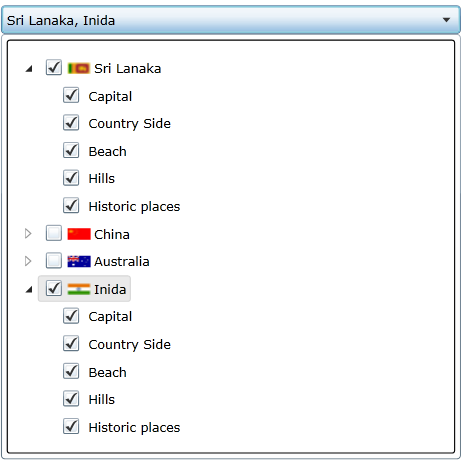
- Multilevel mode: the multiple selection capability with multiple levels.
- SelectAll mode: the multiple selection capability with multiple levels including select all option.
- Image mode: the multiple selection capability with multiple levels including images for each item.
- Enum mode: given an enum type, displays multi selection capabilities.
Implementation
This is a control designed to enable multiple selections, but still operate as a combo box control. In this implementation, the user control is designed with a combination of a combo box having aComboBox.ItemTemplate of the tree view. Tree view is suitable to display hierarchical data. AHierarchicalDataTemplate is used to display the required data and check boxes are used to enable the selection of multiple items form that hierarchy as follows:
 Collapse | Copy Code
<sdk:hierarchicaldatatemplate x:key="TreeViewTemplate" itemssource="{Binding Path=ChildItemList}">

        <grid horizontalalignment="Stretch">

            <grid.columndefinitions>

                <columndefinition width="Auto">

                <columndefinition width="Auto">

                <columndefinition width="Auto">

            </columndefinition></columndefinition>

            </columndefinition></grid.columndefinitions>

            <checkbox grid.column="1" horizontalcontentalignment="Stretch"

                      ischecked="{Binding IsChecked, Mode=TwoWay}"

                      verticalalignment="Center" margin="3,0,0,0">

                <stackpanel orientation="Horizontal">

                <img source="{Binding Image}"

                  horizontalalignment="Center" margin="0" />

                <textblock horizontalalignment="Stretch"

                  text="{Binding Display}" margin="3,0,0,0"

                  verticalalignment="Center">

                </textblock></stackpanel>

            </checkbox>

        </grid>

    </sdk:hierarchicaldatatemplate>

<combobox height="25" name="ItemListCombo">

    <combobox.itemcontainerstyle>

        <style targettype="ComboBoxItem">

            <Setter Property="HorizontalContentAlignment" Value="Stretch"/>

        </style>

    </combobox.itemcontainerstyle>

    <combobox.itemtemplate>

        <datatemplate>

            <sdk:treeview itemssource="{Binding Path=Tag,ElementName=ItemListCombo}"

               itemtemplate="{StaticResource TreeViewTemplate}"

               horizontalalignment="Stretch" horizontalcontentalignment="Stretch">

        </sdk:treeview></datatemplate>

    </combobox.itemtemplate>

</combobox>
Note that the combo box data source only has one item, which becomes the source to the tree view in that item.
Now, in order to expose custom properties for this control such as hierarchical data list and other configuration properties, DependencyProperties have been declared for each.
Collapse | Copy Code
public static readonly DependencyProperty ItemListProperty = DependencyProperty.Register("ItemList",

     typeof(List<MultiSelectComboItem>), typeof(MultiLevelMultiSelectComboBox),

     new PropertyMetadata((s, e) => ((MultiLevelMultiSelectComboBox)s).SetItemsSource()));

public List<MultiSelectComboItem> ItemList

{

    get { return (List<MultiSelectComboItem>)GetValue(ItemListProperty); }

    set { SetValue(ItemListProperty, value); }

}
Among the properties are:
ItemList: This is the desired hierarchical data to be displayed. Each item of this list should be of typeMultiSelectComboItem. It is important to note that when an item is checked, to trigger selections up and down the hierarchy, theParentandChildItemListproperties have to be assigned properly in eachMultiSelectComboItemincluded in theItemList. At the top most level, leaveParentas null and at the lowest level, leave theItemListas null (see the sample project).In the case of binding Enums, the user does not have to prepare a
MultiSelectComboItemlist. Instead, theEnumToMultiItemListConvertercan be used as follows, which will convert an Enum to aMultiSelectComboItemlist as follows.EnumCountryis an Enum Country exposed as a binding property in the DataContext. Collapse | Copy CodeItemList="{Binding Path=EnumCountry, Converter={StaticResource EnumToMultiItemListConverter}}"SetSelectAll: If true, this property includes the Select All item in the list.SelectedList: Returns theMultiSelectComboItemlist with the selected items and their hierarchy. Use a LINQ query to list all selected items at different levels.
Use Cases
In this section, a XAML code snippet is presented in order to explain how to use this control.
Collapse | Copy Code
 xmlns:control="clr-namespace:MultiLevelMultiSelectCombo"

<control:MultiLevelMultiSelectComboBox SelectedItemList="{Binding SelectedList, Mode=TwoWay}"

  ItemList="{Binding Path=ComboAreaList,Mode=OneTime}"

  Width="400" SetSelectAll="True"/>
http://www.codeproject.com/Tips/612864/MultiLevelMultiSelectCombo-Silverlight
多级下拉菜单zz的更多相关文章
- jquery实现多级下拉菜单
支持多种浏览器,体验效果:http://keleyi.com/keleyi/phtml/jqmenu/4.htm 多级菜单,理论上支持无限多的层级,文件结构非常简单的,以下是完整代码: <!DO ...
- 基于jQuery带图标的多级下拉菜单
之前为大家分享了很多导航菜单.今天我们要来分享一款很不错的jQuery左侧带小图标的多级下拉菜单,菜单是垂直的,每一个菜单项带有一个小图标,看起来非常专业.并且菜单支持无限极下拉,所以对各位Web开发 ...
- 一款多浏览器兼容的javascript多级下拉菜单
这个多级下拉菜单的脚本大小不到2K,带有动画效果,可以方便地支持多个实例,并且能良好兼容WordPress系统wp_list_cats和wp_list_pages生成的多级列表.要初始化一个菜单,只需 ...
- 小程序多级下拉菜单demo
小程序多级下拉菜单demo - CSDN博客 https://blog.csdn.net/github_39371177/article/details/80251211
- bootstrap多级下拉菜单
只需为下拉菜单的任意 <li> 元素添加 .dropdown-submenu 的类,并在该 <li> 元素下添加 .dropdown-menu 类的列表,就可以为该菜单项添加一 ...
- jQuery制作水平多级下拉菜单
本篇体验使用jQuery制作水平的.多级的.下拉菜单. 下拉菜单的html部分如下. <body> <nav class="main-nav"> <u ...
- android 多级下拉菜单实现教程
原创,如转载请标明链接:http://blog.csdn.net/q610098308/article/details/50333387 很多App,都有二级菜单出现,但android 本身实现的菜单 ...
- jquery多级下拉菜单
var menu = new Click('#menu',{target:'p',parent:'li',contr:'ul',way:0}); /* 参数说明: target : 点击事件发生在该元 ...
- struts ajax多级下拉菜单
先看项目截图: 看看要加入的jar包 除了struts核心的那个几个之外,我们还需要这两个 OK先看struts.xml <?xml version="1.0" encodi ...
随机推荐
- 如何设计一个 iOS 控件?(iOS 控件完全解析) (转)
前言 一个控件从外在特征来说,主要是封装这几点: 交互方式 显示样式 数据使用 对外在特征的封装,能让我们在多种环境下达到 PM 对产品的要求,并且提到代码复用率,使维护工作保持在一个相对较小的范围内 ...
- hdu 4070 福州赛区网络赛J 贪心 ***
优先发路程最长的 #include<cstdio> #include<iostream> #include<algorithm> #include<cstri ...
- 源码方式安装mysql5.5
mysql5.5开始,源码配置编译工具configure变成了cmake,所以先要去把cmake装上.并安装make,bison,cmake,gcc-c++,ncurses的包 去http://www ...
- 基于MATLAB的adaboost级联形式的人脸检测实现
很早之前就做过一些关于人脸检测和目标检测的课题,一直都没有好好总结出来,趁着这个机会,写个总结,希望所写的内容能给研究同类问题的博友一些见解和启发!!博客里面涉及的公式太繁琐了,直接截图了. 转载请注 ...
- HDU 5213 Lucky 莫队+容斥
Lucky Problem Description WLD is always very lucky.His secret is a lucky number K.k is a fixed odd n ...
- 非正规写法获取不到tr,td
<!DOCTYPE html> <html> <head> <meta charset="UTF-8"> <title> ...
- Linux学习笔记(6)Linux常用命令之帮助命令与用户管理命令
(1)man man命令用于获得命令或配置文件的帮助信息,英文原意为manual,所在路径为/usr/bin/man,其语法格式为: man [命令或配置文件] 注意:查看配置文件的帮助信息时无需绝对 ...
- html table之 全选,全不选
就是这个小功能让我和组长引发争端,就是这个小功能让我差点"被"辞职,就是这个自封装的js方法让我放下了对组长的敬畏之心,现在分享一下,其实也很简单,但是真的有这么简单吗? < ...
- 导出word使用模版
在我们做我们的小组项目的时候,刚开始的时候我们用到的是Mvc+EF,用上了我们的ITOO框架.在最开始的计划,我们要用到瑞郎报表.可是呢,由于工期原因以及技术暂时没有实现,我们不得不想一个比较折中的方 ...
- How to choose the number of topics/partitions in a Kafka cluster?
This is a common question asked by many Kafka users. The goal of this post is to explain a few impor ...