
[转]nopCommerce Widgets and How to Create One
本文转自:https://dzone.com/articles/what-are-nopcommerce-widgets-and-how-to-create-one
A widget is a stand-alone application that can be embedded into third party sites by any user on a page. It's a small application that can be installed and executed within a web page by an end user. (Wikipedia).
What Are Widgets in Nopcommerce?
A widget is an element of a graphical user interface (GUI) that displays information which can be changed by the user or store admin. nopCommerce has several built-in widget plugins such as Google Analytics and Nivo Slider etc. When adding a widget to the public store, the site administrator needs to define (or select) a widget zone. Now, you must be wondering, what is a widget zone? A widget zone is part of the UI (user-interface) in the public store where the widget can be displayed or rendered. For example, you can place a Live Person chat widget on the left column or on the right column widget zone. Widget zones are basically the pre-defined locations in a nopCommerce public site that make it easier for the store admin to display any information.
How Widgets Are Different From Plugins in Nopcommerce?
In nopCommerce, a widget is used to add some kind of functionality or feature (or even display information) that can be rendered on some parts of the public site (also known as widget zones). Whereas, plugins in nopCommerce are used to extend the functionality of nopCommerce. nopCommerce has several types of plugins. Some examples are payment methods (such as PayPal), tax providers, shipping method computation methods (such as UPS, USP, FedEx), widgets (such as 'live chat' block), and many others.
Here you can find third-party plugins/extensions and themes which are developed by the nopCommerce community and partners: http://www.nopcommerce.com/extensions-and-themes.aspx
The Widget Structure, Required Files, and Locations
The first thing you need to do is to create a new "Class Library" project in the solution. It's a good practice to place all widgets (or plugins) into \Plugins directory in the root of your solution (do not mix up with \Plugins subdirectory located in \Nop.Web directory which is used for already deployed widgets and plugins). You can find more information about solution folders here.
Steps to Create a Custom Nopcommerce Widget
Step 1) Open the nopCommerce solution in Visual Studio (remember you need full source code)
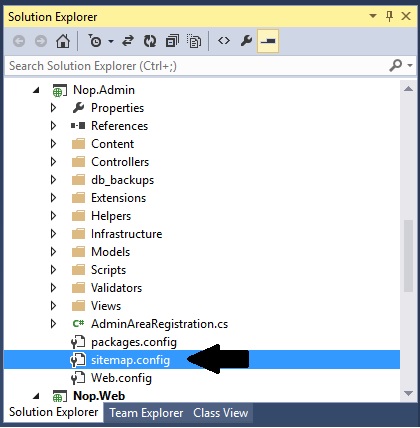
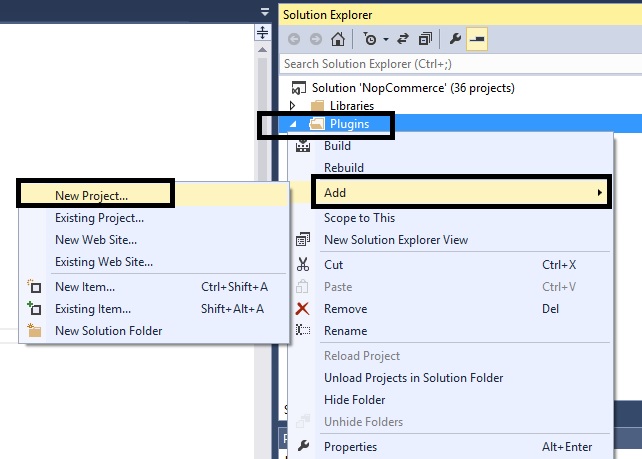
Step 2) Right click on the plugin folder: Add > New Project
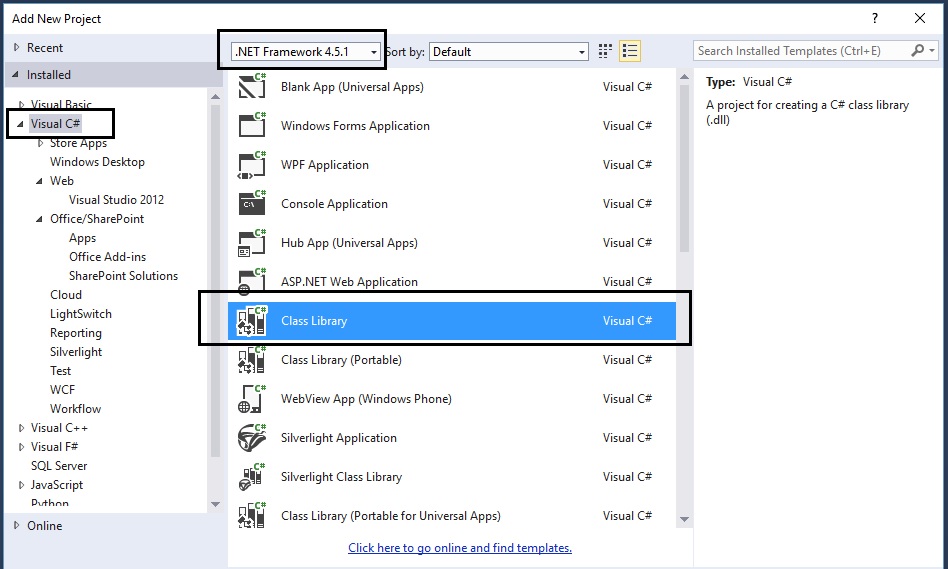
Step 3) On the add new project window:
select.NET Framework 4.5.1
select Visual C#
select Class Library
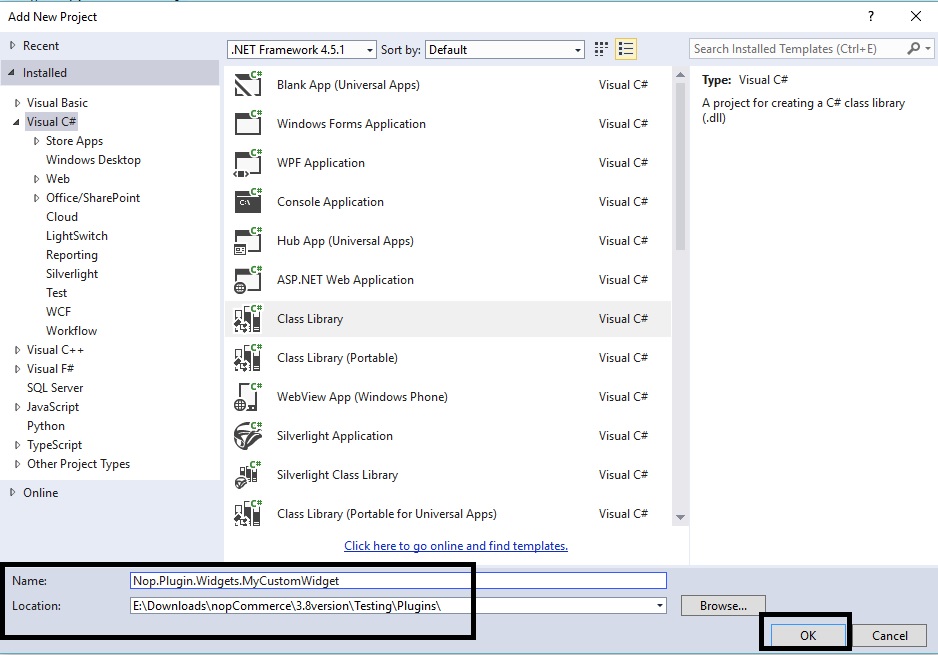
Step 4) Now, name the widget and set the location as follows:
In this case, we are naming the plugin: Nop.Plugin.Widgets.MyCustomWidget
Location: You will need to click on the "Browse" button and select the plugin folder that contains the source code of all the plugins / widgets (not the folder inside Nop.Web that only contains the compiled dlls)
Step 5) Now, you should be able to see your custom widget project in the solution explorer like this:
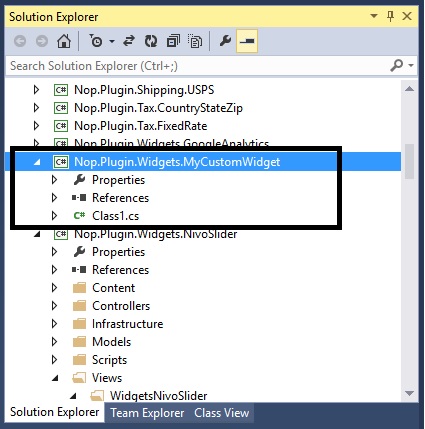
Step 6) Now is the time to add all the correct references. Go to: References > Add Reference…
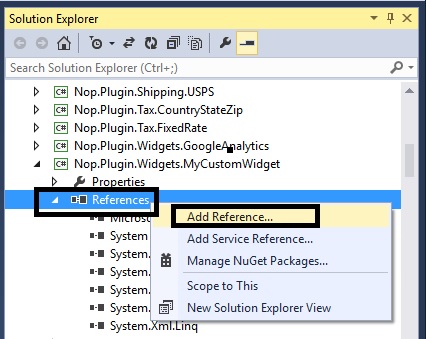
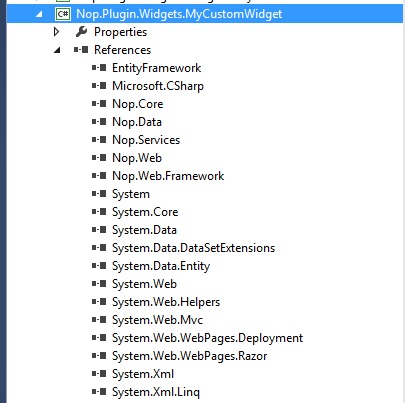
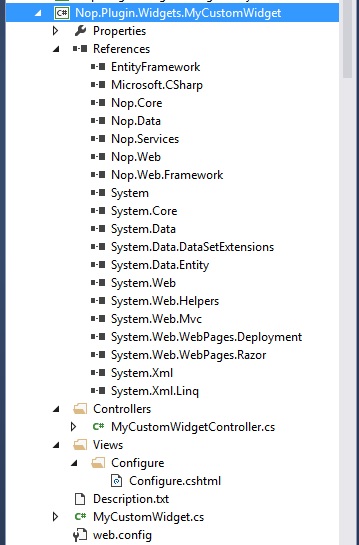
You will need to add all the references (see pic below). In case you are not able to find the right reference, simple go to any other plugin that has it and get the reference from there.
Step 7) You need to configure your custom widget in a proper structure.
Description.txt: The next step is creating a Description.txt file required for each widget. This file contains meta information describing your widget. Just copy this file from any other existing widget and modify it for your needs.
Group: Widgets
FriendlyName: MyCustomWidget
SystemName: Nop.Plugin.Widgets.MyCustomWidget
Version: 1.00
SupportedVersions: 3.80
Author: Lavish Kumar
DisplayOrder: 1
FileName: Nop.Plugin.Widgets.MyCustomWidget.dll
Web.config: You should also create a web.config file and ensure that it's copied to output. Just copy it from any existing widget.
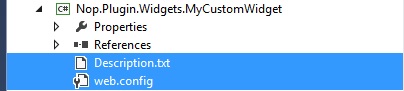
Step 8) Add a class MyCustomWidget.cs and use the following code:

using System;
using System.Collections.Generic;
using System.Linq;
using System.Text;
using System.Threading.Tasks;
using System.IO;
using System.Web.Routing;
using Nop.Core;
using Nop.Core.Plugins;
using Nop.Services.Cms;
using Nop.Services.Configuration;
using Nop.Services.Localization;
using Nop.Services.Media;
using Nop.Services.Common;
namespace Nop.Plugin.Widgets.MyCustomWidget
{
/// <summary>
/// PLugin
/// </summary>
public class MyCustomWidget : BasePlugin, IWidgetPlugin
{
/// <summary>
/// Gets widget zones where this widget should be rendered
/// </summary>
/// <returns>Widget zones</returns>
public IList<string> GetWidgetZones()
{
return new List<string> { "home_page_before_categories" };
}
/// <summary>
/// Gets a route for provider configuration
/// </summary>
/// <param name="actionName">Action name</param>
/// <param name="controllerName">Controller name</param>
/// <param name="routeValues">Route values</param>
public void GetConfigurationRoute(out string actionName, out string controllerName, out RouteValueDictionary routeValues)
{
actionName = "Configure";
controllerName = "MyCustomWidget";
routeValues = new RouteValueDictionary { { "Namespaces", "Nop.Plugin.Widgets.MyCustomWidget.Controllers" }, { "area", null } };
}
/// <summary>
/// Gets a route for displaying widget
/// </summary>
/// <param name="widgetZone">Widget zone where it's displayed</param>
/// <param name="actionName">Action name</param>
/// <param name="controllerName">Controller name</param>
/// <param name="routeValues">Route values</param>
public void GetDisplayWidgetRoute(string widgetZone, out string actionName, out string controllerName, out RouteValueDictionary routeValues)
{
actionName = "PublicInfo";
controllerName = "MyCustomWidget";
routeValues = new RouteValueDictionary
{
{"Namespaces", "Nop.Plugin.Widgets.MyCustomWidget.Controllers"},
{"area", null},
{"widgetZone", widgetZone}
};
}
/// <summary>
/// Install plugin
/// </summary>
public override void Install()
{
PluginManager.MarkPluginAsInstalled(this.PluginDescriptor.SystemName);
}
/// <summary>
/// Uninstall plugin
/// </summary>
public override void Uninstall()
{
PluginManager.MarkPluginAsUninstalled(this.PluginDescriptor.SystemName);
}
}
}
Step 9) Add a class MyCustomWidgetController.cs (in folder “Controllers” within your widget) and use the following code:
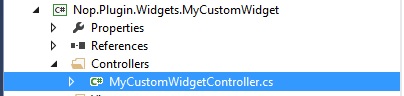
using System;
using System.Collections.Generic;
using System.Data.Entity.Migrations;
using System.Linq;
using System.Text.RegularExpressions;
using System.Web.Mvc;
using Nop.Services;
using Nop.Web.Framework.Controllers;
using Nop.Web.Framework.Kendoui;
using Nop.Services.Localization;
using Nop.Services.Security;
using Nop.Core.Domain.Localization;
using Nop.Core.Data;
using Nop.Core;
using Nop.Web.Models.Common;
using Nop.Core.Caching;
using Nop.Web.Infrastructure.Cache;
using Nop.Core.Infrastructure;
namespace Nop.Plugin.Widgets.MyCustomWidget.Controllers
{
public class MyCustomWidgetController : BasePluginController
{
[AdminAuthorize]
public ActionResult Configure()
{
return View("/Plugins/Widgets.MyCustomWidget/Views/Configure/Configure.cshtml");
}
public ActionResult PublicInfo(string widgetZone, object additionalData = null)
{
return View("/Plugins/Widgets.MyCustomWidget/Views/Configure/PublicInfo.cshtml");
}
}
}
Step 10) Add a Configure.cshtml (View) inside “Views” folder – In this case we are creating a blank view
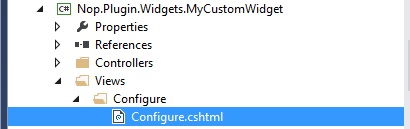
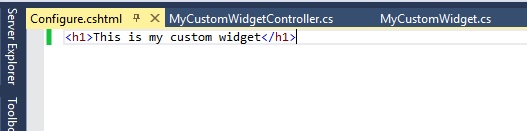
Note: Make sure the output directory (in properties) for your view (Configure.cshtml) is defined as “Copy if newer”
Step 11) Right click on the “Nop.Plugin.Widgets.MyCustomWidget” project and click “Properties”
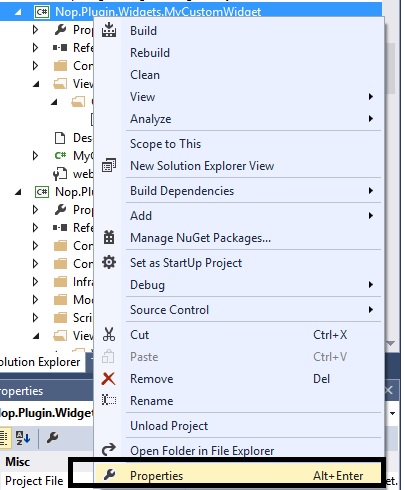
Make sure the assemble name and default namespaces are as follows (along with the.NET Framework):
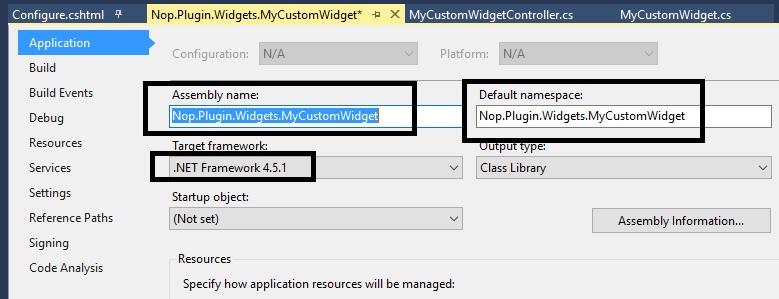
Go to the left tab “Build” in the properties window:
Scroll down to “Output” and make sure the path is same as:
..\..\Presentation\Nop.Web\Plugins\Widgets.MyCustomWidget\
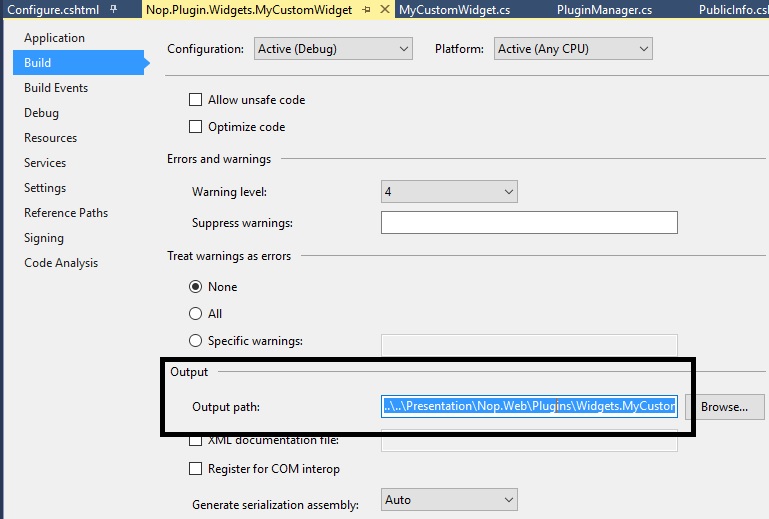
Step 12) Make sure everything is saved and look like this (and follows this structure):
Step 13) Right click on your custom widget project and click “Build”
Step 14) After re-building your project, run the whole solution and go to the Administration section and “Clear cache”
Step 15) Go to the plugin directory and click on the button “Reload list of plugins”
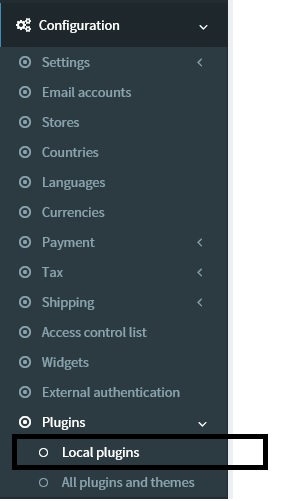

Step 16) Now, if you scroll down, you should be able to see your new custom widget in the list of plugins - Click on the “Install” button for your custom widget.
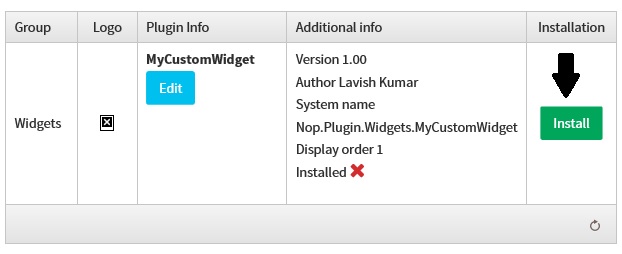
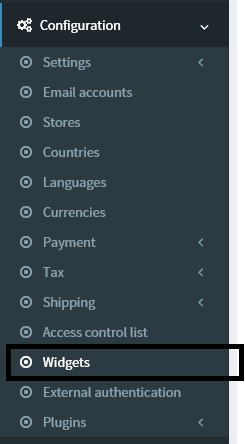
Step 17) Go to: Administration > Configuration > Widgets
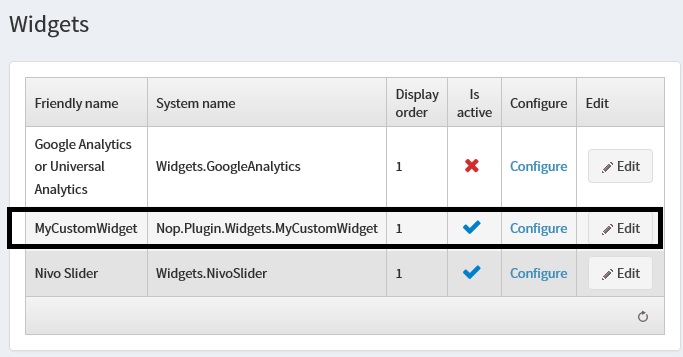
Now, you should be able to see your widget in the list.
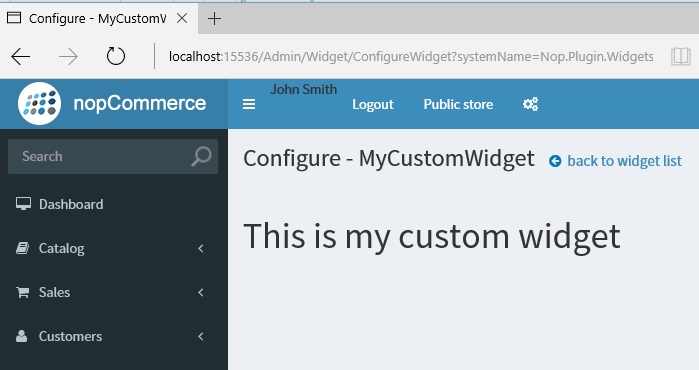
Step 18) Click on the CONFIGURE link and you should be able to see your view like this:
We have successfully created a nopCommerce widget. If you have any questions, please feel free to ask.
nopCommerce can be download here: http://www.nopcommerce.com/downloads.aspx
nopCommerce Version (used in this article): Version 3.80
nopCommerce Support: http://www.nopcommerce.com/boards/
[转]nopCommerce Widgets and How to Create One的更多相关文章
- pyqt的信号槽机制(转)
PySide/PyQt Tutorial: Creating Your Own Signals and Slots This article is part 5 of 8 in the series ...
- Dojo Widget系统(转)
Dojo 里所有的小部件(Widget)都会直接或间接的继承 dijit._Widget / dijit._WidgetBase dijit._Widget 是 dojo 1.6 和 1.6之前的版本 ...
- YII 主题
heming是一个在Web应用程序里定制网页外观的系统方式.通过采用一个新的主题,网页应用程序的整体外观可以立即和戏剧性的改变. 在Yii,每个主题由一个目录代表,包含view文件,layout文件和 ...
- Django之Form字段插件
一.Django内置Form组件: 在使用Django内置的Form组件时,里面包含了许多[字段]和[插件],也就是验证用户输入的请求以及生成显示在前端的HTML.下面介绍一下用法: F ...
- Wrapping calls to the Rational Functional Tester API——调用Rational Functional Tester封装的API
转自:http://www.ibm.com/developerworks/lotus/library/rft-api/index.html The Rational GUI automation to ...
- [STemWin教程入门篇] 第一期:emWin介绍
转自:http://bbs.armfly.com/read.php?tid=1544 SEGGER公司介绍 了解emWin之前,先了解一下SEGGER这家公司,了解生产商才能对emWin有更加全面的认 ...
- nopCommerce 3.9 大波浪系列 之 网页加载Widgets插件原理
一.插件简介 插件用于扩展nopCommerce的功能.nopCommerce有几种类型的插件如:支付.税率.配送方式.小部件等(接口如下图),更多插件可以访问nopCommerce官网. 我们看下后 ...
- [转]simple sample to create and use widget for nopcommerce
本文转自:http://badpaybad.info/simple-sample-to-create-and-use-widget-for-nopcommerce Here is very simpl ...
- [转]NopCommerce之视图设计
本文转自:http://blog.csdn.net/hygx/article/details/7324452 Designer's Guide Contents Overview 概述 Inst ...
随机推荐
- 《Django By Example》第五章 中文 翻译 (个人学习,渣翻)
书籍出处:https://www.packtpub.com/web-development/django-example 原作者:Antonio Melé (译者@ucag注:大家好,我是新来的翻译, ...
- 多线程爬坑之路-学习多线程需要来了解哪些东西?(concurrent并发包的数据结构和线程池,Locks锁,Atomic原子类)
前言:刚学习了一段机器学习,最近需要重构一个java项目,又赶过来看java.大多是线程代码,没办法,那时候总觉得多线程是个很难的部分很少用到,所以一直没下决定去啃,那些年留下的坑,总是得自己跳进去填 ...
- C# - 值类型、引用类型&走出误区,容易错误的说法
1. 值类型与引用类型小总结 1)对于引用类型的表达式(如一个变量),它的值是一个引用,而非对象. 2)引用就像URL,是允许你访问真实信息的一小片数据. 3)对于值类型的表达式,它的值是实际的数据. ...
- mac osx 安装redis扩展
1 php -v查看php版本 2 brew search php|grep redis 搜索对应的redis ps:如果没有brew 就根据http://brew.sh安装 3 brew ins ...
- jq跑马灯效果
这几天公司产品有个无缝循环滚动的广告跑马灯要做,最开始想到的是<marquee>标签,但在PC端正常,在安卓广告屏上却怎么都跑不动,后来用的css3的animation,结果也是PC端及其 ...
- 深入理解 JavaScript,以及 Linux 下的开发调试工具
前言 JavaScript 是我接触到的第二门编程语言,第一门是 C 语言.然后才是 C++.Java 还有其它一些什么.所以我对 JavaScript 是非常有感情的,毕竟使用它有十多年了.早就想写 ...
- AspNetPager分页控件样式的使用
分页是Web应用程序中最常用到的功能之一,AspNetPager 简单实用,应用到项目后台中,棒极了! 自定义样式: <style type="text/css"> ...
- 如何使用SHOW WARNINGS?
1.show warnings:显示上一个语句的错误.警告以及注意.如图:
- Linux下编译安装Vim8.0
什么是Vim? Vim 是经典的 UNIX 编辑器 Vi 的深度改良版本.它增加了许多功能,包括:多级撤销.格式高亮.命令行历史.在线帮助.拼写检查.文件名补完.块操作.脚本支持,等等.除了字符界面版 ...
- EntityFramework 6 + Mysql 生成POCOs
问题 使用EDMX文件 EF Power Tools参数不正确的解决方法 对于"异常来自 HRESULT:0x80070057 (E_INVALIDARG)",有方法说" ...