
[转]nopCommerce Widgets and How to Create One
本文转自:https://dzone.com/articles/what-are-nopcommerce-widgets-and-how-to-create-one
A widget is a stand-alone application that can be embedded into third party sites by any user on a page. It's a small application that can be installed and executed within a web page by an end user. (Wikipedia).
What Are Widgets in Nopcommerce?
A widget is an element of a graphical user interface (GUI) that displays information which can be changed by the user or store admin. nopCommerce has several built-in widget plugins such as Google Analytics and Nivo Slider etc. When adding a widget to the public store, the site administrator needs to define (or select) a widget zone. Now, you must be wondering, what is a widget zone? A widget zone is part of the UI (user-interface) in the public store where the widget can be displayed or rendered. For example, you can place a Live Person chat widget on the left column or on the right column widget zone. Widget zones are basically the pre-defined locations in a nopCommerce public site that make it easier for the store admin to display any information.
How Widgets Are Different From Plugins in Nopcommerce?
In nopCommerce, a widget is used to add some kind of functionality or feature (or even display information) that can be rendered on some parts of the public site (also known as widget zones). Whereas, plugins in nopCommerce are used to extend the functionality of nopCommerce. nopCommerce has several types of plugins. Some examples are payment methods (such as PayPal), tax providers, shipping method computation methods (such as UPS, USP, FedEx), widgets (such as 'live chat' block), and many others.
Here you can find third-party plugins/extensions and themes which are developed by the nopCommerce community and partners: http://www.nopcommerce.com/extensions-and-themes.aspx
The Widget Structure, Required Files, and Locations
The first thing you need to do is to create a new "Class Library" project in the solution. It's a good practice to place all widgets (or plugins) into \Plugins directory in the root of your solution (do not mix up with \Plugins subdirectory located in \Nop.Web directory which is used for already deployed widgets and plugins). You can find more information about solution folders here.
Steps to Create a Custom Nopcommerce Widget
Step 1) Open the nopCommerce solution in Visual Studio (remember you need full source code)
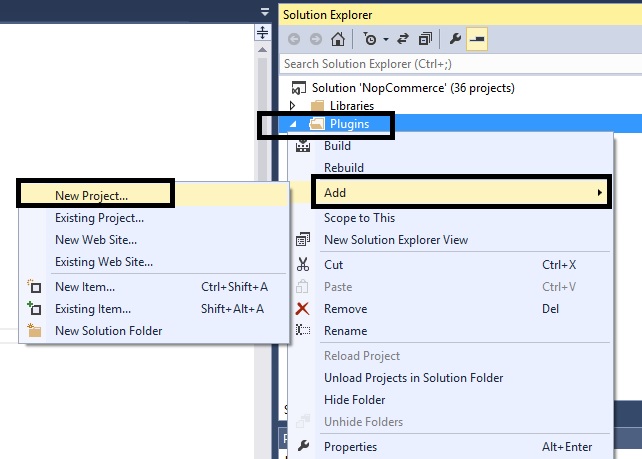
Step 2) Right click on the plugin folder: Add > New Project
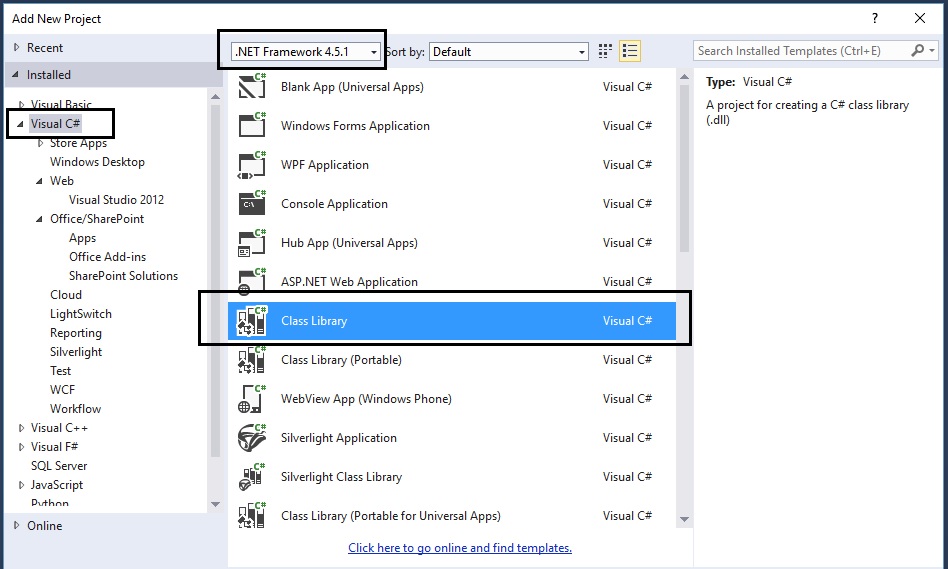
Step 3) On the add new project window:
select.NET Framework 4.5.1
select Visual C#
select Class Library
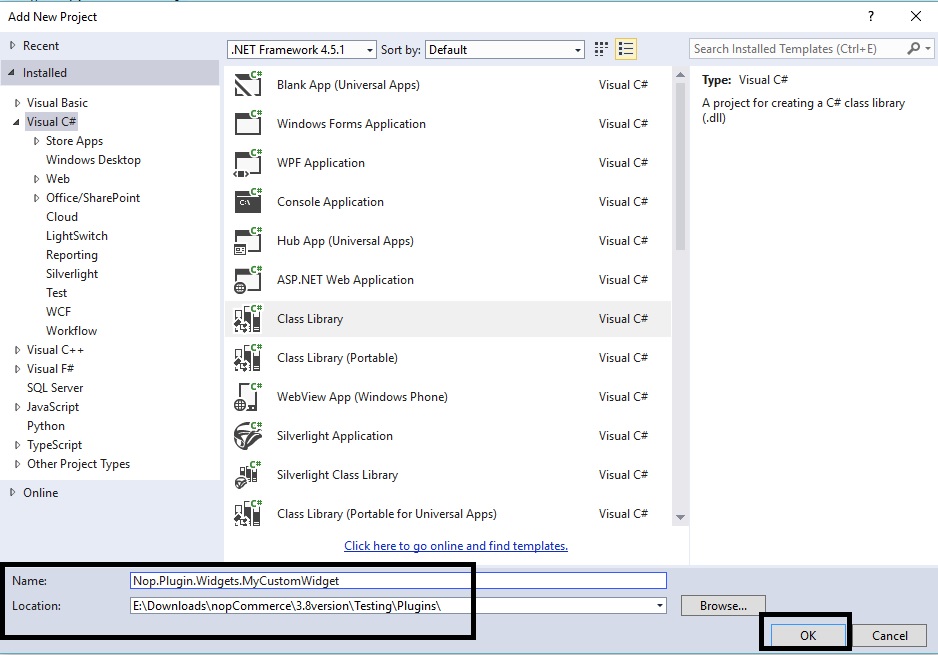
Step 4) Now, name the widget and set the location as follows:
In this case, we are naming the plugin: Nop.Plugin.Widgets.MyCustomWidget
Location: You will need to click on the "Browse" button and select the plugin folder that contains the source code of all the plugins / widgets (not the folder inside Nop.Web that only contains the compiled dlls)
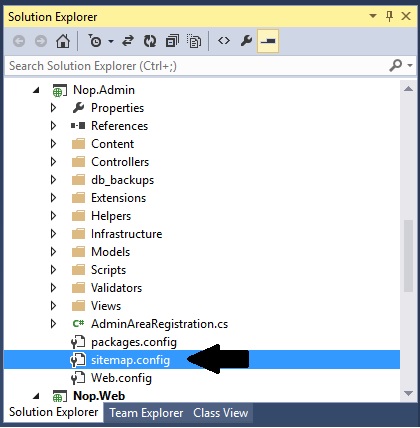
Step 5) Now, you should be able to see your custom widget project in the solution explorer like this:
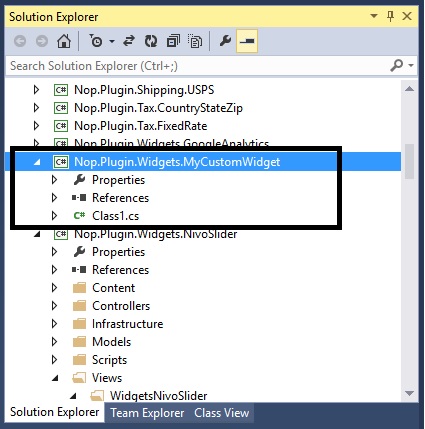
Step 6) Now is the time to add all the correct references. Go to: References > Add Reference…
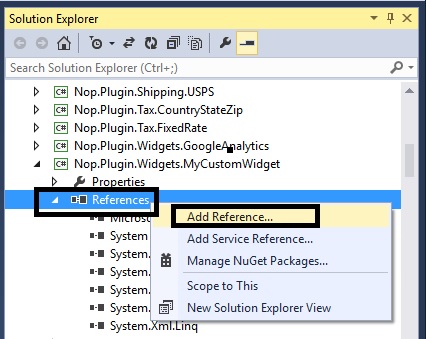
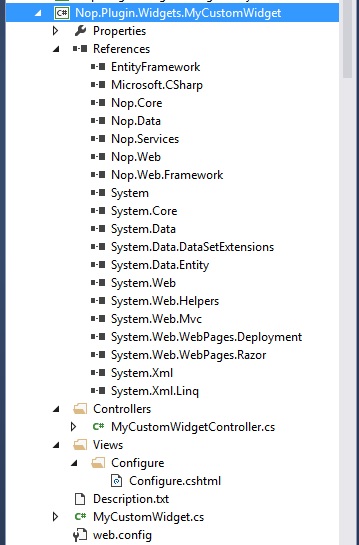
You will need to add all the references (see pic below). In case you are not able to find the right reference, simple go to any other plugin that has it and get the reference from there.
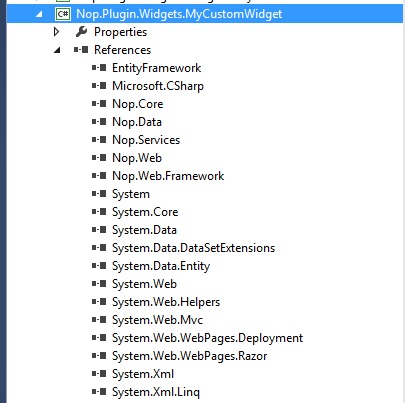
Step 7) You need to configure your custom widget in a proper structure.
Description.txt: The next step is creating a Description.txt file required for each widget. This file contains meta information describing your widget. Just copy this file from any other existing widget and modify it for your needs.
Group: Widgets
FriendlyName: MyCustomWidget
SystemName: Nop.Plugin.Widgets.MyCustomWidget
Version: 1.00
SupportedVersions: 3.80
Author: Lavish Kumar
DisplayOrder: 1
FileName: Nop.Plugin.Widgets.MyCustomWidget.dll
Web.config: You should also create a web.config file and ensure that it's copied to output. Just copy it from any existing widget.
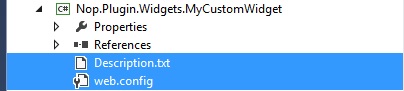
Step 8) Add a class MyCustomWidget.cs and use the following code:

using System;
using System.Collections.Generic;
using System.Linq;
using System.Text;
using System.Threading.Tasks;
using System.IO;
using System.Web.Routing;
using Nop.Core;
using Nop.Core.Plugins;
using Nop.Services.Cms;
using Nop.Services.Configuration;
using Nop.Services.Localization;
using Nop.Services.Media;
using Nop.Services.Common;
namespace Nop.Plugin.Widgets.MyCustomWidget
{
/// <summary>
/// PLugin
/// </summary>
public class MyCustomWidget : BasePlugin, IWidgetPlugin
{
/// <summary>
/// Gets widget zones where this widget should be rendered
/// </summary>
/// <returns>Widget zones</returns>
public IList<string> GetWidgetZones()
{
return new List<string> { "home_page_before_categories" };
}
/// <summary>
/// Gets a route for provider configuration
/// </summary>
/// <param name="actionName">Action name</param>
/// <param name="controllerName">Controller name</param>
/// <param name="routeValues">Route values</param>
public void GetConfigurationRoute(out string actionName, out string controllerName, out RouteValueDictionary routeValues)
{
actionName = "Configure";
controllerName = "MyCustomWidget";
routeValues = new RouteValueDictionary { { "Namespaces", "Nop.Plugin.Widgets.MyCustomWidget.Controllers" }, { "area", null } };
}
/// <summary>
/// Gets a route for displaying widget
/// </summary>
/// <param name="widgetZone">Widget zone where it's displayed</param>
/// <param name="actionName">Action name</param>
/// <param name="controllerName">Controller name</param>
/// <param name="routeValues">Route values</param>
public void GetDisplayWidgetRoute(string widgetZone, out string actionName, out string controllerName, out RouteValueDictionary routeValues)
{
actionName = "PublicInfo";
controllerName = "MyCustomWidget";
routeValues = new RouteValueDictionary
{
{"Namespaces", "Nop.Plugin.Widgets.MyCustomWidget.Controllers"},
{"area", null},
{"widgetZone", widgetZone}
};
}
/// <summary>
/// Install plugin
/// </summary>
public override void Install()
{
PluginManager.MarkPluginAsInstalled(this.PluginDescriptor.SystemName);
}
/// <summary>
/// Uninstall plugin
/// </summary>
public override void Uninstall()
{
PluginManager.MarkPluginAsUninstalled(this.PluginDescriptor.SystemName);
}
}
}
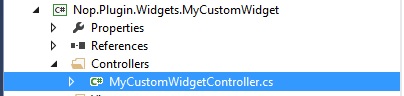
Step 9) Add a class MyCustomWidgetController.cs (in folder “Controllers” within your widget) and use the following code:
using System;
using System.Collections.Generic;
using System.Data.Entity.Migrations;
using System.Linq;
using System.Text.RegularExpressions;
using System.Web.Mvc;
using Nop.Services;
using Nop.Web.Framework.Controllers;
using Nop.Web.Framework.Kendoui;
using Nop.Services.Localization;
using Nop.Services.Security;
using Nop.Core.Domain.Localization;
using Nop.Core.Data;
using Nop.Core;
using Nop.Web.Models.Common;
using Nop.Core.Caching;
using Nop.Web.Infrastructure.Cache;
using Nop.Core.Infrastructure;
namespace Nop.Plugin.Widgets.MyCustomWidget.Controllers
{
public class MyCustomWidgetController : BasePluginController
{
[AdminAuthorize]
public ActionResult Configure()
{
return View("/Plugins/Widgets.MyCustomWidget/Views/Configure/Configure.cshtml");
}
public ActionResult PublicInfo(string widgetZone, object additionalData = null)
{
return View("/Plugins/Widgets.MyCustomWidget/Views/Configure/PublicInfo.cshtml");
}
}
}
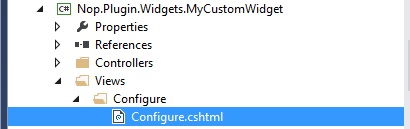
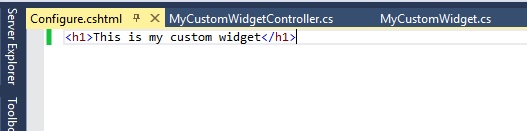
Step 10) Add a Configure.cshtml (View) inside “Views” folder – In this case we are creating a blank view
Note: Make sure the output directory (in properties) for your view (Configure.cshtml) is defined as “Copy if newer”
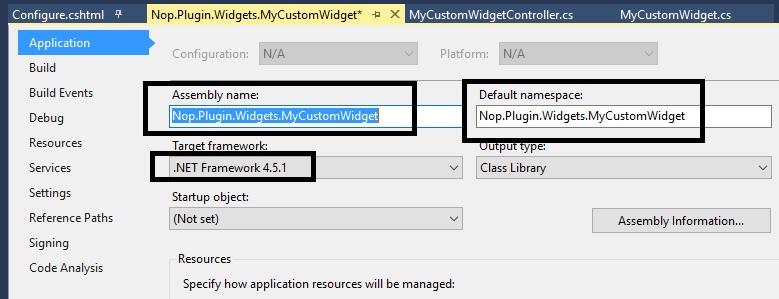
Step 11) Right click on the “Nop.Plugin.Widgets.MyCustomWidget” project and click “Properties”
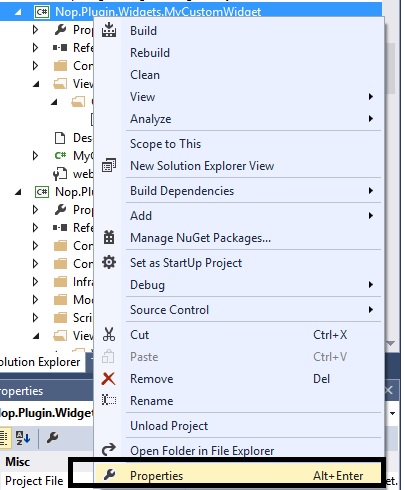
Make sure the assemble name and default namespaces are as follows (along with the.NET Framework):
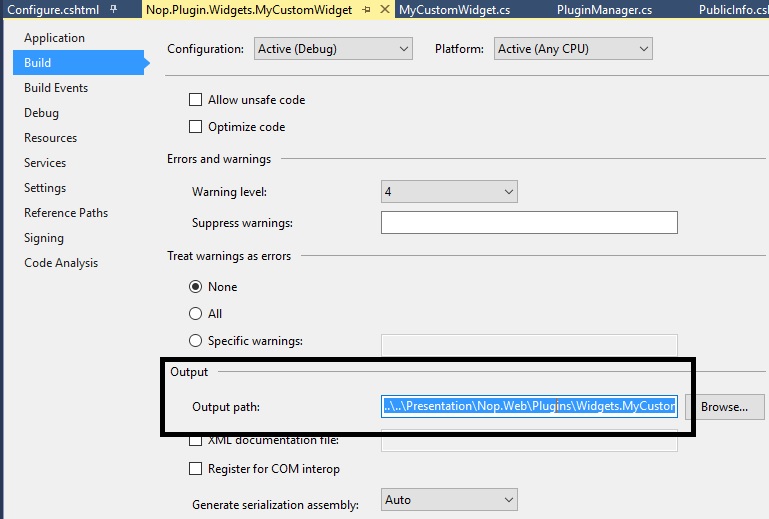
Go to the left tab “Build” in the properties window:
Scroll down to “Output” and make sure the path is same as:
..\..\Presentation\Nop.Web\Plugins\Widgets.MyCustomWidget\
Step 12) Make sure everything is saved and look like this (and follows this structure):
Step 13) Right click on your custom widget project and click “Build”
Step 14) After re-building your project, run the whole solution and go to the Administration section and “Clear cache”
Step 15) Go to the plugin directory and click on the button “Reload list of plugins”
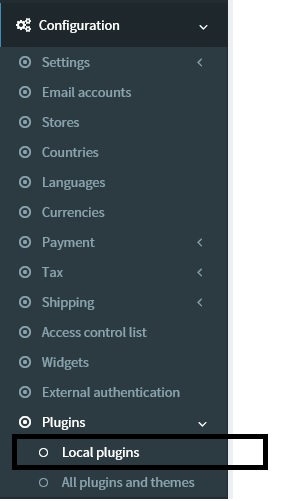

Step 16) Now, if you scroll down, you should be able to see your new custom widget in the list of plugins - Click on the “Install” button for your custom widget.
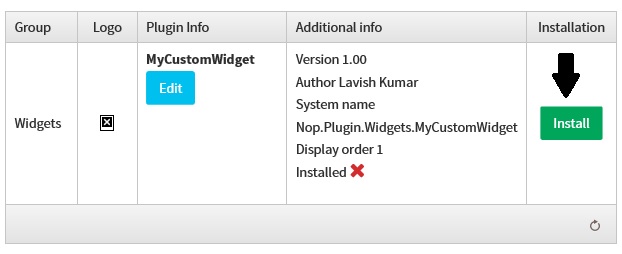
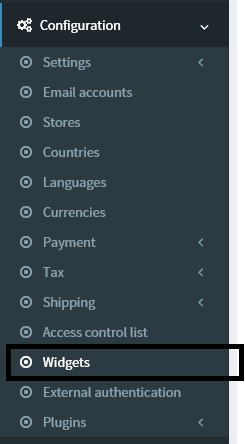
Step 17) Go to: Administration > Configuration > Widgets
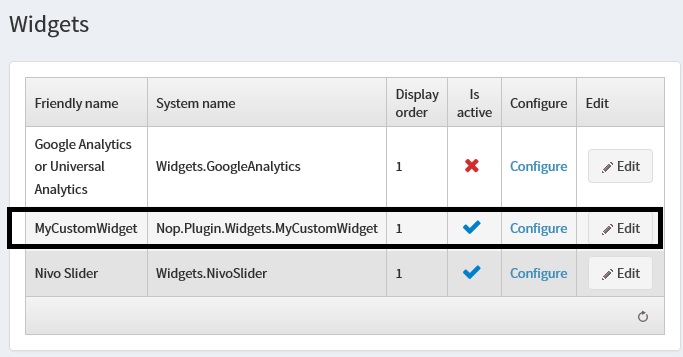
Now, you should be able to see your widget in the list.
Step 18) Click on the CONFIGURE link and you should be able to see your view like this:
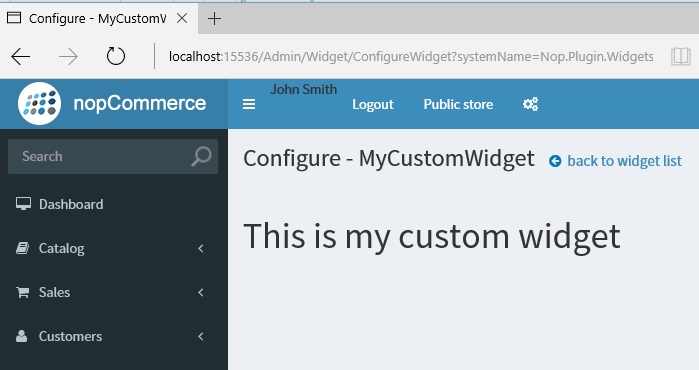
We have successfully created a nopCommerce widget. If you have any questions, please feel free to ask.
nopCommerce can be download here: http://www.nopcommerce.com/downloads.aspx
nopCommerce Version (used in this article): Version 3.80
nopCommerce Support: http://www.nopcommerce.com/boards/
[转]nopCommerce Widgets and How to Create One的更多相关文章
- pyqt的信号槽机制(转)
PySide/PyQt Tutorial: Creating Your Own Signals and Slots This article is part 5 of 8 in the series ...
- Dojo Widget系统(转)
Dojo 里所有的小部件(Widget)都会直接或间接的继承 dijit._Widget / dijit._WidgetBase dijit._Widget 是 dojo 1.6 和 1.6之前的版本 ...
- YII 主题
heming是一个在Web应用程序里定制网页外观的系统方式.通过采用一个新的主题,网页应用程序的整体外观可以立即和戏剧性的改变. 在Yii,每个主题由一个目录代表,包含view文件,layout文件和 ...
- Django之Form字段插件
一.Django内置Form组件: 在使用Django内置的Form组件时,里面包含了许多[字段]和[插件],也就是验证用户输入的请求以及生成显示在前端的HTML.下面介绍一下用法: F ...
- Wrapping calls to the Rational Functional Tester API——调用Rational Functional Tester封装的API
转自:http://www.ibm.com/developerworks/lotus/library/rft-api/index.html The Rational GUI automation to ...
- [STemWin教程入门篇] 第一期:emWin介绍
转自:http://bbs.armfly.com/read.php?tid=1544 SEGGER公司介绍 了解emWin之前,先了解一下SEGGER这家公司,了解生产商才能对emWin有更加全面的认 ...
- nopCommerce 3.9 大波浪系列 之 网页加载Widgets插件原理
一.插件简介 插件用于扩展nopCommerce的功能.nopCommerce有几种类型的插件如:支付.税率.配送方式.小部件等(接口如下图),更多插件可以访问nopCommerce官网. 我们看下后 ...
- [转]simple sample to create and use widget for nopcommerce
本文转自:http://badpaybad.info/simple-sample-to-create-and-use-widget-for-nopcommerce Here is very simpl ...
- [转]NopCommerce之视图设计
本文转自:http://blog.csdn.net/hygx/article/details/7324452 Designer's Guide Contents Overview 概述 Inst ...
随机推荐
- 阿里签名中URLEncode于C#URLEncod不同之处
问题 如上图所示,阿里云的PercentEncode 转换! 为 %21 PercentEncode 源码为: package com.aliyuncs.auth; import java.io.Un ...
- Word/Excel 在线预览
前言 近日项目中做到一个功能,需要上传附件后能够在线预览.之前也没做过这类似的,于是乎就查找了相关资料,.net实现Office文件预览大概有这几种方式: ① 使用Microsoft的Office组件 ...
- SQL Server-聚焦计算列持久化(二十一)
前言 上一节我们结束了Hash Match Aggregate和Stream Aggregate的讲解,本系列我们来讲讲关于SQL Server中的计算列问题,简短的内容,深入的理解,Always t ...
- android 两种实现计时器时分秒的实现,把时间放在你的手中~
可能我们在开发中会时常用到计时器这玩意儿,比如在录像的时候,我们可能需要在右上角显示一个计时器.这个东西其实实现起来非常简单. 只需要用一个控件Chronometer,是的,就这么简单,我都不好意思讲 ...
- isEmpty和isNull()区别
isEmpty和isNull()区别一个NULL字符串一定是一个空串,一个空串未必是一个NULL字符串例如:QString().isNull(): //结果为trueQString().isEm ...
- [Android]使用Dagger 2进行依赖注入 - Producers(翻译)
以下内容为原创,欢迎转载,转载请注明 来自天天博客:http://www.cnblogs.com/tiantianbyconan/p/6234811.html 使用Dagger 2进行依赖注入 - P ...
- git init和git init -bare区别
1 Git init 和 git init –bare 的区别 用"git init"初始化的版本库用户也可以在该目录下执行所有git方面的操作.但别的用户在将更新push上来的 ...
- Node.js 教程 01 - 简介、安装及配置
系列目录: Node.js 教程 01 - 简介.安装及配置 Node.js 教程 02 - 经典的Hello World Node.js 教程 03 - 创建HTTP服务器 Node.js 教程 0 ...
- IP报头
位字段的值设置为二进制的0100表示IP版本4(IPv4).设置为0110表示IP版本6(IPv6) 位,它表示32位字长的IP报头长度,设计报头长度的原因是数据包可选字段大小会发生变化.IP ...
- 挑子学习笔记:两步聚类算法(TwoStep Cluster Algorithm)——改进的BIRCH算法
转载请标明出处:http://www.cnblogs.com/tiaozistudy/p/twostep_cluster_algorithm.html 两步聚类算法是在SPSS Modeler中使用的 ...