
Shiro-认证
认证流程:
1. 获取当前的 Subject. 调用 SecurityUtils.getSubject();
2. 测试当前的用户是否已经被认证. 即是否已经登录. 调用 Subject 的 isAuthenticated()
3. 若没有被认证, 则把用户名和密码封装为 UsernamePasswordToken 对象
1). 创建一个表单页面
2). 把请求提交到 SpringMVC 的 Handler
3). 获取用户名和密码.
4. 执行登录: 调用 Subject 的 login(AuthenticationToken) 方法.
5. 自定义 Realm 的方法, 从数据库中获取对应的记录, 返回给 Shiro.
1). 实际上需要继承 org.apache.shiro.realm.AuthenticatingRealm 类
2). 实现 doGetAuthenticationInfo(AuthenticationToken) 方法.
6. 由 shiro 完成对密码的比对.
实现过程:
创建一个login.jsp
<%@ page language="java" contentType="text/html; charset=UTF-8"

    pageEncoding="UTF-8"%>

<!DOCTYPE html PUBLIC "-//W3C//DTD HTML 4.01 Transitional//EN" "http://www.w3.org/TR/html4/loose.dtd">

<html>

<head>

<meta http-equiv="Content-Type" content="text/html; charset=UTF-8">

<title>Insert title here</title>

</head>

<body>

    <h4>Login Page</h4>

    <form action="shiro/login" method="post">

        username: <input type="text" name="userName"/>

        <br><br>

        password: <input type="password" name="password" />

        <br><br>

        <input type="submit" value="Submit"/>

    </form>

</body>

</html>
登录成功后的list.jsp 包含登出按钮
<%@ page language="java" contentType="text/html; charset=UTF-8"

    pageEncoding="UTF-8"%>

<!DOCTYPE html PUBLIC "-//W3C//DTD HTML 4.01 Transitional//EN" "http://www.w3.org/TR/html4/loose.dtd">

<html>

<head>

<meta http-equiv="Content-Type" content="text/html; charset=UTF-8">

<title>Insert title here</title>

</head>

<body>

    <h4>List Page</h4>

    <a href="shiro/logout">Logout</a>

</body>

</html>
创建一个Controller ShiroHandler.java
package com.java.shiro.realms;

import org.apache.shiro.SecurityUtils;

import org.apache.shiro.authc.AuthenticationException;

import org.apache.shiro.authc.AuthenticationToken;

import org.apache.shiro.authc.UsernamePasswordToken;

import org.apache.shiro.subject.Subject;

import org.springframework.stereotype.Controller;

import org.springframework.web.bind.annotation.RequestMapping;

import org.springframework.web.bind.annotation.RequestParam;

@Controller

@RequestMapping("/shiro")

public class ShiroHandler {

    @RequestMapping("/login")

    public String login(@RequestParam("userName") String userName,

            @RequestParam("password") String password) {

        Subject currentUser = SecurityUtils.getSubject();

        if (!currentUser.isAuthenticated()) {

            UsernamePasswordToken token = new UsernamePasswordToken(userName,

                    password);

            token.setRememberMe(true);

            try {

                currentUser.login(token);

            } catch (AuthenticationException e) {

                System.out.println("登录失败:" + e.getMessage());

            }

        }

        return "redirect:/list.jsp";

    }

}
创建一个Realm 重写AuthenticatingRealm 的doGetAuthenticationInfo()
package com.java.shiro.realms;

import org.apache.shiro.authc.AuthenticationException;

import org.apache.shiro.authc.AuthenticationInfo;

import org.apache.shiro.authc.AuthenticationToken;

import org.apache.shiro.authc.LockedAccountException;

import org.apache.shiro.authc.SimpleAuthenticationInfo;

import org.apache.shiro.authc.UnknownAccountException;

import org.apache.shiro.authc.UsernamePasswordToken;

import org.apache.shiro.realm.AuthenticatingRealm;

public class ShiroRealm extends AuthenticatingRealm {

    @Override

    protected AuthenticationInfo doGetAuthenticationInfo(

            AuthenticationToken token) throws AuthenticationException {

        System.out.println("doGetAuthenticationInfo " + token);

        // 1. 把AuthenticationToken 转换为UsernamePasswordToken

        UsernamePasswordToken up = (UsernamePasswordToken) token;

        // 2. 从UsernamePasswordToken 中来获取username

        String username = up.getUsername();

        // 3. 调用数据库的方法,从数据库中查询username对应的用户记录

        System.out.println("从数据库中获取userName :" + username + " 所对应的用户信息.");

        // 4. 若用户不存在,则可以抛出 UnknownAccoountException 异常

        if ("unknown".equals(username)) {

            throw new UnknownAccountException("用户不存在");

        }

        // 5. 根据用户信息的情况,决定是否需要抛出其他的AuthencationException 异常 假设用户被锁定

        if ("monster".equals(username)) {

            throw new LockedAccountException("用户被锁定");

        }

        // 6. 根据用户的情况,来构建AuthenticationInfo 对象并返回,通常使用的是

        // SimpleAuthenticationInfo

        // 以下信息是从数据库获取的.

        Object principal = username; // principal 认证的实体信息.

                                        // 可以是username,也可以是数据表对应的用户的实体类对象

        String credentials = "123456"; // credentials:密码

        String realmName = getName();

        AuthenticationInfo info = new SimpleAuthenticationInfo(principal,

                credentials, realmName);

        return info;

    }

}
在applicationContext.xml 中添加对应的 过滤器
<?xml version="1.0" encoding="UTF-8"?>

<beans xmlns="http://www.springframework.org/schema/beans"

    xmlns:xsi="http://www.w3.org/2001/XMLSchema-instance"

    xsi:schemaLocation="http://www.springframework.org/schema/beans http://www.springframework.org/schema/beans/spring-beans.xsd">

    <!-- 数据源配置,暂时不考虑数据源,做一些静态的数据 -->

    <!-- Sample RDBMS data source that would exist in any application - not Shiro related. -->

    <!-- <bean id="dataSource" class="org.springframework.jdbc.datasource.DriverManagerDataSource">

        <property name="driverClassName" value="org.hsqldb.jdbcDriver"/>

        <property name="url" value="jdbc:hsqldb:mem:shiro-spring"/>

        <property name="username" value="sa"/>

    </bean> -->

    <!-- Populates the sample database with sample users and roles. -->

    <!-- <bean id="bootstrapDataPopulator" class="org.apache.shiro.samples.spring.BootstrapDataPopulator">

        <property name="dataSource" ref="dataSource"/>

    </bean> -->

    <!-- Simulated business-tier "Manager", not Shiro related, just an example -->

    <!-- <bean id="sampleManager" class="org.apache.shiro.samples.spring.DefaultSampleManager"/> -->

    <!-- =========================================================

         Shiro Core Components - Not Spring Specific

         ========================================================= -->

    <!-- Shiro's main business-tier object for web-enabled applications

         (use DefaultSecurityManager instead when there is no web environment)-->

    <!--

        1.配置SecurityManager!

    -->

    <bean id="securityManager" class="org.apache.shiro.web.mgt.DefaultWebSecurityManager">

        <property name="cacheManager" ref="cacheManager"/>

        <!-- Single realm app.  If you have multiple realms, use the 'realms' property instead. -->

        <!-- 配置session的管理方式 -->

        <!-- <property name="sessionMode" value="native"/> -->

        <property name="realm" ref="jdbcRealm"/>

    </bean>

    <!-- Let's use some enterprise caching support for better performance.  You can replace this with any enterprise

         caching framework implementation that you like (Terracotta+Ehcache, Coherence, GigaSpaces, etc -->

    <!--

        2.配置CacheManager,实例上可以用企业的缓存产品来提升性能

        2.1需要加入ehcache的jar包及配置文件

     -->

    <bean id="cacheManager" class="org.apache.shiro.cache.ehcache.EhCacheManager">

        <!-- Set a net.sf.ehcache.CacheManager instance here if you already have one.  If not, a new one

             will be creaed with a default config:

             <property name="cacheManager" ref="ehCacheManager"/> -->

        <!-- If you don't have a pre-built net.sf.ehcache.CacheManager instance to inject, but you want

             a specific Ehcache configuration to be used, specify that here.  If you don't, a default

             will be used.: -->

        <property name="cacheManagerConfigFile" value="classpath:ehcache.xml"/>

    </bean>

    <!-- Used by the SecurityManager to access security data (users, roles, etc).

         Many other realm implementations can be used too (PropertiesRealm,

         LdapRealm, etc. -->

    <!--

        3.配置Realm

        3.1 自己写一个Realm,需要实现Realm接口

     -->

    <bean id="jdbcRealm" class="com.java.shiro.realms.ShiroRealm"></bean>

    <!-- =========================================================

         Shiro Spring-specific integration

         ========================================================= -->

    <!-- Post processor that automatically invokes init() and destroy() methods

         for Spring-configured Shiro objects so you don't have to

         1) specify an init-method and destroy-method attributes for every bean

            definition and

         2) even know which Shiro objects require these methods to be

            called. -->

    <!--

        4.配置 LifecycleBeanPostProcessor,可以自动的调用配置在spring IOC容器中Shiro bean的声明周期方法

     -->

    <bean id="lifecycleBeanPostProcessor" class="org.apache.shiro.spring.LifecycleBeanPostProcessor"/>

    <!-- Enable Shiro Annotations for Spring-configured beans.  Only run after

         the lifecycleBeanProcessor has run: -->

    <!--

        5.启用 IOC 容器中使用 shiro 注解,但必须在配置了LifecycleBeanPostProcessor 之后才可以使用。

     -->

    <bean class="org.springframework.aop.framework.autoproxy.DefaultAdvisorAutoProxyCreator"

          depends-on="lifecycleBeanPostProcessor"/>

    <bean class="org.apache.shiro.spring.security.interceptor.AuthorizationAttributeSourceAdvisor">

        <property name="securityManager" ref="securityManager"/>

    </bean>

    <!-- Secure Spring remoting:  Ensure any Spring Remoting method invocations can be associated

         with a Subject for security checks. -->

    <!-- 远程调用,暂时不需要 -->

    <!-- <bean id="secureRemoteInvocationExecutor" class="org.apache.shiro.spring.remoting.SecureRemoteInvocationExecutor">

        <property name="securityManager" ref="securityManager"/>

    </bean> -->

    <!-- Define the Shiro Filter here (as a FactoryBean) instead of directly in web.xml -

         web.xml uses the DelegatingFilterProxy to access this bean.  This allows us

         to wire things with more control as well utilize nice Spring things such as

         PropertiesPlaceholderConfigurer and abstract beans or anything else we might need: -->

    <!--

        6.配置ShiroFilter

        6.1 id 必须和web.xml 中配置的 DelegatingFilterProxy 的 <filter-name> 一致

            若不一致,则会抛出:NoSuchBeanDefinitionException.因为Shiro会来IOC容器中查找和<filter-name> 名字对应的filter bean.

     -->

    <bean id="shiroFilter" class="org.apache.shiro.spring.web.ShiroFilterFactoryBean">

        <property name="securityManager" ref="securityManager"/>

        <property name="loginUrl" value="/login.jsp"/><!-- 登录页面 -->

        <property name="successUrl" value="/list.jsp"/><!-- 登录成功页面 -->

        <property name="unauthorizedUrl" value="/unauthorized.jsp"/><!-- 没有权限的页面 -->

        <!-- The 'filters' property is not necessary since any declared javax.servlet.Filter bean

             defined will be automatically acquired and available via its beanName in chain

             definitions, but you can perform overrides or parent/child consolidated configuration

             here if you like: -->

        <!-- <property name="filters">

            <util:map>

                <entry key="aName" value-ref="someFilterPojo"/>

            </util:map>

        </property> -->

        <!--

            配置哪些页面需要受保护

            以及访问这些页面需要的权限

            1). anon(anonymous) 可以被匿名访问,即不需要登录就可以访问

            2). authc(authentication) 必须认证之后,即登录后才可以访问

            3). URL 权限采取第一次匹配优先的方式,即从开头使用第一个匹配的url模式对应的拦截器链。

             4). logout 登出

         -->

        <property name="filterChainDefinitions">

            <value>

                /login.jsp= anon

                /shiro/login= anon

                /shiro/logout = logout

                # everything else requires authentication:

                /** = authc

            </value>

        </property>

    </bean>

</beans>
在登录成功后,点击后退,再次随便输入依旧能够登录成果,是由于缓存的作用。
密码的比对:
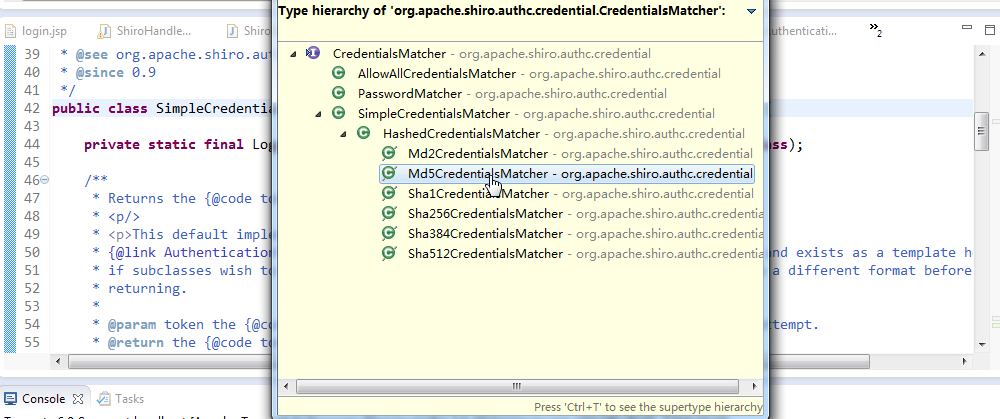
通过AuthenticatingRealm 的 credentialsMatcher 属性进行的比对

credentialsMatcher 非常重要,因为在生产中数据库存的密码不会是一个明文的密码,会是一个加密后的密码,比对加密的密码也是通过credentialsMatcher 来进行比对
Shiro-认证的更多相关文章
- Apache Shiro 使用手册(二)Shiro 认证
认证就是验证用户身份的过程.在认证过程中,用户需要提交实体信息(Principals)和凭据信息(Credentials)以检验用户是否合法.最常见的"实体/凭证"组合便是&quo ...
- Apache Shiro 认证过程
3.1.1 示例 Shiro验证Subjects 的过程中,可以分解成三个不同的步骤: 1. 收集Subjects 提交的Principals(身份)和Credentials(凭证): 2. 提 ...
- shiro认证登录实现
准备工作: 在web.xml中配置shiro核心过滤器 在spring配置文件中提供核心过滤器运行所需要的辅助bean对象,在对象内注入安全管理器 拦截认证 配置三个url 拦截除了登录页面以及认证a ...
- 【shiro】(4)---Shiro认证、授权案例讲解
Shiro认证.授权案例讲解 一.认证 1. 认证流程 2.用户密码已经加密.加盐的用户认证 (1)测试类 // 用户登陆和退出,这里我自定了一个realm(开发肯定需要自定义realm获取 ...
- 无状态shiro认证组件(禁用默认session)
准备内容 简单的shiro无状态认证 无状态认证拦截器 import com.hjzgg.stateless.shiroSimpleWeb.Constants; import com.hjzgg.st ...
- 转:JAVAWEB开发之权限管理(二)——shiro入门详解以及使用方法、shiro认证与shiro授权
原文地址:JAVAWEB开发之权限管理(二)——shiro入门详解以及使用方法.shiro认证与shiro授权 以下是部分内容,具体见原文. shiro介绍 什么是shiro shiro是Apache ...
- frame shiro 认证示例及原理简述
shiro 认证流程 1.创建一个 javaSE 的maven项目(quickstart),并添加依赖 <dependency> <groupId>junit</grou ...
- Shiro认证的另一种方式
今天在学习shiro的时候使用另一种shiro验证的方式. 总体的思路是: (1)先在自己的方法中进行身份的验证以及给出提示信息.(前提是将自己的验证方法设为匿名可访问) (2)当验证成功之后到Shi ...
- 将 Shiro 作为应用的权限基础 二:shiro 认证
认证就是验证用户身份的过程.在认证过程中,用户需要提交实体信息(Principals)和凭据信息(Credentials)以检验用户是否合法.最常见的“实体/凭证”组合便是“用户名/密码”组合. 一. ...
- springmvc+shiro认证框架配置
1,在web.xml中配置fiter,如下所示 <!-- shiro的filter --> <!-- shiro过虑器,DelegatingFilterProxy通过代理模式将spr ...
随机推荐
- js获取可视区大小和页面大小的兼容性写法
var getPageSize = function() { var scrW, scrH; if(window.innerHeight && window.scrollMaxY) { ...
- css相关问题
display:none和visibility:hidden的区别? 前几天遇到的这个问题,表格布局:::::display:none 隐藏对应的元素,在文档布局中不再给它分配空间,它各边的元素会合拢 ...
- C语言--scanf
关于C语言的scanf,首先看个例子 int get_int(void){ int input; char ch; ){ printf("is not an integer,please e ...
- data:image/png;base64
大家可能注意到了,网页上有些图片的src或css背景图片的url后面跟了一大串字符,比如: data:image/png;base64,iVBORw0KGgoAAAANSUhEUgAAAAkAAAAJ ...
- C#开发中Windows域认证登录2(扩展吉日嘎拉GPM系统)
原文地址:http://www.cuiwenyuan.com/shanghai/post/Windows-AD-Logon-Intergrated-into-Jirigala-GPM-DotNet-B ...
- Linux下who命令之C语言实现
Linux下who命令之C语言实现 Step1:前期准备 首先要有一个清楚的认识:linux中一切皆文件 实现who命令,who命令也是Linux中的一个文件,那我们怎么找到它呢?我们可以" ...
- ios蓝牙开发(五)BabyBluetooth蓝牙库介绍
BabyBluetooth 是一个最简单易用的蓝牙库,基于CoreBluetooth的封装,并兼容ios和mac osx. 特色: 基于原生CoreBluetooth框架封装的轻量级的开源库,可以帮你 ...
- 20145222GDB调试汇编堆栈过程分析
GDB调试汇编堆栈过程分析 实践代码example.c #include<stdio.h> short addend1 = 1; static int addend2 = 2; const ...
- HTTP 状态代码表示什么意思?
HTTP 状态代码表示什么意思? 如果某项请求发送到您的服务器要求显示您网站上的某个网页,服务器将会返回 HTTP 状态码响应请求.此状态代码提供关于请求状态的信息,一些常见的状态代码为: 200 - ...
- 青瓷引擎使用心得——修改引擎的loading界面
一. 修改引擎的Loading界面之使用进度条显示1. 双击打开引擎包中的lib/qc-loading-debug.js,如下图所示: 2. 只需要修改qici.init函数即可改变loading界面 ...