
ActiveMQ持久化消息(转)
ActiveMQ的另一个问题就是只要是软件就有可能挂掉,挂掉不可怕,怕的是挂掉之后把信息给丢了,所以本节分析一下几种持久化方式:
一、持久化为文件
ActiveMQ默认就支持这种方式,只要在发消息时设置消息为持久化就可以了。
打开安装目录下的配置文件:
D:\ActiveMQ\apache-activemq\conf\activemq.xml在越80行会发现默认的配置项:
<persistenceAdapter>
<kahaDB directory="${activemq.data}/kahadb"/>
</persistenceAdapter>
注意这里使用的是kahaDB,是一个基于文件支持事务的消息存储器,是一个可靠,高性能,可扩展的消息存储器。
他的设计初衷就是使用简单并尽可能的快。KahaDB的索引使用一个transaction log,并且所有的destination只使用一个index,有人测试表明:如果用于生产环境,支持1万个active connection,每个connection有一个独立的queue。该表现已经足矣应付大部分的需求。
然后再发送消息的时候改变第二个参数为:
MsgDeliveryMode.Persistent
Message保存方式有2种
PERSISTENT:保存到磁盘,consumer消费之后,message被删除。
NON_PERSISTENT:保存到内存,消费之后message被清除。
注意:堆积的消息太多可能导致内存溢出。
然后打开生产者端发送一个消息:
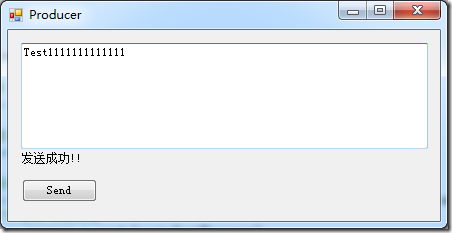
不启动消费者端,同时在管理界面查看:

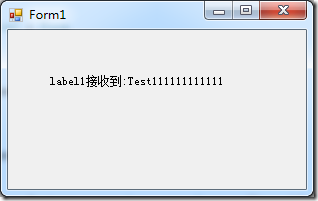
发现有一个消息正在等待,这时如果没有持久化,ActiveMQ宕机后重启这个消息就是丢失,而我们现在修改为文件持久化,重启ActiveMQ后消费者仍然能够收到这个消息。
二、持久化为数据库
我们从支持Mysql为例,先从http://dev.mysql.com/downloads/connector/j/下载mysql-connector-java-5.1.34-bin.jar包放到:
D:\ActiveMQ\apache-activemq\lib目录下。
打开并修改配置文件:
<beans
xmlns="http://www.springframework.org/schema/beans"
xmlns:xsi="http://www.w3.org/2001/XMLSchema-instance"
xsi:schemaLocation="http://www.springframework.org/schema/beans http://www.springframework.org/schema/beans/spring-beans.xsd
http://activemq.apache.org/schema/core http://activemq.apache.org/schema/core/activemq-core.xsd"> <!-- Allows us to use system properties as variables in this configuration file -->
<bean class="org.springframework.beans.factory.config.PropertyPlaceholderConfigurer">
<property name="locations">
<value>file:${activemq.conf}/credentials.properties</value>
</property>
</bean> <!-- Allows accessing the server log -->
<bean id="logQuery" class="org.fusesource.insight.log.log4j.Log4jLogQuery"
lazy-init="false" scope="singleton"
init-method="start" destroy-method="stop">
</bean> <!--
The <broker> element is used to configure the ActiveMQ broker.
-->
<broker xmlns="http://activemq.apache.org/schema/core" brokerName="localhost" dataDirectory="${activemq.data}"> <destinationPolicy>
<policyMap>
<policyEntries>
<policyEntry topic=">" >
<!-- The constantPendingMessageLimitStrategy is used to prevent
slow topic consumers to block producers and affect other consumers
by limiting the number of messages that are retained
For more information, see: http://activemq.apache.org/slow-consumer-handling.html -->
<pendingMessageLimitStrategy>
<constantPendingMessageLimitStrategy limit=""/>
</pendingMessageLimitStrategy>
</policyEntry>
</policyEntries>
</policyMap>
</destinationPolicy> <!--
The managementContext is used to configure how ActiveMQ is exposed in
JMX. By default, ActiveMQ uses the MBean server that is started by
the JVM. For more information, see: http://activemq.apache.org/jmx.html
-->
<managementContext>
<managementContext createConnector="false"/>
</managementContext> <!--
Configure message persistence for the broker. The default persistence
mechanism is the KahaDB store (identified by the kahaDB tag).
For more information, see: http://activemq.apache.org/persistence.html
<kahaDB directory="${activemq.data}/kahadb"/>
-->
<persistenceAdapter>
<jdbcPersistenceAdapter dataDirectory="${activemq.base}/data" dataSource="#derby-ds"/>
</persistenceAdapter> <!--
The systemUsage controls the maximum amount of space the broker will
use before disabling caching and/or slowing down producers. For more information, see:
http://activemq.apache.org/producer-flow-control.html
-->
<systemUsage>
<systemUsage>
<memoryUsage>
<memoryUsage percentOfJvmHeap="" />
</memoryUsage>
<storeUsage>
<storeUsage limit="100 gb"/>
</storeUsage>
<tempUsage>
<tempUsage limit="50 gb"/>
</tempUsage>
</systemUsage>
</systemUsage> <!--
The transport connectors expose ActiveMQ over a given protocol to
clients and other brokers. For more information, see: http://activemq.apache.org/configuring-transports.html
-->
<transportConnectors>
<!-- DOS protection, limit concurrent connections to and frame size to 100MB -->
<transportConnector name="openwire" uri="tcp://0.0.0.0:61616?maximumConnections=1000&wireFormat.maxFrameSize=104857600"/>
<transportConnector name="amqp" uri="amqp://0.0.0.0:5672?maximumConnections=1000&wireFormat.maxFrameSize=104857600"/>
<transportConnector name="stomp" uri="stomp://0.0.0.0:61613?maximumConnections=1000&wireFormat.maxFrameSize=104857600"/>
<transportConnector name="mqtt" uri="mqtt://0.0.0.0:1883?maximumConnections=1000&wireFormat.maxFrameSize=104857600"/>
<transportConnector name="ws" uri="ws://0.0.0.0:61614?maximumConnections=1000&wireFormat.maxFrameSize=104857600"/>
</transportConnectors> <!-- destroy the spring context on shutdown to stop jetty -->
<shutdownHooks>
<bean xmlns="http://www.springframework.org/schema/beans" class="org.apache.activemq.hooks.SpringContextHook" />
</shutdownHooks> </broker>
<bean id="derby-ds" class="org.apache.commons.dbcp.BasicDataSource" destroy-method="close">
<property name="driverClassName" value="com.mysql.jdbc.Driver"/>
<property name="url" value="jdbc:mysql://localhost/activemq?relaxAutoCommit=true"/>
<property name="username" value="root"/>
<property name="password" value=""/>
<property name="maxActive" value=""/>
<property name="poolPreparedStatements" value="true"/>
</bean>
<!--
Enable web consoles, REST and Ajax APIs and demos
The web consoles requires by default login, you can disable this in the jetty.xml file Take a look at ${ACTIVEMQ_HOME}/conf/jetty.xml for more details
-->
<import resource="jetty.xml"/> </beans>
<!-- END SNIPPET: example -->
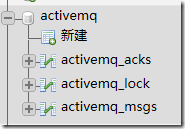
重启ActiveMQ打开phpmyadmin发现多了3张表:
然后启动生产者(不启动消费者)
在Mysql中可以找到这条消息:

关掉ActiveMQ并重启,模拟宕机。
然后启动消费者:
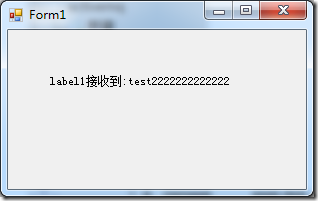
然后发现Mysql中已经没有这条消息了。
ActiveMQ持久化消息(转)的更多相关文章
- ActiveMQ持久化消息
ActiveMQ的另一个问题就是只要是软件就有可能挂掉,挂掉不可怕,怕的是挂掉之后把信息给丢了,所以本节分析一下几种持久化方式: 一.持久化为文件 ActiveMQ默认就支持这种方式,只要在发消息时设 ...
- ActiveMQ持久化消息的三种方式
详见:http://blog.yemou.net/article/query/info/tytfjhfascvhzxcyt362 本文只介绍三种方式,分别是持久化为文件,MYSql,Oracle.下面 ...
- ActiveMQ持久化及测试(转)
转:http://blog.csdn.net/xyw_blog/article/details/9128219 ActiveMQ持久化 消息持久性对于可靠消息传递来说应该是一种比较好的方法,有了消息持 ...
- ActiveMQ的消息持久化机制
为了避免意外宕机以后丢失信息,需要做到重启后可以恢复消息队列,消息系统一般都会采用持久化机制. ActiveMQ的消息持久化机制有JDBC,AMQ,KahaDB和LevelDB,无论使用哪种持久化方式 ...
- ActiveMQ (三)—持久化消息
ActiveMQ的另一个问题就是只要是软件就有可能挂掉,挂掉不可怕,怕的是挂掉之后把信息给丢了,所以本节分析一下几种持久化方式: 一.持久化为文件 ActiveMQ默认就支持这种方式,只要在发消息时设 ...
- ActiveMQ安装与持久化消息
activityMQ官网:http://activemq.apache.org/ 有windows版与linux版 windows版启动 在bin目录下双击activemq.bat linux版的安 ...
- JMS服务器ActiveMQ的初体验并持久化消息到MySQL数据库中
JMS服务器ActiveMQ的初体验并持久化消息到MySQL数据库中 一.JMS的理解JMS(Java Message Service)是jcp组织02-03年定义了jsr914规范(http://j ...
- ActiveMQ持久化机制和JMS可靠消息
1.ActiveMQ持久化机制 1.1 JDBC将数据持久化到数据库 1.2 AMQ生成日志文件 1.3 KahaDB:本次磁盘生成数据文件(默认) 1.4 LevelDB:谷歌K/V数据库 1.5 ...
- ActiveMQ之消息指针
消息指针(Message cursor)是activeMQ里一个非常重要的核心类,它是提供某种优化消息存储的方法.消息中间件的实现一般都是当消费者准备好消费消息的时候,它会从持久化存储中一批一批的读取 ...
随机推荐
- DTO学习系列之AutoMapper(四)
本篇目录: Mapping Inheritance-映射继承 Queryable Extensions (LINQ)-扩展查询表达式 Configuration-配置 Conditional Mapp ...
- 关于Eclipse中Jsp页面打不开并且显示Failed to create the part's controls的解决办法
问题描述:同事从svn上导入的一个项目,jdk都设置好了以后,java.xml.html等文件都能打开,唯独jsp文件打不开,并且显示Failed to create the part's contr ...
- 医院设置 codevs 2577
Floyd+二叉树 #include<iostream>#include<cstdlib>#include<cstdio>#include<cstring&g ...
- MYSQL常用简单语句
使用SQL语法大写,增加可读性(小写部分就是自己数据库写的表/字段喽,具体你懂得...). 创建数据库:CREATE DATABASE mysql_db;删除数据库:DROP DATABASE mys ...
- freemarker中遍历list<map<String,String>>
<#list var as map><tr> <#list map?keys as itemKey> //关键点 <#if itemKey=" ...
- 列表:一个打了激素的数组3 - 零基础入门学习Python012
列表:一个打了激素的数组3 让编程改变世界 Change the world by program 列表的一些常用操作符 比较操作符 逻辑操作符 连接操作符 重复操作符 成员关系操作符 ...... ...
- Linux下装VirtualBox
一:下载 进入VirtualBox的下载地址:https://www.virtualbox.org/ 点击左侧的download, 选择适合自己系统的版本,我的是红帽,故选择: 进行下载. 二:安装 ...
- Database JDBC Developer's Guide
http://docs.oracle.com/database/121/JJDBC/datacc.htm#JJDBC28363
- windows下wchar_t* 转char*
这个在windows下很常见,常用,留个档. 一般用这个函数: size_t wcstombs( char *mbstr, const wchar_t *wcstr, size_t count ); ...
- Grunt 插件开发与调式
1 grunt是什么 官方网站解释的很清楚,http://gruntjs.com/ http://gruntjs.cn/ 它是一种javascript任务运行器,对于需要反复重复的任务,例如压缩.编译 ...