
MVC项目中如何判断用户是在用什么设备进行访问
使用UAParser在C#MVC项目中如何判断用户是在用什么设备进行访问(手机,平板还是普通的电脑)
现在我们开发的很多web应用都要支持手机等移动设备。为了让手机用户能有更加好的用户体验,我们经常为手机设备专门准备一套前端的页面。这样当用户使用普通电脑来访问的时候,我们的应用就向用户展示普通电脑的页面。当用户使用手机等移动设备来访问我们的系统的时候,我们就向用户展示手机设备的页面。但是这时候另一个问题出现了。如何判断用户在使用什么设备访问我们的应用?是使用手机还是普通电脑?
网上能查到的不同的实现方式不少。我在这里也介绍一个我们最近在项目中采用的方法。
我们使用的是UAParser。UAParser是一个开源的项目,主要的功能是实现对各种用户useragent的解析。现在已经有很多种编程语言的实现。C#只是其中的一种。
为了方便大家理解,我在这里把主要的步骤和代码都写出来。
1) 用vs2013新建一个mvc的项目。
2) 使用nuget下载UAParser

3) 新建一个接口和实现它的类。
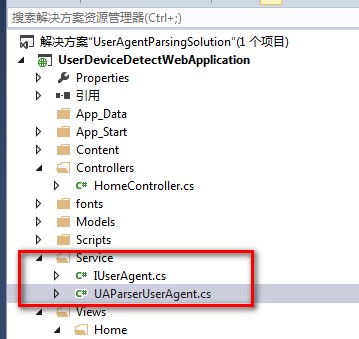
4) 代码
IUserAgent

using System;

using System.Collections.Generic;

using System.Linq;

using System.Text;

using System.Threading.Tasks;

namespace UserDeviceDetectWebApplication.Service

{

    public interface IUserAgent

    {

        string RawValue { get; set; }

        UserAgentInfo UserAgent { get; }

        DeviceInfo Device { get; }

        OSInfo OS { get; }

        bool IsBot { get; }

        bool IsMobileDevice { get; }

        bool IsTablet { get; }

        //bool IsPdfConverter { get; }

    }

    public sealed class DeviceInfo

    {

        public DeviceInfo(string family, bool isBot)

        {

            this.Family = family;

            this.IsBot = isBot;

        }

        public override string ToString()

        {

            return this.Family;

        }

        public string Family { get; private set; }

        public bool IsBot { get; private set; }

    }

    public sealed class OSInfo

    {

        public OSInfo(string family, string major, string minor, string patch, string patchMinor)

        {

            this.Family = family;

            this.Major = major;

            this.Minor = minor;

            this.Patch = patch;

            this.PatchMinor = patchMinor;

        }

        public override string ToString()

        {

            var str = VersionString.Format(Major, Minor, Patch, PatchMinor);

            return (this.Family + (!string.IsNullOrEmpty(str) ? (" " + str) : null));

        }

        public string Family { get; private set; }

        public string Major { get; private set; }

        public string Minor { get; private set; }

        public string Patch { get; private set; }

        public string PatchMinor { get; private set; }

        private static string FormatVersionString(params string[] parts)

        {

            return string.Join(".", (from v in parts

                                     where !string.IsNullOrEmpty(v)

                                     select v).ToArray<string>());

        }

    }

    public sealed class UserAgentInfo

    {

        public UserAgentInfo(string family, string major, string minor, string patch)

        {

            this.Family = family;

            this.Major = major;

            this.Minor = minor;

            this.Patch = patch;

        }

        public override string ToString()

        {

            var str = VersionString.Format(Major, Minor, Patch);

            return (this.Family + (!string.IsNullOrEmpty(str) ? (" " + str) : null));

        }

        public string Family { get; private set; }

        public string Major { get; private set; }

        public string Minor { get; private set; }

        public string Patch { get; private set; }

    }

    internal static class VersionString

    {

        public static string Format(params string[] parts)

        {

            return string.Join(".", (from v in parts

                                     where !string.IsNullOrEmpty(v)

                                     select v).ToArray<string>());

        }

    }

}
UAParserUserAgent
using System;

using System.Collections.Generic;

using System.Linq;

using System.Web;

using uap = UAParser;

using System.Text.RegularExpressions;

namespace UserDeviceDetectWebApplication.Service

{

    public class UAParserUserAgent : IUserAgent

    {

        private readonly static uap.Parser s_uap;

        private static readonly Regex s_pdfConverterPattern = new Regex(@"wkhtmltopdf", RegexOptions.Compiled | RegexOptions.IgnoreCase | RegexOptions.CultureInvariant);

        # region Mobile UAs, OS & Devices

        private static readonly HashSet<string> s_MobileOS = new HashSet<string>

        {

            "Android",

            "iOS",

            "Windows Mobile",

            "Windows Phone",

            "Windows CE",

            "Symbian OS",

            "BlackBerry OS",

            "BlackBerry Tablet OS",

            "Firefox OS",

            "Brew MP",

            "webOS",

            "Bada",

            "Kindle",

            "Maemo"

        };

        private static readonly HashSet<string> s_MobileBrowsers = new HashSet<string>

        {

            "Android",

            "Firefox Mobile",

            "Opera Mobile",

            "Opera Mini",

            "Mobile Safari",

            "Amazon Silk",

            "webOS Browser",

            "MicroB",

            "Ovi Browser",

            "NetFront",

            "NetFront NX",

            "Chrome Mobile",

            "Chrome Mobile iOS",

            "UC Browser",

            "Tizen Browser",

            "Baidu Explorer",

            "QQ Browser Mini",

            "QQ Browser Mobile",

            "IE Mobile",

            "Polaris",

            "ONE Browser",

            "iBrowser Mini",

            "Nokia Services (WAP) Browser",

            "Nokia Browser",

            "Nokia OSS Browser",

            "BlackBerry WebKit",

            "BlackBerry", "Palm",

            "Palm Blazer",

            "Palm Pre",

            "Teleca Browser",

            "SEMC-Browser",

            "PlayStation Portable",

            "Nokia",

            "Maemo Browser",

            "Obigo",

            "Bolt",

            "Iris",

            "UP.Browser",

            "Minimo",

            "Bunjaloo",

            "Jasmine",

            "Dolfin",

            "Polaris",

            "Skyfire"

        };

        private static readonly HashSet<string> s_MobileDevices = new HashSet<string>

        {

            "BlackBerry",

            "MI PAD",

            "iPhone",

            "iPad",

            "iPod",

            "Kindle",

            "Kindle Fire",

            "Nokia",

            "Lumia",

            "Palm",

            "DoCoMo",

            "HP TouchPad",

            "Xoom",

            "Motorola",

            "Generic Feature Phone",

            "Generic Smartphone"

        };

        #endregion

        private readonly HttpContextBase _httpContext;

        private string _rawValue;

        private UserAgentInfo _userAgent;

        private DeviceInfo _device;

        private OSInfo _os;

        private bool? _isBot;

        private bool? _isMobileDevice;

        private bool? _isTablet;

        private bool? _isPdfConverter;

        static UAParserUserAgent()

        {

            s_uap = uap.Parser.GetDefault();

        }

        public UAParserUserAgent(HttpContextBase httpContext)

        {

            this._httpContext = httpContext;

        }

        public string RawValue

        {

            get

            {

                if (_rawValue == null)

                {

                    if (_httpContext.Request != null)

                    {

                        _rawValue = _httpContext.Request.UserAgent.ToString();

                    }

                    else

                    {

                        _rawValue = "";

                    }

                }

                return _rawValue;

            }

            // for (unit) test purpose

            set

            {

                _rawValue = value;

                _userAgent = null;

                _device = null;

                _os = null;

                _isBot = null;

                _isMobileDevice = null;

                _isTablet = null;

                _isPdfConverter = null;

            }

        }

        public virtual UserAgentInfo UserAgent

        {

            get

            {

                if (_userAgent == null)

                {

                    var tmp = s_uap.ParseUserAgent(this.RawValue);

                    _userAgent = new UserAgentInfo(tmp.Family, tmp.Major, tmp.Minor, tmp.Patch);

                }

                return _userAgent;

            }

        }

        public virtual DeviceInfo Device

        {

            get

            {

                if (_device == null)

                {

                    var tmp = s_uap.ParseDevice(this.RawValue);

                    _device = new DeviceInfo(tmp.Family, tmp.IsSpider);

                }

                return _device;

            }

        }

        public virtual OSInfo OS

        {

            get

            {

                if (_os == null)

                {

                    var tmp = s_uap.ParseOS(this.RawValue);

                    _os = new OSInfo(tmp.Family, tmp.Major, tmp.Minor, tmp.Patch, tmp.PatchMinor);

                }

                return _os;

            }

        }

        public virtual bool IsBot

        {

            get

            {

                if (!_isBot.HasValue)

                {

                    _isBot = _httpContext.Request.Browser.Crawler || this.Device.IsBot;

                }

                return _isBot.Value;

            }

        }

        public virtual bool IsMobileDevice

        {

            get

            {

                if (!_isMobileDevice.HasValue)

                {

                    _isMobileDevice =

                        s_MobileOS.Contains(this.OS.Family) ||

                        s_MobileBrowsers.Contains(this.UserAgent.Family) ||

                        s_MobileDevices.Contains(this.Device.Family);

                }

                return _isMobileDevice.Value;

            }

        }

        public virtual bool IsTablet

        {

            get

            {

                if (!_isTablet.HasValue)

                {

                    _isTablet =

                        Regex.IsMatch(this.Device.Family, "iPad|Kindle Fire|Nexus 10|Xoom|Transformer|MI PAD|IdeaTab", RegexOptions.CultureInvariant) ||

                        this.OS.Family == "BlackBerry Tablet OS";

                }

                return _isTablet.Value;

            }

        }

        public virtual bool IsPdfConverter

        {

            get

            {

                if (!_isPdfConverter.HasValue)

                {

                    _isPdfConverter = s_pdfConverterPattern.IsMatch(this.RawValue);

                }

                return _isPdfConverter.Value;

            }

        }

    }

}
5) 修改HomeController.cs
using System;

using System.Collections.Generic;

using System.Linq;

using System.Web;

using System.Web.Mvc;

using UserDeviceDetectWebApplication.Service;

using System.Diagnostics;

namespace UserDeviceDetectWebApplication.Controllers

{

    public class HomeController : Controller

    {

        public ActionResult Index()

        {

            UAParserUserAgent userAgent = new UAParserUserAgent(this.HttpContext);

            ViewBag.Os= userAgent.OS.ToString();

            ViewBag.Device = userAgent.Device.ToString();

            ViewBag.Agent = userAgent.UserAgent.ToString();

            ViewBag.RawValue = userAgent.RawValue.ToString();

            Debug.WriteLine("user os: "+userAgent.OS.ToString());

            Debug.WriteLine("user Device: " + userAgent.Device.ToString());

            Debug.WriteLine("user Agent: " + userAgent.UserAgent.ToString());

            Debug.WriteLine("user RawValue: " + userAgent.RawValue.ToString());

            if (userAgent.IsMobileDevice)

            {

                Debug.WriteLine("这是一个手机");

                ViewBag.MobilePc = "手机";

            }

            else if (userAgent.IsTablet)

            {

                ViewBag.MobilePc = "平板";

                Debug.WriteLine("这是一个平板");

            }

            else

            {

                ViewBag.MobilePc = "普通电脑";

                Debug.WriteLine("这是一个普通电脑");

            }

            return View();

        }

    }

}
6) 修改views\home\Index.cshtml
@{

    Layout = null;

    ViewBag.Title = "Home Page";

}

<p>

    用户的 操作系统:@ViewBag.Os</br>

    用户的设备: @ViewBag.Device </br>

    用户的浏览器: @ViewBag.Agent </br>

    原始的用户访问设备信息: @ViewBag.RawValue </br>

    用户使用的是 @ViewBag.MobilePc </br>

</p>
7) 编译我们的程序,运行它。试着用不同的浏览器,不同的手机访问http://localhost:62526/Home/Index。端口号你的环境可能和我的不一样哦。如果你不知道如何运行mvc的web程序,可以咨询我哦。
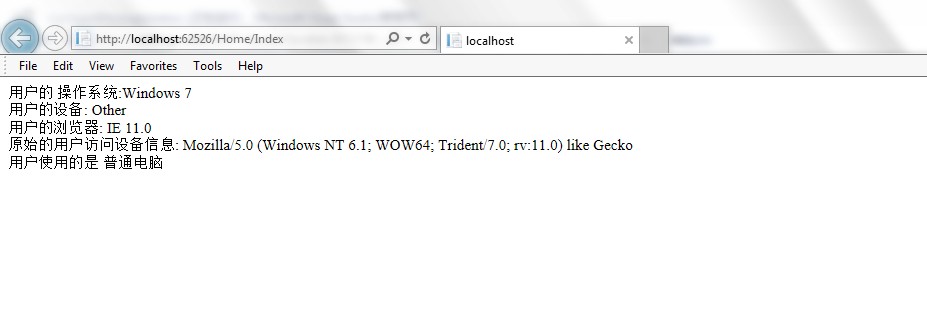
欢迎大家指正和讨论。
MVC项目中如何判断用户是在用什么设备进行访问的更多相关文章
- 使用UAParser在C#MVC项目中如何判断用户是在用什么设备进行访问(手机,平板还是普通的电脑)
现在我们开发的很多web应用都要支持手机等移动设备.为了让手机用户能有更加好的用户体验,我们经常为手机设备专门准备一套前端的页面.这样当用户使用普通电脑来访问的时候,我们的应用就向用户展示普通电脑的页 ...
- 谈谈MVC项目中的缓存功能设计的相关问题
本文收集一些关于项目中为什么需要使用缓存功能,以及怎么使用等,在实际开发中对缓存的设计的考虑 为什么需要讨论缓存呢? 缓存是一个中大型系统所必须考虑的问题.为了避免每次请求都去访问后台的资源(例如数据 ...
- 在ASP.NET MVC项目中使用极验验证(geetest)
时间 2016-03-02 18:22:37 smallerpig 原文 http://www.smallerpig.com/979.html 主题 ASP.NET MVC geetest开发体 ...
- 转 mvc项目中,解决引用jquery文件后智能提示失效的办法
mvc项目中,解决用Url.Content方法引用jquery文件后智能提示失效的办法 这个标题不知道要怎么写才好, 但是希望文章的内容对大家有帮助. 场景如下: 我们在用开发开发程序的时候,经常 ...
- 在 ASP.NET MVC 项目中使用 WebForm、 HTML
原文地址:http://www.cnblogs.com/snowdream/archive/2009/04/17/winforms-in-mvc.html ASP.NET MVC和WebForm各有各 ...
- 在已有的Asp.net MVC项目中引入Taurus.MVC
Taurus.MVC是一个优秀的框架,如果要应用到已有的Asp.net MVC项目中,需要修改一下. 1.前提约定: 走Taurus.MVC必须指定后缀.如.api 2.原项目修改如下: web.co ...
- ASP.NET MVC项目中App_Code目录在程序应用
学习ASP.NET MVC,如果你是开发ASP.NET MVC项目的,也许你去为项目添加前ASP.NET项目的APP_Code目录,在这里创建与添加的Class类,也许你无法在MVC项目所引用. 那这 ...
- ssm项目中遇到微信用户名称带有表情,插入失败问题
ssm项目中遇到微信用户名称带有表情,插入失败问题 问题 Mysql的utf8编码最多3个字节,而Emoji表情或者某些特殊字符是4个字节. 因此会导致带有表情的昵称插入数据库时出错. 解决方法 一. ...
- 如何在mvc项目中使用apiController
文章地址:How do you route from an MVC project to an MVC ApiController in another project? 文章地址:How to Us ...
随机推荐
- vb6.0 倒计时
Dim t Dim start As Boolean Private Sub Command1_Click() If start = False Then t = Val(Text1) * 3600 ...
- [置顶] fmt日期格式化
jstl中的日期格式化 <%@ taglib prefix="c" uri="http://java.sun.com/jstl/core" %> & ...
- cocos2d-x-3.1 Text Labels(官方正式译文)
介绍 cocos2d支持(true type字体)标签,和纹理地图集标签. LabelTTF 标签的优缺点: 全部 TTF 字体的长处: 随意大小,支持调整字距. 易于使用. 不须要外部编辑器. 创建 ...
- C++之构造函数重载
#include<stdio.h> class Test { private: int i; int j; int k; ...
- Android adb 命令图解
做了这么长时间的开发与管理,在命令上总是自见则过,往往却忽视了在其命令上的分享过程,所以现在稍微有点时间就把 其命令的相关操作来简单的扫盲一番吧,也系统通过这种方式去授之以渔而不是鱼,好了,我以图解的 ...
- javascript函数querySelector
querySelector用于获得dom节点,可以接受三种类型的参数:id(#),class(.),标签.很像jquery的选择器.不过只能返回一个子孙元素,但是jquery选择器的话,可以返回一组元 ...
- Retrofit2 上传图片等文件
普通写法: //创建表单的普通字段public static RequestBody createFormBody(String content) { RequestBody body = Reque ...
- VC++ win32 多线程 一边画圆一边画矩形
// WinThreadTest.cpp : Defines the entry point for the application. // #include "stdafx.h" ...
- 10,随机等概率的输出m个不重复的数
今天看到一段代码,可以从0.....n-1中随机等概率的输出m个不重复的数(n远远大于m).遂记录下来. 首先,产生随机数,不免要用到srand,rand函数.先简单介绍下两个函数. 1,void s ...
- Oracle SQL篇(二)oracle自连接操作
oracle 的自连接(self join)操作 对于oracle数据库来说,目前支持两套语法,一套是oracle自己的sql语法,一套是通行标准的SQL99语法,那么对于oracle的连接操 ...