
winPcap_6_不用回调方法捕获数据包
用 pcap_next_ex() 函数代替 _5_ 中的 pcap_loop()函数;
pcap_loop()函数是基于回调的原理来进行数据捕获,这是一种精妙的方法,并且在某些场合中,它是一种很好的选择。 然而,处理回调有时候并不实用 -- 它会增加程序的复杂度,特别是在拥有多线程的C++程序中。
可以通过直接调用pcap_next_ex() 函数来获得一个数据包 -- 只有当编程人员使用了 pcap_next_ex() 函数才能收到数据包。
这个函数的参数和捕获回调函数的参数是一样的 -- 它包含一个网络适配器的描述符和两个可以初始化和返回给用户的指针 (一个指向 pcap_pkthdr 结构体,另一个指向数据报数据的缓冲)。
在下面的程序中,我们会再次用到上一讲中的有关回调方面的代码,只是我们将它放入了main()函数,之后调用 pcap_next_ex()函数。
int pcap_next_ex  ( pcap_t *  p,

  struct pcap_pkthdr **  pkt_header,

  const u_char **  pkt_data

 )
Read a packet from an interface or from an offline capture.
This function is used to retrieve the next available packet, bypassing the callback method traditionally provided by libpcap.
pcap_next_ex fills the pkt_header and pkt_data parameters (see pcap_handler()) with the pointers to the header and to the data of the next captured packet.
The return value can be:
- 1 if the packet has been read without problems
- 0 if the timeout set with pcap_open_live() has elapsed. In this case pkt_header and pkt_data don't point to a valid packet
- -1 if an error occurred
- -2 if EOF was reached reading from an offline capture
typedef void(*) pcap_handler(u_char *user, const struct pcap_pkthdr *pkt_header, const u_char *pkt_data)
Prototype of the callback function that receives the packets.
When pcap_dispatch() or pcap_loop() are called by the user, the packets are passed to the application by means of this callback. user is a user-defined parameter that contains the state of the capture session, it corresponds to the user parameter of pcap_dispatch() and pcap_loop(). pkt_header is the header associated by the capture driver to the packet. It is NOT a protocol header. pkt_data points to the data of the packet, including the protocol headers.
 #include "pcap.h"

 #pragma comment(lib, "wpcap.lib")

 #pragma comment(lib, "Packet.lib")

 #pragma comment(lib, "wsock32.lib")

 #include "pcap.h"

 main()

 {

 pcap_if_t *alldevs;

 pcap_if_t *d;

 int inum;

 int i=;

 pcap_t *adhandle;

 int res;

 char errbuf[PCAP_ERRBUF_SIZE];

 struct tm *ltime;

 char timestr[];

 struct pcap_pkthdr *header;

 const u_char *pkt_data;

 time_t local_tv_sec;

     /* 获取本机设备列表 */

     if (pcap_findalldevs_ex(PCAP_SRC_IF_STRING, NULL, &alldevs, errbuf) == -)

     {

         fprintf(stderr,"Error in pcap_findalldevs: %s\n", errbuf);

         exit();

     }

     /* 打印列表 */

     for(d=alldevs; d; d=d->next)

     {

         printf("%d. %s", ++i, d->name);

         if (d->description)

             printf(" (%s)\n", d->description);

         else

             printf(" (No description available)\n");

     }

     if(i==)

     {

         printf("\nNo interfaces found! Make sure WinPcap is installed.\n");

         return -;

     }

     printf("Enter the interface number (1-%d):",i);

     scanf("%d", &inum);

     if(inum <  || inum > i)

     {

         printf("\nInterface number out of range.\n");

         /* 释放设备列表 */

         pcap_freealldevs(alldevs);

         return -;

     }

     /* 跳转到已选中的适配器 */

     for(d=alldevs, i=; i< inum- ;d=d->next, i++);

     /* 打开设备 */

     if ( (adhandle= pcap_open(d->name,          // 设备名

                               ,            // 要捕捉的数据包的部分

                                                 // 65535保证能捕获到不同数据链路层上的每个数据包的全部内容

                               PCAP_OPENFLAG_PROMISCUOUS,    // 混杂模式

                               ,             // 读取超时时间

                               NULL,             // 远程机器验证

                               errbuf            // 错误缓冲池

                               ) ) == NULL)

     {

         fprintf(stderr,"\nUnable to open the adapter. %s is not supported by WinPcap\n", d->name);

         /* 释放设列表 */

         pcap_freealldevs(alldevs);

         return -;

     }

     printf("\nlistening on %s...\n", d->description);

     /* 释放设备列表 */

     pcap_freealldevs(alldevs);

     /* 获取数据包 */

     while((res = pcap_next_ex( adhandle, &header, &pkt_data)) >= ){

         if(res == )

             /* 超时时间到 */

             continue;

         /* 将时间戳转换成可识别的格式 */

         local_tv_sec = header->ts.tv_sec;

         ltime=localtime(&local_tv_sec);

         strftime( timestr, sizeof timestr, "%H:%M:%S", ltime);

         printf("%s,%.6d len:%d\n", timestr, header->ts.tv_usec, header->len);

     }

     if(res == -){

         printf("Error reading the packets: %s\n", pcap_geterr(adhandle));

         return -;

     }

     return ;

 }
不用回调方法捕获数据包.c
·结果:
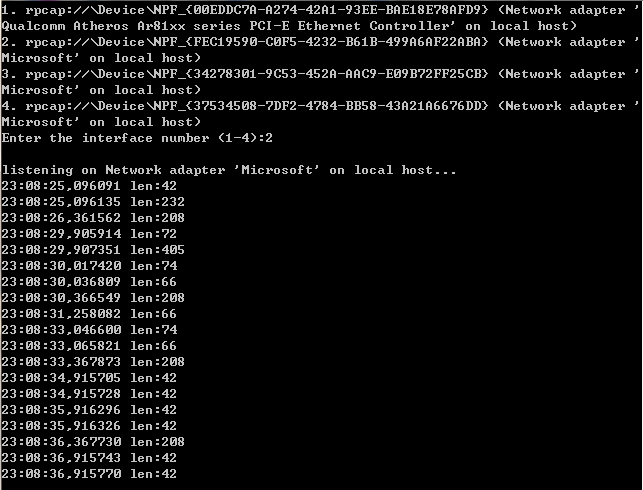
为什么我们要用 pcap_next_ex() 代替以前的 pcap_next()? 因为 pcap_next() 有一些不好的地方。首先,它效率低下,尽管它隐藏了回调的方式,但它依然依赖于函数 pcap_dispatch()。第二,它不能检测到文件末尾这个状态(EOF),因此,如果数据包是从文件读取来的,那么它就不那么有用了。
值得注意的是, pcap_next_ex() 在成功,超时,出错或EOF的情况下,会返回不同的值。
winPcap_6_不用回调方法捕获数据包的更多相关文章
- winPcap编程之不用回调方法捕获数据包(五 转)
这一次要分析的实例程序跟上一讲非常类似(“打开适配器并捕获数据包”),略微不同的一点是本次将pcap_loop()函数替换成了pcap_next_ex()函数.本节的重点也就是说一下这两个函数之间的差 ...
- Winpcap笔记4之不用回调函数捕获数据包
函数1: pcap_next_ex(pcap_t* p, struct pcap_pkthdr** pkt_header, const u_char* ...
- winPcap_5_打开适配器并捕获数据包
知道如何获取适配器的信息了,那我们就开始一项更具意义的工作,打开适配器并捕获数据包.编写一个程序,将每一个通过适配器的数据包打印出来. 打开设备的函数是 pcap_open(). (Open a ge ...
- Winpcap笔记3之打开适配器并捕获数据包
上一讲中知道了如何获取适配的信息,这一将我们讲写一个程序蒋每一个通过适配器的数据包打印出来. 打开设备的函数是pcap_open().函数原型是 pcap_t* pcap_open(const cha ...
- winpcap使用之捕获数据包
第一种方法,调用回调函数 #include "pcap.h" /* packet handler 函数原型 */ void packet_handler(u_char *param ...
- winPcap编程之打开适配器并捕获数据包(四 转)
在贴源码之前先介绍一个将要用到的很重要的函数--pcap_open(),下面是pcap_open()在remote-ex.h中的声明: pcap_t *pcap_open(const char *so ...
- Python3+pyshark捕获数据包并保存为文件
一.直接使用wireshark捕获数据包并保存为文件 可以使用wireshark通过图形界面的操作来实现捕获数据包并保存为文件. wireshark默认捕获的数据包保存为临时文件,如果最后退出时不选择 ...
- Linux系统捕获数据包流程
Linux系统捕获数据包流程 为了提高数据包的捕获效率,瓶颈问题是一个需要非常关注的焦点.减少在捕获数据包过程中的瓶颈,就能够提高数据包捕获的整体性能.下面本文将以Linux操作系统为平台,分析捕获数 ...
- ARPSpoofing教程(三) - 捕获数据包
1: #include"pcap.h" 2: //每次捕获到数据包时,libpcap都会自动调用这个回调函数 3: void packet_handler(u_char *para ...
随机推荐
- ThinkPHP自动验证
自动验证是ThinkPHP模型层提供的一种数据验证方法,可以在使用create创建数据对象的时候自动进行数据验证. 验证规则 数据验证可以进行数据类型.业务规则.安全判断等方面的验证操作.数据验证有两 ...
- 文成小盆友python-num3 集合,函数,-- 部分内置函数
本接主要内容: set -- 集合数据类型 函数 自定义函数 部分内置函数 一.set 集合数据类型 set集合,是一个无序且不重复的元素集合 集合基本特性 无序 不重复 创建集合 #!/bin/en ...
- iOS学习之数据请求
GET请求----同步连接 //GET请求 同步连接 - (void)handleSynchronize:(UIBarButtonItem *)item { //GET请求 //1.创建网址字符串; ...
- Scala学习笔记--Akka
待完成 http://www.gtan.com/akka_doc/ http://my.oschina.net/mingdong/blog/297972 http://www.jdon.com/con ...
- Debian/Ubuntu 安装bcm43142无线网卡驱动
Drivers for Broadcom BCM43142 wireless card of Ubuntu/Debian 64-bit Linux 1.Check the wireless card ...
- dedecms 在php7.0无法安装
dedecms 需要mysql扩展的支持!而php7.0已废弃mysql扩展.所以我讲7.0改回了5.6然后就可以顺利安装了. 总结了一个经验:没有绝对实力,不要尝试新东西
- chrome加载本地js
通过chrome的扩展功能,可以执行一些本地脚本. 1.如何添加扩展程序 具体做法是:chrome -> 设置 -> 扩展程序 -> 加载正在开发的扩展程序 图(1.1) 图(1.2 ...
- QQ地图api里的 地址解析函数 看不懂 javascript_百度知道
QQ地图api里的 地址解析函数 看不懂 javascript_百度知道 QQ地图api里的 地址解析函数 看不懂 javascript 2011-09-18 12:18 匿名 ...
- phpcms:三、头部包含
1‘标题:{if isset($SEO['title']) && !empty($SEO['title'])}{$SEO['title']}{/if}{$SEO['site_title ...
- hdu 4055 Number String(dp)
Problem Description The signature of a permutation is a string that is computed as follows: for each ...