
Android 中文 API (40) —— RatingBar
Android 中文 API (40) —— RatingBar
前言
本章内容是 android.widget.RatingBar,译为"评分条",版本为Android 2.2 r1,翻译来自"madgoat"和"wallace2010",欢迎大家访问他们的博客:http://madgoat.cn/、http://blog.csdn.net/springiscoming2008,再次感谢"madgoat"和"wallace2010" !期待你加入Android中文翻译组,联系我over140@gmail.com。
声明
欢迎转载,但请保留文章原始出处:)
Android中文翻译组:http://www.cnblogs.com/over140/
正文
一、结构
public class RatingBar extends AbsSeekBar
java.lang.Object
android.widget.ProgressBar
android.widget.RatingBar
二、概述
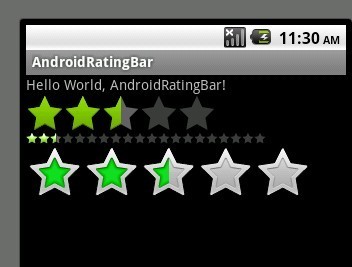
RatingBar是基于SeekBar和ProgressBar的扩展,用星型来显示等级评定。使用RatingBar的默认大小时,用户可以触摸/拖动或使用键来设置评分,它有两种样式(小风格用ratingBarStyleSmall,大风格用ratingBarStyleIndicator),其中大的只适合指示,不适合于用户交互。
当使用可以支持用户交互的RatingBar时,无论将控件(widgets)放在它的左边还是右边都是不合适的。
只有当布局的宽被设置为wrap content时,设置的星星数量(通过函数setNumStars(int)或者在XML的布局文件中定义)将显示出来(如果设置为另一种布局宽的话,后果无法预知)。
次级进度一般不应该被修改,因为他仅仅是被当作星型部分内部的填充背景。
三、嵌套类
接口:RatingBar.OnRatingBarChangeListener
一个回调函数,当星级进度改变时修改客户端的星级。
四、XML属性
|
属性名称 |
描述 |
|
android:isIndicator |
RatingBar是否是一个指示器(用户无法进行更改) |
|
android:numStars |
显示的星型数量,必须是一个整形值,像“100”。 |
|
android:rating |
默认的评分,必须是浮点类型,像“1.2”。 |
|
android:stepSize |
评分的步长,必须是浮点类型,像“1.2”。 |
五、公共方法
public int getNumStars ()
返回显示的星型数量
返回值
显示的星型数量
public RatingBar.OnRatingBarChangeListener getOnRatingBarChangeListener ()
返回值
监听器(可能为空)监听评分改变事件
public float getRating ()
获取当前的评分(填充的星型的数量)
返回值
当前的评分
public float getStepSize ()
获取评分条的步长
返回值
步长
public boolean isIndicator ()
返回值
判断当前的评分条是否仅仅是一个指示器(注:即能否被修改)
public void setIsIndicator (boolean isIndicator)
设置当前的评分条是否仅仅是一个指示器(这样用户就不能进行修改操作了)
参数
isIndicator Bool值,是否是一个指示器
public synchronized void setMax (int max)
设置评分等级的范围,从0到max
参数
max 评分条最大范围。
public void setNumStars (int numStars)
设置显示的星型的数量。为了能够正常显示它们,建议将当前widget的布局宽度设置为
wrap content
参数
numStars 星型的数量
public void setOnRatingBarChangeListener (RatingBar.OnRatingBarChangeListener listener)
设置当评分等级发生改变时回调的监听器
参数
listener 监听器
public void setRating (float rating)
设置分数(星型的数量)
参数
rating 设置的分数
public void setStepSize (float stepSize)
设置当前评分条的步长(step size)
参数
stepSize 评分条的步进。例如:如果想要半个星星,它的值为0.5。
六、受保护方法
protected synchronized void onMeasure(int widthMeasureSpec, int heightMeasureSpec)
权衡 view 和 content 来决定它的宽度和高度的整齐。它被measure(int, int) 调用 并且应该被子类所覆盖,以便提供准确高效的布局测量。
规定: 当覆盖这个方法的时候,你必须调用 setMeasuredDimension(int, int)以便存储精确的视图的宽和高。如果不这样做的话将触发llegalStateException异常,被函数 measure(int, int)抛出。调用父类 onMeasure(int, int)是合理的。
尺寸的基本类的实现默认是背景大小,除非通过MeasureSpec允许大的尺寸。子类应该覆盖 onMeasure(int, int) 以便提供更好的布局大小。
如果这个方法被覆盖,子类应该负责确保标准的宽和高至少是视图的最小宽度和高度的值(分别为getSuggestedMinimumHeight() 和 getSuggestedMinimumWidth()两方法)。
参数
widthMeasureSpec 受主窗口支配的水平空间要求。这个需求通过 View.MeasureSpec.进行编码。
heightMeasureSpec 受主窗口支配的垂直空间要求。这个需求通过 View.MeasureSpec.进行编码。
七、补充
文章链接
示例代码(代码转载自Android手机开发者论坛)
Java文件
public class AndroidRatingBar extends Activity {

   /** Called when the activity is first created. */

   @Override

   public void onCreate(Bundle savedInstanceState) {

       super.onCreate(savedInstanceState);

       setContentView(R.layout.main);

       final RatingBar ratingBar_Small = (RatingBar)findViewById(R.id.ratingbar_Small);

       final RatingBar ratingBar_Indicator = (RatingBar)findViewById(R.id.ratingbar_Indicator);

       final RatingBar ratingBar_default = (RatingBar)findViewById(R.id.ratingbar_default);

       ratingBar_default.setOnRatingBarChangeListener(new RatingBar.OnRatingBarChangeListener(){

   public void onRatingChanged(RatingBar ratingBar, float rating,

     boolean fromUser) {

    ratingBar_Small.setRating(rating);

    ratingBar_Indicator.setRating(rating);

    Toast.makeText(AndroidRatingBar.this, "rating:"+String.valueOf(rating),

      Toast.LENGTH_LONG).show();

   }});

   }

}
XML文件
<?xml version="1.0" encoding="utf-8"?>

<LinearLayout xmlns:android="http://schemas.android.com/apk/res/android"

   android:orientation="vertical"

   android:layout_width="fill_parent"

   android:layout_height="fill_parent"

   >

<TextView

   android:layout_width="fill_parent"

   android:layout_height="wrap_content"

   android:text="@string/hello"

   />

<RatingBar

   android:layout_width="wrap_content"

   android:layout_height="wrap_content"

   style="?android:attr/ratingBarStyleIndicator"

   android:id="@+id/ratingbar_Indicator"

   />

<RatingBar

   android:layout_width="wrap_content"

   android:layout_height="wrap_content"

   style="?android:attr/ratingBarStyleSmall"

   android:id="@+id/ratingbar_Small"

   android:numStars="20"

   />

<RatingBar

   android:layout_width="wrap_content"

   android:layout_height="wrap_content"

   style="?android:attr/ratingBarStyle"

   android:id="@+id/ratingbar_default"

   />

</LinearLayout>
Android 中文 API (40) —— RatingBar的更多相关文章
- Android 中文API (69) —— BluetoothAdapter[蓝牙]
前言 本章内容是 android.bluetooth.BluetoothAdapter,为Android蓝牙部分的章节翻译.本地蓝牙设备的适配类,所有的蓝牙操作都要通过该类完成.版本为 Androi ...
- Android 中文API (70) —— BluetoothDevice[蓝牙]
前言 本章内容是 android.bluetooth.BluetoothDevice,为Android蓝牙部分的章节翻译.蓝牙设备类,代表了蓝牙通讯国足中的远端设备.版本为 Android 2.3 ...
- Android 中文API (68) —— BluetoothClass.Service
前言 本章内容是 android.bluetooth.BluetoothClass.Service,为Android蓝牙部分的章节翻译,版本为 Android 2.3 r1,翻译来自中山大学的&q ...
- Android 中文API (67) —— BluetoothClass.Device.Major
前言 本章内容是android.bluetooth.BluetoothClass.Device.Major,为Android蓝牙部分的章节翻译,版本为Android 2.3 r1,翻译来自中山大学 ...
- Android 中文API (66) —— BluetoothClass.Device
前言 本章内容是android.bluetooth.BluetoothClass.Device,为Android蓝牙部分的章节翻译,版本为Android 2.3 r1,翻译来自中山大学的" ...
- Android 中文API (65) —— BluetoothClass[蓝牙]
前言 本章内容是android.bluetooth.BluetoothClass,为Android蓝牙部分的章节翻译.用于描述远端设备的类型,特点等信息,通过getBluetoothClass()方法 ...
- android中文api(79)——Gallery
前言 本章内容是 android.widget.Gallery,版本为Android 2.3 r1,翻译来自"henly.zhang",欢迎大家访问他的博客:http://www. ...
- Android中文API
Android中文API http://www.android-doc.com/index.html
- Android 中文 API (29) —— CompoundButton
前言 本章内容是android.widget.CompoundButton,翻译来自德罗德,再次感谢德罗德 !期待你一起参与Android API 的中文翻译,联系我over140@gmail.com ...
随机推荐
- tomcat startup.sh提示java.lang.OutOfMemoryError: PermGen space
JAVA_OPTS="-server -XX:PermSize=512M -XX:MaxPermSize=1024m"if [ -z "$LOGGING_MANAGER& ...
- IIS 7.5 配置伪静态
IIS 7.5 配置伪静态_win服务器_脚本之家 win7下IIS的安装和配置 图文教程详细出处参考:http://www.jb51.net/article/29787.htm http://blo ...
- xxx is not in the sudoers file. This incident will be reported的解决方法
1>.进入超级用户模式.也就是输入"su -",系统会让你输入超级用户密码,输入密码后就进入了超级用户模式.(当然,你也可以直接用root用户登录,因为红旗安装过后默认的登录 ...
- Windows服务器之间rsync同步文件
两台windows7机器 server:192.168.12.104 client:192.168.12.103 目的:将server上的E盘的目录FYFR里面的内容定时同步到client上的D盘下F ...
- PHP HTTP
安装 HTTP 函数是 PHP 核心的组成部分.无需安装即可使用这些函数. PHP HTTP 函数 PHP:指示支持该函数的最早的 PHP 版本. 函数 描述 PHP header() 向客户端发送原 ...
- NetBeans使用技巧记录
1.窗体字体大小设置: 在etc文件夹下的netbeans.conf中添加,12表示字体大小,12正合适. netbeans_default_options="--fontsize 12 - ...
- mysql 数据库字符串替换
UPDATE `table_name` SET `field_name` = replace (`field_name`,'from_str','to_str') WHERE `field_name` ...
- php视图操作
一.视图的基本介绍 视图是虚拟的表.与包含数据的表不一样,视图只包含使用时动态检索数据的查询. 使用视图需要MySQL5及以后的版本支持. 下面是视图 ...
- 武汉科技大学ACM :1004: 华科版C语言程序设计教程(第二版)课后习题3.7
Problem Description 输入无符号短整数k[hex.]和p[oct.],将k的高字节作为结果的低字节,p的高字节作为结果的高字节组成一个新的整数. Input k[hex.]和p[oc ...
- QT5控件-QDateTimeEdit和类QDateTime
#ifndef MAINWINDOW_H #define MAINWINDOW_H #include <QMainWindow> #include <QDateTime> #i ...