
day50—JavaScript鼠标拖拽事件
转行学开发,代码100天——2018-05-05
今天通过鼠标拖拽事件复习巩固一下鼠标事件。
鼠标拖拽事件需要记住两点:
1.距离不变
2.鼠标事件(按下,移动,抬起)
<div id="div1"></div>
<style type="text/css">

        #div1{

            width: 100px;

            height: 100px;

            background: red;

            position: absolute;

        }

    </style>
JavaScript事件:
    <script type="text/javascript">

        window.onload = function(){

            var oDiv = document.getElementById("div1");

            var disX = 0;

            var disY = 0;

            //鼠标按下

            oDiv.onmousedown = function(ev){

                var oEvent = ev||event;

                disX = oEvent.clientX-oDiv.offsetLeft;

                disY = oEvent.clientY-oDiv.offsetTop;

                //鼠标移动

                oDiv.onmousemove = function(ev){

                var oEvent  = ev||event;

                oDiv.style.left = oEvent.clientX-disX+"px";

                oDiv.style.top = oEvent.clientY-disY+"px";

                };

                oDiv.onmouseup = function(){

                    oDiv.onmousemove = null;

                    oDiv.onmouseup = null;

                }

            };

        }

    </script>
注意:这里的鼠标的移动事件是在鼠标按下之后发生;鼠标抬起时需要关闭鼠标移动事件和它本身。
这时可以实现一个基本的拖拽效果。但是,当鼠标快速移动时,仍然有个问题:当鼠标移到div盒子外面时盒子被鼠标甩掉了。。
究其原因在于鼠标事件的添加对象只是div盒子,盒子很小时会发生上述情况。因此可以将事件添加对象升级到document上。
<script type="text/javascript">

        window.onload = function(){

            var oDiv = document.getElementById("div1");

            var disX = 0;

            var disY = 0;

            //鼠标按下

            document.onmousedown = function(ev){

                var oEvent = ev||event;

                disX = oEvent.clientX-oDiv.offsetLeft;

                disY = oEvent.clientY-oDiv.offsetTop;

                //鼠标移动

                document.onmousemove = function(ev){

                var oEvent  = ev||event;

                oDiv.style.left = oEvent.clientX-disX+"px";

                oDiv.style.top = oEvent.clientY-disY+"px";

                };

                document.onmouseup = function(){

                    document.onmousemove = null;

                    document.onmouseup = null;

                }

            };

        }

    </script>
尽管如此,在火狐浏览器下拖拽空DIV盒子会出现重影,因此需要阻止默认事件,在鼠标按下事件中添加
   return false;
此外,通过学习事件捕获,IE转属的setCapture()方法,可以避免使用事件对象升级到document。同时需要在鼠标抬起事件中,取消事件捕获releaseCapture();
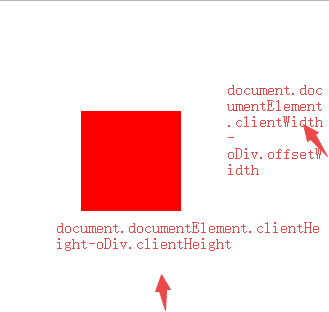
最后,为了提升用户体验,还可以对上述拖拽事件进行更进一步的优化,即对拖拽范围添加限制。
    <script type="text/javascript">

        window.onload = function(){

            var oDiv = document.getElementById("div1");

            var disX = 0;

            var disY = 0;

            //鼠标按下

            document.onmousedown = function(ev){

                var oEvent = ev||event;

                disX = oEvent.clientX-oDiv.offsetLeft;

                disY = oEvent.clientY-oDiv.offsetTop;

                //鼠标移动

                document.onmousemove = function(ev){

                var oEvent  = ev||event;

                var l = oEvent.clientX-disX;

                var t = oEvent.clientY-disY;

                if (l<0) {

                    l =0;

                }else if(l>document.documentElement.clientWidth-oDiv.offsetWidth)

                {

                    l = document.documentElement.clientWidth-oDiv.offsetWidth;

                }

                if (t<0) {

                    t =0;

                }else if(t>document.documentElement.clientHeight-oDiv.offsetHeight)

                {

                    t = document.documentElement.clientHeight-oDiv.offsetHeight;

                }

                oDiv.style.left = l+"px";

                oDiv.style.top = t+"px";

                };

                document.onmouseup = function(){

                    document.onmousemove = null;

                    document.onmouseup = null;

                };

                return false;

            };

        }

    </script>
添加事件捕获后优化代码如下:
<script type="text/javascript">

        window.onload = function(){

            var oDiv = document.getElementById("div1");

            var disX =0;

            var disY =0;

            oDiv.onmousedown = function(ev){

                var oEvent = ev||event;

                disX = oEvent.clientX-oDiv.offsetLeft;

                disY = oEvent.clientY-oDiv.offsetTop;

                if (oDiv.setCapture) {

                //鼠标移动事件

                oDiv.onmousemove = mouseMove;

                oDiv.onmouseup = mouseUp;

                oDiv.setCapture();//ie专用

                return false;

            }else{

                   //鼠标移动

                   document.onmousemove = mouseMove;

                   document.onmouseup = mouseUp;

                   return false;

                }

            };

            //鼠标抬起事件

            function mouseUp(){

                this.onmousemove = null;

                this.onmouseup = null;

                if (this.setCapture) {

                        this.releaseCapture();//ie专用

                    }

                };

            //鼠标移动事件

            function mouseMove(ev){

                var oEvent  = ev||event;

                var l = oEvent.clientX-disX;

                var t = oEvent.clientY-disY;

                if (l<0) {

                    l =0;

                }else if(l>document.documentElement.clientWidth-oDiv.offsetWidth)

                {

                    l = document.documentElement.clientWidth-oDiv.offsetWidth;

                }

                if (t<0) {

                    t =0;

                }else if(t>document.documentElement.clientHeight-oDiv.offsetHeight)

                {

                    t = document.documentElement.clientHeight-oDiv.offsetHeight;

                }

                oDiv.style.left = l+"px";

                oDiv.style.top = t+"px";

            };

           }

        </script>
day50—JavaScript鼠标拖拽事件的更多相关文章
- javascript鼠标拖拽的那些事情
<html> <head> <title>javascript鼠标拖拽的那些事情</title> <meta http-equiv="C ...
- 完美实现鼠标拖拽事件,解决各种小bug,基于jquery
鼠标拖拽事件是web中使用频率极高的事件,之前写过的代码包括网上的代码,总存在各种各样的问题,包括拖拽体验差,松开鼠标后拖拽效果仍存在以及代码冗余过大等 本次我才用jQuery实现一个尽可能高效的拖拽 ...
- JS Event 鼠标拖拽事件
<!DOCTYPE html><html> <head> <meta charset="UTF-8"> ...
- JavaScript鼠标拖拽特效及相关问题总结
#div1{width:200px;height:200px;background:red;position:absolute;} #div2{width:200px;height:200px;bac ...
- HTML5深入学习之鼠标跟随,拖拽事件
知识点(鼠标跟随): mousedown: 当用户用鼠标点击在某一元素上就会触发该事件 mouseover: 当鼠标指针在某一元素上移动就会触发改事件 下面这个例子的效果就是鼠标点击元素后,元素跟着 ...
- day52—JavaScript拖拽事件的应用(自定义滚动条)
转行学开发,代码100天——2018-05-07 前面的记录里展示了JavaScript中鼠标拖拽功能,今天利用拖拽功能实现另一个应用场景——自定义滚动条(作为控制器)的用法. 常通过自定义滚动条控制 ...
- 鼠标拖拽定位和DOM各种尺寸详解
<!DOCTYPE html> <html> <head> <meta charset="UTF-8"> <title> ...
- html5拖拽事件 xhr2 实现文件上传 含进度条
<!DOCTYPE html> <html> <head> <meta http-equiv="Content-Type" content ...
- JavaScript实现拖拽元素对齐到网格(每次移动固定距离)
这几天在做一个拖拽元素的附加功能,就是对齐到网格,实际上就是确定好元素的初始位置,然后拖拽元素时,每次移动固定的距离.让元素都可以在网格内对齐.先上效果图,然后在详细说明一下细节问题 做了一个gif图 ...
随机推荐
- 思维体操: HDU1008 Elevator
Elevator Time Limit: 2000/1000 MS (Java/Others) Memory Limit: 65536/32768 K (Java/Others) Total S ...
- java 如何重写equal 和hashcode方法(最佳实践)
先看完理解这篇:Java hashCode() 和 equals()的若干问题解答 实现高质量的equals方法的诀窍包括 使用==操作符检查“参数是否为这个对象的引用”: 使用instanceof操 ...
- RabbitMQ事务和Confirm发送方消息确认
RabbitMQ事务和Confirm发送方消息确认——深入解读 RabbitMQ系列文章 RabbitMQ在Ubuntu上的环境搭建 深入了解RabbitMQ工作原理及简单使用 RabbitMQ交换器 ...
- 使用axios发送ajax请求
1.安装 npm install axios 2.在Home.vue中引入 import axios from 'axios' export default { name: 'Home', c ...
- jquery 关于load()加载页面遇见的坑(js代码使用不了)
- Nginx设置上传文件大小限制
就是nginx对上传的图片大小有了限制嘛,所以更改nginx的配置文件就好了 client_max_body_size 1000m; 参考:https://blog.csdn.net/TitanSee ...
- MySQL数据类型和约束条件
一.数据库操作数据的存储引擎 INNODB:支持事务 行锁 外键 查询速度比MYSiam慢 但是保证了数据的安全性 5.1 版本之后 MYSIAM:老版本用 5.1版本之前 搜索速度快 不支持事务 没 ...
- HBase(三)——搭建Fully-distributed
HBase搭建--Fully-distributed 1.搭建方式说明 By default, HBase runs in standalone mode. Both standalone mode ...
- 如何算gama(1/2)=sqrt(pi)?
关键是算e^{-x^2}在0到oo的定积分是sqrt(pi)/2. 或者利用高斯密度函数来求解
- 【Linux】CentOS6上安装Python3.7(config、make、make install)及“No module named '_ctypes'”/pip install时“ssl module in Python is not available.”的解决
1.下载安装包 https://www.python.org/ftp/python/ 该目录下选择所需要的版本进行下载.解压. wget https://www.python.org/ftp/pyth ...