
easyUI学习笔记一
1.引用js文件
    <script type="text/javascript" src = jquery-easyui/jquery.min.js> </script>

    <script type="text/javascript" src = jquery-easyui/jquery.easyui.min.js> </script>

    <script type="text/javascript" src = jquery-easyui/locale/easyui-lang-zh_CN.js> </script>

    <script type="text/javascript" src ="index.js"></script>  <!-- 自定义js -->
2.引用css文件
<link rel="stylesheet"  href="jquery-easyui/themes/default/easyui.css">

    <link rel="stylesheet"  href="jquery-easyui/themes/icon.css">
3.第一个demo
<!DOCTYPE html>

<html>

<head>

    <title>easyui学习</title>

    <script type="text/javascript" src = jquery-easyui/jquery.min.js> </script>

    <script type="text/javascript" src = jquery-easyui/jquery.easyui.min.js> </script>

    <script type="text/javascript" src = jquery-easyui/locale/easyui-lang-zh_CN.js> </script>

    <link rel="stylesheet"  href="jquery-easyui/themes/default/easyui.css">

    <link rel="stylesheet"  href="jquery-easyui/themes/icon.css">

</head>

<body>

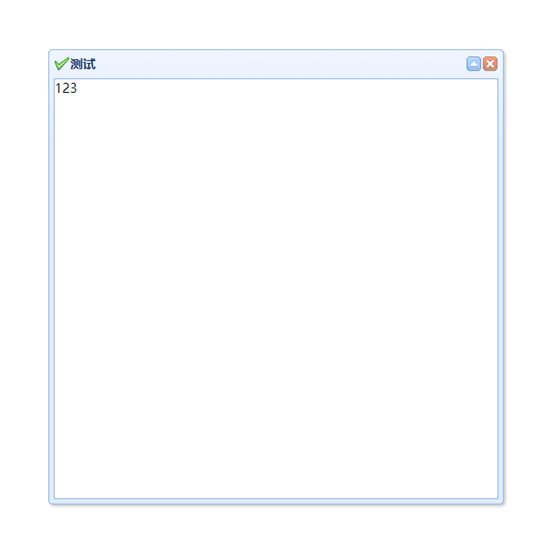
<div class="easyui-dialog" style="width:500px;height:500px" data-options="title:'标题 ',collapsible:true,iconCls:'icon-ok'">

内容部分</div>

</body>

</html>
4.js调用dialog
   <div id ="box" title="标题" style="width:500px;height:500px">

        内容部分

  </div>
$(function(){

    $('#box').dialog();

})
5.可拖动
$(function(){

         $('#box').draggable();

})
6.拖放Droppable
<!DOCTYPE html>

<html>

<head>

    <title>easyui学习</title>

    <script type="text/javascript" src = jquery-easyui/jquery.min.js> </script>

    <script type="text/javascript" src = jquery-easyui/jquery.easyui.min.js> </script>

    <script type="text/javascript" src = jquery-easyui/locale/easyui-lang-zh_CN.js> </script>

    <script type="text/javascript" src ="index.js"></script>  <!-- 自定义js -->

    <link rel="stylesheet"  href="jquery-easyui/themes/default/easyui.css">

    <link rel="stylesheet"  href="jquery-easyui/themes/icon.css">

</head>

<body>

<div id="dd"  style="width: 600px;height: 600px;background-color:red;" ></div>

  <div id ="box" title="标题" style="width:500px;height:500px;background-color: green;">

        <span id="span">内容部分</span>

  </div>

<!--    <div id ="box" title="标题" style="width:500px;height:500px">

        内容部分

  </div> -->

</div>

</body>

</html>
$(function(){

$("#dd").droppable({

accept:'#box',

onDragEnter:function(e,source){

  $(this).css("background-color",'blue');

},

onDragLeave:function(e,source){

  $(this).css("background-color",'red');

}

});

    $('#box').draggable();

})
easyUI学习笔记一的更多相关文章
- easyUI学习笔记二
1. 拖拉大小 <!DOCTYPE html> <html> <head> <title>easyui学习</title> <scr ...
- easyui学习笔记8—在手风琴中加载其他的页面
在手风琴中加载其他页面和在表格中加载其他的页面有写类似的,就是请求另外一个页面显示数据. 1.先看看引用的资源文件 <link rel="stylesheet" href=& ...
- easyui学习笔记2—在行内进行表格的增删改操作
第一篇笔记中记录了如何实现表格的增删改,那个是点击之后跳出来一个对话框然后进行的,这里是在表格本身上进行的操作,也很简单,但是这里发现一个版本问题,也可以说是兼容性问题. 1.首先我们看引用的js和c ...
- easyui学习笔记1—增删改操作
最近公司要用easyui,这里自己看了官网几篇文章,遇到些问题,大多数的问题都是敲代码的时候笔误,其他有些地方确实需要注意一下,这里做些笔记. 1.在mysql中建好表之后修改id字段为递增字段,发现 ...
- easyUi 学习笔记 (二 ) 使用tabs 里datagridview 发送ajax请求 不访问后台的问题
这个BUG 我花了一个半小时, 还是看不出哪里的问题, 于是就百度到这么一段话,我需要记住 <================================================= ...
- EasyUI学习笔记之panel
<easyUI panel 属性:> <!--引入easyUI panel 组件 设置宽,高,定义标题(默认在左上角),设置图标iconCls:'icon-ok',引入工具tools ...
- EasyUI学习笔记---Datagrid真分页
EasyUI Datagrid组件在我看来功能还是很强大的,在我使用过程中遇到分页请求的问题困扰了一天才解决,下面我就把我遇到的问题分享一下 //datagrid数据表格渲染 $("#dg& ...
- easyui学习笔记14-拓展的基本验证规则
/** * 扩展的基本校验规则, */ $.extend($.fn.validatebox.defaults.rules, { minLength : { // 判断最小长度 validator : ...
- JQuery EasyUI学习笔记
转载请注明原文地址:http://www.cnblogs.com/ygj0930/p/6690888.html 简介与准备 jQuery EasyUI 是一个基于 jQuery 的框架,集成了各种用 ...
随机推荐
- 左侧菜单收缩的实现(包括,筛选器,addclass、removeclass、绑定事件,链式编程)
<!DOCTYPE html> <html lang="en"> <head> <meta charset="UTF-8&quo ...
- Address already in use : connect
Address already in use : connect 错误以及处理 项目中有过手写并发测试,在长时间的并发测试(超过20秒,美妙超过2000)的情况下出现了以上错误 处理方法如下(抄的) ...
- eclipse安装weblogic Server服务器
1.首先打开eclipse,第一次进入欢迎画面点击上方标签X,关闭欢迎标签 2.关闭欢迎标签后,进入eclipse操作界面,在上方的菜单栏,选择windows下拉菜单,选择子菜单Preference ...
- smbd - 向客户提供SMB/CIFS服务的服务器
总览 SYNOPSIS smbd [-D] [-F] [-S] [-i] [-h] [-V] [-b] [-d <debug level>] [-l <log directory&g ...
- USB接口外壳地和信号地间的处理
USB外壳地和信号地之间串接1M电阻,并且还接一个0.01uf的电容到信号地,能否将一下这样处理的原理和目的: 1.将影响外壳的噪音滤除,不影响信号地: 2.迫使板子上电流是流入内部的信号地,而不是流 ...
- Codeforces 735E 树形DP
题意:给你一棵树,你需要在这棵树上选择一些点染成黑色,要求染色之后树中任意节点到离它最近的黑色节点的距离不超过m,问满足这种条件的染色方案有多少种? 思路:设dp[x][i]为以x为根的子树中,离x点 ...
- 【读书笔记】Cracking the Code Interview(第五版中文版)
导语 所有的编程练习都在牛客网OJ提交,链接: https://www.nowcoder.com/ta/cracking-the-coding-interview 第八章 面试考题 8.1 数组与字符 ...
- source insight 4.0.86.0安装破解问题
source insight 4.0.86.0安装过程中碰到导入lic文件一直不正确 解决办法: 需要将SourceInsight\SW_Install\SI4安装及破解文件 目录下的sourcein ...
- Tab选项卡 自动切换效果js实现
try.html <!DOCTYPE html> <html> <head> <meta charset="utf-8"> < ...
- Cesium标点
let startPoint = this.viewer.entities.add( //viewer.entities.add 添加实体的方法 { name: '测量距离', //这个属性跟页面显示 ...