
Incorporating ASP.NET MVC and SQL Server Reporting Services, Part 2
In the last issue, I introduced you to the basics of incorporating SQL Server Reporting Services into your ASP.NET MVC applications. In this issue, I’ll finish the series by illustrating how we can transfer data between the ASP.NET MVC context and the SSRS report context. In addition, I will also cover deployment issues such as authentication.
To illustrate these additional concepts, I will use our trusty old friend, the Northwind database. In particular, the report will leverage the Alphabetical List of Products view.Figure 1 illustrates the design time view of our report. The report has one parameter - category. Ultimately, this parameter will be supplied by the ASP.NET MVC application.Figure 2 illustrates the report in preview mode, listing products in the condiment category. In part 1 of this article I covered how to build and deploy reports to the report server. If you need to primer on those concepts, please consult that previous article.
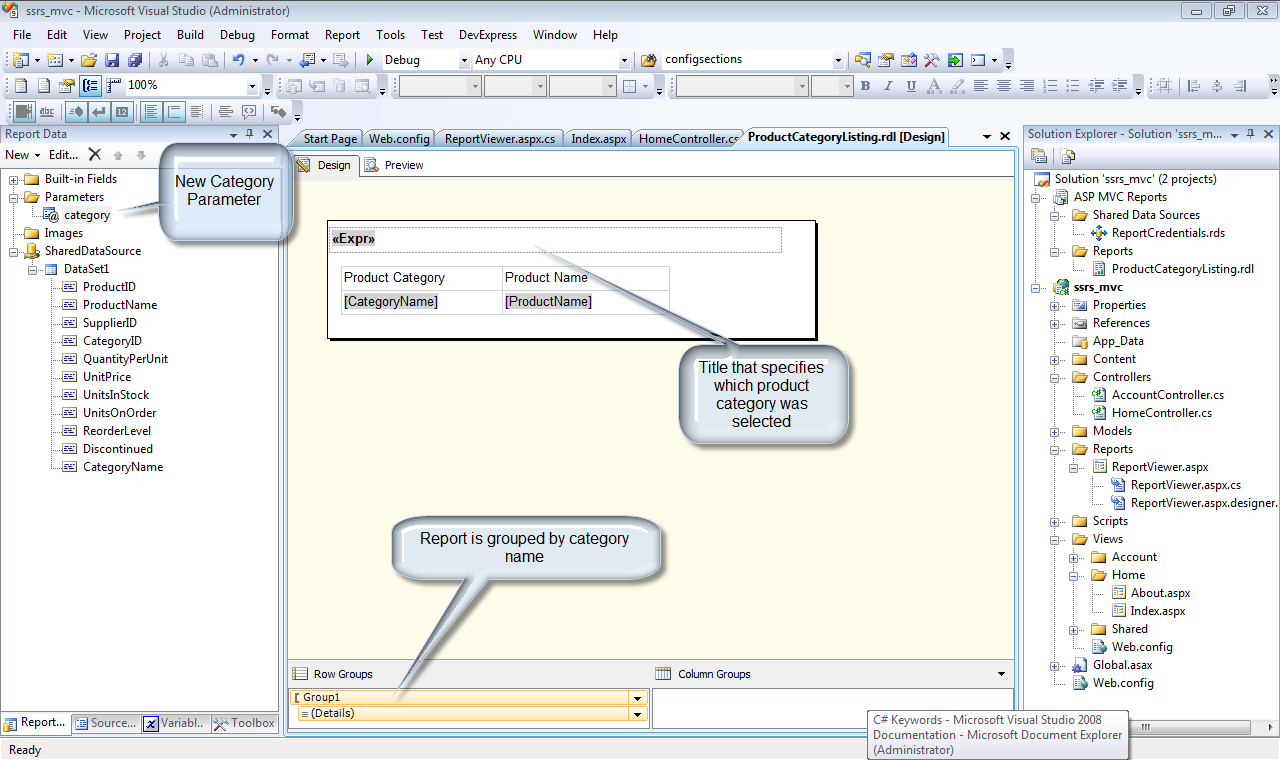 Figure 1: The report in this example is a listing of products, sorted by category.
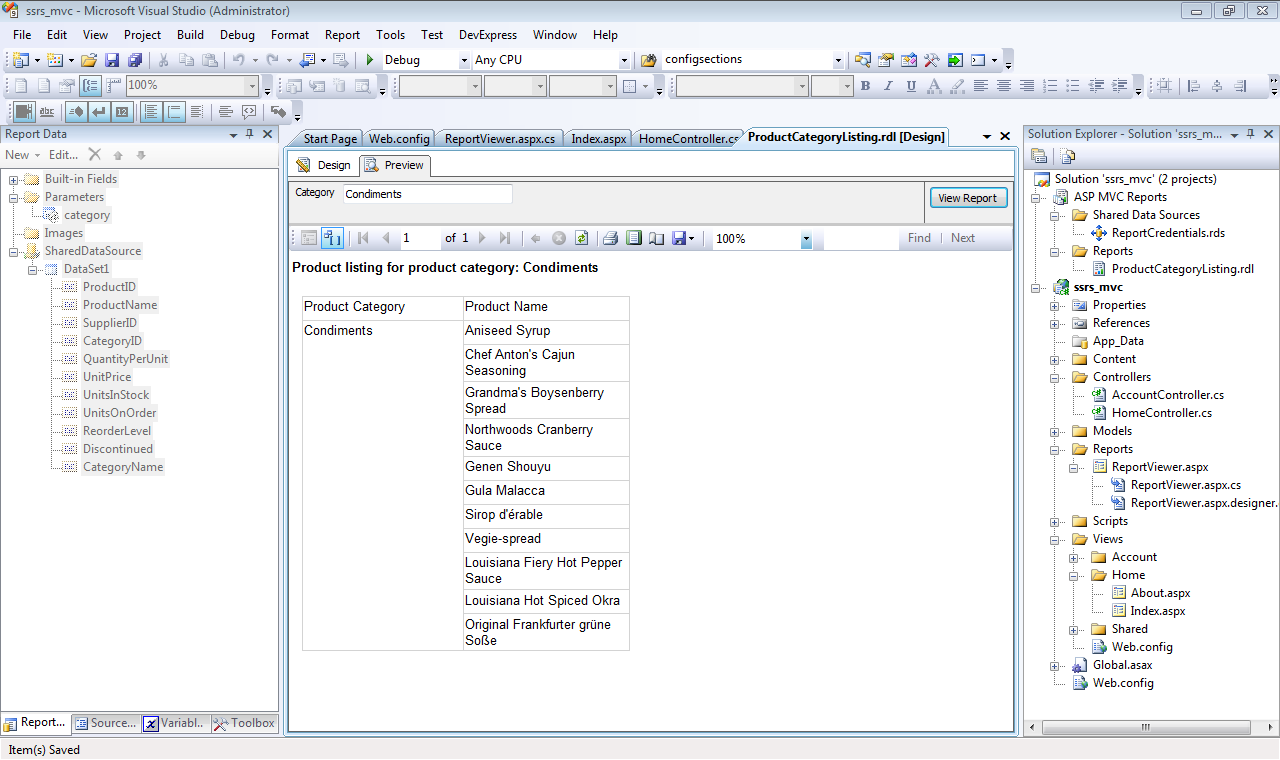 Figure 2: Product listing report in preview mode.
Passing Data Between Contexts
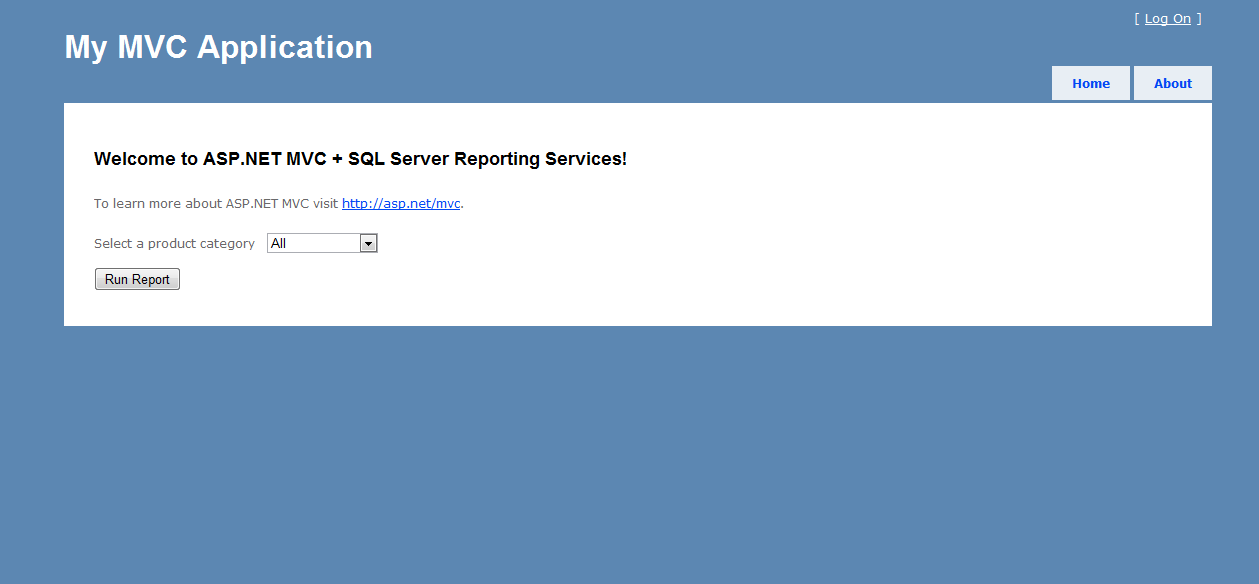
Listing 1 illustrates the controller method that launches the product listing report.Figure 3 illustrates the ASP.NET MVC page that invokes the ProductListingReport action. The key to passing data between contexts lies in the Session variable. The code uses a hash to keep track of report variables and their respective values. That hash is stored in the Session[“reportParameters”] variable. In part 1 of this article, the process was very specific in regards to the generated report. In fact, the Web Form that hosts the report viewer control could run any report. In other words, the report viewer controller only needs to know the report server and the report name. Accordingly, the report server and report name details will be passed to the report viewer control. With these examples we very easily achieve reusability. The last line of code re-directs the application to the report viewer aspx page. Listing 2 illustrates how the report viewer acts on these passed values.
In Listing 2, there are four basic operations:
- Report server specification
- Report name specification
- Security credentials specification
- Report parameter setting
You may be wondering where the report server and security credential information is stored. Because the report server and security credentials are not specific to any one report, that data should not be specified in a controller. Rather, these data points belong as part of the application configuration. In the case of an ASP.NET application, those configuration items are stored in the web.config file. The following configuration items supply the needed data:
<appSettings>

 <add key="ReportServerURL"

    value="http://host/reportserver" />

 <add key ="ReportServerDomain" value="Domain"/>

 <add key ="ReportServerUser" value="User"/>

 <add key="ReportServerPassword"

    value="Password"/>

</appSettings>
The domain, user and password data listed is for illustration purposes only. In a real production scenario, the report server will exist on a separate server that has its own authentication requirements. In order gain access to and to run those reports, authentication credentials must be passed to the report viewer.
Generating the Report
Because the ASP.NET MVC app will supply the necessary parameter values, there is no need to make parameters accessible or visible within the report. Figure 4 illustrates the report as generated by the ASP.NET MVC application. The following snippet shows the SQL code used by the report. The code incorporates the @category parameter. That is how the results are filtered.
SELECT *

   FROM

[Northwind].[dbo].[Alphabetical list of products]

  where CategoryName like @category
Conclusion
The combination of ASP.NET MVC and SQL Server Reporting Services (SSRS) provide a framework for robust applications. In this two-part series, you have seen how easy it is to extend your ASP.NET MVC applications with SSRS. With the approach presented here, you can easily achieve reusability, thereby using a common set of application components that are not specific to any one report and/or report server. I hope you find the information presented over these past two issues to be useful in your application development efforts. Until next time - happy coding!
Listing 1: Controller method to launch report

 [HttpPost]

public ActionResult ProductListingReport(FormCollection form)

{

  var reportParameters =

    new Dictionary<string, string>();

if (form["Category"] == "All")

   form["Category"] = "%";

   reportParameters.Add("category",

      form["Category"]);

Session["reportParameters"] =

   reportParameters;

Session["reportPath"] =

   "/ASPMVCReports/ProductCategoryListing";

return

   Redirect("../Reports/ReportViewer.aspx");

}

Listing 2: Page_Load code for ReportViewer.aspx page

protected void Page_Load(object sender, EventArgs e)

{

  if (!Page.IsPostBack)

  {

    //Specify the report server

    ReportViewer1.

      ServerReport.

      ReportServerUrl =

      new Uri(WebConfigurationManager.

      AppSettings["ReportServerURL"]);

    //Specify the report name

    ReportViewer1.

      ServerReport.

      ReportPath = Session["reportPath"].ToString();

    //Specify the server credentials

    ReportViewer1.

      ServerReport.

      ReportServerCredentials =

      new CustomReportCredentials

       (

         WebConfigurationManager.

          AppSettings["ReportServerUser"],

         WebConfigurationManager.

          AppSettings["ReportServerPassword"],

         WebConfigurationManager.

          AppSettings["ReportServerDomain"]

       );

                /*

                 * With the report specified, hydrate the report

                 * parameters based on the values in the

                 * reportParameters hash.

                 */

    var reportParameters = (Dictionary<string,

      string>)Session["reportParameters"];

    foreach (var item in reportParameters)

       {

         ReportViewer1.

           ServerReport.

           SetParameters(

             new List<ReportParameter>()

              {

                new ReportParameter

                  (item.Key, item.Value)

              });

        }

            }

}
Incorporating ASP.NET MVC and SQL Server Reporting Services, Part 2的更多相关文章
- Incorporating ASP.NET MVC and SQL Server Reporting Services, Part 1
Your ASP.NET MVC application needs reports. What do you do? In this article, I will demonstrate how ...
- ASP.NET MVC与Sql Server交互,把字典数据插入数据库
在"ASP.NET MVC与Sql Server交互, 插入数据"中,在Controller中拼接sql语句.比如: _db.InsertData("insert int ...
- ASP.NET MVC与Sql Server交互, 插入数据
在"ASP.NET MVC与Sql Server建立连接"中,与Sql Server建立了连接.本篇实践向Sql Server中插入数据. 在数据库帮助类中增加插入数据的方法. p ...
- [转]SQL Server Reporting Services - Timeout Settings
本文转自:https://social.technet.microsoft.com/wiki/contents/articles/23508.sql-server-reporting-services ...
- SQL Server Reporting Services本机模式下的权限管理
SQL Server Reporting Services在安装配置后,缺省只给BUILTIN\Administrators用户组(实际上只有本机的Administrator用户)提供管理权限.所以所 ...
- SrsDataConnector The SQL Server Reporting Services account is a local user and is not supported.
这次使用OS+SQL的镜像还原系统后安装了CRM 2015,主要流程是 安装IIS/AD,SSRS ,CRM2015.自带的SQL中SSRS没有安装完全,需配置一下. 这一切都满顺利的,最后在安装 S ...
- 充分利用 SQL Server Reporting Services 图表
最近在查SSRS的一些文章,看到MSDN在有一篇不错的文章,许多图表设置都有说明,共享给大家.. 其中有说明在SSRS中如果去写条件表达写和报表属性中的“自定义代码”,文章相对比较长,需要大家耐心的查 ...
- SQL Server Reporting Services – Insufficient Rights Error
http://www.sql-server-performance.com/2011/security-ssrs-reporting-error/ SQL Server Reporting Servi ...
- SQL Server Reporting Services (SQLEXPRESS) 服务占用80端口
win7, 好多时候,看到system进程占用了80端口,这个是系统进程,不能直接结束.我们不知道这个进程的哪个服务占用了80端口,这里记录其中一个服务"SQL Server Reporti ...
随机推荐
- ubuntu 安装java1.8
1.进入官网下载页面http://www.oracle.com/technetwork/java/javase/downloads/index.html 2.选择需要的版本,进入下载页面 下载 jdk ...
- Map类集合遍历
- Openstack_通用技术_RPC 远程异步调用
目录 目录 RPC 一个通过 HTTP Request 调用操作函数的 RPC 实现样例 环境 接收 HTTP Request RPC 调用具体的操作函数 测试 RPC RPC: 同一个项目内的不同服 ...
- Delphi XE2 之 FireMonkey 入门(21) - 和 FMX 相关的类(表)
TObject TPersistent TComponent IInterface,IInterfaceComponentReference TBasicAction TControl ...
- 阶段1 语言基础+高级_1-3-Java语言高级_06-File类与IO流_04 IO字节流_9_字节输入流读取字节数据
硬盘读取到内存 read值会读一个字节 a.txt里面a变成整数就是97 读取到末尾,返回-1 再读一次还是-1 读取的代码是重复的.可以使用循环去读取.while循环. 转行成char类型的 ...
- postman的断言/环境变量的处理
我们做接口测试都会有一个断言操作:也有一个变量被频繁使用,这时候可以用环境变量来处理 目录 1.postman之断言 2.postman之环境变量 1.postman之断言 同样以postman的登录 ...
- sql时间类型相关
1.现在时间 NOW() 示例: select * from users where date<now() 2.时间相减 INTERVAL ' DAY 示例: ' DAY 3.timestamp ...
- 16/7/8_PHP-对象的高级特性
对这个理解不太懂或者说 没有一个明确的用法,不知道该怎么使用,说到底还是不懂有什么用.我还是先把只是点复制过来 对象比较,当同一个类的两个实例的所有属性都相等时,可以使用比较运算符==进行判断,当需要 ...
- python接口自动化:调试接口的代码(无token情况下)
实现代码如下: #接口调试 import requests,time class api_demo1: def __init__(self,RequestWay,url,data): self.s=r ...
- 《深入浅出WPF》学习总结之XAML标签语言二
x名称空间 “x名称空间”的这个X是映射XML名称空间时给他取的名字(如果用的是字母y,那他就叫“y名称空间了”),x名称空间里的成员(x.name.x.class)是专门给XAML编译器看的.用来引 ...