
关于position的操作
1.position:relative
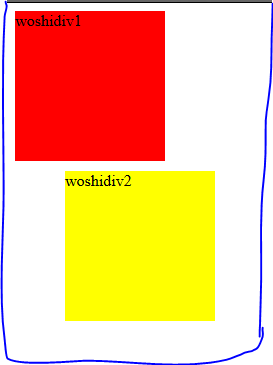
相较于正常位置的定位
<!DOCTYPE html>

<html lang="en">

<head>

    <meta charset="UTF-8">

    <meta name="viewport" content="width=device-width, initial-scale=1.0">

    <meta http-equiv="X-UA-Compatible" content="ie=edge">

    <title>Document</title>

    <style>

    #div1{

        width: 150px;

        height: 150px;

        background-color: red;

    }

    #div2{

        width: 150px;

        height: 150px;

        background-color: yellow;

        position: relative;

        left: 50px;//第二个div块离左边窗口50px

        top: 10px;//div2块相对于上面的div1块有
10px

    }

    </style>

</head>

<body>

    <div id="div1">woshidiv1</div>

    <div id="div2">woshidiv2</div>

</body>

</html>
下图为代码结果:
<!DOCTYPE html>

<html lang="en">

<head>

    <meta charset="UTF-8">

    <meta name="viewport" content="width=device-width, initial-scale=1.0">

    <meta http-equiv="X-UA-Compatible" content="ie=edge">

    <title>Document</title>

    <style>

    #div1{

        width: 150px;

        height: 150px;

        background-color: red;

    }

    #div2{

        width: 150px;

        height: 150px;

        background-color: yellow;

        position: relative;

        left: 150px;

        top: -150px;

    }

    </style>

</head>

<body>

    <div id="div1">woshidiv1</div>

    <div id="div2">woshidiv2</div>

</body>

</html>
<!DOCTYPE html>

<html lang="en">

<head>

    <meta charset="UTF-8">

    <meta name="viewport" content="width=device-width, initial-scale=1.0">

    <meta http-equiv="X-UA-Compatible" content="ie=edge">

    <title>Document</title>

    <style>

    #div1{

        width: 150px;

        height: 150px;

        background-color: red;

    }

    #div2{

        width: 150px;

        height: 150px;

        background-color: yellow;

        position: relative;

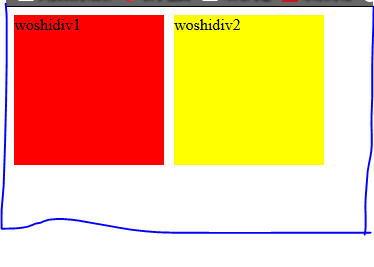
        left: 150px;//div2相对于div1距离左边有150px

        top: -150px;//div2相对于div1距离上边有150px

    }

    </style>

</head>

<body>

    <div id="div1">woshidiv1</div>

    <div id="div2">woshidiv2</div>

</body>

</html>
下图为代码结果:
2.position:absolute若滚动浏览器,则区块随之滚动
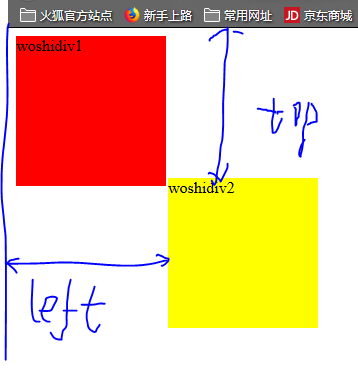
相对于浏览器窗口的左上角
<!DOCTYPE html>

<html lang="en">

<head>

    <meta charset="UTF-8">

    <meta name="viewport" content="width=device-width, initial-scale=1.0">

    <meta http-equiv="X-UA-Compatible" content="ie=edge">

    <title>Document</title>

    <style>

    #div1{

        width: 150px;

        height: 150px;

        background-color: red;

    }

    #div2{

        width: 150px;

        height: 150px;

        background-color: yellow;

        position: absolute;

        left: 160px;//距离窗口左边160px

        top: 150px;//距离窗口上边150px

    }

    </style>

</head>

<body>

    <div id="div1">woshidiv1</div>

    <div id="div2">woshidiv2</div>

</body>

</html>
下图为代码结果:
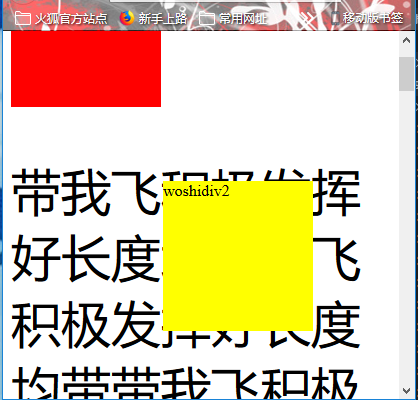
3.position:fixed位移基于浏览器左上角,以这种方式定位,若滚动窗口这个区块不随之滚动
<!DOCTYPE html>

<html lang="en">

<head>

    <meta charset="UTF-8">

    <meta name="viewport" content="width=device-width, initial-scale=1.0">

    <meta http-equiv="X-UA-Compatible" content="ie=edge">

    <title>Document</title>

    <style>

    #div1{

        width: 150px;

        height: 150px;

        background-color: red;

    }

    #div2{

        width: 150px;

        height: 150px;

        background-color: yellow;

        position: fixed;

        left: 160px;

        top: 150px;

    }

    p{

        font-size: 50px;

    }

    </style>

</head>

<body>

    <div id="div1">woshidiv1</div>

    <div id="div2">woshidiv2</div>

    <p>带我飞积极发挥好长度均带我飞积极发挥好长度均带

            带我飞积极发挥好长度均带我飞积极发挥

            带我飞积极发挥好长度均带我飞积极发挥好长度均

            带我飞积极发挥好长度均带我飞积极发挥好长度均

            带我飞积极发挥好长度均带我飞积极发挥好长度均带我飞积极发挥好长度均带我飞积极发
挥好长度均带带我飞积极发挥好长度均我飞积极发挥好长度均带我飞积极发挥好带我飞积极发挥好长度均长度均带我飞
积极发挥好长度均带我飞积极发带我飞积极发挥好长度均挥好长度均带我飞积极发挥好长度均带我飞带我飞积极发挥好长
度均积极发挥好长度均带我飞积极发挥好长度均带我飞积极发挥好长度均带我飞积极发挥好长度均

            带我飞积极发挥好长度均好长度均我飞积极发挥好长度均</p>

</body>

</html>
下图为代码结果:
4.position:static表示默认值
<!DOCTYPE html>

<html lang="en">

<head>

    <meta charset="UTF-8">

    <meta name="viewport" content="width=device-width, initial-scale=1.0">

    <meta http-equiv="X-UA-Compatible" content="ie=edge">

    <title>Document</title>

    <style>

    #div1{

        width: 150px;

        height: 150px;

        background-color: red;

    }

    #div2{

        width: 150px;

        height: 150px;

        background-color: yellow;

        position: static;

    }

    </style>

</head>

<body>

    <div id="div1">woshidiv1</div>

    <div id="div2">woshidiv2</div>

</body>

</html>
下图为代码结果:
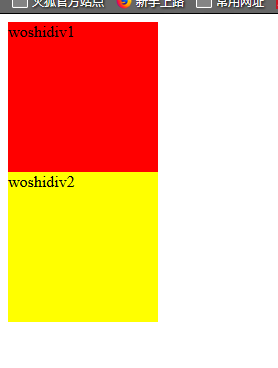
5.position:auto由浏览器自己计算
关于position的操作的更多相关文章
- android操作通讯录的联系人
界面配置文件 <LinearLayout xmlns:android="http://schemas.android.com/apk/res/android" and ...
- RecycleView 实现多布局
最近的一个新需求,简单描述下吧: 需求: 目标样式如图所示,我们需要根据需求动态添加网关和设备. 目标有了下面就是怎么实现了.首先我们选用的是RecycleView 那么主要目标就成了 在recycl ...
- XML数据 JSON数据 LitJSON 数据 的编写和解析 小结
用XML生成如下数据<?xml version="1.0"encoding="UTF-8"?><Transform name="My ...
- 条款3:尽可能地使用const
如下为const修饰的几种类型: char name[] = "benxintuzi"; char* p1 = name; // non-const ...
- 【原创】java NIO FileChannel 学习笔记 FileChannel 简介
java NIO 中FileChannel 的实现类是 FileChannelImpl,FileChannel本身是一个抽象类. 先介绍FileChannel File Channels 是线程安全 ...
- Java NIO之缓冲区
1.简介 Java NIO 相关类在 JDK 1.4 中被引入,用于提高 I/O 的效率.Java NIO 包含了很多东西,但核心的东西不外乎 Buffer.Channel 和 Selector.这其 ...
- Xapian的内存索引
关键字:xapian.内存索引 xapian除了提供用于生产环境的磁盘索引,也提供了内存索引(InMemoryDatabase).内存索引.我们可以通过观察内存索引的设计,来了解xapian的设计思路 ...
- 感悟优化——Netty对JDK缓冲区的内存池零拷贝改造
NIO中缓冲区是数据传输的基础,JDK通过ByteBuffer实现,Netty框架中并未采用JDK原生的ByteBuffer,而是构造了ByteBuf. ByteBuf对ByteBuffer做了大量的 ...
- android -------- Data Binding的使用 RecyclerView
今天来说说DataBinding在列表RecyclerView中的使用 列表绑定 App中经常用到列表展示,Data Binding在列表中一样可以扮演重要的作用,直接绑定数据和事件到每一个列表的it ...
随机推荐
- HDU 6012 Lotus and Horticulture(离散化)
题目代号:HDU 6012 题目链接:http://acm.hdu.edu.cn/showproblem.php?pid=6012 Lotus and Horticulture Time Limit: ...
- xshell的快捷键
https://blog.csdn.net/hellozpc/article/details/46753575
- shell变量与运算
shell变量与运算 @(0003 shell编程) 变量存在于内存中.假设变量str,设置或修改变量属性时,不带$号,只有引用变量的值时才使用$号.也就是说在内存中,标记变量的变量名称是str,而不 ...
- java生成二维码的几种方式
1: 使用SwetakeQRCode在Java项目中生成二维码 http://swetake.com/qr/ 下载地址 或着http://sourceforge.jp/projects/qrcode/ ...
- sass scss less 的编译工具 koala
使用 koala 时注意事项: 1.目录中一定不能出现中文,否则就会报错 2.文件中如果出现中文(!注释也算) 开头一定要加 @charset "utf-8"; 否则就会出现无 ...
- JS实现数组排序:升序和降序
如果指明了 compareFunction ,那么数组会按照调用该函数的返回值排序.即 a 和 b 是两个将要被比较的元素: 如果 compareFunction(a, b) 小于 0 ,那么 a 会 ...
- python中单下划线和双下划线的区别
1.python中双下划线(__str__)代表这个变量是特殊变量,是可以直接访问的 __xxx___ 定义的是特列方法.像__init__之类的 2.python前面双划线(__name)代表这个变 ...
- lua源码学习篇一:环境部署
研究生即将毕业,答辩完成后,这几天有些时间.开始写一些自己的东西,记录自己的学习历程. --前言 本着学习和交流的原则,本文的内容仅供参考,而不是权威版本,如有任何问题,欢迎指出. --声明 跨专业考 ...
- 思维导图之kubernetes
k8s docker
- 【MyBatis】----【MyBatis】--封装---别名---properties
一.核心配置文件 <?xml version="1.0" encoding="UTF-8"?> <!DOCTYPE configuration ...