
RocketMQ事务性消息
mq事务介绍
mq事务消息流程
- 生产者发送消息到mq,消息状态为:SEND_OK。此消息是消费者不可见(消费者无法消费此条消息)
- 执行本地任务:成功则返回COMMIT_MESSAGE,此时消费者可消费此条消息。失败则返回ROLLBACK_MESSAGE,此时删除mq的此条消息
- 如果消息一定时间后没有被确认(COMMIT_MESSAGE)也没有被删除(ROLLBACK_MESSAGE),则mq回调一个方法,主动确认本地事务是否成功,主动要求确认消息状态。
1、配置文件
2、生产者
1、生产者配置
package com.gofun.customer.mqTrans;

import com.gofun.customer.mq.RocketMqProducerProperties;

import org.apache.rocketmq.client.exception.MQClientException;

import org.apache.rocketmq.client.producer.TransactionMQProducer;

import org.springframework.beans.factory.annotation.Autowired;

import org.springframework.boot.autoconfigure.condition.ConditionalOnProperty;

import org.springframework.boot.context.properties.EnableConfigurationProperties;

import org.springframework.context.annotation.Bean;

import org.springframework.context.annotation.Configuration;

import java.util.concurrent.*;

@Configuration

@EnableConfigurationProperties(RocketMqProducerProperties.class)

@ConditionalOnProperty(prefix = "rocketmq.producer", name = "iseffect", havingValue = "true")

public class RocketMqTransConfig {

    @Autowired

    private RocketMqProducerProperties rocketMqProperties;

    private final int corePoolSize = 2;//消费最小线程数

    private final int maximumPoolSize = 5;//消费最大线程数

    private final long keepAliveTime = 100;//线程活跃时间

    private final TimeUnit timeUnit = TimeUnit.SECONDS;//keepAliveTime时间单位

    private final int capacity = 2000;//保存任务的队列容量

    @Bean

    @ConditionalOnProperty(prefix = "rocketmq.producer", name = "type", havingValue = "transaction")

    public TransactionMQProducer transactionMQProducer() throws MQClientException {

        TransactionMQProducer transactionMQProducer = new TransactionMQProducer(rocketMqProperties.getGroupName());

        ExecutorService executorService = new ThreadPoolExecutor(corePoolSize, maximumPoolSize, keepAliveTime, timeUnit,

                new ArrayBlockingQueue<Runnable>(capacity), new ThreadFactory() {

            @Override

            public Thread newThread(Runnable r) {

                Thread thread = new Thread(r);

                thread.setName("client-transaction-msg-check-thread");

                return thread;

            }

        });

        transactionMQProducer.setNamesrvAddr(rocketMqProperties.getNamesrvAddr());

        transactionMQProducer.setExecutorService(executorService);

        transactionMQProducer.start();

        return transactionMQProducer;

    }

}
生产者发送工具类
package com.gofun.customer.mqTrans;

import com.alibaba.fastjson.JSON;

import com.gofun.customer.mq.RocketMqProducerProperties;

import org.apache.rocketmq.client.producer.DefaultMQProducer;

import org.apache.rocketmq.client.producer.SendResult;

import org.apache.rocketmq.client.producer.TransactionListener;

import org.apache.rocketmq.client.producer.TransactionMQProducer;

import org.apache.rocketmq.common.message.Message;

import org.springframework.beans.factory.annotation.Autowired;

import org.springframework.stereotype.Component;

@Component

public class RocketMqTransProducer {

    @Autowired

    private TransactionMQProducer transactionMQProducer;

    @Autowired

    private RocketMqProducerProperties rocketMqProperties;

    public void setListener(TransactionListener listener) {

        transactionMQProducer.setTransactionListener(listener);

        transactionMQProducer.setSendMsgTimeout(10000);

    }

    public SendResult send(String topic, String tag, Object obj) {

        Message msg = new Message(topic, tag, getBody(obj));

        SendResult sendResult = null;

        try {

            sendResult = transactionMQProducer.sendMessageInTransaction(msg, null);

        } catch (Exception e) {

        }

        return sendResult;

    }

    public SendResult send(String tag, Object obj) {

        Message msg = new Message(rocketMqProperties.getTopicName(), tag, getBody(obj));

        SendResult sendResult = null;

        try {

            sendResult = transactionMQProducer.sendMessageInTransaction(msg, null);

        } catch (Exception e) {

        }

        return sendResult;

    }

    private byte[] getBody(Object obj) {

        String body = null;

        if(obj == null){

            return null;

        }

        if(obj instanceof String){

            body = (String) obj;

        }else{

            body = JSON.toJSONString(obj);

        }

        return body.getBytes();

    }

}
2、本地事务和超时mq回调方法
package com.gofun.customer.controller.test;

import org.apache.rocketmq.client.producer.LocalTransactionState;

import org.apache.rocketmq.client.producer.TransactionListener;

import org.apache.rocketmq.common.message.Message;

import org.apache.rocketmq.common.message.MessageExt;

import org.springframework.stereotype.Component;

import java.util.Random;

@Component

public class TestTransactionListener implements TransactionListener {

    private static boolean transStatus = true;

    /**

     * 执行本地事务

     *

     * @param message

     * @param o

     * @return

     */

    @Override

    public LocalTransactionState executeLocalTransaction(Message message, Object o) {

        System.out.println("用一个随机数模拟本地任务执行成功或失败");

        Random random = new Random();

        transStatus = random.nextBoolean();

        if (transStatus) {

            System.out.println("执行本地任务成功。。。。。。");

            return LocalTransactionState.COMMIT_MESSAGE;

        }

        System.out.println("执行本地任务失败。。。。。");

        return LocalTransactionState.ROLLBACK_MESSAGE;

    }

    /**

     * mq长时间收不到提交消息,会执行此方法,检查本地事务是否成功

     * @param messageExt

     * @return

     */

    @Override

    public LocalTransactionState checkLocalTransaction(MessageExt messageExt) {

        System.out.println("获取本地任务执行成功或失败");

        if (transStatus) {

            System.out.println("判断本地任务成功。。。。");

            return LocalTransactionState.COMMIT_MESSAGE;

        }

        System.out.println("判断本地任务失败。。。。");

        return LocalTransactionState.ROLLBACK_MESSAGE;

    }

}
- 实现接口TransactionListener
- executeLocalTransaction 方法内执行本地事务,并且判断事务是否成功,成功返回LocalTransactionState.COMMIT_MESSAGE,失败返回:LocalTransactionState.ROLLBACK_MESSAGE;
- LocalTransactionState.ROLLBACK_UNKNOW 是中间状态,该消息正在检查中,等待检查结果后执行上述两个状态
- checkLocalTransaction 方法是mq 长时间处于UNKNOW 状态时会调用此方法,主动请求确认消息状态。
3、发送事务消息
1、引入发送事务消息的工具类
@Autowired

    private RocketMqTransProducer rocketMqProducer;

    @Autowired

    private TestTransactionListener testTransactionListener;
2、发送消息
rocketMqProducer.setListener(testTransactionListener);

        SendResult sendResult = rocketMqProducer.send("testTag", "测试mq发送消息。。。。");

        if (sendResult != null) {

            SendStatus sendStatus = sendResult.getSendStatus();

            System.out.println("发送消息返回:" + sendStatus.toString());

        } else {

            System.out.println("发送消息失败");

        }
3、消费者
消费者与非事务性消费者相同见:https://www.cnblogs.com/happydreamzjl/p/12022412.html
4、消费者消费情况
- 可看到本地任务成功时消费者消费了消息,本地任务失败时没有消费消息(消息没有发送成功)
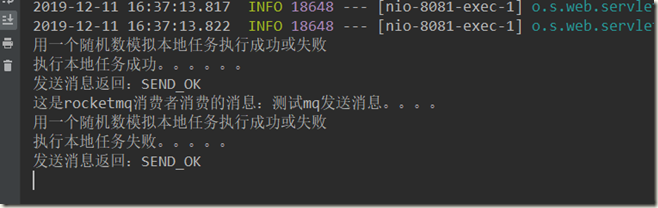
转自:https://blog.csdn.net/Cy_LightBule/article/details/88891844
https://www.jianshu.com/p/5260a2739d80
RocketMQ事务性消息的更多相关文章
- RocketMQ事务性消息及持久化
TransactionProducer(事务消息): 在分布式系统中,我们时常会遇到分布式事务的问题,除了常规的解决方案之外,我们还可以利用RocketMQ的事务性消息来解决分布式事务的问题.Rock ...
- rocketmq总结(消息的高可用、中间件选型)
rocketmq总结(消息的高可用.中间件选型) 参考: https://blog.csdn.net/meilong_whpu/article/details/76922456 http://blog ...
- JMS - 事务性消息
JMS 事务遵从发送操作与接收操作相互分离的约定.下图显示的是一个事务性发送,其中一组消息要么能够保证全部到达消息服务器,要么连一条消息也不能保证到达消息服务器.从发送者的角度来看,JMS 提供者为这 ...
- RocketMQ源码 — 九、 RocketMQ延时消息
上一节消息重试里面提到了重试的消息可以被延时消费,其实除此之外,用户发送的消息也可以指定延时时间(更准确的说是延时等级),然后在指定延时时间之后投递消息,然后被consumer消费.阿里云的ons还支 ...
- 聊一聊顺序消息(RocketMQ顺序消息的实现机制)
当我们说顺序时,我们在说什么? 日常思维中,顺序大部分情况会和时间关联起来,即时间的先后表示事件的顺序关系. 比如事件A发生在下午3点一刻,而事件B发生在下午4点,那么我们认为事件A发生在事件B之前, ...
- RocketMQ源码分析之RocketMQ事务消息实现原理上篇(二阶段提交)
在阅读本文前,若您对RocketMQ技术感兴趣,请加入 RocketMQ技术交流群 根据上文的描述,发送事务消息的入口为: TransactionMQProducer#sendMessageInTra ...
- RocketMQ事务消息实现分析
这周RocketMQ发布了4.3.0版本,New Feature中最受关注的一点就是支持了事务消息: 今天花了点时间看了下具体的实现内容,下面是简单的总结. RocketMQ事务消息概要 通过冯嘉发布 ...
- RocketMQ之消息幂等
幂等(idempotent.idempotence)是一个数学与计算机学概念,常见于抽象代数中. 在编程中一个幂等操作的特点是其任意多次执行所产生的影响均与一次执行的影响相同. 首先我们了解一下什么是 ...
- rocketmq总结(消息的顺序、重复、事务、消费模式)
rocketmq总结(消息的顺序.重复.事务.消费模式) 参考: http://www.cnblogs.com/wxd0108/p/6038543.html https://www.cnblogs.c ...
随机推荐
- cglib代理与jdk动态代理示例
先看基于jdk实现的动态代理实现例子 1.先声明一个接口类 public interface UserService{ public String getName(String msg); } 2.实 ...
- 转帖 java使用poi.3.10读取excel 2010
package poi; import java.io.FileInputStream; import java.io.IOException; import java.io.InputStream; ...
- sql格式化时间
sql格式化date类型 DATE_FORMAT(nuw(), '%Y-%m-%d') sql格式化long类型时间 FROM_UNIXTIME(time/1000,'%Y-%m-%d')
- 关于Linux_监控系统资源/性能命令_vmstat
(系统资源查看命令-vmstat[监控系统资源命令]) command:vmstat [刷新延时 刷新次数] 分解解析: procs:进程信息字段: ...
- python读取配置文件(ini、yaml、xml)
python读取配置文件(ini.yaml.xml)
- javaweb判断当前请求是否为移动设备访问的方法
由于移动端和pc端还是稍微有些区别的,我觉得最好是在一个地儿统一判断,而且不要改动原先的代码,这样可以从一定程度上减少bug的数量.我的想法是首先应该判断当前请求是否为移动端,然后设一个标识到sess ...
- tp框架连接数据库配置及Model数据模型层
在config.php做数据库连接配置 <?php return array( //'配置项'=>'配置值' 'SHOW_PAGE_TRACE'=>true, /* 数据库设置 */ ...
- Python--前端之HTML
html概述和基本结构 HTML概述 HTML是 HyperText Mark-up Language 的首字母简写,意思是超文本标记语言,超文本指的是超链接,标记指的是标签,是一种用来制作网页的语言 ...
- hdu 4352 XHXJ's LIS (数位dp+状态压缩)
Description #define xhxj (Xin Hang senior sister(学姐)) If you do not know xhxj, then carefully readin ...
- Springboot与jsp使用404错误
未加依赖包时出现:Did not find handler method for [/WEB-INF/views/login.jsp] 加入下面依赖包: <dependency> < ...