
spring security 学习二
doc:https://docs.spring.io/spring-security/site/docs/
基于表单的认证(个性化认证流程):
一、自定义登录页面
1、在securityConfigy配置类中的config方法中添加调用链方法
    @Override

    protected void configure(HttpSecurity http) throws Exception {

        http.formLogin()//指定是表单登录

                .loginPage("/cus_login.html")//登录页面

                .and()

                .authorizeRequests()//授权

                .anyRequest()//任何请求

                .authenticated();//都需要身份认证

    }
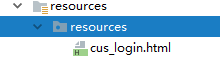
2、同时在resources/resources下创建一个html文件
<!DOCTYPE html>

<html lang="en">

<head>

    <meta charset="UTF-8">

    <title>Title</title>

</head>

<body>

自定义登录页面

</body>

</html>
/3、配置好之后,启动项目,访问localhost:9999/h api
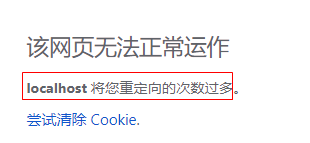
浏览器后报错:,重定向到登录页面次数太多
4、为什么出现这种情况:
因为在securityconfigy配置类中指定了一个loginPage,但是在方法链中,有表明:任何请求都需要认证
.anyRequest()//任何请求

                .authenticated();//都需要身份认证
处理:在anyRequest方法前和authorizeRequests方法后添加antMatchers匹配规则,指定登录页面允许访问
.authorizeRequests()//授权

                .antMatchers("/cus_login.html").permitAll()
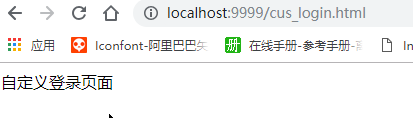
配置完成后再次访问localhost:9999/h :,即可跳转至自定义的登录页面
5、完善登录页面
//在usernamePasswordAuthenticationFilter中处理的action为/login,请求方式是post
 public UsernamePasswordAuthenticationFilter() {

        super(new AntPathRequestMatcher("/login", "POST"));

    }
<!DOCTYPE html>

<html lang="en">

<head>

    <meta charset="UTF-8">

    <title>Title</title>

</head>

<body>

自定义登录页面

<form action="/authentication/form" method="POST">

    <table>

        <tr>

            <td>用户名:</td>

            <td><input type="text" name="username"></td>

        </tr>

        <tr>

            <td>密码:</td>

            <td><input type="text" name="password"></td>

        </tr>

        <tr>

            <td>

                <button type="submit">登录</button>

            </td>

        </tr>

    </table>

</form>

</body>

</html>
因为在登录页面中设定的action为“/authentication/form”,所以在securityConfig配置类的方法链中添加loginProcessingUrl方法
    @Override

    protected void configure(HttpSecurity http) throws Exception {

        http.formLogin()//指定是表单登录

                .loginPage("/cus_login.html")//登录页面

                .loginProcessingUrl("/authentication/form")

                .and()

                .authorizeRequests()//授权

                .antMatchers("/cus_login.html").permitAll()

                .anyRequest()//任何请求

                .authenticated();//都需要身份认证

    }
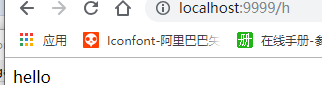
重启项目:访问localhost:9999/h
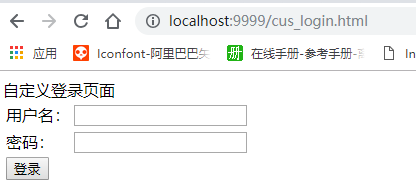
显示为自定义的页面。
csrf().disable();//跨站防护不适用
6、将loginPage(/cus_login.html) html页面改为一个controller代码
①新建一个controller
@RestController

public class LoginSecurityController {

    @RequestMapping("/authentication/require")

    public String requireAuthentication(HttpServletRequest request, HttpServletResponse response) {

        return null;

    }

}
②修改securityconfig配置类中的config中的方法调用链中的loginPage
    @Override

    protected void configure(HttpSecurity http) throws Exception {

        http.formLogin()//指定是表单登录

                .loginPage("/authentication/require")//登录页面

                .loginProcessingUrl("/authentication/form")

                .and()

                .authorizeRequests()//授权

                .antMatchers("/authentication/require").permitAll()

                .anyRequest()//任何请求

                .authenticated()//都需要身份认证

                .and()

                .csrf().disable();//跨站防护不适用

    }
二、自定义登录成功的处理
实现AuthenticationSucessHandler接口,一下实现方式是:继承SaveRequestAwareAuthenticationSuccessHandler类(这样的话是可以根据请求方式的类型,来返回不同个数的数据,json或者默认)
package com.nxz.security.handler;

import com.fasterxml.jackson.databind.ObjectMapper;

import com.nxz.security.core.properties.LoginType;

import com.nxz.security.core.properties.SecurityProperties;

import lombok.extern.slf4j.Slf4j;

import org.springframework.beans.factory.annotation.Autowired;

import org.springframework.security.core.Authentication;

import org.springframework.security.web.authentication.SavedRequestAwareAuthenticationSuccessHandler;

import org.springframework.stereotype.Component;

import javax.servlet.ServletException;

import javax.servlet.http.HttpServletRequest;

import javax.servlet.http.HttpServletResponse;

import java.io.IOException;

@Component("custAuthenticationSuccessHandler")

@Slf4j

public class CustAuthenticationSuccessHandler extends SavedRequestAwareAuthenticationSuccessHandler {

    @Autowired//springmvc自动注册的一个mapper类

    private ObjectMapper objectMapper;

    @Autowired

    private SecurityProperties securityProperties;

    @Override

    public void onAuthenticationSuccess(HttpServletRequest httpServletRequest, HttpServletResponse httpServletResponse, Authentication authentication) throws IOException, ServletException {

        log.info("登录成功");

        if (LoginType.JSON.equals(securityProperties.getBrowser().getLoginType())) {

            httpServletResponse.setContentType("application/json;UTF-8");

            httpServletResponse.getWriter().write(objectMapper.writeValueAsString(authentication));

        } else {

            super.onAuthenticationSuccess(httpServletRequest, httpServletResponse, authentication);

        }

    }

}
 @Autowired

 private AuthenticationSuccessHandler custAuthenticationSuccessHandler;

http.formLogin()

                .loginPage("/authentication/require").loginProcessingUrl("/authentication/form")

                .successHandler(custAuthenticationSuccessHandler)

                .failureHandler(custAuthenticationFailerHandler)

                .and()

                .authorizeRequests()

                .antMatchers("/authentication/require",loginPage,"/code/image").permitAll()

                .anyRequest()

                .authenticated();
三、自定义登录失败的处理
实现AuthenticationFailureHandler接口,继承SimpleUrlAuthenticationFailureHandler,根据请求方式返回不同的类型
package com.nxz.security.handler;

import com.alibaba.fastjson.JSON;

import com.fasterxml.jackson.databind.ObjectMapper;

import com.nxz.security.core.properties.LoginType;

import com.nxz.security.core.properties.SecurityProperties;

import lombok.extern.slf4j.Slf4j;

import org.springframework.beans.factory.annotation.Autowired;

import org.springframework.http.HttpStatus;

import org.springframework.security.core.AuthenticationException;

import org.springframework.security.web.authentication.SimpleUrlAuthenticationFailureHandler;

import org.springframework.stereotype.Component;

import javax.servlet.ServletException;

import javax.servlet.http.HttpServletRequest;

import javax.servlet.http.HttpServletResponse;

import java.io.IOException;

@Slf4j

@Component("custAuthenticationFailerHandler")

public class CustAuthenticationFailerHandler extends SimpleUrlAuthenticationFailureHandler {

    @Autowired

    private ObjectMapper objectMapper;

    @Autowired

    private SecurityProperties securityProperties;

    @Override

    public void onAuthenticationFailure(HttpServletRequest request, HttpServletResponse response, AuthenticationException exception) throws IOException, ServletException {

        log.info("登录失败!");

        if (LoginType.JSON.equals(securityProperties.getBrowser().getLoginType())) {

            response.setStatus(HttpStatus.INTERNAL_SERVER_ERROR.value());

            response.setContentType("application/json;charset=UTF-8");

            response.getWriter().write(JSON.toJSONString(objectMapper.writeValueAsString(exception)));

        } else {

            super.onAuthenticationFailure(request, response, exception);

        }

    }

}
@Autowired

    private AuthenticationFailureHandler custAuthenticationFailerHandler;
四、源码学习
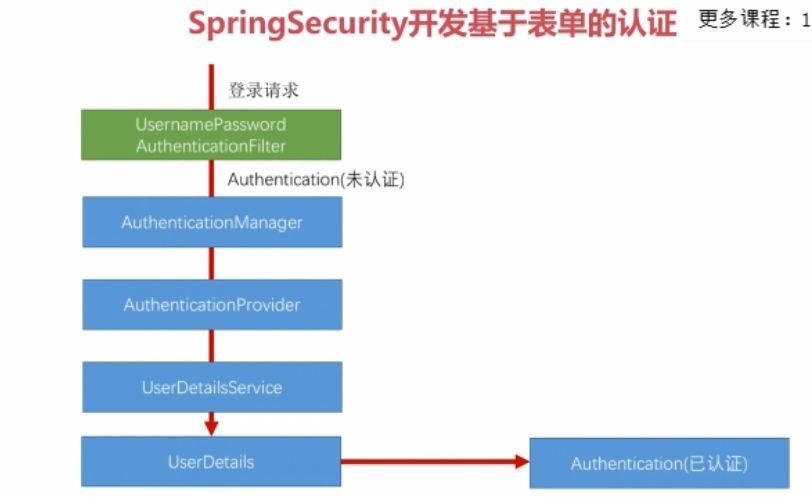
1、认证流程说明
登录请求进来是,会先到UsernamePasswordAuthentication类的,其实最先走的是它的父类AbstractAuthenticationProcessingFilter.java,在父类中会走attemptAuthentication方法,父类没有实现,因此会走子类的方法,当认证成功后,会走到最后successFulAuthentication方法
public void doFilter(ServletRequest req, ServletResponse res, FilterChain chain)

            throws IOException, ServletException {

     。。。。
     。。。。

        Authentication authResult;

        try {

            authResult = attemptAuthentication(request, response);

            if (authResult == null) {

                // return immediately as subclass has indicated that it hasn't completed

                // authentication

                return;

            }

            sessionStrategy.onAuthentication(authResult, request, response);

        }

    。。。。

    。。。。

        // Authentication success

        if (continueChainBeforeSuccessfulAuthentication) {

            chain.doFilter(request, response);

        }

        successfulAuthentication(request, response, chain, authResult);

    }
attemptAuthentication方法(子类usernamepasswordAuthenticationFilter.java)
    public Authentication attemptAuthentication(HttpServletRequest request,

            HttpServletResponse response) throws AuthenticationException {

        if (postOnly && !request.getMethod().equals("POST")) {

            throw new AuthenticationServiceException(

                    "Authentication method not supported: " + request.getMethod());

        }

        String username = obtainUsername(request);

        String password = obtainPassword(request);

    。。。。
    。。。。
        username = username.trim();

    //这个UsernamepasswordAuthenticationToken其实就是封装了username 和password信息

        UsernamePasswordAuthenticationToken authRequest = new UsernamePasswordAuthenticationToken(

                username, password);

        // 这个setDetails会把请求的一些信息设置到authRequest对象中

        setDetails(request, authRequest);

        return this.getAuthenticationManager().authenticate(authRequest);

    }
上边那个this.getAuthenticationManager() 会获取一个authenticationManager类
作用:收集相关的provider,当请求到的时候,循环判断是否支持当前的provider类型
public interface AuthenticationManager {
  //authenticate认证方法,交给实现类实现

    Authentication authenticate(Authentication var1) throws AuthenticationException;

}
他的实现类(用的就是ProviderManger类),不同的provider支持的Authentication是不同的
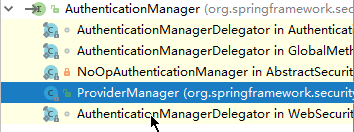
例如:UsernamePasswordAuthenticationToken类型的Authentication时,provider就是DaoAuthenticationProvider,
   public Authentication authenticate(Authentication authentication) throws AuthenticationException {

        Class<? extends Authentication> toTest = authentication.getClass();

        AuthenticationException lastException = null;

        AuthenticationException parentException = null;

        Authentication result = null;

        Authentication parentResult = null;

        boolean debug = logger.isDebugEnabled();

        Iterator var8 = this.getProviders().iterator();

        while(var8.hasNext()) {

            AuthenticationProvider provider = (AuthenticationProvider)var8.next();

            if (provider.supports(toTest)) {

                if (debug) {

                    logger.debug("Authentication attempt using " + provider.getClass().getName());

                }

                try {

                    result = provider.authenticate(authentication);

                    if (result != null) {

                        this.copyDetails(authentication, result);

                        break;

                    }

                } catch (AccountStatusException var13) {

                    this.prepareException(var13, authentication);

                    throw var13;

                } catch (InternalAuthenticationServiceException var14) {

                    this.prepareException(var14, authentication);

                    throw var14;

                } catch (AuthenticationException var15) {

                    lastException = var15;

                }

            }

        }

      。。。。。

    }
上边那个标红的provider.authenticate方法会走到DaoAuthenticationProvider对象的父类对象的authticate方法,
public Authentication authenticate(Authentication authentication) throws AuthenticationException {

        Assert.isInstanceOf(UsernamePasswordAuthenticationToken.class, authentication, () -> {

            return this.messages.getMessage("AbstractUserDetailsAuthenticationProvider.onlySupports", "Only UsernamePasswordAuthenticationToken is supported");

        });

        String username = authentication.getPrincipal() == null ? "NONE_PROVIDED" : authentication.getName();

        boolean cacheWasUsed = true;

        UserDetails user = this.userCache.getUserFromCache(username);

        if (user == null) {

            cacheWasUsed = false;

            try {
         //这块会进入子类DaoAuthenticationPrivoder

                user = this.retrieveUser(username, (UsernamePasswordAuthenticationToken)authentication);

            } catch (UsernameNotFoundException var6) {

                this.logger.debug("User '" + username + "' not found");

                if (this.hideUserNotFoundExceptions) {

                    throw new BadCredentialsException(this.messages.getMessage("AbstractUserDetailsAuthenticationProvider.badCredentials", "Bad credentials"));

                }

                throw var6;

            }

            Assert.notNull(user, "retrieveUser returned null - a violation of the interface contract");

        }


        try {
       //校验是否锁定。。(userdetails里边的几个返回值)

            this.preAuthenticationChecks.check(user);
       //校验密码是否匹配

            this.additionalAuthenticationChecks(user, (UsernamePasswordAuthenticationToken)authentication);

        } catch (AuthenticationException var7) {

            if (!cacheWasUsed) {

                throw var7;

            }

            cacheWasUsed = false;

            user = this.retrieveUser(username, (UsernamePasswordAuthenticationToken)authentication)
       this.preAuthenticationChecks.check(user);

            this.additionalAuthenticationChecks(user, (UsernamePasswordAuthenticationToken)authentication);

        }

     //后置查询

        this.postAuthenticationChecks.check(user);

        if (!cacheWasUsed) {

            this.userCache.putUserInCache(user);

        }

        Object principalToReturn = user;

        if (this.forcePrincipalAsString) {

            principalToReturn = user.getUsername();

        }

        return this.createSuccessAuthentication(principalToReturn, authentication, user);

    }
子类DapAuthenticationPrivoder类的
    protected final UserDetails retrieveUser(String username, UsernamePasswordAuthenticationToken authentication) throws AuthenticationException {

        this.prepareTimingAttackProtection();

        try {
       //这一块就是调用自定义得人UserDetailsService类

            UserDetails loadedUser = this.getUserDetailsService().loadUserByUsername(username);

            if (loadedUser == null) {

                throw new InternalAuthenticationServiceException("UserDetailsService returned null, which is an interface contract violation");

            } else {

                return loadedUser;

            }

        } catch (UsernameNotFoundException var4) {

            this.mitigateAgainstTimingAttack(authentication);

            throw var4;

        } catch (InternalAuthenticationServiceException var5) {

            throw var5;

        } catch (Exception var6) {

            throw new InternalAuthenticationServiceException(var6.getMessage(), var6);

        }

    }
进入自定义的CusUserDetailsService
public class MyUserDetailsService implements UserDetailsService {

    @Override

    public UserDetails loadUserByUsername(String s) throws UsernameNotFoundException {

        //根据username查找用户信息,在这,先手动写一个user信息

        log.info("查找用户信息{}", s);

        BCryptPasswordEncoder encoder = new BCryptPasswordEncoder();

        String password = encoder.encode("password");

        //user前两个参数是进行认证的,第三个参数是当前用户所拥有的权限,security回根据授权代码进行验证

        return new User(s, password, true, true, true, true,

                AuthorityUtils.commaSeparatedStringToAuthorityList("admin"));

//        AuthorityUtils.commaSeparatedStringToAuthorityList 这个方法是将一个字符一“,” 分割开

    }

}

spring security 学习二的更多相关文章
- [转]Spring Security学习总结二
原文链接: http://www.blogjava.net/redhatlinux/archive/2008/08/20/223148.html http://www.blogjava.net/red ...
- SpringBoot + Spring Security 学习笔记(五)实现短信验证码+登录功能
在 Spring Security 中基于表单的认证模式,默认就是密码帐号登录认证,那么对于短信验证码+登录的方式,Spring Security 没有现成的接口可以使用,所以需要自己的封装一个类似的 ...
- [转]Spring Security学习总结一
[总结-含源码]Spring Security学习总结一(补命名空间配置) Posted on 2008-08-20 10:25 tangtb 阅读(43111) 评论(27) 编辑 收藏 所属分 ...
- Spring Security 解析(二) —— 认证过程
Spring Security 解析(二) -- 认证过程 在学习Spring Cloud 时,遇到了授权服务oauth 相关内容时,总是一知半解,因此决定先把Spring Security .S ...
- Spring security 学习 (自助者,天助之!)
自己努力,何必要强颜欢笑的求助别人呢? 手心向下不求人! Spring security学习有进展哦: 哈哈! 1.页面都是动态生产的吧! 2.设置权限: a:pom.xml配置jar包 b:cr ...
- SpringBoot + Spring Security 学习笔记(三)实现图片验证码认证
整体实现逻辑 前端在登录页面时,自动从后台获取最新的验证码图片 服务器接收获取生成验证码请求,生成验证码和对应的图片,图片响应回前端,验证码保存一份到服务器的 session 中 前端用户登录时携带当 ...
- Spring Security(二)
Spring Security(二) 注:凡是源码部分,我已经把英文注释去掉了,有兴趣的同学可以在自己项目里进去看看.:-) 定义用户认证逻辑 用户登录成功后,用户的信息会被 Security 封装在 ...
- spring security 学习资料
spring security 学习资料 网址 Spring Security 文档参考手册中文版 https://springcloud.cc/spring-security.html
- Spring Security教程(二):自定义数据库查询
Spring Security教程(二):自定义数据库查询 Spring Security自带的默认数据库存储用户和权限的数据,但是Spring Security默认提供的表结构太过简单了,其实就 ...
随机推荐
- SQL语句优化方式
不要使用*号进行查询操作,使用具体字段. 索引 在where子句和order by 涉及的字段上合理的添加索引. where 子句优化 避免在where子句中对null值进行判断,应对字段设置默认值 ...
- OKVIS框架之前端
1. 数据流入 在okvis_app_sychronous.cpp内,把IMU和图像数据加入到各自的队列里.由ThreadedKFVio负责队列的各种操作.作者对队列加了特殊功能,保证队列是线程安全的 ...
- go中变量的使用
// 变量的使用 package main import "fmt" // 定义多个全局变量 var ( globalName = "Jackie" globa ...
- MYSQL全文索引—CONTAINS语法
我们通常在 WHERE 子句中使用 CONTAINS ,就象这样:SELECT * FROM table_name WHERE CONTAINS(fullText_column,'search con ...
- mybatis 自定义查询语句
通过mybatis插件生成的mapper文件只有基本的增.删.改.查.汇总.但是实际使用场景中,总是有各种需要连表.汇总.分组查询的需求,那我们一般都通过自定义查询语句去实现. 有时候会有表结构更改的 ...
- shell巡检草拟
#!/bin/bash phy_cpu=$(cat /proc/cpuinfo | grep "physical id"|sort | uniq | wc -l) logic_cp ...
- java命令-jstat/ javap
jstat命令对应用程序资源和性能进行实时监控 常用参数列举如下: 1. jstat -class pid 显示加载class的数量.所占空间.所耗时间等信息 2.jstat -compiler pi ...
- find及其他命令
Find命令 Find / -type f :f为普通文件 Find / -name *.txt :查找.txt结尾的 Find / -size +30M :找根目录下大于30M的文件 F ...
- Hibernate 单项多对1
自己理解: 单向1对多. 一个客户可以发出多个订单.但是一个订单只属于一个客户. 写对象的时候.在多的那个类对象把1的作为自己的一个属性. 写配置文件 <many-to-one name=1的属 ...
- POJ 1273 Drainage Ditches (网络流Dinic模板)
Description Every time it rains on Farmer John's fields, a pond forms over Bessie's favorite clover ...