
Aspose.Cells导出Excel(1)
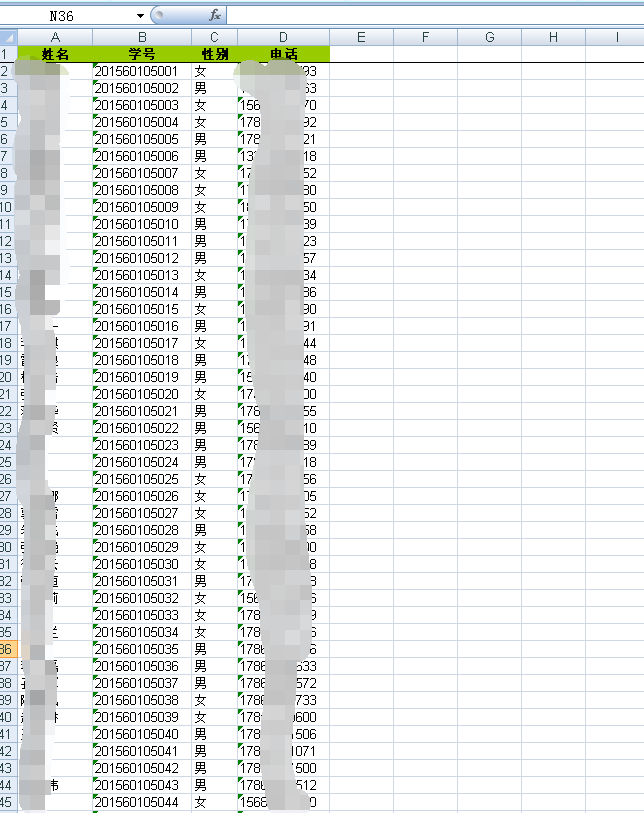
利用Aspose.Cells导出excel
注意的问题
1、DataTable的处理
2、进行编码,便于中文名文件下载
3、别忘了Aspose.Cells.dll(可以自己在网上搜索)
public static bool DataTableToExcel2(DataTable datatable, string filepath, out string error)

{

    error = "";

    Aspose.Cells.Workbook wb = new Aspose.Cells.Workbook();

    try

    {

        if (datatable == null)

        {

            error = "DataTableToExcel:datatable 为空";

            return false;

        }

        //为单元格添加样式

        Aspose.Cells.Style style = wb.Styles[wb.Styles.Add()];

        //设置居中

        style.HorizontalAlignment = Aspose.Cells.TextAlignmentType.Center;

        //设置背景颜色

        style.ForegroundColor = System.Drawing.Color.FromArgb(, , );

        style.Pattern = BackgroundType.Solid;

        style.Font.IsBold = true;

        int rowIndex = ;

        for (int i = ; i < datatable.Columns.Count; i++)

        {

            DataColumn col = datatable.Columns[i];

            string columnName = col.Caption ?? col.ColumnName;

            wb.Worksheets[].Cells[rowIndex, i].PutValue(columnName);

            wb.Worksheets[].Cells[rowIndex, i].SetStyle(style);

        }

        rowIndex++;

        foreach (DataRow row in datatable.Rows)

        {

            for (int i = ; i < datatable.Columns.Count; i++)

            {

                wb.Worksheets[].Cells[rowIndex, i].PutValue(row[i].ToString());

            }

            rowIndex++;

        }

        for (int k = ; k < datatable.Columns.Count; k++)

        {

            wb.Worksheets[].AutoFitColumn(k, , );

        }

        wb.Worksheets[].FreezePanes(, , , datatable.Columns.Count);

        wb.Save(filepath);

        return true;

    }

    catch (Exception e)

    {

        error = error + " DataTableToExcel: " + e.Message;

        return false;

    }

}

protected void btnExport_Click(object sender, EventArgs e)

{//导出

    int ClassID = ;

    int.TryParse(hidClassID.Value, out ClassID);

    string error = "";

    string filepath = "";

    BLL.TUser bll_TUser = new BLL.TUser();

    BLL.TClass bll_Class = new BLL.TClass();

    Model.TClass model = (new BLL.TClass()).GetModel(ClassID);

    //处理DataTable

    DataTable dt = bll_TUser.GetListByClass(ClassID);

    DataTable dtNew = new DataTable();

    dtNew.Columns.Add("姓名", typeof(string));

    dtNew.Columns.Add("学号", typeof(string));

    dtNew.Columns.Add("性别", typeof(string));

    dtNew.Columns.Add("电话", typeof(string));

    if (dt != null && dt.Rows.Count > )

    {

        DataRow drNew = dtNew.NewRow();

        foreach (DataRow dr in dt.Rows)

        {

            //drNew = dtNew.NewRow();

            drNew["姓名"] = dr["UserName"];

            drNew["学号"] = dr["IDNO"];

            drNew["性别"] = dr["Sex"].ToString() == "" ? "男" : (dr["Sex"].ToString() == "" ? "女" : "");

            drNew["电话"] = dr["Phone"];

            dtNew.Rows.Add(drNew.ItemArray);

        }

    }

    if (model != null)

    {

        filepath = "/UploadFiles/ExportClass/";// + model.ClassName + ".xlsx";

        string filaname = model.ClassName + ".xlsx";

        string finalPath = MapPath("~" + filepath + filaname);

        //检查有该路径是否就创建

        if (!Directory.Exists(MapPath("~/UploadFiles/ExportClass/")))

        {

            Directory.CreateDirectory(MapPath("~/UploadFiles/ExportClass/"));

        }

        if (DataTableToExcel2(dtNew, finalPath, out error))

        {

            string SiteRoot = "http://" + Request.Url.Authority.ToString() + filepath + Uri.EscapeDataString(filaname); //进行编码,便于中文名文件下载

            //下载excel

            ClientScript.RegisterStartupScript(this.GetType(), "", ",<script type='text/javascript'>window.open('" + SiteRoot + "');</script>");

        }

        else

        {

            ClientScript.RegisterStartupScript(this.GetType(), "", "<script type='text/javascript'>alert('提示', '" + error + "!');</script>");

        }

    }

    else

    {

        ClientScript.RegisterStartupScript(this.GetType(), "", "<script type='text/javascript'>alert('提示', '班级不存在!');</script>");

    }

}
Aspose.Cells导出Excel(1)的更多相关文章
- C#使用Aspose.Cells导出Excel简单实现
首先,需要添加引用Aspose.Cells.dll,官网下载地址:http://downloads.aspose.com/cells/net 将DataTable导出Xlsx格式的文件下载(网页输出) ...
- Aspose.Cells导出Excel(2)
DataTable dtTitle = ds.Tables[]; DataTable dtDetail = ds.Tables[]; int columns = dtTitle.Columns.Cou ...
- C#+Aspose.Cells 导出Excel及设置样式 (Webform/Winform)
在项目中用到,特此记录下来,Aspose.Cells 不依赖机器装没有装EXCEL都可以导出,很方便.具体可以参考其他 http://www.aspose.com/docs/display/cells ...
- C# 使用Aspose.Cells 导出Excel
今天在工作中碰到同事用了一种新型的方式导入excel,在此做个学习记录. 插件:Aspose.Cells 第一步:准备好导出的模板,例子: C#代码: #region 验证数据 if (model = ...
- aspose.Cells 导出Excel
aspose aspse.Cells可以操作Excel,且不依赖于系统环境. 使用模板,通过绑定输出数据源 这种适合于对格式没有特别要求的,直接绑定数据源即可.和数据绑定控件差不多. Workbook ...
- Aspose.Cells 导出 excel
Aspose.Cells.Workbook book = new Aspose.Cells.Workbook(); Aspose.Cells.Worksheet sheet = book.Worksh ...
- 使用Aspose.Cells读取Excel
最新更新请访问: http://denghejun.github.io Aspose.Cells读取Excel非常方便,以下是一个简单的实现读取和导出Excel的操作类: 以下是Aspose.Ce ...
- 报表中的Excel操作之Aspose.Cells(Excel模板)
原文:报表中的Excel操作之Aspose.Cells(Excel模板) 本篇中将简单记录下Aspose.Cells这个强大的Excel操作组件.这个组件的强大之处,就不多说,对于我们的报表总是会有导 ...
- 怎么使用Aspose.Cells读取excel 转化为Datatable
说明:vs2012 asp.net mvc4 c# 使用Aspose.Cells 读取Excel 转化为Datatable 1.HTML前端代码 <%@ Page Language=" ...
随机推荐
- UWP开发之Mvvmlight实践八:为什么事件注销处理要写在OnNavigatingFrom中
前一段开发UWP应用的时候因为系统返回按钮事件(SystemNavigationManager.GetForCurrentView().BackRequested)浪费了不少时间.现象就是在手机版的详 ...
- c# 基础 object ,new操作符,类型转换
参考页面: http://www.yuanjiaocheng.net/webapi/config-webapi.html http://www.yuanjiaocheng.net/webapi/web ...
- spring maven pom.xml设置
spring pom.xml设置 <?xml version="1.0" encoding="UTF-8"?> <project xmlns= ...
- 排序算法----调用库函数qsort进行快速排序
功 能: 快速排序 头文件:stdlib.h 用 法: void qsort(void *base,int nelem,int width,int (*fcmp)(const void *,const ...
- .NET Core 1.0.1 升级汇总
ASP.NET Core BUG fix: ASP.NET Routing Port fix for "Request not matching route with defaults&qu ...
- Unity3D新手引导开发手记
最近开始接手新手引导的开发,记录下这块相关的心得 首先客户端是Unity,在接手前,前面的同学已经初步完成了新手引导框架的搭建,这套框架比较简单,有优点也有缺点,稍后一一点评 我们的新手引导是由一个个 ...
- Windows10自适应和交互式toast通知[1]
阅读目录: 概述 toast通知的结构 视觉区域(Visual) 行为(Actions) 特定场景下的Toast通知 带多内容的通知 带行为的通知(例子1) 带行为的通知(例子2) 带文本输入框和行为 ...
- 企业IT管理员IE11升级指南【15】—— 代理自动配置脚本
企业IT管理员IE11升级指南 系列: [1]—— Internet Explorer 11增强保护模式 (EPM) 介绍 [2]—— Internet Explorer 11 对Adobe Flas ...
- 让Unity NavMesh为我所用
Unity里面整合了一个NavMesh功能,虽然让人又爱又恨. 但当你在其他地方需要这个NavMesh的数据时,就更让人欲罢不能了. 比如说服务器需要Unity的NavMesh数据时. 比如说你想将U ...
- ASP.NET MVC Model绑定(五)
ASP.NET MVC Model绑定(五) 前言 前面的篇幅对于IValueProvider的获取位置和所处的生成过程做了讲解,本篇将会对IValueProvider的使用做个基础的示例讲解,读完本 ...