
在openshift上自定义node.js的版本
https://github.com/ramr/nodejs-custom-version-openshift
由于是线上服务器,一步一步来:
先把上面的工程拉下来,覆盖到初始化的工程里,提交,让服务器端装起来。
#  Uncomment one of the version lines to select the node version to use.

#  The last "non-blank" version line is the one picked up by the code in

#  .openshift/lib/utils

#  Default: 0.10.

#

#  0.8.

#  0.9.

#  0.10.

#  0.11.

#  0.12.

#  0.12.

4.2.
配置好.openshift/markers/NODEJS_VERSION (默认写的4.2.3, 我改的6.9.2)
如果失败了,找到最初commit id 用reset --hard HEAD~1 一版一版往前退,
然后pull 返回去初始状态,否则错上推错很有可能会出现被服务器永久拒绝的状态(哭),那就只能重新建应用了
还没commit的直接 checkout --force 就放弃修改了
一堆无关痛痒的依赖错误之后是:

那么会不会是503呢,它没有明显的deploy failure,说是node启动失败
看看dashboard 状态
只要不是一直被stopped就还有希望 
页面并没有受到影响,仍然显示默认的index.html
在dashboard点restart,重启之后页面仍然正常显示,猜想服务器终于把node给升级好啦?
(尝试了一次不点restrt, 跑去网上冲浪不知等了多久也自动能stated) 页面改头换面了:
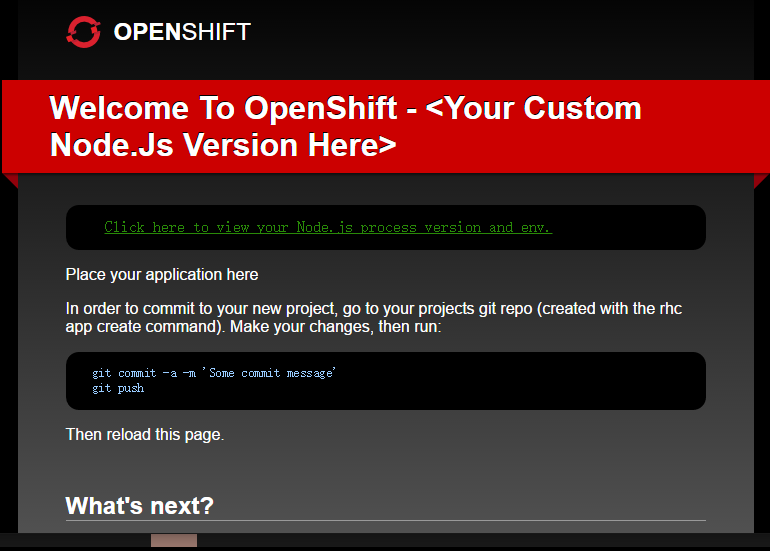
把package.json里面scripts、dependencies、devDependencies加进去
再次push应该会看到这样

明显的node已经升级成功,但是dashboard上仍然显示0.10
然后我有一个用了webpack的工程需要移植上去,
根据stackoverflow这篇文章,需要设置.openshift中的action_hook下build文件:
create the following file: .openshift/action_hook/build which contains the following:
#!/bin/bash

webpack --config $OPENSHIFT_DATA_DIR/webpack.config.js
题主出现了报错,但我是一次成功的。。。
另外,如果出现这种问题像我之前查到的解决方式一样需要配置静态地址:
self.initializeServer = function() {

        self.createRoutes();

        self.app = express();

        self.app.use('/', express.static(__dirname + '/dist'));

        //  Add handlers for the app (from the routes).

        for (var r in self.routes) {

            self.app.get(r, self.routes[r]);

        }

    };
还有上面一段populate the cache也需要设置
     /**

     *  Populate the cache.

     */

    self.populateCache = function() {

        if (typeof self.zcache === "undefined") {

            self.zcache = { 'index.html': '' };

        }

     //  Local cache for static content.

   //原来openshift给的index.html

    //self.zcache['index.html'] = fs.readFileSync('./index.html');

        self.zcache['index.html'] = fs.readFileSync('./dist/index.html');

    };
这样就和本地启动一样了,本地npm start还是可以指定其他的入口文件进行本地启动,并不会冲突。
$ git push

Counting objects: , done.

Delta compression using up to  threads.

Compressing objects: % (/), done.

Writing objects: % (/), 43.95 KiB |  bytes/s, done.

Total  (delta ), reused  (delta )

remote:

remote:   - pre_stop_nodejs: Adding Node.js version 6.9. binaries to path

remote:   - PATH set to include custom node version (6.9.) from

remote:        /var/lib/openshift/585cd49089f5cf3e75000095/app-root/data//node-v6.9.2-linux-x64/bin

remote:     PATH = /var/lib/openshift/585cd49089f5cf3e75000095/app-root/data//node-v6.9.2-linux-x64/bin:/var/lib/openshift/585cd49089f5cf3e75000095/app-root/runtime/repo/node_modules/.bin:/var/lib/openshift/585cd49089f5cf3e75000095//.node_modules/.bin:/opt/rh/nodejs010/root/usr/bin:/bin:/usr/bin:/usr/sbin

remote: Stopping NodeJS cartridge

remote: Tue Dec   :: GMT- (EST): Stopping application 'angular' ...

remote: Tue Dec   :: GMT- (EST): Stopped Node application 'angular'

remote: Repairing links for  deployments

remote: Saving away previously installed Node modules

remote: Building git ref 'master', commit d3e7fb0

remote: NOTE: The .openshift/action_hooks/pre_build hook is not executable, to make it executable:

remote:       On Windows run:   git update-index --chmod=+x .openshift/action_hooks/pre_build

remote:       On Linux/OSX run: chmod +x .openshift/action_hooks/pre_build

remote: Building NodeJS cartridge

remote: npm info it worked if it ends with ok

remote: npm info using npm@2.14.

remote: npm info using node@v0.10.35

remote: npm info preinstall nodejs-Custom-Version-Sample@1.0.

remote: npm info package.json core-js@2.4. No README data

remote: npm info package.json ts-loader@0.8. No README data

remote: npm info package.json @angular/compiler@2.0.-rc. No README data

remote: npm info package.json @angular/common@2.0.-rc. No description

remote: npm info package.json @angular/common@2.0.-rc. No README data

remote: npm info package.json @angular/compiler-cli@0.6. No README data

remote: npm info package.json @angular/core@2.0.-rc. No README data

remote: npm info package.json @angular/forms@2.0.-rc. No README data

remote: npm info package.json @angular/http@2.0.-rc. No README data

remote: npm info package.json @angular/platform-browser@2.0.-rc. No README data

remote: npm info package.json @angular/platform-browser-dynamic@2.0.-rc. No README data

remote: npm info package.json @angular/router@3.0.-rc. No README data

remote: npm info package.json @angular/upgrade@2.0.-rc. No description

remote: npm info package.json @angular/upgrade@2.0.-rc. No README data

remote: npm info package.json echarts@3.3. No license field.

remote: npm info package.json raw-loader@0.5. No license field.

remote: npm info build /var/lib/openshift/585cd49089f5cf3e75000095/app-root/runtime/repo

remote: npm info linkStuff nodejs-Custom-Version-Sample@1.0.

remote: npm info install nodejs-Custom-Version-Sample@1.0.

remote: npm info postinstall nodejs-Custom-Version-Sample@1.0.

remote:

remote: > nodejs-Custom-Version-Sample@1.0. postinstall /var/lib/openshift/585cd49089f5cf3e75000095/app-root/runtime/repo

remote: > typings install

remote:

remote:

remote: Error: EACCES, permission denied '/var/lib/openshift/585cd49089f5cf3e75000095/.config'

remote:     at Object.fs.mkdirSync (fs.js::)

remote:     at sync (/var/lib/openshift/585cd49089f5cf3e75000095/app-root/runtime/repo/node_modules/typings/node_modules/typings-core/node_modules/mkdirp/index.js::)

remote:     at Function.sync (/var/lib/openshift/585cd49089f5cf3e75000095/app-root/runtime/repo/node_modules/typings/node_modules/typings-core/node_modules/mkdirp/index.js::)

remote:     at Object.create.all.get (/var/lib/openshift/585cd49089f5cf3e75000095/app-root/runtime/repo/node_modules/typings/node_modules/typings-core/node_modules/configstore/index.js::)

remote:     at Object.Configstore (/var/lib/openshift/585cd49089f5cf3e75000095/app-root/runtime/repo/node_modules/typings/node_modules/typings-core/node_modules/configstore/index.js::)

remote:     at Object.<anonymous> (/var/lib/openshift/585cd49089f5cf3e75000095/app-root/runtime/repo/node_modules/typings/node_modules/typings-core/dist/utils/store.js::)

remote:     at Module._compile (module.js::)

remote:     at Object.Module._extensions..js (module.js::)

remote:     at Module.load (module.js::)

remote:     at Function.Module._load (module.js::)

remote:     at Module.require (module.js::)

remote:     at require (module.js::)

remote:     at Object.<anonymous> (/var/lib/openshift/585cd49089f5cf3e75000095/app-root/runtime/repo/node_modules/typings/node_modules/typings-core/dist/utils/fs.js::)

remote:     at Module._compile (module.js::)

remote:     at Object.Module._extensions..js (module.js::)

remote:     at Module.load (module.js::)

remote:

remote: npm info nodejs-Custom-Version-Sample@1.0. Failed to exec postinstall script

remote: npm ERR! Linux 2.6.-642.6..el6.x86_64

remote: npm ERR! argv "node" "/opt/rh/nodejs010/root/usr/bin/npm" "install" "-d

remote: npm ERR! node v0.10.35

remote: npm ERR! npm  v2.14.13

remote: npm ERR! code ELIFECYCLE

remote: npm ERR! nodejs-Custom-Version-Sample@1.0. postinstall: `typings install`

remote: npm ERR! Exit status

remote: npm ERR!

remote: npm ERR! Failed at the nodejs-Custom-Version-Sample@1.0. postinstall script 'typings install'.

remote: npm ERR! This is most likely a problem with the nodejs-Custom-Version-Sample package,

remote: npm ERR! not with npm itself.

remote: npm ERR! Tell the author that this fails on your system:

remote: npm ERR!     typings install

remote: npm ERR! You can get their info via:

remote: npm ERR!     npm owner ls nodejs-Custom-Version-Sample

remote: npm ERR! There is likely additional logging output above.

remote:

remote: npm ERR! Please include the following file with any support request:

remote: npm ERR!     /var/lib/openshift/585cd49089f5cf3e75000095/app-root/runtime/repo/npm-debug.log

remote: An error occurred executing 'gear postreceive' (exit code: )

remote: Error message: CLIENT_ERROR: Failed to execute: 'control build' for /var/lib/openshift/585cd49089f5cf3e75000095/nodejs

remote:

remote: For more details about the problem, try running the command again with the '--trace' option.

To ssh://xxx.rhcloud.com/~/git/angular.git/

   bf853eb..d3e7fb0  master -> master
每次push完也没法直接看到页面,总是会进入building,等它打包完自动started就好了。
在openshift上自定义node.js的版本的更多相关文章
- 在Visual Studio上开发Node.js程序
[题外话] 最近准备用Node.js做些东西,于是找找看能否有Visual Studio上的插件以方便开发.结果还真找到了一个,来自微软的Node.js Tools for Visual Studio ...
- [译]How to Install Node.js on Ubuntu 14.04 如何在ubuntu14.04上安装node.js
原文链接为 http://www.hostingadvice.com/how-to/install-nodejs-ubuntu-14-04/ 由作者Jacob Nicholson 发表于October ...
- CentOS上安装Node.js
CentOS上安装Node.js [日期:2014-07-21] 来源:Linux社区 作者:maskdfe [字体:大 中 小] CentOS上安装Node.js(想在Linux上学习No ...
- 在 Ubuntu 14.04/15.04 上配置 Node JS v4.0.0
大家好,Node.JS 4.0 发布了,这个流行的服务器端 JS 平台合并了 Node.js 和 io.js 的代码,4.0 版就是这两个项目结合的产物——现在合并为一个代码库.这次最主要的变化是 N ...
- 如何发布一个自定义Node.js模块到NPM(详细步骤)
咱们闲话不多说,直接开始! 由于我从没有使用过MAC,所以我不保证本文中介绍的操作与MAC一致. 文章开始我先假定各位已经在window全局安装了Node.js,下面开始进行详细步骤介绍: 本文本着, ...
- Deepin 15.5上安装 Node.js
Node.js 源码安装 以下部分我们将介绍在Ubuntu Linux下安装 Node.js . 其他的Linux系统,如Centos等类似如下安装步骤. 在 Github 上获取 Node.js 源 ...
- Window 上安装Node.js
Window 上安装Node.js 1.Windows安装包下载地址 https://nodejs.org/en/ 2.下载好后,按照默认设置即可,安装路径可以更改 3.安装好后,检测PATH环境变量 ...
- 在CentOS 7上安装Node.js的4种方法(yum安装和源码安装)
CentOS 7上的安装方法,其中涵盖了源码安装,已编译版本安装,EPEL(Extra Packages for Enterprise Linux)安装和通过NVM(Node version mana ...
- 如何发布一个自定义Node.js模块到NPM(详细步骤,附Git使用方法)
咱们闲话不多说,直接开始! 由于我从没有使用过MAC,所以我不保证本文中介绍的操作与MAC一致. 文章开始我先假定各位已经在window全局安装了Node.js,下面开始进行详细步骤介绍: 本文本着, ...
随机推荐
- iOS 并行编程:Thread
1 创建线程 1.1 NSThread 使用 NSThread 来创建线程有两个可以使用的方法: 1) 使用 detachNewThreadSelector:toTarget:withOb ...
- kali2.0如何安装中文输入法
由于kali的更新源是国外网站,替换成国内的镜像站,具体操作如下: 打开终端输入 leafpad /etc/apt/sources.list 把下面的源粘贴进去,原有内容注释掉 #中科大源deb ...
- 万网免费主机wordpress快速建站教程-万网主机申请
很多小伙伴在万网的免费主机申请活动中建立起了自己的个人网站,但还是还有许多小伙伴现在想建站,却发现官网找不到免费主机的申请地址了,以为活动结束了?其实还是可以继续申请免费主机的,接下来小编给大家介绍如 ...
- XML序列化/反序列化数据库形式保存和读取。
直接上码: 首先创建class1类 public class Class1 { public string name { get; set; } public int age { get; set; ...
- js选中checkbox赋值给文本框
//js $(function(){ var name=""; var kmname=[]; var n= $("input[type=checkbox]"). ...
- 20160405javaweb之jdbc
一.数据库驱动的概念.JDBC 数据库厂商提供的用来操作数据库用的jar包就是数据库驱动.各个厂商如果提供各自的数据库驱动的话会导致开发人员学习成本太高,所以sun公司提供了一套数据库驱动应该遵循的接 ...
- ios专题 - 委托模式实现
在ios中,委托模式非常常见,那委托模式是什么? 委托模式是把一个对象把请求给另一个对象处理. 下面见例子: #import <UIKit/UIKit.h> @protocol LQIPe ...
- Fibonacci数列的java实现
关于Fibonacci应该都比较熟悉,0,1,1,2,3..... 基本公式为f(n) = f(n-1) + f(n-2); f(0) = 0; f(1) =1; 方法1:可以运用迭代的方法实现: p ...
- python+sqlite3
一个小例子, # -*- coding:utf-8 -*- ''' Created on 2015年10月8日 (1.1)Python 2.7 Tutorial Pt 12 SQLite - http ...
- 【制作镜像Win*】环境准备(设置yum源)
首先使用 yum repolist all 命令查看当前启用了哪些yum源. 镜像配置文件在/etc/yum.repos.d/目录下,ll会看到很多repo文件,每一个文件里面都配置了yum源: [b ...