
令人头疼的clientTop、scrollTop、offsetTop
1、网络上流传的图片
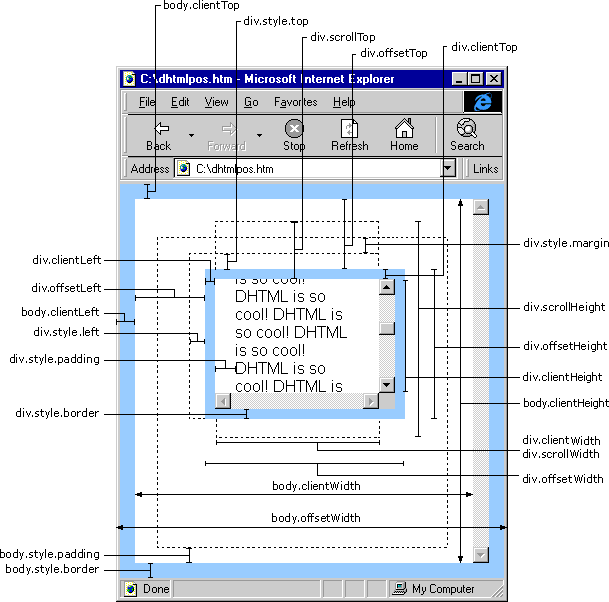
2、稍微容易理解点的示意图

参考链接:http://blog.csdn.net/lidiansheng/article/details/7950751
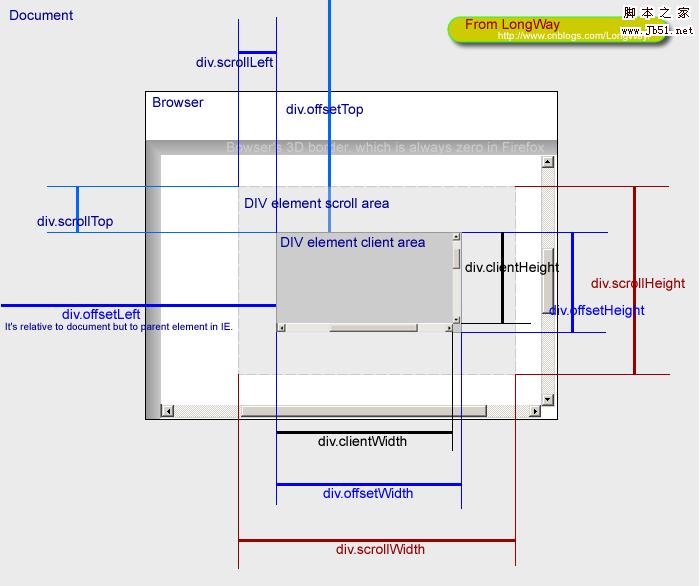
3、言简意赅的示意图

4、最完善的一张图!!!
5、文字总结
1. 基本概念
- offsetWidth/offsetHeight
对象的可见宽度
- clientWidth/clientHeight
内容的可见宽度
- scrollWidth/scrollHeight
元素完整的高度和宽度,overflow:hidden的部分也计算在内。
- offsetLeft/offsetTop
当前元素距浏览器边界的偏移量,以像素为单位。
- clientTop/clientLeft
这个属性测试下来的结果就是border。
- scrollLeft/scrollTop
设置或返回已经滚动到元素的左边界或上边界的像素数。
2. 推断计算
等式①:内容宽度clientWidth=元素宽度elementWidth+内边距padding-滚动条的宽度(如果有滚动条)(不考虑边界border)
比如下方例子中:clientWidth=300+20-17=303
等式②:可见宽度offsetWidth=元素宽度elementWidth+内边距padding+边界border(滚动条包含在边界内部了,没有产生额外距离,不用计算)
比如下方例子中:offsetWidth=300+20+16=336

3.xxxTop区别
等式③:clientTop=border-top属性值(‘-’不是减号,是连字符)
等式④:offsetTop=元素距上边界高度+margin
比如下方例子中:offsetTop=150+15=165
scrollTop:元素的滚动值 (可用来做滚动效果)
4、采用scrollTop做滚动效果
 <html>

 <head>

     <title>测试滚动效果</title>

     <meta charset="utf-8">

     <style type="text/css">

         #viewBox

         {

             width: 500px;

             overflow: hidden;

             border: 1px solid pink;

         }

         #scrollBox

         {

             float: left;

             width: 2500px; /*必须足够大才能放下所有滚动内容*/

         }

         #A1, #A2, ul li

         {

             float: left;

             list-style: none;

         }

     </style>

     <script type="text/javascript">

         var viewBox, As1, As2, Atimer;

         function init() {

             viewBox = getid("viewBox");

             As1 = getid("A1");

             As2 = getid("A2");

             As2.innerHTML = As1.innerHTML; //复制一份相同的放在ul后面做衔接

             Atimer = setInterval(Amar, 20);

         }

         function Amar() {

             if (As1.offsetWidth <= viewBox.scrollLeft) {

                 viewBox.scrollLeft -= As1.offsetWidth;

             } else {

                 viewBox.scrollLeft++;

             }

         }

         function getid(id) {

             return document.getElementById(id);

         }

         window.onload = init;

     </script>

 </head>

 <body>

     <div id="viewBox" onmouseover="clearInterval(Atimer)" onmouseout="Atimer=setInterval(Amar,20)">

         <div id="scrollBox">

             <ul id="A1">

                 <li><a href="#">公告1</a></li>

                 <li><a href="#">公告2</a></li>

                 <li><a href="#">公告3</a></li>

             </ul>

             <!-- 用来做无缝衔接 -->

             <ul id="A2"></ul>

         </div>

     </div>

 </body>

 </html>
显示效果:

6、一个小例子
 <html>

 <head>

     <title>测试</title>

     <meta charset="utf-8">

     <style type="text/css">

         *

         {

             margin: 0px;

             padding: 0px;

         }

         #container

         {

             width: 300px;

             height: 200px;

             position: absolute;

             left: 200px;

             top: 150px;

             margin: 15px;

             padding: 10px;

             overflow: auto;

             background-color: #555;

             border: 8px solid green;

         }

             #container p

             {

                 background-color: pink;

                 width: 200px;

                 height: 500px;

             }

     </style>

 </head>

 <body>

     <div id="container">

         <p>

             文字内容

         </p>

     </div>

     <script type="text/javascript">

         /*在Chrome或Firefox下查看输出*/

         console.log('元素内样式属性(不指定则为空)style.top →→→→ ' + container.style.top)

         console.log('元素内样式属性(不指定则为空)style.left →→→→ ' + container.style.left)

         console.log('元素内样式属性(不指定则为空)style.width →→→→ ' + container.style.width)

         console.log('元素内样式属性(不指定则为空)style.height →→→→ ' + container.style.height)

         console.log('可见区域上边框(border属性指定) clientTop →→→→ ' + container.clientTop)

         console.log('可见区域左边框(border属性指定) clientLeft →→→→ ' + container.clientLeft)

         console.log('内容区域宽度(包括padding 20px,不包括滚动条17px,即300+20-17=303) clientWidth →→→→ ' + container.clientWidth)

         console.log('可见区域宽度(包括padding 20px 和border 16px 滚动条在其内部,没有产生额外长度)offsetWidth →→→→ ' + container.offsetWidth)

         console.log('内容区域高度(包括padding 20px) clientHeight →→→→ ' + container.clientHeight)

         console.log('可见区域高度度(包括padding 20px和border 16px 滚动条在其内部,没有产生额外长度) offsetHeight →→→→ ' + container.offsetHeight)

         console.log('与上层或外层偏移(包括margin 15px) offsetTop →→→→ ' + container.offsetTop)

         console.log('与左层或外层偏移(包括margin 15px)  offsetLeft →→→→ ' + container.offsetLeft)

         console.log('已经滚动的距离(只有出现滚动条才有效,否则均为0)scrollTop →→→→ ' + container.scrollTop)

         console.log('已经滚动的距离(只有出现滚动条才有效,否则均为0)scrollLeft →→→→ ' + container.scrollLeft)

         console.log('滚动条最大滚动距离(即隐藏的部分的高度) scrollTopMax →→→→ ' + container.scrollTopMax)

         console.log('滚动对象的完整宽度(至少是元素宽度) scrollWidth →→→→ ' + container.scrollWidth)

         console.log('滚动对象的完整高度(至少是元素高度) scrollHeight →→→→ ' + container.scrollHeight)

         console.log('screen.top →→→→ ' + window.screen.top);

         console.log('screen.left →→→→ ' + window.screen.left);

         console.log('screen.height →→→→ ' + window.screen.height);

         console.log('screen.width →→→→ ' + window.screen.width);

         console.log('screen.availHeight →→→→ ' + window.screen.availHeight);

         console.log('screen.availWidth →→→→ ' + window.screen.availWidth);

     </script>

 </body>

 </html>
界面显示:

后台输出:
 "元素内样式属性(不指定则为空)style.top →→→→ "

 "元素内样式属性(不指定则为空)style.left →→→→ "

 "元素内样式属性(不指定则为空)style.width →→→→ "

 "元素内样式属性(不指定则为空)style.height →→→→ "

 "可见区域上边框(border属性指定) clientTop →→→→ 8" /*就是border-top宽度*/

 "可见区域左边框(border属性指定) clientLeft →→→→ 8" /*就是border-left宽度*/

 "内容区域宽度(包括padding 20px,不包括滚动条17px,即300+20-17=303) clientWidth →→→→ 303" /*参见等式①*/

 "可见区域宽度(包括padding 20px 和border 16px 滚动条在其内部,没有产生额外长度)offsetWidth →→→→ 336" /*300+20+16=336,参见等式②*/

 "内容区域高度(包括padding 20px) clientHeight →→→→ 220" /*元素200+padding20-滚动条0=220*/

 "可见区域高度度(包括padding 20px和border 16px 滚动条在其内部,没有产生额外长度) offsetHeight →→→→ 236" /*200+20+16=236,类似等式②*/

 "与上层或外层偏移(包括margin 15px) offsetTop →→→→ 165" /*150+15(margin-top),参见等式④*/
12 "与左层或外层偏移(包括margin 15px) offsetLeft →→→→ 215"/*200+15(margin-left),类似等式④*/

 "已经滚动的距离(只有出现滚动条才有效,否则均为0)scrollTop →→→→ 0"

 "已经滚动的距离(只有出现滚动条才有效,否则均为0)scrollLeft →→→→ 0"

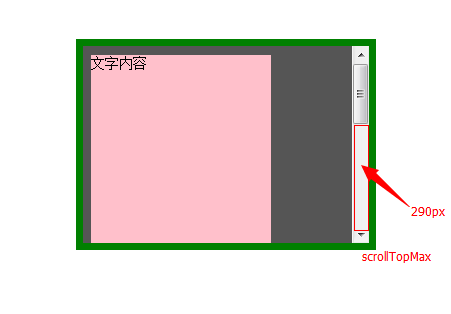
 "滚动条最大滚动距离(即隐藏的部分的高度) scrollTopMax →→→→ 290"

 "滚动对象的完整宽度(至少是元素宽度) scrollWidth →→→→ 303"

 "滚动对象的完整高度(至少是元素高度) scrollHeight →→→→ 510"

 "screen.top →→→→ 0"

 "screen.left →→→→ 0"

 "screen.height →→→→ 900"

 "screen.width →→→→ 1600"

 "screen.availHeight →→→→ 860"

 "screen.availWidth →→→→ 1600"
隐藏部分的高度scrollTopMax:
令人头疼的clientTop、scrollTop、offsetTop的更多相关文章
- clientTop scrollTop offsetTop
关于top.clientTop.scrollTop.offsetTop的用法 网页可见区域宽: document.body.clientWidth;网页可见区域高: document.body.cli ...
- scrollTop,scrollHeight,clientTop,clientHeight,offsetTop,offsetHeight实际意义 及 计算方式 附实例说明
一.滚动距离.高度 scrollTop scrollLeft scrollHeight scrollWidth 二.相对位置.距离 offsetTop offsetLeft offsetHeight ...
- clientTop、offsetTop和scrollTop的区分
页可见区域宽: document.body.clientWidth; 网页可见区域高: document.body.clientHeight; 网页可见区域宽: document.body.offse ...
- JS clientHeight,scrollHeight,offsetHeight,scrollTop,offsetTop概念
JS滚动页面到某一位置时触发指定事件能够增强用户体验或是提高性能,其中使用最多的场景是加载更多,当鼠标滚动至页面下方时,自动加载下一页的内容.另一个常用的场景是当用户滚动至页面某一地方时,页面会给出提 ...
- clientTop,scrollTop,兼容
在开发中常见的额兼容性问题: scrollTop问题: function scroll() { // 开始封装自己的scrollTop if(window.pageYOffset != null) { ...
- Uncaught TypeError: Cannot read property 'offsetTop' of undefined at VueComponent.handleScroll
mounted() { window.addEventListener("scroll", this.handleScroll); }, beforeDestroy() { win ...
- js/jQuery使用过程中常见问题
目录 一.jQuery选择器选择选中的或者disabled的选择框时attr函数无效 二.jQuery each函数的break/continue 三.jQuery 获取元素的left会值/left数 ...
- HTML input小结
一.Input表示Form表单中的一种输入对象,其又随Type类型的不同而分文本输入框,密码输入框,单选/复选框,提交/重置按钮等,下面一一介绍. 1.type=text 输入类型是text,这是我们 ...
- HTML元素坐标定位,这些知识点得掌握
文档坐标和视口坐标 视口坐标是相对于窗口的坐标,而文档坐标是相对于整个文档而言.例如,在文档坐标中如果一个元素的相对于文档的Y坐标是200px,并且用户已经把浏览器向下滚动了75px,那么视口坐标中元 ...
随机推荐
- Java实战之03Spring-05Spring中的事务控制(基于AOP)
五.Spring中的事务控制(基于AOP) 1.Spring中事务有关的接口 1.1.明确: JavaEE体系进行分层开发,事务处理位于业务层,Spring提供了分层设计业务层的事务处理解决方案 1. ...
- HDU 4430 Yukari's Birthday(二分)
题目链接:http://acm.hdu.edu.cn/showproblem.php?pid=4430 题目大意:给定n个蜡烛,围绕蛋糕的中心插同心圆,从里往外分别是第1圈.第2圈....第r圈,第 ...
- 关于atoi的实现
一.关于atoi atol的实现 __BEGIN_NAMESPACE_STD __extern_inline double __NTH (atof (__const char *__nptr)) { ...
- mysql学习笔记4
用phpmyadmin创建数据库时出现 #1064 - You have an error in your SQL syntax; check the manual that corresponds ...
- 【NOI2001】炮兵阵地
[题目描述] 司令部的将军们打算在N*M的网格地图上部署他们的炮兵部队.一个N*M的地图由N行M列组成,地图的每一格可能是山地(用“H” 表示),也可能是平原(用“P”表示),如下图.在每一格平原地形 ...
- Linux内核中的通用双向循环链表
开发中接触Linux越来越多,休息放松之余,免不了翻看翻看神秘的Linux的内核.看到双向链表时,觉得挺有意思的,此文记下. 作为众多基础数据结构中的一员,双向循环链表在各种“教科书”中的实现是相当的 ...
- QtSQL学习笔记(2)- 连接到数据库
要使用QSqlQuery或者QSqlQueryModel访问一个数据库,首先需要创建并打开一个或多个数据库连接(database connections). 一般地,数据库连接是根据连接名(conne ...
- Date、String、Calendar类型之间的转化
原文出处:http://fjfj910.iteye.com/blog/1202219 1.Calendar 转化 String //获取当前时间的具体情况,如年,月,日,week,date,分,秒等 ...
- 百度地图API应用实践(一) —— 栅格图(草稿)
概述 运用百度地图JS API,实现了在百度地图上绘制栅格并按统计值渲染栅格颜色.实现的过程是不断补习的过程,其中用到一些技术,是个人首次尝试.包括:(1)简单的jQuery语法,并实现Ajax:(2 ...
- SQL学习_时间函数
最近测试报表需要统计不同时间段的列表记录,收集一些时间函数作为参考,原文地址:http://blog.csdn.net/lyzlyfok/article/details/6282509 sql ser ...