
令人头疼的clientTop、scrollTop、offsetTop
1、网络上流传的图片
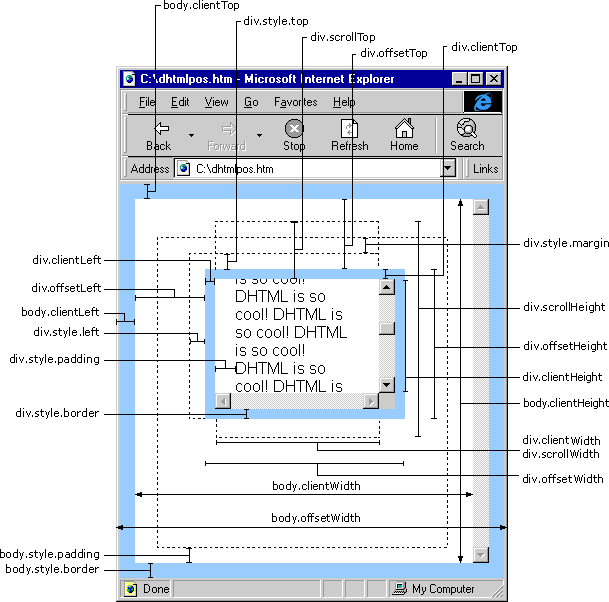
2、稍微容易理解点的示意图

参考链接:http://blog.csdn.net/lidiansheng/article/details/7950751
3、言简意赅的示意图

4、最完善的一张图!!!
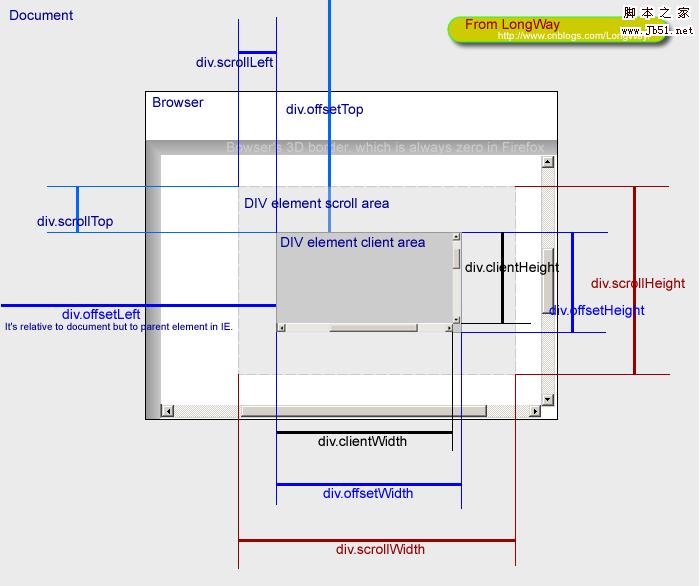
5、文字总结
1. 基本概念
- offsetWidth/offsetHeight
对象的可见宽度
- clientWidth/clientHeight
内容的可见宽度
- scrollWidth/scrollHeight
元素完整的高度和宽度,overflow:hidden的部分也计算在内。
- offsetLeft/offsetTop
当前元素距浏览器边界的偏移量,以像素为单位。
- clientTop/clientLeft
这个属性测试下来的结果就是border。
- scrollLeft/scrollTop
设置或返回已经滚动到元素的左边界或上边界的像素数。
2. 推断计算
等式①:内容宽度clientWidth=元素宽度elementWidth+内边距padding-滚动条的宽度(如果有滚动条)(不考虑边界border)
比如下方例子中:clientWidth=300+20-17=303
等式②:可见宽度offsetWidth=元素宽度elementWidth+内边距padding+边界border(滚动条包含在边界内部了,没有产生额外距离,不用计算)
比如下方例子中:offsetWidth=300+20+16=336

3.xxxTop区别
等式③:clientTop=border-top属性值(‘-’不是减号,是连字符)
等式④:offsetTop=元素距上边界高度+margin
比如下方例子中:offsetTop=150+15=165
scrollTop:元素的滚动值 (可用来做滚动效果)
4、采用scrollTop做滚动效果
 <html>

 <head>

     <title>测试滚动效果</title>

     <meta charset="utf-8">

     <style type="text/css">

         #viewBox

         {

             width: 500px;

             overflow: hidden;

             border: 1px solid pink;

         }

         #scrollBox

         {

             float: left;

             width: 2500px; /*必须足够大才能放下所有滚动内容*/

         }

         #A1, #A2, ul li

         {

             float: left;

             list-style: none;

         }

     </style>

     <script type="text/javascript">

         var viewBox, As1, As2, Atimer;

         function init() {

             viewBox = getid("viewBox");

             As1 = getid("A1");

             As2 = getid("A2");

             As2.innerHTML = As1.innerHTML; //复制一份相同的放在ul后面做衔接

             Atimer = setInterval(Amar, 20);

         }

         function Amar() {

             if (As1.offsetWidth <= viewBox.scrollLeft) {

                 viewBox.scrollLeft -= As1.offsetWidth;

             } else {

                 viewBox.scrollLeft++;

             }

         }

         function getid(id) {

             return document.getElementById(id);

         }

         window.onload = init;

     </script>

 </head>

 <body>

     <div id="viewBox" onmouseover="clearInterval(Atimer)" onmouseout="Atimer=setInterval(Amar,20)">

         <div id="scrollBox">

             <ul id="A1">

                 <li><a href="#">公告1</a></li>

                 <li><a href="#">公告2</a></li>

                 <li><a href="#">公告3</a></li>

             </ul>

             <!-- 用来做无缝衔接 -->

             <ul id="A2"></ul>

         </div>

     </div>

 </body>

 </html>
显示效果:

6、一个小例子
 <html>

 <head>

     <title>测试</title>

     <meta charset="utf-8">

     <style type="text/css">

         *

         {

             margin: 0px;

             padding: 0px;

         }

         #container

         {

             width: 300px;

             height: 200px;

             position: absolute;

             left: 200px;

             top: 150px;

             margin: 15px;

             padding: 10px;

             overflow: auto;

             background-color: #555;

             border: 8px solid green;

         }

             #container p

             {

                 background-color: pink;

                 width: 200px;

                 height: 500px;

             }

     </style>

 </head>

 <body>

     <div id="container">

         <p>

             文字内容

         </p>

     </div>

     <script type="text/javascript">

         /*在Chrome或Firefox下查看输出*/

         console.log('元素内样式属性(不指定则为空)style.top →→→→ ' + container.style.top)

         console.log('元素内样式属性(不指定则为空)style.left →→→→ ' + container.style.left)

         console.log('元素内样式属性(不指定则为空)style.width →→→→ ' + container.style.width)

         console.log('元素内样式属性(不指定则为空)style.height →→→→ ' + container.style.height)

         console.log('可见区域上边框(border属性指定) clientTop →→→→ ' + container.clientTop)

         console.log('可见区域左边框(border属性指定) clientLeft →→→→ ' + container.clientLeft)

         console.log('内容区域宽度(包括padding 20px,不包括滚动条17px,即300+20-17=303) clientWidth →→→→ ' + container.clientWidth)

         console.log('可见区域宽度(包括padding 20px 和border 16px 滚动条在其内部,没有产生额外长度)offsetWidth →→→→ ' + container.offsetWidth)

         console.log('内容区域高度(包括padding 20px) clientHeight →→→→ ' + container.clientHeight)

         console.log('可见区域高度度(包括padding 20px和border 16px 滚动条在其内部,没有产生额外长度) offsetHeight →→→→ ' + container.offsetHeight)

         console.log('与上层或外层偏移(包括margin 15px) offsetTop →→→→ ' + container.offsetTop)

         console.log('与左层或外层偏移(包括margin 15px)  offsetLeft →→→→ ' + container.offsetLeft)

         console.log('已经滚动的距离(只有出现滚动条才有效,否则均为0)scrollTop →→→→ ' + container.scrollTop)

         console.log('已经滚动的距离(只有出现滚动条才有效,否则均为0)scrollLeft →→→→ ' + container.scrollLeft)

         console.log('滚动条最大滚动距离(即隐藏的部分的高度) scrollTopMax →→→→ ' + container.scrollTopMax)

         console.log('滚动对象的完整宽度(至少是元素宽度) scrollWidth →→→→ ' + container.scrollWidth)

         console.log('滚动对象的完整高度(至少是元素高度) scrollHeight →→→→ ' + container.scrollHeight)

         console.log('screen.top →→→→ ' + window.screen.top);

         console.log('screen.left →→→→ ' + window.screen.left);

         console.log('screen.height →→→→ ' + window.screen.height);

         console.log('screen.width →→→→ ' + window.screen.width);

         console.log('screen.availHeight →→→→ ' + window.screen.availHeight);

         console.log('screen.availWidth →→→→ ' + window.screen.availWidth);

     </script>

 </body>

 </html>
界面显示:

后台输出:
 "元素内样式属性(不指定则为空)style.top →→→→ "

 "元素内样式属性(不指定则为空)style.left →→→→ "

 "元素内样式属性(不指定则为空)style.width →→→→ "

 "元素内样式属性(不指定则为空)style.height →→→→ "

 "可见区域上边框(border属性指定) clientTop →→→→ 8" /*就是border-top宽度*/

 "可见区域左边框(border属性指定) clientLeft →→→→ 8" /*就是border-left宽度*/

 "内容区域宽度(包括padding 20px,不包括滚动条17px,即300+20-17=303) clientWidth →→→→ 303" /*参见等式①*/

 "可见区域宽度(包括padding 20px 和border 16px 滚动条在其内部,没有产生额外长度)offsetWidth →→→→ 336" /*300+20+16=336,参见等式②*/

 "内容区域高度(包括padding 20px) clientHeight →→→→ 220" /*元素200+padding20-滚动条0=220*/

 "可见区域高度度(包括padding 20px和border 16px 滚动条在其内部,没有产生额外长度) offsetHeight →→→→ 236" /*200+20+16=236,类似等式②*/

 "与上层或外层偏移(包括margin 15px) offsetTop →→→→ 165" /*150+15(margin-top),参见等式④*/
12 "与左层或外层偏移(包括margin 15px) offsetLeft →→→→ 215"/*200+15(margin-left),类似等式④*/

 "已经滚动的距离(只有出现滚动条才有效,否则均为0)scrollTop →→→→ 0"

 "已经滚动的距离(只有出现滚动条才有效,否则均为0)scrollLeft →→→→ 0"

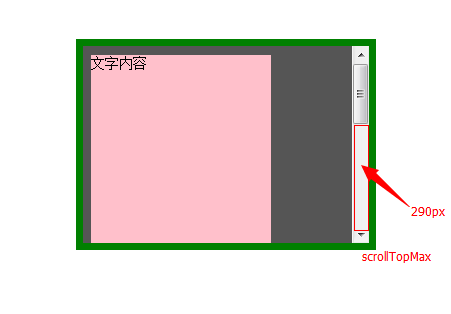
 "滚动条最大滚动距离(即隐藏的部分的高度) scrollTopMax →→→→ 290"

 "滚动对象的完整宽度(至少是元素宽度) scrollWidth →→→→ 303"

 "滚动对象的完整高度(至少是元素高度) scrollHeight →→→→ 510"

 "screen.top →→→→ 0"

 "screen.left →→→→ 0"

 "screen.height →→→→ 900"

 "screen.width →→→→ 1600"

 "screen.availHeight →→→→ 860"

 "screen.availWidth →→→→ 1600"
隐藏部分的高度scrollTopMax:
令人头疼的clientTop、scrollTop、offsetTop的更多相关文章
- clientTop scrollTop offsetTop
关于top.clientTop.scrollTop.offsetTop的用法 网页可见区域宽: document.body.clientWidth;网页可见区域高: document.body.cli ...
- scrollTop,scrollHeight,clientTop,clientHeight,offsetTop,offsetHeight实际意义 及 计算方式 附实例说明
一.滚动距离.高度 scrollTop scrollLeft scrollHeight scrollWidth 二.相对位置.距离 offsetTop offsetLeft offsetHeight ...
- clientTop、offsetTop和scrollTop的区分
页可见区域宽: document.body.clientWidth; 网页可见区域高: document.body.clientHeight; 网页可见区域宽: document.body.offse ...
- JS clientHeight,scrollHeight,offsetHeight,scrollTop,offsetTop概念
JS滚动页面到某一位置时触发指定事件能够增强用户体验或是提高性能,其中使用最多的场景是加载更多,当鼠标滚动至页面下方时,自动加载下一页的内容.另一个常用的场景是当用户滚动至页面某一地方时,页面会给出提 ...
- clientTop,scrollTop,兼容
在开发中常见的额兼容性问题: scrollTop问题: function scroll() { // 开始封装自己的scrollTop if(window.pageYOffset != null) { ...
- Uncaught TypeError: Cannot read property 'offsetTop' of undefined at VueComponent.handleScroll
mounted() { window.addEventListener("scroll", this.handleScroll); }, beforeDestroy() { win ...
- js/jQuery使用过程中常见问题
目录 一.jQuery选择器选择选中的或者disabled的选择框时attr函数无效 二.jQuery each函数的break/continue 三.jQuery 获取元素的left会值/left数 ...
- HTML input小结
一.Input表示Form表单中的一种输入对象,其又随Type类型的不同而分文本输入框,密码输入框,单选/复选框,提交/重置按钮等,下面一一介绍. 1.type=text 输入类型是text,这是我们 ...
- HTML元素坐标定位,这些知识点得掌握
文档坐标和视口坐标 视口坐标是相对于窗口的坐标,而文档坐标是相对于整个文档而言.例如,在文档坐标中如果一个元素的相对于文档的Y坐标是200px,并且用户已经把浏览器向下滚动了75px,那么视口坐标中元 ...
随机推荐
- HTML——表格table标签,tr或者td
表格定义和用法 <tr> 标签定义 HTML 表格中的行. tr 元素包含一个或多个 th 或 td 元素. HTML 与 XHTML 之间的差异 在 HTML 4.01 中,tr 元素的 ...
- 选择结构if语句和switch语句的区别
------- android培训.java培训.期待与您交流! ---------- 1.选择结构if语句格式及其使用 A:if语句的格式: if(比较表达式1) { 语句体1; }else if( ...
- Container容器控件的使用、Hbox与Vbox布局管理器的使用、以及AjaxAction前后台事件响应
1.由于有前后台交互功能,需要在Spring上下文中注册一个用于提供服务的bean,对于这个bean使用Spring提供的@Component标注,如果需要使用@Component注解,需要在项目中W ...
- call_user_func
(PHP 4, PHP 5) call_user_func — 把第一个参数作为回调函数调用 mixed call_user_func ( callable $callback [, mixed $p ...
- php用正则表达式获取网站的标题内容
已知网站的网址,用php获取网站的内容. 编写正则表达式. 用preg_match_all函数获取标题内容. $url='http://www.m-ivi.com'; $content=file_ge ...
- 判断浏览器是否支持某个css3属性的javascript方法
判断浏览器是否支持css3某个属性的方法: /** * 判断浏览器是否支持某一个CSS3属性 * @param {String} 属性名称 * @return {Boolean} true/false ...
- c语言知识(找出大于2门成绩不及格的学生)
1.首先定义一个学生结构体(结构体中包含一个Score结构体): typedef struct score{ float chinese;//语文成绩 float english;//英语成绩 flo ...
- Delphi中的GetEnumName和GetEnumValue的使用方法
利用TypInfo单元的GetEnumName和GetEnumValue可以遍历任意枚举类型,并获取其名称和值.下面是示例Demo. uses TypInfo; ... procedure TForm ...
- oracle服务介绍
按照windows 7 64位 安装oracle 11g R2中的方法成功安装Oracle 11g后,共有7个服务,这七个服务的含义分别为: 1. Oracle ORCL VSS Writer Ser ...
- mysql(转)
/* 启动MySQL */net start mysql /* 连接与断开服务器 */mysql -h 地址 -P 端口 -u 用户名 -p 密码 /* 跳过权限验证登录MySQL */mysqld ...