
css3表格隔行变色和表格选中变颜色代码
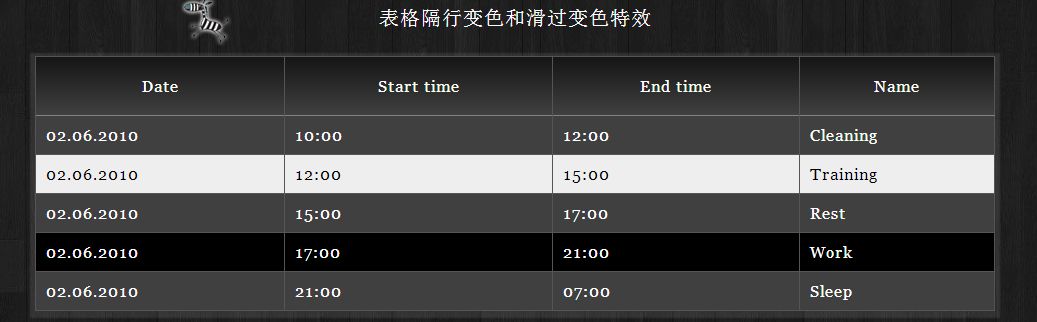
<!DOCTYPE html PUBLIC "-//W3C//DTD XHTML 1.0 Transitional//EN" "http://www.w3.org/TR/xhtml1/DTD/xhtml1-transitional.dtd">

<html xmlns="http://www.w3.org/1999/xhtml">

<head>

	<meta http-equiv="Content-Type" content="text/html; charset=utf-8" />

	<title>Beautiful design tables in HTML in the style of a zebra.</title>

	<link rel="stylesheet" href="css/style.css" type="text/css">

</head>

<body>

<div id="container">

	<table class="zebra">

    <caption>表格隔行变色和滑过变色特效</caption>

		<thead>

        	<tr>

				<th>Date</th>

				<th>Start time</th>

				<th>End time</th>

				<th>Name</th>

            </tr>

		</thead>

        <tbody>

        	<tr>

            	<td>02.06.2010</td>

                <td>10:00</td>

                <td>12:00</td>

                <td>Cleaning</td>

            </tr>

            <tr>

            	<td>02.06.2010</td>

                <td>12:00</td>

                <td>15:00</td>

                <td>Training</td>

            </tr>

            <tr>

            	<td>02.06.2010</td>

                <td>15:00</td>

                <td>17:00</td>

                <td>Rest</td>

            </tr>

            <tr>

            	<td>02.06.2010</td>

                <td>17:00</td>

                <td>21:00</td>

                <td>Work</td>

            </tr>

            <tr>

            	<td>02.06.2010</td>

                <td>21:00</td>

                <td>07:00</td>

                <td>Sleep</td>

            </tr>

        </tbody>

	</table>

</div>

</body>

</html>
@charset "UTF-8";

html, body{

    padding:;

    margin:;

    position:relative;

    background:url(../img/body.jpg);

    background-repeat:repeat;

    color:#fff;

    letter-spacing:1px;

    font-family:Georgia, "Times New Roman", Times, serif;

}

.zebra caption{

    font-size:20px;

    font-weight:normal;

    background:url(../img/zebratable.png);

    background-repeat:no-repeat;

    background-position: 130px center;

    padding-top: 20px;

    height:50px;}

#container{

    padding-top:20px;

    width:960px;

    margin:0 auto;

}

table {

    border-collapse: collapse;

    border-spacing:;

    width:100%;

    -webkit-box-shadow:  0px 2px 1px 5px rgba(242, 242, 242, 0.1);

    box-shadow:  0px 2px 1px 5px rgba(242, 242, 242, 0.1);

}

.zebra {

    border: 1px solid #555;

}

.zebra td {

    border-left: 1px solid #555;

    border-top: 1px solid #555;

    padding: 10px;

    text-align: left;

}

.zebra th, .zebra th:hover {

    border-left: 1px solid #555;

    border-bottom: 1px solid #828282;

    padding: 20px;

    background-color:#151515 !important;

    background-image: -webkit-gradient(linear, left top, left bottom, from(#151515), to(#404040)) !important;

    background-image: -webkit-linear-gradient(top, #151515, #404040) !important;

    background-image:    -moz-linear-gradient(top, #151515, #404040) !important;

    background-image:     -ms-linear-gradient(top, #151515, #404040) !important;

    background-image:      -o-linear-gradient(top, #151515, #404040) !important;

    background-image:         linear-gradient(top, #151515, #404040) !important;

    color:#fff !important;

    font-weight:normal;

}

.zebra tbody tr:nth-child(even) {

    background: #000 !important;

    color:#fff;

}

.zebra tr:hover *{

    background: #eeeeee;

    color:#000;

}

.zebra tr {

    background:#404040;

    color:#fff;

}
css3表格隔行变色和表格选中变颜色代码的更多相关文章
- css选择器,用来处理隔行变色的表格
CSS3 :nth-last-child() 选择器,可以用来处理隔行变色的表格,详情请参考网上资料.
- jQuery 表格隔行变色插件
jQuery提供了用于扩展jQuery功能的方法,即jQuery.fn.extend()方法和jQuery.extend()方法. 基本的JS框架代码如下: ;(function($) { $.fn. ...
- 案例(拖拽对话框、高清放大镜、自制滚动条、元素的隐藏方式、表格隔行变色、tab切换效果、字符串拼接、刷新评论)
一.拖拽对话框 <style> .of{ width: 500px; } #link,#close{ text-decoration: none; margin: 0 10px; font ...
- jquery实现html表格隔行变色
效果图 实现代码: 通过css控制样式,利用jquery的addClass方法实现 <!DOCTYPE HTML PUBLIC "-//W3C//DTD HTML 4.01 Trans ...
- jquery插件之表格隔行变色并鼠标滑过高亮显示
该插件乃本博客作者所写,目的在于提升作者的js能力,也给一些js菜鸟在使用插件时提供一些便利,老鸟就悠然地飞过吧. 此插件旨在实现表格隔行变色,且鼠标移动在表格的某一行上时,该行能高亮显示.整体代码如 ...
- 用JQuery实现表格隔行变色和突出显示当前行
用JQuery实现表格隔行变色和突出显示当前行 上源码 <!DOCTYPE HTML PUBLIC "-//W3C//DTD HTML 4.01//EN" "htt ...
- 我的第一个jQuery插件--表格隔行变色
虽然网上有大量的插件供我们去使用,但不一定有一款适合你的,必要的时候还是要自己动手去敲的.下面,开始我的第一个插件... 参考<锋利的JQuery>,JQuery为开发插件增设了俩个方法: ...
- JavaScript 实现表格隔行变色
JavaScript 实现表格隔行变色 版权声明:未经授权,严禁分享! 构建界面 界面HTML代码 <style> #data,th,td{ border: 1px solid #aaaa ...
- 表格隔行变色_CSS实现鼠标悬停高亮
<!doctype html> <html> <head> <meta http-equiv="content-type" content ...
随机推荐
- JS 输出与变量
1. JS的输出 innerHTML: <!DOCTYPE html> <html> <head> <meta charset="utf-8&quo ...
- 从零开始学Sketch——进阶篇-b
从零开始学Sketch——进阶篇 Sketch是一款矢量绘图应用,而矢量绘图无疑是目前进行网页.图标以及界面设计的最好方式. 在初识了Sketch的界面布局和基础工具之后,我们就可以开始进入高阶的Sk ...
- C语言学习笔记--类型定义&联合
一.类型定义 C语言自定义数据类型 (typedef) C语言提供一个叫做typedef的功能来声明一个已有的数据类型的新名字. typedef int Length; 使得Length成为int类型 ...
- 突然间,对JAVA也找到点感觉了。
书上没有那段代码,我自己修修补补弄完全了呢.... 就是感觉体系有点宏大,不要急,慢慢玩~!~~ 这个世界很精彩哟~~: QuizCard.java package QuizCard.sky.com; ...
- 复位应答ATR的基本结构和数据元
根据定义,复位应答是一系列字节的值,这些字节是由卡作为对复位命令的响应发送给接口设备的 ,在I/O电路上,每个字节在一个异步字符中传输.每个成功的复位操作,都会导致I/O上的一个初始字符TS,TS后面 ...
- ISO7816协议的块传输协议
1.块传输协议中的前三个字节是强制必须有的 NAD节点地址: 当终端支持多个卡槽,终端和这些卡槽以总线的方式通讯时,该字节有用,其他情况下,默认为0 bit1-3:定义了源地址 bit5-7:定义了目 ...
- Qt中添加背景图片的方法
工作似乎走上正轨了,上周五的工作是做一个界面,用到QFrame和QPushButton,QFrame做主面板,QPushButton为其子控件,需要在主面板上贴背景图片,还需要在QPushButton ...
- android 状态栏(StatusBar)
一.SystemUI 概述 自 android2.2 开始 , 原本存在与 framework-res.apk 中的状态栏和下拉通知栏界面控制被分割出一个单独的 apk 文件 , 命名为 System ...
- Hadoop FileInputFormat实现原理及源码分析
FileInputFormat(org.apache.hadoop.mapreduce.lib.input.FileInputFormat)是专门针对文件类型的数据源而设计的,也是一个抽象类,它提供两 ...
- Delphi HTTPRIO控件怎么设置超时参数
HTTPRIO控件怎么设置超时参数 //HTTPRIO1: THTTPRIO 设置5分钟超时 HTTPRIO1.HTTPWebNode.ConnectTimeout := 5000; Connect ...