
Shell编程之运算
一、变量的数值计算
1.算术运算符
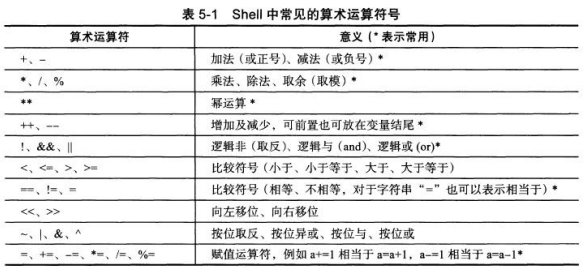
常用的运算符号
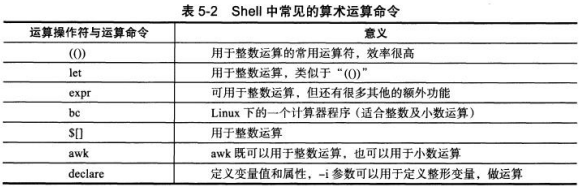
常用的运算命令
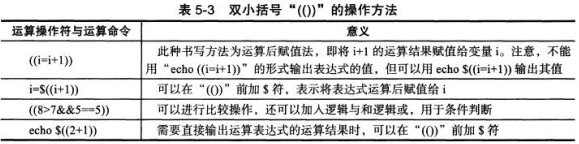
(1)双小括号
基本语法
1)利用“(())”进行简单运算
[root@codis-178 ~]# echo $((1+1))

2

[root@codis-178 ~]# echo $((6-3))

3

[root@codis-178 ~]# ((i=5))

[root@codis-178 ~]# ((i=i*2))

[root@codis-178 ~]# echo $i

10
2)利用“(())”进行复杂运算
[root@codis-178 ~]# ((a=1+2**3-4%3))

[root@codis-178 ~]# echo $a

8

[root@codis-178 ~]# b=$((1+2**3-4%3))

[root@codis-178 ~]# echo $b

8

[root@codis-178 ~]# echo $((1+2**3-4%3))

8

[root@codis-178 ~]# a=$((100*(100+1)/2))

[root@codis-178 ~]# echo $a

5050

[root@codis-178 ~]# echo $((100*(100+1)/2))

5050
3)特殊运算符的运算
[root@codis-178 ~]# a=8

[root@codis-178 ~]# echo $((a=a+1))

9

[root@codis-178 ~]# echo $((a+=1))

10

[root@codis-178 ~]# echo $((a**2))

100
4)比较和判断
[root@codis-178 ~]# echo $((3<8))

1

[root@codis-178 ~]# echo $((8<3))

0

[root@codis-178 ~]# echo $((8==8))

1

[root@codis-178 ~]# if ((8>7&&5==5))

> then

> echo yes

> fi

yes
5)在变量前后使用--和++特殊运算符的表达式
[root@codis-178 ~]# a=10

[root@codis-178 ~]# echo $((a++))

10

[root@codis-178 ~]# echo $a

11

[root@codis-178 ~]# a=11

[root@codis-178 ~]# echo $((a--))

11

[root@codis-178 ~]# echo $a

10

[root@codis-178 ~]# a=10

[root@codis-178 ~]# echo $a

10

[root@codis-178 ~]# echo $((--a))

9

[root@codis-178 ~]# echo $((++a))

10

[root@codis-178 ~]# echo $a

10
6)通过“(())”运算后赋值给变量
[root@codis-178 ~]# myvar=99

[root@codis-178 ~]# echo $((myvar+1))

100

[root@codis-178 ~]# echo $((   myvar+1   ))

100

[root@codis-178 ~]# myvar=$((myvar+1))

[root@codis-178 ~]# echo $myvar

100
7)包含“(())”的各种常见运算
[root@codis-178 ~]# echo $((6+2))

8

[root@codis-178 ~]# echo $((6-2))

4

[root@codis-178 ~]# echo $((6*2))

12

[root@codis-178 ~]# echo $((6/2))

3

[root@codis-178 ~]# echo $((6%2))

0

[root@codis-178 ~]# echo $((6**2))

36
8)在shell脚本中的示例
[root@codis-178 ~]# cat test.sh

#!/bin/bash

a=6

b=2

echo "a-b=$(($a-$b))"

echo "a+b=$(($a+$b))"

echo "a*b=$(($a*$b))"

echo "a/b=$(($a/$b))"

echo "a**b=$(($a**$b))"

echo "a%b=$(($a%$b))"

[root@codis-178 ~]# sh test.sh

a-b=4

a+b=8

a*b=12

a/b=3

a**b=36

a%b=0
9)将上面的脚本中a、b两个变量通过命令行脚本传参,以实现混合运算
[root@codis-178 ~]# cat test.sh

#!/bin/bash

a=$1

b=$2

echo "a-b=$(($a-$b))"

echo "a+b=$(($a+$b))"

echo "a*b=$(($a*$b))"

echo "a/b=$(($a/$b))"

echo "a**b=$(($a**$b))"

echo "a%b=$(($a%$b))"

[root@codis-178 ~]# sh test.sh 8 3

a-b=5

a+b=11

a*b=24

a/b=2

a**b=512

a%b=2

[root@codis-178 ~]# sh test.sh 3 6

a-b=-3

a+b=9

a*b=18

a/b=0

a**b=729

a%b=3
10)实现输入2个数进行运算的计算器
[root@codis-178 ~]# cat yunsuan.sh

#!/bin/bash

print_usage(){

	printf "Please enter an integer\n"

	exit 1

}

read -p "Please input first number: " firstnum

if [ -n "`echo $firstnum|sed 's/[0-9]//g'`" ];then

	print_usage

fi

read -p "Please input the operators: " operators

if [ "${operators}" != "+" ] && [ "${operators}" != "-" ] && [ "${operators}" != "*" ] && [ "${operators}" != "/" ];then

	echo "please use (+|-|*|/)"

	exit 2

fi

read -p "Please input second number: " secondnum

if [ -n "`echo $secondnum|sed 's/[0-9]//g'`" ];then

	printf_usage

fi

echo "${firstnum}${operators}${secondnum}=$((${firstnum}${operators}${secondnum}))"

[root@codis-178 ~]# sh yunsuan.sh

Please input first number: 5

Please input the operators: +

Please input second number: 16

5+16=21

[root@codis-178 ~]# sh yunsuan.sh

Please input first number: 9

Please input the operators: *

Please input second number: 24

9*24=216

[root@codis-178 ~]# sh yunsuan.sh

Please input first number: 76

Please input the operators: -

Please input second number: 24

76-24=52
改良版
[root@codis-178 ~]# cat yunsuan1.sh

#!/bin/bash

print_usage(){

	printf $"USAGE:$0 NUM1 {+|-|*|/} NUM2\n"

	exit 1

}

if [ $# -ne 3 ]

	then

		print_usage

fi

firstnum=$1

secondnum=$3

op=$2

if [ -n "`echo $firstnum|sed 's/[0-9]//g'`" ];then

	print_usage

fi

if [ "$op" != "+" ] && [ "$op" != "-" ] && [ "$op" != "*" ] && [ "$op" != "/" ]

	then

		print_usage

fi

if [ -n "`echo $secondnum|sed 's/[0-9]//g'`" ];then

	printf_usage

fi

echo "${firstnum}${op}${secondnum}=$((${firstnum}${op}${secondnum}))"

[root@codis-178 ~]# sh yunsuan1.sh 6 + 8

6+8=14

[root@codis-178 ~]# sh yunsuan1.sh 56 + 13

56+13=69

[root@codis-178 ~]# sh yunsuan1.sh 56 - 13

56-13=43

[root@codis-178 ~]# sh yunsuan1.sh 2 * 2

USAGE:yunsuan1.sh NUM1 {+|-|*|/} NUM2

[root@codis-178 ~]# sh yunsuan1.sh 9 / 3

9/3=3

[root@codis-178 ~]# sh yunsuan1.sh 2 \* 2  # 乘号需要转义

2*2=4
(2)let运算命令
1)给自变量加8
[root@codis-178 ~]# i=2

[root@codis-178 ~]# i=i+8

[root@codis-178 ~]# echo $i

i+8

[root@codis-178 ~]# unset i

[root@codis-178 ~]# i=2

[root@codis-178 ~]# let i=i+8

[root@codis-178 ~]# echo $i

10
2)监控Web服务状态,如果访问两次均失败,则报警
[root@codis-178 ~]# cat web.sh

#!/bin/bash

CheckUrl(){

	timeout=5

	fails=0

	success=0

	while true

		do

			wget --timeout=$timeout --tries=1 http://oldboy.blog.51cto.com -q -O /dev/null

			if [ $? -ne 0 ]

				then

					let fails=fails+1

			else

				let success+=1

			fi

			if [ $success -ge 1 ]

				then

					echo success

					exit 0

			fi

			if [ $fails -ge 2 ]

				then

					Critical="sys is down."

					echo $Critical|tee|mail -s "$Critical" tongxiaoda@anzhi.com

					exit 2

			fi

	done

}

CheckUrl

[root@codis-178 ~]# sh web.sh

success
(3)expr命令
1)expr用于计算
[root@codis-178 ~]# expr 2 + 2

4

[root@codis-178 ~]# expr 2 - 2

0

[root@codis-178 ~]# expr 2 * 2  # 需要转义

expr: syntax error

[root@codis-178 ~]# expr 2 \* 2

4

[root@codis-178 ~]# expr 2 / 2

1
2)expr配合变量计算
[root@codis-178 ~]# i=5

[root@codis-178 ~]# i=`expr $i + 6`

[root@codis-178 ~]# echo $i

11
3)判断一个变量或字符串是否为整数
[root@codis-178 ~]# i=5

[root@codis-178 ~]# expr $i + 6 &>/dev/null

[root@codis-178 ~]# echo $?

0

[root@codis-178 ~]# i=oldboy

[root@codis-178 ~]# expr $i + 6 &>/dev/null

[root@codis-178 ~]# echo $?

2
4)通过传参判断输出内容是否为整数
[root@codis-178 ~]# cat expr.sh

#!/bin/bash

expr $1 + 1 > /dev/null 2>&1

[ $? -eq 0 ] && echo int || echo chars

[root@codis-178 ~]# sh expr.sh oldboy

chars

[root@codis-178 ~]# sh expr.sh 119

int
5)通过read读入持续等待输入
[root@codis-178 ~]# cat judge_int.sh

#!/bin/bash

while true

do

	read -p "Pls input:" a

	expr $a + 0 >/dev/null 2>&1

	[ $? -eq 0 ] && echo int || echo chars

done

[root@codis-178 ~]# sh judge_int.sh

Pls input:oldgirl

chars

Pls input:76

int

Pls input:76sd

chars
6)通过expr判断文件扩展名是否符合要求
[root@codis-178 ~]# cat expr1.sh

#!/bin/bash

if expr "$1" : ".*\.pub" &>/dev/null

	then

		echo "you are using $1"

else

	echo "Pls use *.pub file"

fi

[root@codis-178 ~]# sh expr1.sh ttt.pub

you are using ttt.pub

[root@codis-178 ~]# sh expr1.sh ttt.py

Pls use *.pub file
7)使用expr命令实现ssh服务自带的ssh-copy-id公钥分发脚本
[root@codis-178 ~]# sed -n '10,20p' which /usr/bin/ssh-copy-id

sed: can't read which: No such file or directory

if [ "-i" = "$1" ]; then

  shift

  # check if we have 2 parameters left, if so the first is the new ID file

  if [ -n "$2" ]; then

    if expr "$1" : ".*\.pub" > /dev/null ; then

      ID_FILE="$1"

    else

      ID_FILE="$1.pub"

    fi

    shift         # and this should leave $1 as the target name

  fi
8)通过expr计算字符串长度
[root@codis-178 ~]# char="I am oldboy"

[root@codis-178 ~]# expr length "$char"

11

[root@codis-178 ~]# echo ${char}

I am oldboy

[root@codis-178 ~]# echo ${char}|wc -L

11

[root@codis-178 ~]# echo ${char}|awk '{print length($0)}'

11
9)请编写shell脚本,打印下面语句中字符数不大于6的单词
I am oldboy linux welcome to our training
[root@codis-178 ~]# cat word_length.sh

#!/bin/bash

for n in I am oldboy linux welcome to our training

do

	if [ `expr length $n` -le 6 ]

		then

			echo $n

	fi

done

[root@codis-178 ~]# sh word_length.sh

I

am

oldboy

linux

to

our
(4)bc命令
Linux内部计算器
[root@codis-178 ~]# bc

bc 1.06.95

Copyright 1991-1994, 1997, 1998, 2000, 2004, 2006 Free Software Foundation, Inc.

This is free software with ABSOLUTELY NO WARRANTY.

For details type `warranty'.

1+1

2

3*3

9
1)将bc用在命令行实现运算
[root@codis-178 ~]# echo 3+5|bc

8

[root@codis-178 ~]# echo 3.3+5.6|bc

8.9

[root@codis-178 ~]# echo 7.28-5.62|bc

1.66

[root@codis-178 ~]# echo "scale=2;355/113"|bc  # scale保留几位小数

3.14

[root@codis-178 ~]# echo "scale=4;355/113"|bc

3.1415

[root@codis-178 ~]# i=5

[root@codis-178 ~]# i=`echo $i+6|bc`

[root@codis-178 ~]# echo $i

11
2)通过一条命令计算输出1+2+3+...+10的表达式,并计算结果
[root@codis-178 ~]# echo `seq -s '+' 10`=`seq -s "+" 10|bc`

1+2+3+4+5+6+7+8+9+10=55

[root@codis-178 ~]# echo `seq -s '+' 10`=$((`seq -s "+" 10`))

1+2+3+4+5+6+7+8+9+10=55

[root@codis-178 ~]# echo `seq -s "+" 10`=`seq -s " + " 10|xargs expr`

1+2+3+4+5+6+7+8+9+10=55
(5)awk实现计算
[root@codis-178 ~]# echo "7.73 3.854" |awk '{print ($1-$2)}'

3.876

[root@codis-178 ~]# echo "367 131" |awk '{print ($1-3)/$2}'

2.77863
(6)$[]符号的运算
[root@codis-178 ~]# i=5

[root@codis-178 ~]# i=$[i+6]

[root@codis-178 ~]# echo $i

11

[root@codis-178 ~]# echo $[2*3]

6

[root@codis-178 ~]# echo $[3%5]

3
打印数学杨辉三角
[root@codis-178 ~]# cat shuxue.sh

#!/bin/bash

if (test -z $1);then

	read -p "Input Max Lines:" MAX

else

	MAX=$1

fi

i=1

while [ $i -le $MAX ]

do

	j=1

	while [ $j -le $i ]

	do

		f=$[i-1]

		g=$[j-1]

		if [ $j -eq $i ] || [ $j -eq 1 ];then

			declare SUM_${i}_$j=1

		else

			declare A=$[SUM_${f}_$j]

			declare B=$[SUM_${f}_$g]

			declare SUM_${i}_$j=`expr $A + $B`

		fi

		echo -en $[SUM_${i}_$j]" "

		let j++

	done

	echo

	let i++

done

[root@codis-178 ~]# sh shuxue.sh

Input Max Lines:4

1

1 1

1 2 1

1 3 3 1
2.基于Shell变量输入read命令的运算
(1)read命令
语法格式:read [参数] [变量名]
参数:
- -p prompt 设置提示信息
- -t timeout 设置输入等待时间,单位秒
[root@codis-178 ~]# read -t 10 -p "Pls input one num:" num

Pls input one num:18

[root@codis-178 ~]# echo $num

18

[root@codis-178 ~]# read -t 10 -p "Pls input two num:" a1 a2

Pls input two num:5 6

[root@codis-178 ~]# echo $a1

5

[root@codis-178 ~]# echo $a2

6
(2)以read命令读取及传参的综合案例
[root@codis-178 ~]# cat read_size01.sh

#!/bin/bash

read -t 15 -p "Please input two number:" a b

[ ${#a} -le 0 ] && {

	echo "the first num is null"

	exit 1

}

[ ${#b} -le 0 ] && {

	echo "the second num is null"

    exit 1

}

expr $a + 1 &>/dev/null

RETVAL_A=$?

expr $b + 1 &>/dev/null

RETVAL_B=$?

if [ $RETVAL_A -ne 0 -o $RETVAL_B -ne 0 ];then

	echo "one of the num is not num,pls input again."

	exit 1

fi

echo "a-b=$(($a-$b))"

echo "a+b=$(($a+$b))"

echo "a*b=$(($a*$b))"

echo "a/b=$(($a/$b))"

echo "a**b=$(($a**$b))"

echo "a%b=$(($a%$b))"

[root@codis-178 ~]# sh read_size01.sh

Please input two number:qq

the second num is null

[root@codis-178 ~]# sh read_size01.sh

Please input two number:12 6

a-b=6

a+b=18

a*b=72

a/b=2

a**b=2985984

a%b=0
通过传参方式
[root@codis-178 ~]# cat read_size02.sh

#!/bin/bash

a=$1

b=$2

Usage(){

	echo $"USAGE:sh $0 num1 num2"

	exit 1

}

if [ $# -ne 2 ];then

	Usage

fi

expr $a + 1 >/dev/null 2>&1

[ $? -ne 0 ] && Usage

echo "a-b=$(($a-$b))"

echo "a+b=$(($a+$b))"

echo "a*b=$(($a*$b))"

echo "a**b=$(($a**$b))"

if [ $b -eq 0 ]

	then

		echo "your input does not allow to run"

		echo "a/b =error"

		echo "a%b =error"

else

	echo "a/b =$(($a/$b))"

	echo "a%b =$(($a%$b))"

fi

[root@codis-178 ~]# sh read_size02.sh

USAGE:sh read_size02.sh num1 num2

[root@codis-178 ~]# sh read_size02.sh 7 old

USAGE:sh read_size02.sh num1 num2

[root@codis-178 ~]# sh read_size02.sh 7 3

a-b=4

a+b=10

a*b=21

a**b=343

a/b =2

a%b =1
Shell编程之运算的更多相关文章
- shell编程系列5--数学运算
shell编程系列5--数学运算 方法1 expr $num1 operator $num2 方法2 $(($num1 operator $num2)) expr操作符对照表1 操作符 含义 num1 ...
- Shell编程菜鸟基础入门笔记
Shell编程基础入门 1.shell格式:例 shell脚本开发习惯 1.指定解释器 #!/bin/bash 2.脚本开头加版权等信息如:#DATE:时间,#author(作者)#mail: ...
- Linux Shell编程基础
在学习Linux BASH Shell编程的过程中,发现由于不经常用,所以很多东西很容易忘记,所以写篇文章来记录一下 ls 显示当前路径下的文件,常用的有 -l 显示长格式 -a 显示所有包括隐 ...
- 【转载】shell编程——if语句 if -z -n -f -eq -ne -lt
shell编程中条件表达式的使用 if 条件then Commandelse Commandfi 别忘了这个结尾 If语句忘了结尾fites ...
- shell编程基础练习
shell作为一个人机交互的接口,在Linux中发挥着很大的作用,而shell编程则是减轻系统工程师工作的利器,这里总结一下shell编程的主要内容(趁着程序运行的空档). 本文的基本结构是shell ...
- Linux Shell编程变量赋值和引用
我们可以使用任意一种文字编辑器,比如gedit.kedit.emacs.vi等来编写shell脚本,它必须以如下行开始(必须放在文件的第一行): #!/bin/sh ... 注意:最好使用“! ...
- shell编程基础(5)---循环指令
while类型的循环 while类型的循环是不定循环的一种,每一次循环都会验证给出的循环条件,判断是否要进行下一次循环.linux中while循环的写法和c语言中很想,但是条件给出的方式有些区别. 首 ...
- linux中shell编程
shell编程 1 echo -e 识别\转义符 \a \b \t \n \x十六进制 \0八进制 等等 #!/bin/bash echo -e "hello world" 执行脚 ...
- linux —— shell 编程(文本处理)
导读 本文为博文linux —— shell 编程(整体框架与基础笔记)的第4小点的拓展.(本文所有语句的测试均在 Ubuntu 16.04 LTS 上进行) 目录 基本文本处理 流编辑器sed aw ...
随机推荐
- Web services 把 Web 应用程序提升到了另外一个层面
通过使用 Web services,您的应用程序可向全世界发布功能或消息. Web services 使用 XML 来编解码数据,并使用 SOAP 借由开放的协议来传输数据. 通过 Web servi ...
- vue 流程
1.vue 项目搭建 2.监听 3.组件 4.路由
- 加号选择器(ul>li + li)
<head> <meta charset="UTF-8"> <title>+ selector</title> <style& ...
- c语言 常用知识点
强制类型转换 (int)(x+y) 输入 scanf("a=%f,b=%f",&a,&b); a=1,b=1 char a; a=getchar(); 输入一个字 ...
- iOS Document Interaction 编程指南
本文转载至 http://www.2cto.com/kf/201306/219382.html iOS支持在你的app中用其他app预览和显示文档.iOS还支持文件关联,允许其他app通过你的程序打开 ...
- 使用RestTemplate发送multipart/form-data格式的数据
现有业务场景需要使用RestTemplate发送一个post请求,请求格式为multipart/form-data的,可以使用以下方法: public Object sendRequest(Objec ...
- tomcat ; nginx ;mysql
[说明]上午在服务器上部署了自己的web目录(tomcat虚拟目录),下午安装并了解了nginx(出了点问题,后来解决了),晚上尝试nginx和tomcat配置(一头雾水) 一:今日完成 1)配置to ...
- 《从零开始学Swift》学习笔记(Day 47)——final关键字
原创文章,欢迎转载.转载请注明:关东升的博客 在类的定义中使用final关键字声明类.属性.方法和下标.final声明的类不能被继承,final声明的属性.方法和下标不能被重写. 下面看一个示例: f ...
- 关于后台传来的json是含英文字母的string
最近帮朋友写东西,遇上一个比较坑的后台,传来的json是字符串,并且还伴有英文字符,类似 callback({xxx:xxx,xxx:xxx}),我打印了一下后台传来的数据格式,发现时string,所 ...
- C#实体类序列化为XML
这两天,应要求做一个C/S的小程序,考虑到程序简洁小巧,存数据的方式不使用数据库,而是直接存入XML文档中保存.为了把复杂实体类里面的属性存入XML,我们可以使用C#有的反射机制,做一个简单的通用工具 ...