
Ubuntu系统里如何正确卸载oracle-j2sdk1.6(图文详解)
问题来源

因为,我在安装clouder manager5.X的时候,默认是需要oracle-j2sdk1.7。
它4.X时,才是1.6的。
若你还是在用clouder manager4.X版本的话,需要用到oracle-j2sdk1.6
则,见
http://download.csdn.net/download/nma_123456/8976865

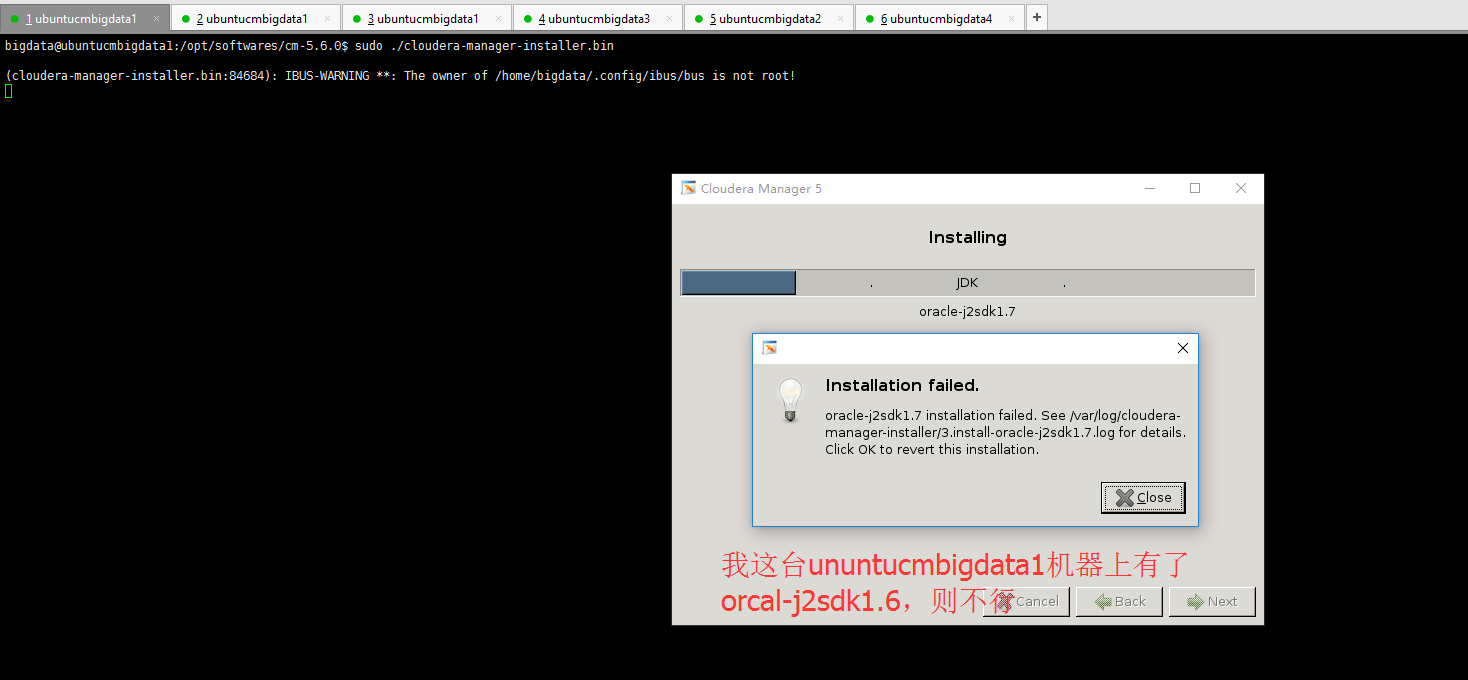
为此,需要卸载它,再来安装

bigdata@ubuntucmbigdata1:/var/log/cloudera-manager-installer$ dpkg --list | grep -i jdk

ii  oracle-j2sdk1.                                       1.6.+update31                                      amd64        Java(TM) JDK, Standard Edition, Oracle(TM)

bigdata@ubuntucmbigdata1:/var/log/cloudera-manager-installer$ sudo apt-get remove oracle-j2sdk1.

Reading package lists... Done

Building dependency tree

Reading state information... Done

The following package was automatically installed and is no longer required:

  libstdc++

Use 'apt-get autoremove' to remove it.

The following packages will be REMOVED:

  oracle-j2sdk1.

 upgraded,  newly installed,  to remove and  not upgraded.

 not fully installed or removed.

After this operation,  MB disk space will be freed.

Do you want to continue? [Y/n] y

(Reading database ...  files and directories currently installed.)

Removing oracle-j2sdk1. (1.6.+update31) ...

Setting up cloudera-manager-server (5.11.-.cm5111.p0.~trusty-cm5) ...

chown: cannot access ‘/var/lib/cloudera-scm-server/’: No such file or directory

dpkg: error processing package cloudera-manager-server (--configure):

 subprocess installed post-installation script returned error exit status

Errors were encountered while processing:

 cloudera-manager-server

E: Sub-process /usr/bin/dpkg returned an error code ()

bigdata@ubuntucmbigdata1:/var/log/cloudera-manager-installer$ dpkg --list | grep -i jdk

bigdata@ubuntucmbigdata1:/var/log/cloudera-manager-installer$
解决办法
bigdata@ubuntucmbigdata3:/usr/java$ dpkg --list | grep -i jdk

ii  oracle-j2sdk1.                                       1.6.+update31                                      amd64        Java(TM) JDK, Standard Edition, Oracle(TM)

iF  oracle-java7-installer                                7u80+7u60arm-~webupd8~                            all          Oracle Java(TM) Development Kit (JDK)

iU  oracle-java7-set-default                              7u80+7u60arm-~webupd8~                            all          Set Oracle JDK  as default Java

bigdata@ubuntucmbigdata3:/usr/java$ sudo apt-get remove oracle-j2sdk1.

Reading package lists... Done

Building dependency tree

Reading state information... Done

The following packages were automatically installed and are no longer required:

  libntdb1 libstdc++ python-ntdb

Use 'apt-get autoremove' to remove them.

The following packages will be REMOVED:

  oracle-j2sdk1.

 upgraded,  newly installed,  to remove and  not upgraded.

 not fully installed or removed.

After this operation,  MB disk space will be freed.

Do you want to continue? [Y/n] y

(Reading database ...  files and directories currently installed.)

Removing oracle-j2sdk1. (1.6.+update31) ...

Setting up oracle-java7-installer (7u80+7u60arm-~webupd8~) ...

Downloading Oracle Java ...

---- ::--  http://download.oracle.com/otn-pub/java/jdk/7u80-b15/jdk-7u80-linux-x64.tar.gz

Resolving download.oracle.com (download.oracle.com)... 23.2.16.218, 23.2.16.208

Connecting to download.oracle.com (download.oracle.com)|23.2.16.218|:... connected.

HTTP request sent, awaiting response...  Moved Temporarily

Location: https://edelivery.oracle.com/otn-pub/java/jdk/7u80-b15/jdk-7u80-linux-x64.tar.gz [following]

---- ::--  https://edelivery.oracle.com/otn-pub/java/jdk/7u80-b15/jdk-7u80-linux-x64.tar.gz

Resolving edelivery.oracle.com (edelivery.oracle.com)... 184.28.37.127, :4f00::::2d3e, :4f00::::2d3e

Connecting to edelivery.oracle.com (edelivery.oracle.com)|184.28.37.127|:... connected.

HTTP request sent, awaiting response...  Moved Temporarily

Location: http://download.oracle.com/otn-pub/java/jdk/7u80-b15/jdk-7u80-linux-x64.tar.gz?AuthParam=1498453415_f4abdac1cfd99129c88b2f3935796ed1 [following]

---- ::--  http://download.oracle.com/otn-pub/java/jdk/7u80-b15/jdk-7u80-linux-x64.tar.gz?AuthParam=1498453415_f4abdac1cfd99129c88b2f3935796ed1

Connecting to download.oracle.com (download.oracle.com)|23.2.16.218|:... connected.

HTTP request sent, awaiting response...  Not Found

-- :: ERROR : Not Found.

download failed

Oracle JDK  is NOT installed.

dpkg: error processing package oracle-java7-installer (--configure):

 subprocess installed post-installation script returned error exit status

dpkg: dependency problems prevent configuration of oracle-java7-set-default:

 oracle-java7-set-default depends on oracle-java7-installer; however:

  Package oracle-java7-installer is not configured yet.

dpkg: error processing package oracle-java7-set-default (--configure):

 dependency problems - leaving unconfigured

No apport report written because the error message indicates its a followup error from a previous failure.

                                                                                                          Errors were encountered while processing:

 oracle-java7-installer

 oracle-java7-set-default

E: Sub-process /usr/bin/dpkg returned an error code ()

bigdata@ubuntucmbigdata3:/usr/java$ dpkg --list | grep -i jdk

iF  oracle-java7-installer                                7u80+7u60arm-~webupd8~                            all          Oracle Java(TM) Development Kit (JDK)

iU  oracle-java7-set-default                              7u80+7u60arm-~webupd8~                            all          Set Oracle JDK  as default Java

bigdata@ubuntucmbigdata3:/usr/java$
同时,大家可以关注我的个人博客:
http://www.cnblogs.com/zlslch/ 和 http://www.cnblogs.com/lchzls/
人生苦短,我愿分享。本公众号将秉持活到老学到老学习无休止的交流分享开源精神,汇聚于互联网和个人学习工作的精华干货知识,一切来于互联网,反馈回互联网。
目前研究领域:大数据、机器学习、深度学习、人工智能、数据挖掘、数据分析。 语言涉及:Java、Scala、Python、Shell、Linux等 。同时还涉及平常所使用的手机、电脑和互联网上的使用技巧、问题和实用软件。 只要你一直关注和呆在群里,每天必须有收获
以及对应本平台的QQ群:161156071(大数据躺过的坑)



Ubuntu系统里如何正确卸载oracle-j2sdk1.6(图文详解)的更多相关文章
- ambari集群里如何正确删除历史修改记录(图文详解)
不多说,直接上干货! 答:这些你想删除的话得得去数据库里删除,最好别删除 . 现在默认就是使用好的配置 欢迎大家,加入我的微信公众号:大数据躺过的坑 人工智 ...
- VirtualBox里如何正确安装增强工具(图文详解)
不多说,直接上干货! 找到 复制到
- VMware里Ubuntu-14.04-desktop的VMware Tools安装图文详解
不多说,直接上干货! 前期步骤,请见如下 VMware里Ubuntukylin-14.04-desktop的VMware Tools安装图文详解 我这里,直接,是来说明,Ubuntu-14.04 ...
- VMware里Ubuntukylin-14.04-desktop的VMware Tools安装图文详解
不多说,直接上干货! 总的来说,根据分为三个步骤. 步骤一: 点击 :虚拟机—–>安装VM tools 然后发现桌面会跳出如下问题: 客户机操作系统已将 CD-ROM 门锁定,并且可能正在使用 ...
- VMware里Ubuntu-16.04-desktop的VMware Tools安装图文详解
不多说,直接上干货! 总的来说,根据分为三个步骤. 步骤一: 点击 :虚拟机—–>安装VM tools 然后发现桌面会跳出如下问题: 客户机操作系统已将 CD-ROM 门锁定,并且可能正在使用 ...
- Ubuntu14.04下Mongodb官网卸载部署步骤(图文详解)(博主推荐)
不多说,直接上干货! 前期博客 Ubuntu14.04下Mongodb官网安装部署步骤(图文详解)(博主推荐) https://docs.mongodb.com/manual/tutorial/ins ...
- Ubuntu16.04下Mongodb官网卸载部署步骤(图文详解)(博主推荐)
不多说,直接上干货! 前期博客 Ubuntu16.04下Mongodb官网安装部署步骤(图文详解)(博主推荐) https://docs.mongodb.com/manual/tutorial/ins ...
- 全网最全的Windows下Anaconda2 / Anaconda3里正确下载安装Theano(图文详解)
不多说,直接上干货! Theano的安装教程目前网上一搜很多,前几天折腾了好久,终于安装成功了Anaconda3(Python3)的Theano,嗯~发博客总结并分享下经验教训吧. 渣电脑,显卡用的是 ...
- 全网最详细的Windows里下载与安装Sublime Text *(图文详解)
不多说,直接上干货! 前言 这是代码编程软件,可以性感编程自己代码,有着非常丰富的插件,界面整洁清爽.第一次使用可能不习惯,当你使用一段时间之后,你就会爱上它. 下载与安装 1.下载:目前官方的正式版 ...
随机推荐
- delphi XE7 在Android编译SharedActivity时出错
delphi XE6 在Android编译SharedActivity时正常,但xe7下编译出错,在uses添加Androidapi.Helpers就可以.
- 20145218PC平台逆向破解
20145218PC平台逆向破解 实践目标 本次实践的对象是一个名为pwn1的linux可执行文件. 该程序正常执行流程是:main调用foo函数,foo函数会简单回显任何用户输入的字符串. 该程序同 ...
- Arduino I2C + DS1307实时时钟
主要特性 DS1307是Maxim的串行.I2C实时时钟芯片.主要特性有: 工作电压:主电源电压4.5~5.5V,电池电压2.0~3.5V 功耗:电池供电.备份模式时<500nA 接口:I2C, ...
- ComicEnhancerPro 系列教程十九:用JpegQuality看JPG文件的压缩参数
作者:马健邮箱:stronghorse_mj@hotmail.com 主页:http://www.comicer.com/stronghorse/ 发布:2017.07.23 教程十九:用JpegQu ...
- 表单使用clone方法后, 原有select无法生效
textarea和select的值clone的时候会丢掉,在clone的时候将val再重新赋值一下,如果知道这个了就加单了 测试发现,textarea和select的jquery的clone方法有 ...
- Dynamically loading unmanaged OCX in C#
You'll have to perform a number of steps that are normally taken of automatically when you use the t ...
- const限定符、constexpr和常量表达式------c++ primer
编译器将在编译过程中把用到const变量的地方都替换成对应的值,为了执行这种替换,编译器必须知道变量的初始值.如果程序包含多个文件,则那个用了const对象的文件都必须能访问到它的初始值才行.要做到这 ...
- 649. Dota2 Senate
In the world of Dota2, there are two parties: the Radiant and the Dire. The Dota2 senate consists of ...
- (转)使用vs调试的时候,如何知道程序阻塞在哪里?
遇到一个问题,加了两个断点当运行到断点A后,我释放掉了,理想状态应该是在断点B停住,但并没有,程序感觉就像是阻塞了一样请问,这种状况如何知道程序当前是在哪里阻塞着? 回复: 可以让调试器停住,然后在调 ...
- 【bzoj4514】: [Sdoi2016]数字配对 图论-费用流
[bzoj4514]: [Sdoi2016]数字配对 好像正常的做法是建二分图? 我的是拆点然后 S->i cap=b[i] cost=0 i'->T cap=b[i] cost=0 然后 ...