
springboot+Zookeeper+Dubbo入门
最近想学习dubbo,就利用周末写了一个特别简单的demo,不知道有没有用,先记录一下。
1、安装zookeeper并启动(安装看我上一篇博客https://www.cnblogs.com/huangzhang/p/9219319.html)
2、下载dubbo源码,安装dubbo-admin(安装看我之前的博客https://www.cnblogs.com/huangzhang/p/9219296.html)
这些准备工作做好之后开始写demo代码:
这里用的开发工具是Intellij IDEA,所以利用idea的智能生成一个spring boot项目,这里就不细说了。
搭建好spring boot项目之后,pom.xml文件中引入依赖
<!--引入dubbot-->

        <dependency>

            <groupId>com.alibaba</groupId>

            <artifactId>dubbo</artifactId>

            <version>2.5.10</version>

        </dependency>

        <!--引入zookeeper-->

        <dependency>

            <groupId>org.apache.zookeeper</groupId>

            <artifactId>zookeeper</artifactId>

            <version>3.4.6</version>

            <exclusions>

                <exclusion>

                    <artifactId>slf4j-log4j12</artifactId>

                    <groupId>org.slf4j</groupId>

                </exclusion>

            </exclusions>

        </dependency>

        <!--引入zookeeper客户端-->

        <dependency>

            <groupId>com.github.sgroschupf</groupId>

            <artifactId>zkclient</artifactId>

            <version>0.1</version>

        </dependency>
这里是生产者
写测试接口:
package com.example.demo01.service;

/**

 * @description 声明服务接口

 * @date 2018/06/23

 * @author huangzhang

 */

public interface DubboServiceProvider {

    //声明服务方法

    public String sayHello(String name);

}
实现该接口:
package com.example.demo01.service.Impl;

import com.example.demo01.service.DubboServiceProvider;

import org.springframework.stereotype.Component;

/**

 * @author huangzhang

 * @description

 * @date Created in 2018/6/23 18:13

 */

@Component("dubboServiceProvider")

public class DubboServiceProviderImpl implements DubboServiceProvider {

    @Override

    public String sayHello(String name) {

        return "------hello  " + name + "------";

    }

}
在resource目录下面加入一个dubbo.xml配置文件
<?xml version="1.0" encoding="UTF-8"?>

<beans xmlns="http://www.springframework.org/schema/beans"

       xmlns:xsi="http://www.w3.org/2001/XMLSchema-instance"

       xmlns:dubbo="http://code.alibabatech.com/schema/dubbo"

       xsi:schemaLocation="http://www.springframework.org/schema/beans http://www.springframework.org/schema/beans/spring-beans.xsd http://code.alibabatech.com/schema/dubbo http://code.alibabatech.com/schema/dubbo/dubbo.xsd">

    <!--配置服务名称-->

    <dubbo:application name="dubboproviderhello" />

    <!--配置服务注册中心,dubbo不仅仅支持zookeeper-->

    <dubbo:registry address="zookeeper://127.0.0.1:2181" />

    <!--声明对外暴露的服务-->

    <dubbo:service interface="com.example.demo01.service.DubboServiceProvider" ref="dubboServiceProvider" />

    <bean id="demoService" class="com.example.demo01.service.Impl.DubboServiceProviderImpl"></bean>

</beans>
启动类加入注解:
package com.example.demo01;

import org.springframework.boot.SpringApplication;

import org.springframework.boot.autoconfigure.SpringBootApplication;

import org.springframework.context.annotation.ComponentScan;

import org.springframework.context.annotation.ImportResource;

@SpringBootApplication

@ImportResource("classpath:/dubbo.xml")

public class Demo01Application {

    public static void main(String[] args) {

        SpringApplication.run(Demo01Application.class, args);

    }

}
编写controller:
package com.example.demo01.controller;

import org.springframework.stereotype.Controller;

import org.springframework.web.bind.annotation.RequestMapping;

import org.springframework.web.bind.annotation.ResponseBody;

@Controller

public class HelloController {

    @RequestMapping("/index")

    @ResponseBody

    public String index(){

        return "hello world";

    }

}
这里项目默认端口是8080,zookeeper默认端口也是8080,所以到application.properties中配置端口
server.port: 8082
然后启动项目,Dubbo-admin管理平台中的注册列表中显示有一个生产者以注册,但是没有消费者,如下图

生产者完成了,然后就是消费者
搭建一个spring boot项目,pom.xml、启动类、service接口都跟生产这一样,在application.properties中配置端口8081
这里配置dubbo.xml的时候有点不一样,不用注入bean
<?xml version="1.0" encoding="UTF-8"?>

<beans xmlns="http://www.springframework.org/schema/beans"

       xmlns:xsi="http://www.w3.org/2001/XMLSchema-instance"

       xmlns:dubbo="http://code.alibabatech.com/schema/dubbo"

       xsi:schemaLocation="http://www.springframework.org/schema/beans http://www.springframework.org/schema/beans/spring-beans.xsd http://code.alibabatech.com/schema/dubbo http://code.alibabatech.com/schema/dubbo/dubbo.xsd">

    <!--配置服务名称-->

    <dubbo:application name="dubboproviderhello" />

    <!--配置服务注册中心,dubbo不仅仅支持zookeeper-->

    <dubbo:registry address="zookeeper://127.0.0.1:2181" />

    <!--声明服务引用,与服务声明接口类型一致-->

    <dubbo:reference interface="com.example.demo01.service.DubboServiceProvider" id="dubboServiceProvider" />

</beans>
编写controller
import org.springframework.stereotype.Controller;

import org.springframework.web.bind.annotation.RequestMapping;

import org.springframework.web.bind.annotation.ResponseBody;

import javax.annotation.Resource;

/**

 * @author huangzhang

 * @description

 * @date Created in 2018/6/23 20:13

 */

@Controller

public class HelloController {

    @Resource

    private DubboServiceProvider dubboServiceProvider;

    @RequestMapping("/index")

    @ResponseBody

    public String index(){return dubboServiceProvider.sayHello("tom");

    }

}
之后Dubbo-admin管理平台就这样了,有了一个消费者
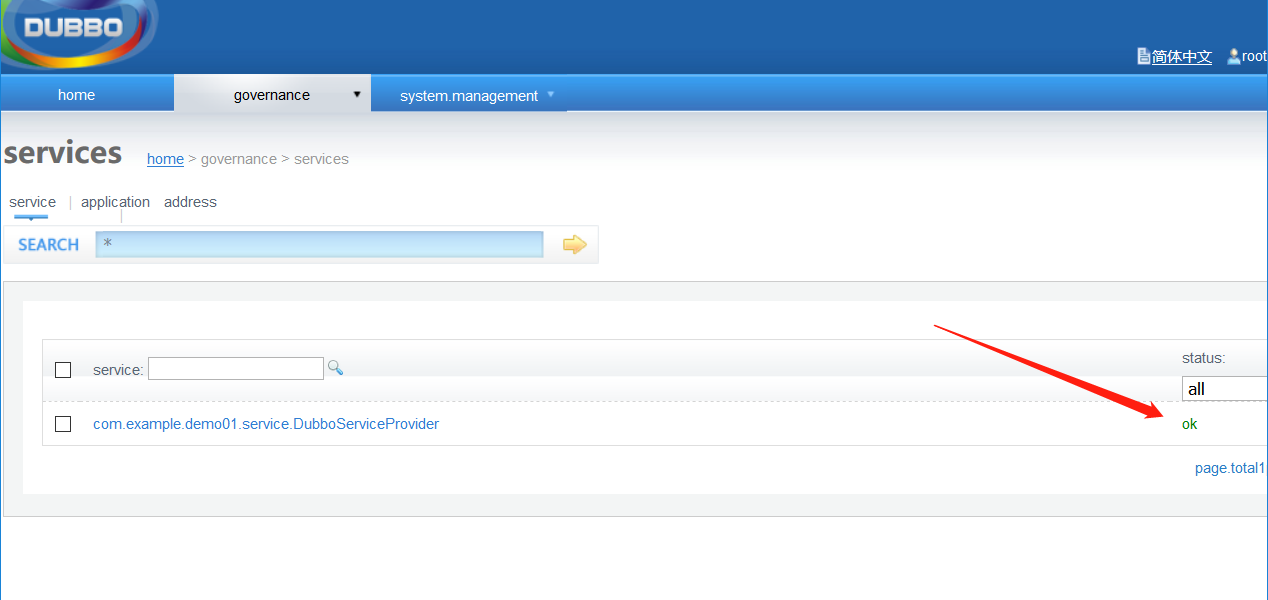
启动消费者,访问消费者提供的index接口,浏览器直接调用就可以了http://localhost:8081/index
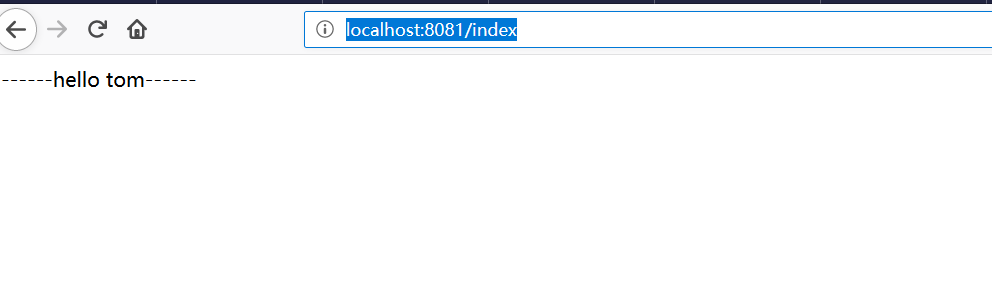
这样一个简单的生产者-消费者demo就搭建完成了,这里消费者通过RPC调用了生产者在Dubbo-admin管理平台注册的服务接口。
springboot+Zookeeper+Dubbo入门的更多相关文章
- IDEA上创建 Maven SpringBoot + zookeeper +dubbo 实例
概述 首先声明,本文是学习总结类型的博客内容,如有雷同纯属学习.本位主要结合zookeeper和dubbo做个简单实例.目前来说,一般网站架构随着业务的发展,逻辑越来越复杂,数据量越来越大,交互越来越 ...
- 基于springboot构建dubbo的入门demo
之前记录了构建dubbo入门demo所需的环境以及基于普通maven项目构建dubbo的入门案例,今天记录在这些的基础上基于springboot来构建dubbo的入门demo:众所周知,springb ...
- SpringBoot+Dubbo+ZooKeeper+Maven入门实践
原创:转载需注明原创地址 https://www.cnblogs.com/fanerwei222/p/11798626.html 注*** 本实例为仅适合初学者,关于dubbo和springboot以 ...
- springboot整合dubbo+zookeeper最新详细
引入 最近和小伙伴做一个比赛,处于开发阶段,因为涉及的服务比较多,且服务需要分开部署在不同的服务器上,讨论之后,打算采用分布式来做,之前学习springboot的时候,部分章节涉及到了springbo ...
- springboot整合dubbo\zookeeper做注册中心
springboot整合dubbo发布服务,zookeeper做注册中心.前期的安装zookeeper以及启动zookeeper集群就不说了. dubbo-admin-2.5.4.war:dubbo服 ...
- springboot与dubbo整合入门(三种方式)
Springboot与Dubbo整合三种方式详解 整合环境: jdk:8.0 dubbo:2.6.2 springboot:2.1.5 项目结构: 1.搭建项目环境: (1)创建父项目与三个子项目,创 ...
- dubbo入门学习(三)-----dubbo整合springboot
springboot节省了大量的精力去配置各种bean,因此通过一个简单的demo来整合springboot与dubbo 一.创建boot-user-service-provider 本篇博文基于上篇 ...
- Springboot整合Dubbo和Zookeeper
Dubbo是一款由阿里巴巴开发的远程服务调用框架(RPC),其可以透明化的调用远程服务,就像调用本地服务一样简单.截至目前,Dubbo发布了基于Spring Boot构建的版本,版本号为0.2.0,这 ...
- springboot使用dubbo和zookeeper
2019-11-17 yls 创建服务接口模块 接口工程只提供接口,不提供实现,在后面的提供者和消费者中使用 在使用接口的模块中只需要写具体实现类,避免了在每个模块中重复编写接口 在接口中引入依赖包 ...
随机推荐
- linux新的API signalfd、timerfd、eventfd使用说明
原文:http://www.cfanz.cn/?c=article&a=read&id=46555注意很多当前(2013/8/6)线上运营的Linux内核可能不支持! 三种新的fd加入 ...
- Java 起名规范
注重代码编写规范: 1)都得遵循标识号的规范 2)不能以关键字,数字开头.也不要以拼音起名,最好用英文单词,单词组合来起名. 3)采用驼峰表示法,使用英文单词组合,单词首字母要大些,起到分割作用. - ...
- 组合(Composite)模式 *
组合(Composite)模式:将对象组合树形结构以表示‘部分-整体’的层次结构. 组合模式使得用户对单个对象和组合对象具有一致性 /* * 抽象构件(Component)角色:这是一个抽象角色,它给 ...
- fabric Clone
记录下: var newObj = fabric.util.object.clone(obj); decDoc.dropCanvas.add(newObj., top: }));
- Qt信号与槽 如何写2个类,一个发送信号,一个接收并处理
题目: 假设要做2个类,一个类的值提供一个函数SetValue,当这个值发生变化时,假设>10就触发告警调用B的函数; ------------------------------------- ...
- [转]Programmatically Register Assemblies in C#.
1. Introduction. 1.1 After publishing Programmatically Register COM Dlls in C# back in 2011, I recei ...
- 【SQL】- 基础知识梳理(二) - SQL简介
一.引言 在梳理这些知识之前,说实话,如果有人问我SQL是什么?我可能会回答就是“INSERT,DELETE,UPDATE,SELECT”语句呗,还能是啥. 二.SQL概念 SQL是什么? SQL是S ...
- L - Ch’s gift HDU - 6162
Ch’s gift Time Limit: 6000/3000 MS (Java/Others) Memory Limit: 65536/65536 K (Java/Others)Total S ...
- C# 继承(4)
接上章: class NameList { public NameList() => Console.WriteLine("这个是NameList的构造函数"); publi ...
- IIS发布的网页上传文件被拒绝
在IIS所在的服务器共享的权限(如下图示,但注意不是加everyone)和共享文件夹的权限里都加上IIS_USER完全控制,如果不行再加上NETWORK SERVICE权限