
3.GlusterFS 企业分布式存储的搭建
3.1 硬件要求
一般选择 2U 机型,磁盘 SATA 盘 4TB,如果 IO 要求比较高,可以采购 SSD 固态硬盘。
为了充分保证系统的稳定性和性能,要求所有 glusterfs 服务器硬件配置尽量一致,尤其是硬盘数量和大小。
机器的 RAID 卡需要带电池,缓存越大,性能越好。一般情况下,建议做 RAID 10,如果出于空间要求的考虑,需要做 RAID 5,建议最好能有 1-2 块硬盘的热备盘。
3.2 系统要求和分区划分
系统可以使用 CentOS 6.x x86_64,安装完成后升级到最新版本,安装的时候,不要使用 LV,
建议:/boot 分区 200M,/ 分区 100G,swap 分区和内存一样大小,剩余空间给 gluster 使用,划分单独的硬盘空间。
系统安装软件没有特殊要求,建议除了开发工具和基本的管理软件,其他软件一律不安装。
3.3 网络环境
网络要求全部千兆环境,gluster 服务器至少有 2 块网卡,1 块网卡绑定供 gluster 使用,剩余一块分配管理网络 IP,用于系统管理。
如果有条件购买万兆交换机,服务器配置万兆网卡,存储性能会更好。网络方面如果安全性要求较高,可以多网卡绑定。
跨地区机房配置 Gluster,在中国网络不适用。
3.4 服务器摆放分布
服务器主备机器要放在不同的机柜,连接不同的交换机,即使一个机柜出现问题,还有一份数据正常访问。
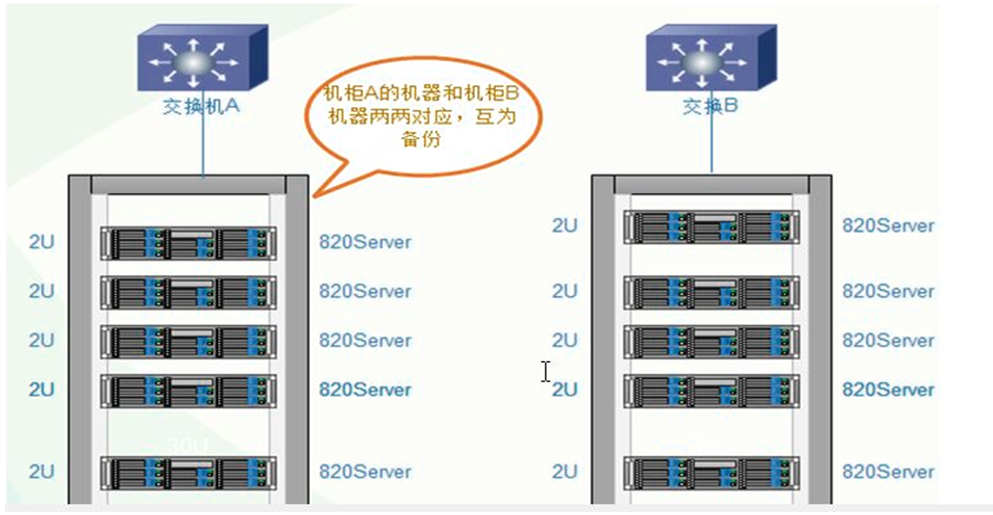
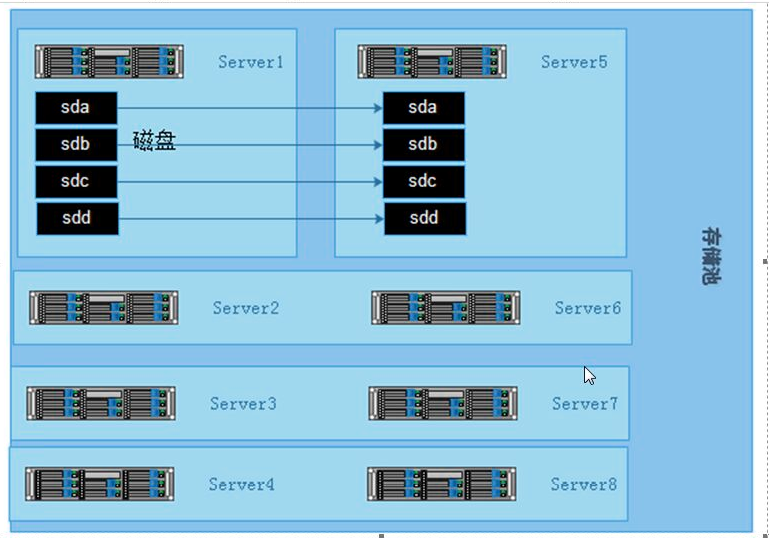
3.5 构建高性能、高可用存储
一般在企业中,采用的是分布式复制卷,因为有数据备份,数据相对安全,分布式条带卷目前对 gluster 来说没有完全成熟,存在一定的数据安全风险。
3.5.1 开启防火墙端口
一般在企业应用中 Linux 防火墙是打开的,这些 Gluster 服务器之间访问的端口如下:
# iptables -I INPUT -p tcp –dport : -j ACCEPT

# iptables -I INPUT -p tcp –dport : -j ACCEPT
上面是卷的端口,下面是硬盘的端口,磁盘越多,端口越多
3.5.2 GlusterFS 文件系统优化
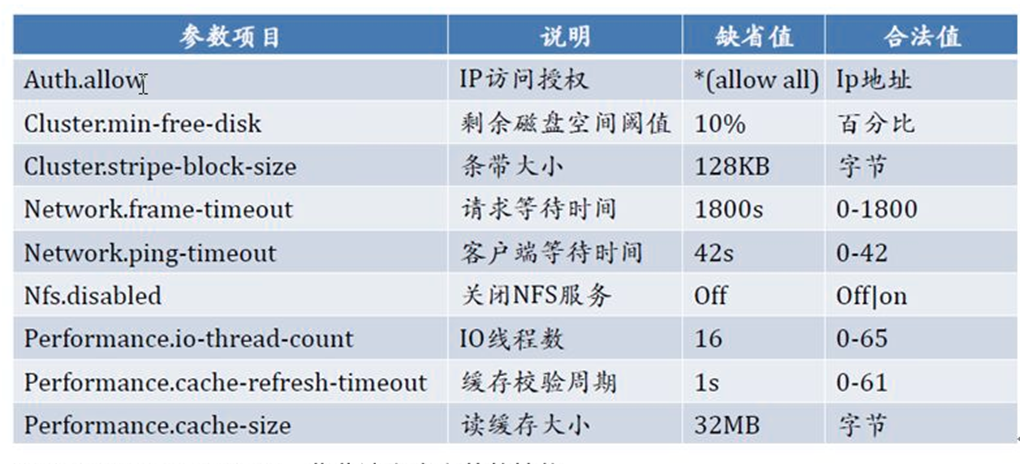
- Performance.quick-read: 优化读取小文件的性能。
- Performance.read-ahead: 用预读的方式提高读取的性能,有利于应用频繁持续性的访问文件,当应用完成当前数据块读取的时候,下一个数据块就已经准备好了。
- Performance.write-behind: 在写数据时,先写入缓存内,再写入硬盘,以提高写入的性能。
- Performance.io-cache: 缓存已经被读过的
GlusterFS 性能参数调整方法
# gluster volume set <卷> <参数>
[root@mystorage1 ~]# gluster volume set gv2 performance.read-ahead on

volume set: success

[root@mystorage1 ~]# gluster volume set gv2 performance.cache-size 256MB

volume set: success

[root@mystorage1 ~]# gluster volume info gv2

Volume Name: gv2

Type: Distributed-Replicate

Volume ID: -263a-4c7a-a155-5115af29221f

Status: Started

Number of Bricks:  x  =

Transport-type: tcp

Bricks:

Brick1: mystorage1:/storage/brick2

Brick2: mystorage2:/storage/brick2

Brick3: mystorage3:/storage/brick1

Brick4: mystorage4:/storage/brick1

Options Reconfigured:

performance.cache-size: 256MB

performance.read-ahead: on

performance.readdir-ahead: on

# GlusterFS 所有性能参数

[root@mystorage1 ~]# gluster volume set gv2 performance.

performance.cache-max-file-size              performance.force-readdirp                   performance.nfs.flush-behind                 performance.read-ahead

performance.cache-min-file-size              performance.high-prio-threads                performance.nfs.strict-o-direct              performance.read-ahead-page-count

performance.cache-priority                   performance.io-cache                         performance.nfs.strict-write-ordering        performance.readdir-ahead

performance.cache-refresh-timeout            performance.io-thread-count                  performance.nfs.write-behind                 performance.resync-failed-syncs-after-fsync

performance.cache-size                       performance.lazy-open                        performance.nfs.write-behind-window-size     performance.stat-prefetch

performance.cache-swift-metadata             performance.least-prio-threads               performance.normal-prio-threads              performance.strict-o-direct

performance.client-io-threads                performance.least-rate-limit                 performance.open-behind                      performance.strict-write-ordering

performance.enable-least-priority            performance.low-prio-threads                 performance.quick-read                       performance.write-behind

performance.flush-behind                     performance.md-cache-timeout                 performance.read-after-open                  performance.write-behind-window-size
3.6 监控及日常维护
可以使用 Zabbix 自带模板监控 CPU、内存、主机存活、磁盘空间、主机运行时间、系统 Load 等。
日常要注意服务器的监控值,遇到报警要及时处理。
以下大多数功能是针对分布式复制卷执行的。
# 查看卷的状态

gluster volume status gv2

# 启动完全修复

gluster volume heal gv2 full

# 查看需要修复的文件

gluster volume heal gv2 info

# 查看修复成功的文件

gluster volume heal gv2 info healed

# 查看修复失败的文件

gluster volume heal gv2 info heal-failed

# 查看脑残的文件

gluster volume heal gv2 info split-brain

# 激活 quota 功能

gluster volume quota gv2 enable

# 关闭 quota 功能

gluster volume quota gv2 disable

# 目录大小限制 /data 是相对卷挂载点的目录,下面是指 /gv2/data

gluster volume quota gv2 limit-usage /data 30MB

# 写入 40MB 文件 测试 quota

dd if=/dev/zero bs= count= of=/gv2/data/40M.file

[root@mystorage1 ~]# dd if=/dev/zero bs= count= of=/gv2/data/40M.file

+ records in

+ records out

 bytes ( MB) copied, 7.53898 s, 5.4 MB/s

[root@mystorage1 ~]# ll /gv2/data/40M.file

-rw-r--r--  root root  Jul  : /gv2/data/40M.file

#  MB的文件竟然可以?下面继续写入一个大一些的文件

[root@mystorage1 ~]# dd if=/dev/zero bs= count= of=/gv2/data/80M.file

dd: opening `/gv2/data/80M.file': Disk quota exceeded

# 这次提示超过了 quota 不能写入,说明 quota 限制的目录大小并不是那么精确。

# quota 信息列表

gluster volume quota gv2 list

[root@mystorage1 ~]# gluster volume quota gv2 list

                  Path                   Hard-limit  Soft-limit      Used  Available  Soft-limit exceeded? Hard-limit exceeded?

-------------------------------------------------------------------------------------------------------------------------------

/data                                     .0MB     %(.0MB)   0Bytes  .0MB              No                   No

# 限制目录的 quota 信息

gluster volume quota gv2 list /data

# 设置信息的超时时间

gluster volume set gv2 features.quota-timeout

# 删除某个目录的 quota 设置

gluster volume quota gv2 remove /data

# 备注:quota 功能,主要是对挂载点下的某个目录进行空间限额,而不是对组成卷组的空间进行限制。
3.GlusterFS 企业分布式存储的搭建的更多相关文章
- 从0到1搭建spark集群---企业集群搭建
今天分享一篇从0到1搭建Spark集群的步骤,企业中大家亦可以参照次集群搭建自己的Spark集群. 一.下载Spark安装包 可以从官网下载,本集群选择的版本是spark-1.6.0-bin-hado ...
- Centos7下GlusterFS 分布式文件系统环境搭建
Centos7下 GlusterFS 环境搭建准备工作glusterfs-3.6.9.tar.gzuserspace-rcu-master.zip三台服务器:192.168.133.53.192.16 ...
- 部署企业LNMP架构搭建bbs
部署企业LNMP架构 1===============部署Nginx 2===============安装及部署Mysql数据库 3===============安装PHP解析环境 4======== ...
- openstack高可用集群15-后端存储技术—GlusterFS(分布式存储)
- glusterFS分布式文件系统的搭建
准备工作 1.安装IBA yum install libradmacm librdmacm-devel libmlx4 infiniband-diags 2.配置IPOIB /etc/sysconfi ...
- .net 企业管理系统快速搭建框架
简言 本人在博客园注册也2年多了,一直没有写自己的博客,因为才疏学浅一直跟着园子里的大哥们学习这.net技术.一年之前跳槽到现在的公司工作,由于公司没有自己一套的开发框架,每次都要重新 ...
- Centos7下GlusterFS分布式存储集群环境部署记录
0)环境准备 GlusterFS至少需要两台服务器搭建,服务器配置最好相同,每个服务器两块磁盘,一块是用于安装系统,一块是用于GlusterFS. 192.168.10.239 GlusterFS-m ...
- glusterfs分布式存储
一,分布式文件系统理论基础 1.1 分布式文件系统出现 计算机通过文件系统管理,存储数据,而现在数据信息爆炸的时代中人们可以获取的数据成指数倍的增长,单纯通过增加硬盘个数来扩展计算机文件系统的存储容量 ...
- Screwturn搭建企业内部wiki
企业内部WIKI搭建 本文所使用的是Screwturn 基于asp.net webform和Sql server的. 仅仅要把本文资源下载下来,直接用IIS部署,然后更改web.config的conn ...
随机推荐
- C# 利用Powershell获取网络相关信息
利用Get-NetAdapter获取信息 Get-NetAdapter 参考链接:https://docs.microsoft.com/en-us/powershell/module/netadapt ...
- UVA - 10817 状压DP
题意:大白P95 本题比较特别的是状压两个集合并且进行转移,因此要分别处理当前集合只有1个老师/2个老师的记录(然后可O(1)得出0个老师的集合) 记忆化过了但是迭代式不能记忆超过2的之前的状态是怎样 ...
- 【记录】adb连不上手机
1.\用户\.android文件夹下新建adb_usb.ini,内容为手机的VID值,如0x9BB5 2.重启adb adb kill-server adb start-server adb devi ...
- linux运维基础知识
linux运维基础知识大全 一,序言 每一个微不足道的知识,也是未来的铺垫.每一份工作的薪资职位,也是曾经努力的结果. 二,服务器 1,运维人员工作职责: 1)保证数据不丢失:2)保证服务器24小时运 ...
- shell 括号的区别
$() 用于命令交换 里面会会执行命令,如果你写其他的: 会直接报错的 ` ` 也是用于命令交换的哦 和$() 的操作是一样的 ${ } 用于变量替换 每次调用环境的时候是需要带一个${ } 但是 ...
- vue之mapMutaions的使用 && vuex中 action 用法示例 && api.js的使用
vue之mapMutations的使用 我们通过Mutation来改变store中的state,方法往往是在子组件中使用 this.$store.commit(); 来实现,但是这样的缺点是不容易查看 ...
- MongoDB数据库进阶 --- 增删查改...
注意: monogdb数据在使用之后必须及时 mongodb.close()否则后台崩溃. 在之前的文章中,我已经介绍了什么事MongoDB以及怎么在windows下安装MongoDB等等基本知识. ...
- 【MFC】消息大全
转自:http://www.cnblogs.com/orez88/articles/2119450.html 消息,就是指Windows发出的一个通知,告诉应用程序某个事情发生了.例如,单击鼠标.改变 ...
- centos7 中文乱码问题解决方法
1.查看是否安装中文包 可以使用下面的命名查看系统是否安装了中文安装包. locale -a |grep "zh_CN" 没有输出,说明没有安装,输入下面的命令安装: yum gr ...
- 案例46-crm练习客户登录
1 login.jsp代码 <%@ page language="java" contentType="text/html; charset=UTF-8" ...