
《ArcGIS Runtime SDK for Android开发笔记》——(12)、自定义方式加载Bundle格式缓存数据
随着ArcGIS 10.3的正式发布,Esri推出了新的紧凑型缓存格式以增强用户的访问体验。新的缓存格式下,Esri将缓存的索引信息.bundlx包含在了缓存的切片文件.bundle中。具体如下图所示:
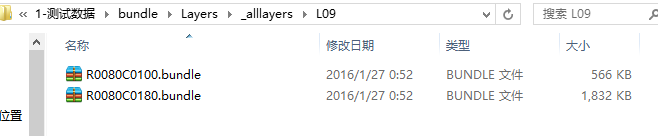
对于bundle格式的具体解析,这里就不再详述,具体可以查阅8013是我的博文《ArcGIS for Server 10.3.X 新型紧凑型缓存的解读和应用》,本文内容就是根据其所述实现。再熟悉bundle实现机理后,结合相关加密算法,可以实现进一步缓存数据的加密解密过程。
转载请注明出处:http://www.cnblogs.com/gis-luq/p/5390343.html
以下仅列出Bundle格式数据的两种加载方式:
1、api默认加载方式
        // Add Local tiled layer to MapView

        ArcGISLocalTiledLayer agsLocaltiledlyr = new ArcGISLocalTiledLayer("file:///mnt/sdcard/ArcGIS/sample/HelloWorld/Layers");

        map.addLayer(agsLocaltiledlyr);
2、利用图层扩展自定义加载Bundle
package com.gis_luq.bundleandroid;

import java.io.ByteArrayOutputStream;

import java.io.File;

import java.io.FileInputStream;

import java.io.FileNotFoundException;

import java.io.FileOutputStream;

import java.io.IOException;

import java.io.InputStream;

import java.io.RandomAccessFile;

import java.util.ArrayList;

import java.util.List;

import android.graphics.Bitmap;

import android.graphics.BitmapFactory;

import android.os.Environment;

import android.util.Log;

import com.esri.android.map.TiledServiceLayer;

import com.esri.android.map.TiledServiceLayer.TileInfo;

import com.esri.core.geometry.Envelope;

import com.esri.core.geometry.Point;

import com.esri.core.geometry.SpatialReference;

import org.w3c.dom.Document;

import org.w3c.dom.Element;

import org.w3c.dom.NodeList;

import org.xml.sax.SAXException;

import javax.xml.parsers.DocumentBuilder;

import javax.xml.parsers.DocumentBuilderFactory;

import javax.xml.parsers.ParserConfigurationException;

public class BundleLayer extends TiledServiceLayer {

    private String TAG = "BundleLayer";

    private TileInfo tileInfo;

    private SpatialReference spatialReference;

    private Envelope fullExtent;

    private String compactTileLoc;

    //web墨卡托默认值

//    private double xmin = 8176078.237600003;

//    private double ymin = 2056264.7502700;

//    private double xmax = 15037808.29357646;

//    private double ymax = 7087593.892070787;

//    private Point origin = new Point(-20037508.342787001, 20037508.342787001);

//    private double[] scale = new double[]{591657527.591555, 295828763.79577702, 147914381.89788899, 73957190.948944002, 36978595.474472001, 18489297.737236001, 9244648.8686180003,

//            4622324.4343090001,2311162.2171550002,1155581.108577,577790.55428899999,288895.27714399999,144447.638572,72223.819285999998,36111.909642999999,18055.954822,9027.9774109999998,

//            4513.9887049999998,2256.994353,1128.4971760000001};

//    private double[] res = new double[]{156543.03392799999,78271.516963999893, 39135.758482000099, 19567.879240999901, 9783.9396204999593,4891.9698102499797, 2445.9849051249898, 1222.9924525624899, 611.49622628138002,

//            305.74811314055802,152.874056570411,76.437028285073197,38.218514142536598,19.109257071268299,9.5546285356341496,4.7773142679493699,2.38865713397468,

//            1.1943285668550501,0.59716428355981699,0.29858214164761698};

//    private int levels = 20;

//    private int dpi = 96;

//    private int tileWidth = 256;

//    private int tileHeight = 256;

    public BundleLayer(String compactTileLoc) {

        super(compactTileLoc);

        this.compactTileLoc = compactTileLoc;

        this.initTileInfo(compactTileLoc);

        this.initLayer();

    }

    private void initTileInfo( String compactTileLoc){

        //以下为需要从配置文件获取到的信息

        int wkid = 102100,dpi =96,levels=20,tileCols=256,tileRows=256;

        double xmin =8176078.237600003, ymin = 2056264.7502700, xmax = 15037808.29357646, ymax = 7087593.892070787;

        double TileOrigin_x =-20037508.342787001 ,TileOrigin_y = 20037508.342787001;

        List<LODInfo> lodInfoList = new ArrayList<>();

        //初始化budle相关信息

        String strConf = compactTileLoc + "/Conf.xml";

        DocumentBuilderFactory factory=null;

        DocumentBuilder builder=null;

        Document document=null;

        InputStream inputStream=null;

        //首先找到xml文件

        factory= DocumentBuilderFactory.newInstance();

        try {

            //找到xml,并加载文档

            builder= factory.newDocumentBuilder();

            File f = new File(strConf);

            inputStream=new FileInputStream(f);

            document=builder.parse(inputStream);

            //找到根Element

            Element root=document.getDocumentElement();

            wkid =Integer.parseInt( root.getElementsByTagName("WKID").item(0).getChildNodes().item(0).getNodeValue());

            dpi = Integer.parseInt( root.getElementsByTagName("DPI").item(0).getChildNodes().item(0).getNodeValue());

            tileCols = Integer.parseInt( root.getElementsByTagName("TileCols").item(0).getChildNodes().item(0).getNodeValue());

            tileRows = Integer.parseInt( root.getElementsByTagName("TileRows").item(0).getChildNodes().item(0).getNodeValue());

            TileOrigin_x = Double.valueOf(root.getElementsByTagName("TileOrigin").item(0).getChildNodes().item(0).getChildNodes().item(0).getNodeValue());

            TileOrigin_y =  Double.valueOf(root.getElementsByTagName("TileOrigin").item(0).getChildNodes().item(1).getChildNodes().item(0).getNodeValue());

            //LODInfos

            NodeList nodes = root.getElementsByTagName("LODInfos").item(0).getChildNodes();

            levels = nodes.getLength();

            //遍历根节点所有子节点,rivers 下所有river

            LODInfo lodInfo=null;

            for(int i=0;i<nodes.getLength();i++){

                lodInfo=new LODInfo();

                //获取river元素节点

                Element riverElement=(Element)(nodes.item(i));

                lodInfo.LevelID =Integer.parseInt(riverElement.getChildNodes().item(0).getChildNodes().item(0).getNodeValue());

                lodInfo.Scale = (Double.valueOf(riverElement.getChildNodes().item(1).getChildNodes().item(0).getNodeValue()));

                lodInfo.Resolution = (Double.valueOf(riverElement.getChildNodes().item(2).getChildNodes().item(0).getNodeValue()));

                Log.d(TAG,"LevelID:"+lodInfo.LevelID +" Scale:"+lodInfo.Scale + " Resolution:"+lodInfo.Resolution);

                lodInfoList.add(lodInfo);

            }

        }catch (Exception e){

            e.printStackTrace();

        }finally{

            try {

                inputStream.close();

            } catch (IOException e) {

                e.printStackTrace();

            }

        }

        spatialReference = SpatialReference.create(wkid);

        fullExtent = new Envelope(xmin, ymin, xmax, ymax);

        setFullExtent(fullExtent);

        Point origin = new Point(TileOrigin_x, TileOrigin_y);

        double[] scal = new double[lodInfoList.size()];

        double[] resls = new double[lodInfoList.size()];

        for (int i=0;i<lodInfoList.size();i++){

            scal[i] = lodInfoList.get(i).Scale;

            resls[i] = lodInfoList.get(i).Resolution;

        }

        tileInfo = new TileInfo(origin,scal ,resls, levels, dpi, tileCols, tileRows);

    }

    protected void initLayer() {

        if(getID()==0){

            this.nativeHandle = create();

        }

        setFullExtent(fullExtent);

        setTileInfo(tileInfo);

        setDefaultSpatialReference(spatialReference);

        super.initLayer();

    }

    @Override

    public TileInfo getTileInfo() {

        return this.tileInfo;

    }

    @Override

    public Envelope getFullExtent() {

        return this.fullExtent;

    }

    @Override

    public SpatialReference getSpatialReference() {

        return this.spatialReference;

    }

    @Override

    protected byte[] getTile(int mLevel, int mColumn, int mRow) throws Exception {

        //第一步,根据参数中的比例级别、列号和行号定位到Bundle文件。

        String level = Integer.toString(mLevel);

        int levelLength = level.length();

        if(levelLength == 1){

            level = "0" + level;

        }

        level = "L" + level;

        int rowGroup = 128*(mRow/128);

        String row = Integer.toHexString(rowGroup);

        int rowLength = row.length();

        if(rowLength < 4){

            for(int i=0; i<4-rowLength; i++){

                row = "0" + row;

            }

        }

        row = "R" + row;

        int columnGroup = 128*(mColumn/128);

        String column = Integer.toHexString(columnGroup);

        int columnLength = column.length();

        if(columnLength < 4) {

            for(int i=0; i<4-columnLength; i++){

                column = "0" + column;

            }

        }

        column = "C" + column;

        String bundleFileName = String.format("%s/%s/%s%s", compactTileLoc+"/_alllayers", level, row, column) + ".bundle";

        //第二步,读取bundle文件,根据前面分析中所推断出的切片的起始位置和切片的长度获取对应的切片并返回

        int index = 128*(mRow - rowGroup) + (mColumn-columnGroup);

        RandomAccessFile isBundle = new RandomAccessFile(bundleFileName, "r");

        isBundle.skipBytes(64 + 8*index);

        //获取位置索引并计算切片位置偏移量

        byte[] indexBytes = new byte[4];

        isBundle.read(indexBytes, 0, 4);

        long offset = (long)(indexBytes[0]&0xff) +(long)(indexBytes[1]&0xff)*256 + (long)(indexBytes[2]&0xff)*65536

                + (long)(indexBytes[3]&0xff)*16777216;

        //获取切片长度索引并计算切片长度

        long startOffset = offset - 4;

        isBundle.seek(startOffset);

        byte[] lengthBytes = new byte[4];

        isBundle.read(lengthBytes, 0, 4);

        int length = (int)(lengthBytes[0] & 0xff) + (int)(lengthBytes[1] & 0xff)*256 + (int)(lengthBytes[2] & 0xff) * 65536

                + (int)(lengthBytes[3] & 0xff) * 16777216;

        //根据切片位置和切片长度获取切片

        ByteArrayOutputStream bos = new ByteArrayOutputStream();

        byte[] tileBytes = new byte[length];

        int bytesRead = 0;

        if(length > 0){

            bytesRead = isBundle.read(tileBytes, 0, tileBytes.length);

            if(bytesRead > 0){

                bos.write(tileBytes, 0, bytesRead);

            }

        }

        byte[] tile = bos.toByteArray();

        return tile;

    }

    public void saveBitmap(String picName, Bitmap bm) {

          System.out.println("保存图片");

          File f = new File(Environment.getExternalStorageDirectory() + "/arcgis", picName);

          if (f.exists()) {

              f.delete();

          }

          try {

              FileOutputStream out = new FileOutputStream(f);

              bm.compress(Bitmap.CompressFormat.PNG, 90, out);

              out.flush();

              out.close();

              System.out.println("已经保存");

          } catch (FileNotFoundException e) {

           e.printStackTrace();

          } catch (IOException e) {

           e.printStackTrace();

          }

    }

    public class LODInfo{

        public int LevelID;

        public double Scale;

        public double Resolution;

    }

}
使用方法:
        //默认bundle数据读取方式

        String localUrl= Environment.getExternalStorageDirectory().getPath() +"/bundle/Layers";

        ArcGISLocalTiledLayer arcGISLocalTiledLayer = new ArcGISLocalTiledLayer(localUrl);

        this.mapView.addLayer(arcGISLocalTiledLayer);

        //自定义bundle数据读取

        String local= Environment.getExternalStorageDirectory().getPath() +"/bundle/Layers";

        BundleLayer bundleLayer = new BundleLayer(local);

        this.mapView.addLayer(bundleLayer);
《ArcGIS Runtime SDK for Android开发笔记》——(12)、自定义方式加载Bundle格式缓存数据的更多相关文章
- 《ArcGIS Runtime SDK for Android开发笔记》
开发笔记之基础教程 ArcGIS Runtime SDK for Android 各版本下载地址 <ArcGIS Runtime SDK for Android开发笔记>——(1).And ...
- 《ArcGIS Runtime SDK for Android开发笔记》——离在线一体化技术:概述
1.前言 数据生产和数据展示是常见的两大专业级移动GIS应用场景,这里我们针对数据生产环节的ArcGIS的离在线一体化技术给大家做一个基本的介绍和梳理. 使用ArcGIS离在线一体化技术首先需要以下基 ...
- 《ArcGIS Runtime SDK for Android开发笔记》——离在线一体化技术:离线矢量数据同步
1.前言 上一篇文章中我们实现了离线要素的编辑操作,这一篇中主要介绍离在线一体化技术中最后一个环节离线数据的同步功能,通过对数据的上传,服务器端的版本化管理,实现数据生产管理的整个流程. 转载请注明出 ...
- 《ArcGIS Runtime SDK for Android开发笔记》——(7)、示例代码arcgis-runtime-samples-android的使用
1.前言 学习ArcGIS Runtime SDK开发,其实最推荐的学习方式是直接看官方的教程.示例代码和帮助文档,因为官方的示例一般来说都是目前技术最新,也是最详尽的.对于ArcGIS Runtim ...
- 《ArcGIS Runtime SDK for Android开发笔记》——(11)、ArcGIS Runtime SDK常见空间数据加载
ArcGIS Runtime SDK for Android 支持多种类型空间数据源.每一种都提供了相应的图层来直接加载,图层Layer是空间数据的载体,其主要继承关系及类型说明如下图所示: 转载请注 ...
- 《ArcGIS Runtime SDK for Android开发笔记》——(5)、基于Android Studio构建ArcGIS Android开发环境(离线部署)(转)
1.前言 在上一篇的内容里我们介绍了基于Android Studio构建ArcGIS Runtime SDK for Android开发环境的基本流程,流程中我们采用的是基于Gradle的构建方式,在 ...
- 《ArcGIS Runtime SDK for Android开发笔记》——(6)、基于Android Studio的ArcGIS Android工程结构解析
1.前言 Android Studio 是第一个Google官方的 Android 开发环境.其他工具,例如 Eclipse,在 Android Studio 发布之前已经有了大规模的使用.为了帮助开 ...
- 《ArcGIS Runtime SDK for Android开发笔记》——(9)、空间数据的容器-地图MapView
1.前言 在上一篇内容里介绍了 关于ArcGIS Android开发的未来(“Quartz”版Beta)相关内容,期间也提到了关于API接口的重构,开发思路的调整,根据2015UC资料也可以知道新版预 ...
- 《ArcGIS Runtime SDK for Android开发笔记》——(3)、ArcGIS Runtime SDK概述
1.前言 ArcGIS Runtime SDK是一整套用于构建原生及跨平台的地图应用程序的开发包,包括移动设备的Android.iOS.Windows Phone,针对桌面的.Net.Java.OSX ...
随机推荐
- hdu_1051 Wooden Sticks 贪心
Wooden Sticks Time Limit: 2000/1000 MS (Java/Others) Memory Limit: 65536/32768 K (Java/Others)Tot ...
- mysql sql知识总结
SQL知识总结: 检索不同的行: SELECT DISTINCT VEND_ID FROM PRODUCTS; DISTINCT 应用于所有的列 =================== 限制结果: S ...
- Qt 学习之路 2(68):访问网络(4)
Home / Qt 学习之路 2 / Qt 学习之路 2(68):访问网络(4) Qt 学习之路 2(68):访问网络(4) 豆子 2013年11月7日 Qt 学习之路 2 19条评论 前面几章我们了 ...
- scrapy的 安装 及 流程 转
安装 linux 和 mac 直接 pip install scrapy 就行 windows 安装步骤 a. pip3 install wheel b. 下载twist ...
- SGU - 507 启发式合并维护平衡树信息
题意:给定一颗树,每个叶子节点\(u\)都有权值\(val[u]\),求每个非叶子节点子树的最小叶子距离,若该子树只有一个叶子节点,输出INF 貌似本来是一道树分治(并不会)的题目,然而可以利用平衡树 ...
- HDU - 6188
用vis表贪心异常方便 #include<bits/stdc++.h> #define rep(i,j,k) for(register int i=j;i<=k;i++) #defi ...
- 选择IM云服务供应商
选择IM云服务供应商,其实最重要是有三个因素:费用.技术稳定性.以及后续运维服务. 对于不少创业公司来讲,可能需要找到成本和稳定性的最佳平衡点.目前国内不少IM云服务产品都推出了免费服务项目或者一定期 ...
- [转] Spring Boot特性
[From] http://blog.javachen.com/2015/03/13/some-spring-boot-features.html 1. SpringApplication Sprin ...
- PIE SDK分类统计
1. 算法功能简介 分类统计功能是将分类后的结果统计输出. PIE SDK支持算法功能的执行,下面对分类统计算法功能进行介绍. 2. 算法功能实现说明 2.1. 实现步骤 第一步 算法参数设置 第二步 ...
- http请求报头和响应报头(1)
1.web端不可避免的http缓存机制,要理解缓存机制,先来了解下http的请求报文和响应报文的内容 2.请求报文 2.1请求行 请求行三部分组成:请求方法.URL以及版本协议 请求的方法有G ...