
AMQ学习笔记 - 02. JMS客户端编程模型
概述
消息传送模式
PTP
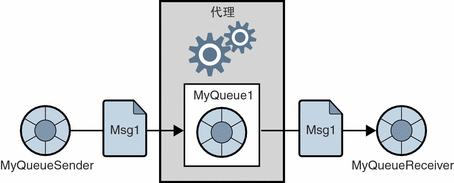
- 一个Message只能交给一个Receiver;这里的Message像是一个消耗品。
- 只要Queue中有Message,Receiver就能获取到。
Pub/Sub
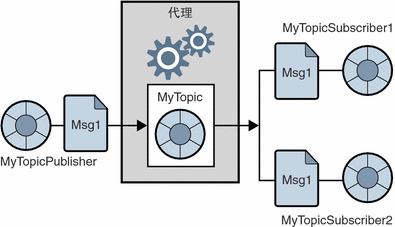
- 一个Message可以复制多份,交给多个Subscriber。
- 先订阅,再获取 - Subscriber只能获取订阅之后发送到Topic的Message。
角色定位

JMS API
统一域和特定于域的API

编程模型
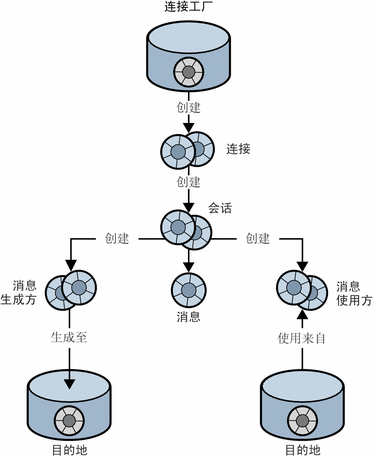
对象简介
- 连接工厂(ConnectionFactory)
客户端使用连接工厂对象(ConnectionFactory)创建连接。 - 连接(Connection)
连接对象 (Connection) 表示客户端与代理之间的活动连接。创建连接时会分配通信资源并对客户端进行验证。这是一个相当重要的对象,大多数客户端均使用一个连接来完成所有的消息传送。连接支持并发使用:一个连接可由任意数量的生成方和使用方共享。 - 会话(Session)
如果连接代表客户端与代理之间的通信渠道,则会话标记客户端与代理之间的单次对话。会话对象主要用于创建消息、消息生成方和消息使用方。 - 消息(Message)
消息封装一次通信的内容。消息由三部分组成:消息头、属性和主体。 - 消息生成方(MessageProducer)
由Session创建,负责发送Message到目的地。 - 消息使用方(MessageConsumer)
由Session创建,负责从目的地中消费Message。 - 目的地(Destination)
JMS Provider负责维护,用于对Message进行管理的对象。MessageProducer需要指定Destination才能发送消息,MessageReceiver需要指定Destination才能接收消息。
demo
Error occurred during initialization of VM
Could not reserve enough space for object heap
Error: Could not create the Java Virtual Machine.
Error: A fatal exception has occurred. Program will exit.
if "%ACTIVEMQ_OPTS%" == "" set ACTIVEMQ_OPTS=-Xms1G -Xmx1G
1.producer-client
文件目录结构
pom.xml

src/main/resources/

    |---- jndi.properties

src/main/java/

    |---- cn.sinobest.asj.producer.jms.clientmode

              |---- SimpleProducer.java # 基于客户端编程模型,发送消息给ActiveMQ
文件内容
1.pom.xml
 <project xmlns="http://maven.apache.org/POM/4.0.0"

     xmlns:xsi="http://www.w3.org/2001/XMLSchema-instance"

     xsi:schemaLocation="http://maven.apache.org/POM/4.0.0 http://maven.apache.org/xsd/maven-4.0.0.xsd">

     <modelVersion>4.0.0</modelVersion>

     <groupId>cn.sinobest.asj</groupId>

     <artifactId>jms-producer</artifactId>

     <version>0.0.1-SNAPSHOT</version>

     <name>jms-producer</name>

     <description>基于ActiveMQ的Producer Client。</description>

     <dependencies>

         <!-- import activemq-client to send message to ActiveMQ -->

         <dependency>

             <groupId>org.apache.activemq</groupId>

             <artifactId>activemq-client</artifactId>

             <version>5.13.2</version>

         </dependency>

         <!-- not necessary, import to remove the warn message from activemq-client -->

         <dependency>

             <groupId>org.slf4j</groupId>

             <artifactId>slf4j-simple</artifactId>

             <version>1.7.19</version>

         </dependency>

     </dependencies>

 </project>
2.jndi.properties
 java.naming.factory.initial=org.apache.activemq.jndi.ActiveMQInitialContextFactory

 # use the following property to configure the default connector

 java.naming.provider.url=tcp://localhost:61616

 # register some queues in JNDI using the form

 # queue.[jndiName] = [physicalName]

 queue.exampleQueue=example.queue

 # register some topics in JNDI using the form

 # topic.[jndiName] = [physicalName]

 topic.exampleTopic = example.topic
说明:
- java.naming.factory.initial
定义ConnectionFactory的实例化类。 - java.naming.provider.url
定义broker的url,这个是ActiveMQ默认的url。 - queue.exampleQueue
定义了一个Queue Destination。name为example.queue,JNDI的name为exampleQueue。 - topic.exampleTopic
定义了一个Topic Destination。name为example.topic,JNDI的name为exampleTopic。
3.SimpleProcedure.java
 package cn.sinobest.asj.producer.jms.clientmode;

 import javax.jms.Connection;

 import javax.jms.ConnectionFactory;

 import javax.jms.Destination;

 import javax.jms.JMSException;

 import javax.jms.MessageProducer;

 import javax.jms.Session;

 import javax.jms.TextMessage;

 import javax.naming.Context;

 import javax.naming.InitialContext;

 import javax.naming.NamingException;

 /**

  * A simple demo for producer client to send message to ActiveMQ.<br>

  * refer to <a href="http://activemq.apache.org/jndi-support.html">JNDI

  * Support</a>

  *

  * @author lijinlong

  */

 public class SimpleProducer {

     /** JNDI name for ConnectionFactory */

     static final String CONNECTION_FACTORY_JNDI_NAME = "ConnectionFactory";

     /** JNDI name for Queue Destination (use for PTP Mode) */

     static final String QUEUE_JNDI_NAME = "exampleQueue";

     /** JNDI name for Topic Destination (use for Pub/Sub Mode) */

     static final String TOPIC_JNDI_NAME = "exampleTopic";

     /**

      * @param args

      */

     public static void main(String[] args) {

         Context jndiContext = null;

         ConnectionFactory connectionFactory = null;

         Connection connection = null;

         Session session = null;

         Destination destination = null;

         MessageProducer producer = null;

         // create a JNDI API IntialContext object

         try {

             jndiContext = new InitialContext();

         } catch (NamingException e) {

             System.out.println("Could not create JNDI Context:"

                     + e.getMessage());

             System.exit(1);

         }

         // look up ConnectionFactory and Destination

         try {

             connectionFactory = (ConnectionFactory) jndiContext

                     .lookup(CONNECTION_FACTORY_JNDI_NAME);

             // look up QUEUE_JNDI_NAME for PTP Mode

             // look up TOPIC_JNDI_NAME for Pub/Sub Mode

             destination = (Destination) jndiContext.lookup(QUEUE_JNDI_NAME);

         } catch (NamingException e) {

             System.out.println("JNDI look up failed:" + e.getMessage());

             System.exit(1);

         }

         // send Messages and finally release the resources.

         try {

             connection = connectionFactory.createConnection();

             session = connection.createSession(Boolean.FALSE,

                     Session.AUTO_ACKNOWLEDGE);

             producer = session.createProducer(destination);

             TextMessage message = session.createTextMessage();

             for (int i = 0; i < 3; i++) {

                 message.setText(String.format("This is the %dth message.",

                         i + 1));

                 producer.send(message);

             }

         } catch (JMSException e) {

             e.printStackTrace();

         } finally {

             try {

                 if (session != null)

                     session.close();

                 if (connection != null)

                     connection.close();

             } catch (JMSException e) {

                 e.printStackTrace();

             }

         }

     }

 }
SimpleProcedure.java
- 第23行声明的JNDI name for ConnectionFactory的值是固定的。
- 第25行声明的JNDI name for Queue的值,对应于jndi.properties的queue的jndi name。
- 第27行声明的JNDI name for Topic的值,对应于jndi.properties的topic的jndi name。
- 第55行look up Destination的实例,参数取QUEUE_JNDI_NAME或TOPIC_JNDI_NAME,分别对应PTP模式和Pub/Sub模式。
2.consumer-client
文件目录结构
pom.xml

src/main/resources/

    |---- jndi.properties

src/main/java/

    |---- cn.sinobest.asj.consumer.jms.clientmode

              |---- SimpleConsumer.java # 基于客户端编程模型,从ActiveMQ接收消息
文件内容
1.pom.xml
 <project xmlns="http://maven.apache.org/POM/4.0.0"

     xmlns:xsi="http://www.w3.org/2001/XMLSchema-instance"

     xsi:schemaLocation="http://maven.apache.org/POM/4.0.0 http://maven.apache.org/xsd/maven-4.0.0.xsd">

     <modelVersion>4.0.0</modelVersion>

     <groupId>cn.sinoebst.asj</groupId>

     <artifactId>jms-consumer</artifactId>

     <version>0.0.1-SNAPSHOT</version>

     <name>jms-consumer</name>

     <description>基于ActiveMQ的Consumer Client。</description>

     <dependencies>

         <!-- import activemq-client to receive message from ActiveMQ -->

         <dependency>

             <groupId>org.apache.activemq</groupId>

             <artifactId>activemq-client</artifactId>

             <version>5.13.2</version>

         </dependency>

         <!-- not necessary, import to remove the warn message from activemq-client -->

         <dependency>

             <groupId>org.slf4j</groupId>

             <artifactId>slf4j-simple</artifactId>

             <version>1.7.19</version>

         </dependency>

     </dependencies>

 </project>
2.jndi.properties
 java.naming.factory.initial=org.apache.activemq.jndi.ActiveMQInitialContextFactory

 # use the following property to configure the default connector

 java.naming.provider.url=tcp://localhost:61616

 # register some queues in JNDI using the form

 # queue.[jndiName] = [physicalName]

 queue.exampleQueue=example.queue

 # register some topics in JNDI using the form

 # topic.[jndiName] = [physicalName]

 topic.exampleTopic = example.topic
3.SimpleConsumer.java
 package cn.sinobest.asj.consumer.jms.clientmode;

 import javax.jms.Connection;

 import javax.jms.ConnectionFactory;

 import javax.jms.Destination;

 import javax.jms.JMSException;

 import javax.jms.Message;

 import javax.jms.MessageConsumer;

 import javax.jms.Session;

 import javax.jms.TextMessage;

 import javax.naming.Context;

 import javax.naming.InitialContext;

 import javax.naming.NamingException;

 /**

  * A simple demo for consumer to receive message from ActiveMQ.<br>

  *

  * @author lijinlong

  *

  */

 public class SimpleConsumer {

     /** JNDI name for ConnectionFactory */

     static final String CONNECTION_FACTORY_JNDI_NAME = "ConnectionFactory";

     /** JNDI name for Queue Destination (use for PTP Mode) */

     static final String QUEUE_JNDI_NAME = "exampleQueue";

     /** JNDI name for Topic Destination (use for Pub/Sub Mode) */

     static final String TOPIC_JNDI_NAME = "exampleTopic";

     /**

      * @param args

      */

     public static void main(String[] args) {

         Context jndiContext = null;

         ConnectionFactory connectionFactory = null;

         Connection connection = null;

         Session session = null;

         Destination destination = null;

         MessageConsumer consumer = null;

         // create a JNDI API IntialContext object

         try {

             jndiContext = new InitialContext();

         } catch (NamingException e) {

             System.out.println("Could not create JNDI Context:"

                     + e.getMessage());

             System.exit(1);

         }

         // look up ConnectionFactory and Destination

         try {

             connectionFactory = (ConnectionFactory) jndiContext

                     .lookup(CONNECTION_FACTORY_JNDI_NAME);

             // look up QUEUE_JNDI_NAME for PTP Mode

             // look up TOPIC_JNDI_NAME for Pub/Sub Mode

             destination = (Destination) jndiContext.lookup(QUEUE_JNDI_NAME);

         } catch (NamingException e) {

             System.out.println("JNDI look up failed:" + e.getMessage());

             System.exit(1);

         }

         // receive Messages and finally release the resources.

         try {

             connection = connectionFactory.createConnection();

             connection.start(); // connection should be called in

                                 // receiver-client

             session = connection.createSession(Boolean.FALSE,

                     Session.AUTO_ACKNOWLEDGE);

             consumer = session.createConsumer(destination);

             long timeout = 10 * 1000;

             for (Message message = consumer.receive(timeout); message != null; message = consumer

                     .receive(timeout)) {

                 String text = ((TextMessage) message).getText();

                 System.out.println(String.format("receive a message:%s", text));

             }

         } catch (JMSException e) {

             e.printStackTrace();

         } finally {

             try {

                 if (session != null)

                     session.close();

                 if (connection != null)

                     connection.close();

             } catch (JMSException e) {

                 e.printStackTrace();

             }

         }

     }

 }
SimpleConsumer.java
3.测试
3.1.基于PTP Mode测试
- 确保SimpleProducer和SimpleConsumer中,都是根据QUEUE_JNDI_NAME来look up Destination实例的。
- 确保ActiveMQ启动正常。
- 运行SimpleProducer。
- 运行SimpleConsumer - 看到信息输出。

3.2.基于Pub/Sub测试
- 确保SimpleProducer和SimpleConsumer中,都是根据TOPIC_JNDI_NAME来look up Destination实例的。
- 确保ActiveMQ启动正常。
- 运行SimpleConsumer。
Pub/Sub的其中一个特点是:先订阅,再接收。所以要先运行Consumer。 - 尽快运行SimpleProducer。
Consumer设置的timeout是10s,如果10s内没有收到消息就会退出。 - SimpleConsumer的控制台有输出信息。
输出内容和PTP的测试结果一致。
4.编程获取ConnectionnFactory和Destination
 // 创建工厂实例

 // javax.jms.ConnectionFactory

 // org.apache.activemq.ActiveMQConnectionFactory

 ConnectionFactory connectionFactory = new ActiveMQConnectionFactory(

     ActiveMQConnectionFactory.DEFAULT_USER,

     ActiveMQConnectionFactory.DEFAULT_PASSWORD,

     ActiveMQConnectionFactory.DEFAULT_BROKER_URL);

 // javax.jms.Connection

 Connection connection = connectionFactory.createConnection();

 // javax.jms.Session

 Session session = connection.createSession(Boolean.FALSE, Session.AUTO_ACKNOWLEDGE);

 // 创建目的地

 // javax.jms.Destination

 Destination destination = session.createQueue("example.queue");

 Destination destination = session.createTopic("example.topic");
附录
参考
- Sun Java System Message Queue 3.7 UR1 技术概述 — 第 2 章 客户端编程模型
大部分理论知识都参考了这里 - JNDI Support
如何配置、使用JNDI获取连接工厂实例和目的地实例
AMQ学习笔记 - 02. JMS客户端编程模型的更多相关文章
- 《Master Bitcoin》学习笔记02——比特币的交易模型
比特币的交易模型 模型基本描述 前面一篇学习笔记01提到了一个交易模型(第三章的内容),在第五章中,除了对这个模型做个详细介绍之外,其实和我上一篇理解的交易模型差不多,一个交易包含输入与输出,比特币是 ...
- AMQ学习笔记 - 08. Spring-JmsTemplate之发送
概述 JmsTemplate提供了3组*3,共计9个发送用的方法. 发送的方法有3组: 基本的发送 转换并发送 转换.后处理再发送 必需的资源 必需的资源有: javax.jms.Connecti ...
- AMQ学习笔记 - 05. 客户端模板化
概述 客户端编程模型中,大部分的步骤都是相同的.将相同的部分做成模板,将不同的部分预留接口,实现者就只需要针对不同的部分提供实现. 设计 类图 发送方客户端 说明: 基于模板的思想,SendTempl ...
- AMQ学习笔记 - 06. 可靠消息传送
概述 本文介绍JMS中可能发生消息故障的3个隐患阶段,以及确保消息安全的3种保障机制. 故障分析 在介绍可靠传送的确保机制之前,先分析消息在传送的过程中可能在哪个阶段出现问题. 1.两个跃点 跃点的含 ...
- 转 网络编程学习笔记一:Socket编程
题外话 前几天和朋友聊天,朋友问我怎么最近不写博客了,一个是因为最近在忙着公司使用的一些控件的开发,浏览器兼容性搞死人:但主要是因为这段时间一直在看html5的东西,看到web socket时觉得很有 ...
- 软件测试之loadrunner学习笔记-02集合点
loadrunner学习笔记-02集合点 集合点函数可以帮助我们生成有效可控的并发操作.虽然在Controller中多用户负载的Vuser是一起开始运行脚本的,但是由于计算机的串行处理机制,脚本的运行 ...
- GIS案例学习笔记-多边形内部缓冲区地理模型
GIS案例学习笔记-多边形内部缓冲区地理模型 联系方式:谢老师,135-4855-4328,xiexiaokui#qq.com 目的:对于多边形,建立内部缓冲区. 问题:ArcGIS缓冲工具不支持内部 ...
- 机器学习实战(Machine Learning in Action)学习笔记————02.k-邻近算法(KNN)
机器学习实战(Machine Learning in Action)学习笔记————02.k-邻近算法(KNN) 关键字:邻近算法(kNN: k Nearest Neighbors).python.源 ...
- OpenCV 学习笔记 02 使用opencv处理图像
1 不同色彩空间的转换 opencv 中有数百种关于不同色彩空间的转换方法,但常用的有三种色彩空间:灰度.BRG.HSV(Hue-Saturation-Value) 灰度 - 灰度色彩空间是通过去除彩 ...
随机推荐
- P1275 魔板
题目描述 有这样一种魔板:它是一个长方形的面板,被划分成n行m列的n*m个方格.每个方格内有一个小灯泡,灯泡的状态有两种(亮或暗).我们可以通过若干操作使魔板从一个状态改变为另一个状态.操作的方式有两 ...
- [洛谷P4722]【模板】最大流 加强版 / 预流推进
会$TLE$... C++ Code:(HLPP) #pragma GCC optimize(3) #pragma GCC optimize("unroll-loops") #in ...
- [洛谷P1951]收费站_NOI导刊2009提高(2)
题目大意:有一张$n$个点$m$条边的图,每个点有一个权值$w_i$,有边权,询问从$S$到$T$的路径中,边权和小于$s$,且$\max\limits_{路径经过k}\{w_i\}$最小,输出这个最 ...
- CSS3中transform属性的用法
有时候网站也要愚弄一下访客,比如愚人节.下面我给大家推荐个效果,就是整个页面左右颠倒了.css3 很强大,简单的几行代码就可以帮我们实现这个效果. view source print? 01 &l ...
- git使用笔记(一)入门
By francis_hao Nov 17,2016 本来是想把git的使用笔记写在一个文件里,但是越写越长,最后也不得不分开了.这样也好,每一篇一个侧重,可以写的详细一点. 初学乍练 在l ...
- nodejs 喜欢报cannot find module .....的简单解决方案
在安装nodejs后使用命令npm install <package_name>一直喜欢报cannot find module........ 因为我之前在我的电脑上安装过nodejs,当 ...
- AnnotationConfigApplicationContext.的用法的核心代码
public static void main(String[] args) {ApplicationContext ctx = new AnnotationConfigApplicationCont ...
- bzoj 1124 [POI2008]枪战Maf 贪心
[POI2008]枪战Maf Time Limit: 10 Sec Memory Limit: 162 MBSubmit: 741 Solved: 295[Submit][Status][Disc ...
- tomcat内存配置(二)
Tomcat本身不能直接在计算机上运行,需要依赖于硬件基础之上的操作系统和一个Java虚拟机.Tomcat的内存溢出本质就是JVM内存溢出,所以在本文开始时,应该先对JavaJVM有关内存方面的知识进 ...
- fs.watch 爬坑
上星期用 fs.watch 和 readline.createInterface 对pm2的合并日志做了监控,根据指定的错误信息重启服务 发现不管是手动vim编辑日志,还是等待日志自动输出. fs.w ...