
C# 二维码扫描
Zint类用于产生二维码。https://sourceforge.net/projects/zint/
Zxing类用于读取二维码. https://github.com/zxing/zxing
AForge类用于初始摄像头等。http://www.aforgenet.com/framework/downloads.html
以上三个类为开源的第三方类,可直接引用。
以下为用AForge和ZXing实时读取二维码的代码:
using System;

using System.Collections.Generic;

using System.ComponentModel;

using System.Data;

using System.Drawing;

using System.IO;

using System.Linq;

using System.Text;

using System.Threading.Tasks;

using System.Windows.Forms;

using ZXing;

using ZXing.Common;

using System.Drawing.Imaging;

using AForge;

using AForge.Controls;

using AForge.Imaging;

using AForge.Video;

using AForge.Video.DirectShow;

namespace AutoScan

{

    public partial class Form1 : Form

    {

        private FilterInfoCollection videoDevices;

        private VideoCaptureDevice videoSource;

        Bitmap bmp = null; //全局变量,保存每一次捕获的图像

        int itop = ;// 全局变量,记录扫描线距离顶端的距离

        public Form1()

        {

            InitializeComponent();

        }

        private void getVideoDevices()

        {

            cboDevices.Items.Clear();

            try

            {

                videoDevices=new FilterInfoCollection(FilterCategory.VideoInputDevice);

                if (videoDevices.Count>)

                {

                    foreach(FilterInfo device in videoDevices)

                        cboDevices.Items.Add(device.Name);

                }

            }

            catch(Exception ex)

            {

                MessageBox.Show("not found camera");

            }

        }

        private void Open()

        {

            if (cboDevices.SelectedIndex == -)

                return;

            try

            {

                btnOpen.Enabled = false;

                btnClose.Enabled = true;

                CloseVideoSource();

                videoSource = new VideoCaptureDevice(videoDevices[cboDevices.SelectedIndex].MonikerString);

                videoSource.DesiredFrameRate = ;

                videoSource.DesiredFrameSize = new Size(, );

                videoSource.NewFrame += new NewFrameEventHandler(newframe);

                videoSource.Start();

            }

            catch

            {

                btnOpen.Enabled = true;

                btnClose.Enabled = false;

                return;

            }

            timer1.Enabled = true;//解析二维码

            timer2.Enabled = true;//启动绘制视频中的扫描线

        }

        private void Stop()

        {

            CloseVideoSource();

        }

        private void newframe(object sender, NewFrameEventArgs args)

        {

            bmp = (Bitmap)args.Frame.Clone();

        }

        private void Form1_Load(object sender, EventArgs e)

        {

            timer1.Enabled = false;

            timer2.Enabled = false;

            getVideoDevices();

        }

        private void CloseVideoSource()

        {

            timer1.Enabled = false;

            timer2.Enabled = false;

            if (videoSource == null) return;

            if (videoSource.IsRunning)

            {

                videoSource.SignalToStop();

                videoSource.WaitForStop();

                videoSource = null;

                pictureBox1.Image = null;

            }

            btnOpen.Enabled = true;

            btnClose.Enabled = false;

            txtMsg.Clear();

        }

        private void ScanBarcode()

        {

            if (pictureBox1.Image == null)

            {

                MessageBox.Show("请载入图像资源!");

                return;

            }

            //设置读取二维码

            DecodingOptions decodeOption = new DecodingOptions();

            decodeOption.PossibleFormats = new List<BarcodeFormat>(){

                BarcodeFormat.QR_CODE

            };

            //读取操作

            BarcodeReader bar = new BarcodeReader();

            bar.Options = decodeOption;

            ZXing.Result rs = bar.Decode(pictureBox1.Image as Bitmap);

            if (rs == null)

            {

                txtMsg.Text = "读取失败";

                MessageBox.Show("读取失败");

            }

            else

            {

                txtMsg.Text = rs.Text;

                MessageBox.Show("读取成功,内容:" + rs.Text);

            }

        }

        private void timer2_Tick(object sender, EventArgs e)

        {

            timer2.Enabled = false;

            try

            {

                if (bmp == null) return;

                Bitmap bmp2 = (Bitmap)bmp.Clone();

                Pen p = new Pen(Color.GreenYellow);

                p.Width = ;

                Graphics g=Graphics.FromImage(bmp2);

                System.Drawing.Point p1 = new System.Drawing.Point(, itop);

                System.Drawing.Point p2 = new System.Drawing.Point(pictureBox1.Width,itop);

                g.DrawLine(p, p1, p2);

                g.Dispose();

                itop += ;

                itop = itop % pictureBox1.Height;

                pictureBox1.Image = bmp2;

            }

            finally

            {

                timer2.Enabled = true;

            }

        }

        private void timer1_Tick(object sender, EventArgs e)

        {

            Result result;

            try

            {

                if (bmp == null) return;

                try

                {

                    BarcodeReader br = new BarcodeReader();

                    result = br.Decode(bmp);

                }

                catch(Exception ex)

                {

                    return;

                }

                /*

                #region

                //将图片转换成byte数组

                MemoryStream ms = new MemoryStream();

                bmp.Save(ms, ImageFormat.Bmp);

                byte[] bt = ms.GetBuffer();

                ms.Close();

                #endregion

                LuminanceSource source = new RGBLuminanceSource(bt, bmp.Width, bmp.Height);

                BinaryBitmap bitmap = new BinaryBitmap(new ZXing.Common.HybridBinarizer(source));

                try

                {

                    result = new MultiFormatReader().decode(bitmap);

                }

                catch (ReaderException ex)

                {

                    return;

                }*/

                if (result != null)

                {

                    txtMsg.Text = result.Text;

                }

            }

            finally

            {

                timer1.Enabled = true;

            }

        }

        private void btnClose_Click(object sender, EventArgs e)

        {

            CloseVideoSource();

        }

        private void btnOpen_Click(object sender, EventArgs e)

        {

            Open();

        }

    }

}
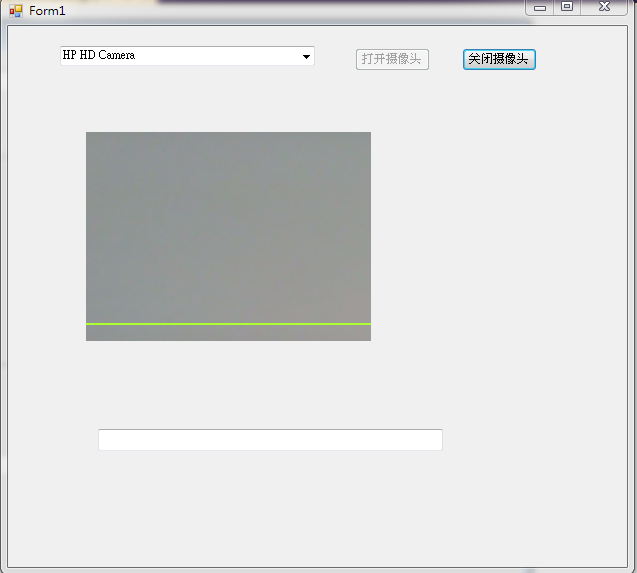
界面(黄绿色条为扫描时上下滚动的线条,把条形码放在摄像头处即可扫描):
C# 二维码扫描的更多相关文章
- XAMARIN ANDROID 二维码扫描示例
现在二维码的应用越来越普及,二维码扫描也成为手机应用程序的必备功能了.本文将基于 Xamarin.Android 平台使用 ZXing.Net.Mobile 做一个简单的 Android 条码扫描示 ...
- [Unity3D]自制UnityForAndroid二维码扫描插件
一周左右终于将二维码生成和扫描功能给实现了,终于能舒缓一口气了,从一开始的疑惑为啥不同的扫码客户端为啥扫出来的效果不同?通用的扫描器扫出来就是一个下载APK,自制的扫描器扫出来是想要的有效信息,然后分 ...
- 有关iOS系统中调用相机设备实现二维码扫描功能的注意点(3/3)
今天我们接着聊聊iOS系统实现二维码扫描的其他注意点. 大家还记得前面我们用到的输出数据的类对象吗?AVCaptureMetadataOutput,就是它!如果我们需要实现目前主流APP扫描二维码的功 ...
- Android仿微信二维码扫描
转载:http://blog.csdn.net/xiaanming/article/details/10163203 了解二维码这个东西还是从微信中,当时微信推出二维码扫描功能,自己感觉挺新颖的,从一 ...
- Android—ZXing二维码扫描遇到的问题
最近工作中需要开发带有二维码扫描功能的软件(基于开源项目ZXing),遇到的问题记录一下,也希望给大家带来帮助. 1.首先因为扫描要开摄像机所以加权限是一定的,不然后面什么都不能进行 <uses ...
- Ios二维码扫描(系统自带的二维码扫描)
Ios二维码扫描 这里给大家介绍的时如何使用系统自带的二维码扫描方法和一些简单的动画! 操作步骤: 1).首先你需要搭建UI界面如图:下图我用了俩个imageview和一个label 2).你需要在你 ...
- iOS 自带二维码扫描功能的实现
自从iOS7以后中新增了二维码扫描功能.因此可以在不借助第三方类库的情况下简单的写出二维码的扫描功能: 原生的二维码扫描功能在AVFoundation框架下,所以在使用原生的二维码扫描功能时要先导入A ...
- PhoneGap(二维码扫描 )
关于 phoneGap 如何做 二维码扫描 1. 先配置好, 环境 http://coenraets.org/blog/cordova-phonegap-3-tutorial/http: ...
- 如何用MediaCapture解决二维码扫描问题
二维码扫描的实现,简单的来说可以分三步走:“成像”.“截图”与“识别”. UWP开发中,最常用的媒体工具非MediaCapture莫属了,下面就来简单介绍一下如何利用MediaCapture来实现扫描 ...
- Swift 二维码扫描 简单实现
3.30看视频 学到了二维码简单的实现 还有一些动画的实现 今天就先记录一下二维码扫描的简单实现 不太好记手写一遍 学习的基础在于模仿嘛 创建一个实现二维码扫描的步骤 1.首先是懒加载创建 会话 ...
随机推荐
- CRM系统主要业务流程思维导图
[CRM五策略] ❶对客户进行分类,不是根据规模,而是根据和你的关系,越细腻越好: ❷不定期更新客户资料,信息越全面越好: ❸主动对客户进行 ...
- 7月17号day9总结
今天学习过程和小结 今天学习了如何使用idea操作hdfs. public class HDFSTest { Configuration configuration; FileSystem ...
- Java面向对象编程三大特性 --- 多态
多态特性: 子类Child继承父类Father,我们可以编写一个指向子类的父类类型引用,该引用既可以处理父类Father对象,也可以处理子类Child对象,当相同的消息发送给子类或者父类对象时,该对象 ...
- 汕头市队赛 SRM16
T3 C-2 SRM 16 描述 给一个数列,给出两种数字, 询问在多少个非空区间中这两种数字出现次数相同. 输入格式 第一行:一个数字n,q,n表示数列长度,q表示q组询问 第二行n个数字表示数列A ...
- python基础===两个list合并成一个dict的方法
def Run(): list2 = [, , , , ]; list3 = ["a", "b", "c", "d",& ...
- Bash Shell 下打开一个TCP / UDP SOCKET
Bash Shell 下打开一个TCP / UDP SOCKET http://jingyan.baidu.com/article/636f38bb6166c3d6b84610d1.html
- linux环境下的GUN make学习笔记(一)
第一章:概述 1.1:make概述 在linux环境下使用make工具能够比较容易的构建一个属于自己的工程,整个工程的编译只需要一个命令就可以完成编译.连接以至于最后的执行.不过我们需要投入一些时间去 ...
- CSS3制作旋转的小风车
制作旋转小风车 一 我先搭建一个大盒子400x400px大盒子里面嵌套四个小盒子200x200px,放在一起肯定是四个排在一行,我想要的效果是上下各两个, css样式 *{ margin:0; pad ...
- jQuery中操作样式
操作行间样式 // 获取div的样式 $("div").css("width"); $("div").css("color&quo ...
- Eclipse svn代码提交冲突
Eclipse svn代码提交冲突(转) 1.Synchronize视图下查看代码冲突 1.Incoming Mode 全部update,更新到本地2.Outgoing Mode 全部commit,提 ...