
C# register global hotkey ,onekey 注册多个全局热键以及单个全局热键
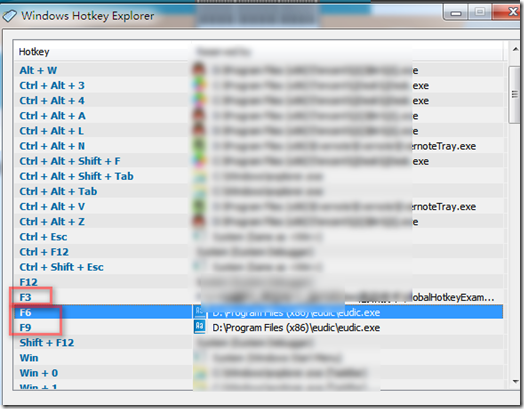
我们需要用非Hook的方法,来给我们的app 或者winform注册热键. 就像下面的 , 欧陆词典注册的一个热键F6一样,
在winform最小化的情况下,也能够全局响应热键. 这里使用系统API来注册.能够达到最好的性能.
代码如下:
using System;
using System.Collections.Generic;
using System.ComponentModel;
using System.Data;
using System.Drawing;
using System.Linq;
using System.Text;
using System.Windows.Forms;
namespace ExampleForm
{
public partial class Form1 : Form
{
//[System.Runtime.InteropServices.DllImport("user32.dll")]
//private static extern bool RegisterHotKey(IntPtr hWnd, int id, int fsModifiers, int vk);
[System.Runtime.InteropServices.DllImport("user32.dll")]
private static extern bool RegisterHotKey(IntPtr hWnd, int id, int fsModifiers, int vk);
[System.Runtime.InteropServices.DllImport("user32.dll")]
private static extern bool UnregisterHotKey(IntPtr hWnd, int id);
enum KeyModifier
{
None = 0,
Alt = 1,
Control = 2,
Shift = 4,
WinKey = 8
}
public Form1()
{
InitializeComponent();
int id = 0; // The id of the hotkey.
//RegisterHotKey(this.Handle, id, (int)KeyModifier.Shift, Keys.A.GetHashCode()); // 注册 Shift + A 为全局热键
RegisterHotKey(this.Handle, id, 0, Keys.F3.GetHashCode());//注册单个按钮F3,只需要把int fsModifiers设置为0即可
}
protected override void WndProc(ref Message m)
{
base.WndProc(ref m);
if (m.Msg == 0x0312)
{
Keys key = (Keys)(((int)m.LParam >> 16) & 0xFFFF); // The key of the hotkey that was pressed.
KeyModifier modifier = (KeyModifier)((int)m.LParam & 0xFFFF); // The modifier of the hotkey that was pressed.
int id = m.WParam.ToInt32(); // The id of the hotkey that was pressed.
MessageBox.Show("Hotkey has been pressed!");
// do something
}
}
private void ExampleForm_FormClosing(object sender, FormClosingEventArgs e)
{
UnregisterHotKey(this.Handle, 0); // Unregister hotkey with id 0 before closing the form. You might want to call this more than once with different id values if you are planning to register more than one hotkey.
}
private void Form1_Load(object sender, EventArgs e)
{
}
private void button1_Click(object sender, EventArgs e)
{
}
}
}
C# register global hotkey ,onekey 注册多个全局热键以及单个全局热键的更多相关文章
- GAC(Global Assembly Cache)注册/卸载 dll
当发现有多个解决方案引用一个dll时,为了不重复引用所以将.net的一个dll注册到GAC中去. gacutil.exe. 记得使用管理员权限打开 开始菜单-Microsoft Visual Stud ...
- BroadcastReceiver register 广播的动态注册方式
1.动态注册方式特点:在代码中进行注册后,当应用程序关闭后,就不再进行监听. 下面是具体的例子: BroadcastTest.java package com.czz.test; import and ...
- 在Global.asax中 注册Application_Error事件 捕获全局异常
参考于:https://shiyousan.com/post/635813858052755170 在ASP.NET MVC中,通过应用程序生命周期中的Application_Error事件可以捕获到 ...
- 如何利用WordPress创建自定义注册表单插件
来源:http://www.ido321.com/1031.html 原文:Creating a Custom WordPress Registration Form Plugin 译文:创建一个定制 ...
- 【C#】【SHARE】The registering of global hotkeys
I remember that when I was still using VB6 sereval years ago, if global hotkeys are required, a mass ...
- Web Api 基于Zookeeper的服务注册与发现
安装与差异 Zookeeper安装请参考我上篇文章 http://www.cnblogs.com/woxpp/p/7700368.html 基于Nginx的服务提供和消费 基于zookeeper的服务 ...
- SpringCloud 源码系列(3)—— 注册中心 Eureka(下)
十一.Eureka Server 集群 在实际的生产环境中,可能有几十个或者几百个的微服务实例,Eureka Server 承担了非常高的负载,而且为了保证注册中心高可用,一般都要部署成集群的,下面就 ...
- MVVM模式解析和在WPF中的实现(六) 用依赖注入的方式配置ViewModel并注册消息
MVVM模式解析和在WPF中的实现(六) 用依赖注入的方式配置ViewModel并注册消息 系列目录: MVVM模式解析和在WPF中的实现(一)MVVM模式简介 MVVM模式解析和在WPF中的实现(二 ...
- Django实现注册
前言 对于web开来说,用户登陆.注册.文件上传等是最基础的功能,针对不同的web框架,相关的文章非常多,但搜索之后发现大多都不具有完整性,对于想学习web开发的新手来说不具有很强的操作性:对于web ...
随机推荐
- WinSock 完成端口模型
之前写了关于Winsock的重叠IO模型,按理来说重叠IO模型与之前的模型相比,它的socket即是非阻塞的,也是异步的,它基本上性能非常高,但是它主要的缺点在于,即使我们使用历程来处理完成通知,但是 ...
- Jms学习篇一:JMS介绍
1.JMS介绍: JMS即Java消息服务(Java Message Service)应用程序接口,是一个Java平台中关于面向消息中间件(MOM)的API JMS是一种与厂商无关的 API,用来访问 ...
- Scarpy框架持久化存储
一.介绍 持久化存储操作分为两类:磁盘文件和数据库. 而磁盘文件存储方式又分为:基于终端指令和基于管道 二.基于终端指令的持久化存储 Scrapy是通过 scrapy 命令行工具进行控制的. 这里我们 ...
- Angular JS例子 ng-repeat遍历输出
首先要有Angular的插件:然后才开始遍历 :<!DOCTYPE html> <html lang="en"> <head> <meta ...
- LotusScript_文档查询循环方法整理
1. 视图(View)查询 ... Set view = db.GetView("ViewName") Set doc = view.GetFirstDocument While ...
- IT人的格言警句
程序员困境:我们通过编码谋生,但环境却正在摧毁我们这种谋生的能力. 在技术日新月异的IT行业,“专家”这个词其实是个危险信号,意味着你的知识距离老化不远了.IT工程师应该经常更换工作领域,了解多个领域 ...
- MarkDown和流程图诠释你的代码
写在前面:首先感谢导师-猴哥对我的认可(求多分享点编程经验.工具.多开课),学习编程是一个痛苦和快乐的过程,希望大家共勉 本文介绍MarkDown的基本语法.使用MarkDown画简单的流程图.使用X ...
- Struts1.x 中处理乱码及通过标签显示数据
1.通过filter解决乱码问题 网页的请求到达之前,先要经过filter的处理: 提取数据出现乱码:request.setCharacterEncoding("UTF-8"); ...
- Windows平台字符串完全指南
The Complete Guide to C++ Strings : The Complete Guide to C++ Strings, Part I - Win32 Character Enco ...
- JDBC操作数据库的基本步骤:
JDBC操作数据库的基本步骤: 1)加载(注册)数据库驱动(到JVM). 2)建立(获取)数据库连接. 3)创建(获取)数据库操作对象. 4)定义操作的SQL语句. 5)执行数据库操作. 6)获取并操 ...