
LINQ to XML简介
我们的配置文件使用XML存储信息。ADO.NET的DataSet(利用扩展方法)可以方便的将数据保存(或加载)为XML。.NET特有的XML API,如XmlReader/XmlWriter类。微端提供了一个特殊的程序集 System.Xml.dll专门对XML文档进行编程。因为LINQ操作数据比较方便,所有大多数人选择使用Linq to XML API来于XML数据进行交互。
传统的XML写法
这个用法就跟用JavaScript在页面上创建元素一样的
            //在内存中新建一个Xml文档

            XmlDocument doc = new XmlDocument();

            //穿件元素 <inventory>

            XmlElement inventory = doc.CreateElement("Inventory");

            //创建<Car>子元素  包含一个ID特性

            XmlElement car = doc.CreateElement("Car");

            car.SetAttribute("ID", "");

            //创建Car元素中的数据

            XmlElement name = doc.CreateElement("PetName");

            name.InnerText = "Jimbo";

            XmlElement color = doc.CreateElement("Color");

            color.InnerText = "Red";

            XmlElement make = doc.CreateElement("Make");

            make.InnerText = "Ford";

            //将<PetName><Color><Make>

            car.AppendChild(name);

            car.AppendChild(color);

            car.AppendChild(make);

            //将<Car>元素添加到<Inventory>元素

            inventory.AppendChild(car);

            //将完整的XML插入到XmlDocument对象并保存文件

            doc.AppendChild(inventory);

            doc.Save("Inventory.xml");
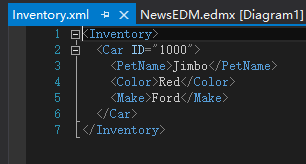
更优秀的Dom———Linq to XML
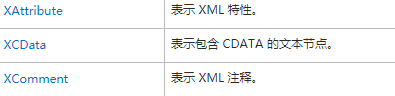
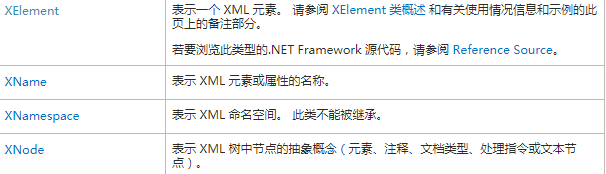
System.XML.Linq包含了一组非常易于管理的类,它们代表一个XML文档的不同方面(元素、属性、XML命名控件、XML注释、处理指令等)
    //注意把格式调一下,可以看的很清除

            XElement doc = new XElement("Inventory",

                         new XElement("Car", new XAttribute("ID", ""),

                             new XElement("PetName", "Jimbo"),

                             new XElement("Color", "Red"),

                             new XElement("Color", "Ford")

                          )

                        );
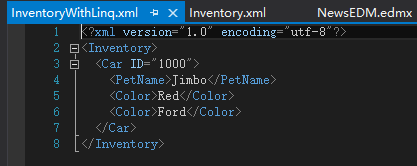
这样对比一下,下面的一种更简些。
System.Xml.Linq 命名空间的成员
LinQ to XML的核心程序集(System.Xml.Linq.dll)只在三个不同空间下定义了很少的类型。这 三个命名空间是 System.Xml.Linq、System.Xml.Schema、System.Xml.xPath.
System.Xml.Linq命名空间的成员


LINQ to XML的轴方法
除这些X*类,System.Xml.Linq中还定义了一个名为Extensions的类,它还定义了一组针对IEnumerable<T>的扩展方法,其中为XNode或XContainer的子类。
LINQ to XML的Extensions类的Selecr成员







这些方法允许在一个已加载的XML树中进行查询。以查找元素、特性以及他们的值。这么方法被称为轴方法(axis method)或简称轴。抽象类XContainer类支持很多于Extensions方法的名称相同的方法。由于XContainer是XElement和XDocument的父类,所以都支持全部的功能。
例如:
  XElement doc = new XElement("Inventory",

                         new XElement("Car", new XAttribute("ID", ""),

                             new XElement("PetName", "Jimbo"),

                             new XElement("Color", "Red"),

                             new XElement("Color", "Ford")

                          )

                        );

            doc.Descendants("PetName").Remove(); //先找到该元素再删除,Linq一样

            doc.Save("InventoryWithLinq1.xml");

奇妙的XName和XNamespace
Desendants<XName name>

相反,此类提供了隐式转换 String ,允许您创建 XName.他会将一个简单的System.String映射到正确的XName对象。XNamespace一样。
使用XElement和XDocument
XDocument表示整个XML文档。它可以用来定义一个根元素及其包含的所有元素、处理指令和XML声明。
            XDocument inventroyDoc = new XDocument(

                new XDocument(

                    new XDeclaration("1.0", "utf-8", "yes"),

                    new XComment("Current Inventroy of cars"),

                    new XProcessingInstruction("xml-stylesheet", "href='MyStyless.css' title='Compact' type='text/css'"),

                    new XElement("Inventory",

                    new XElement("Car", new XAttribute("ID", ""),

                        new XElement("Color", "Green"),

                        new XElement("Make", "BWM"),

                        new XElement("PetName", "stan")

                     ),

                    new XElement("Car", new XAttribute("ID", ""),

                        new XElement("Color", "Pink"),

                        new XElement("Make", "Yugo"),

                        new XElement("PetName", "Melvin")

                    )

                    )

                ));

            inventroyDoc.Save("test.xml");
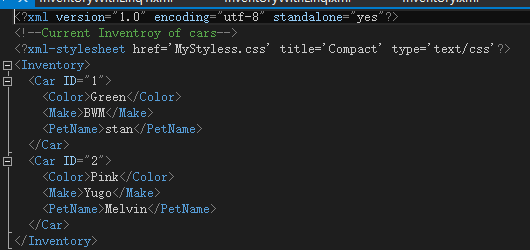
可以简单的就用XElement来创建XML元素。
从数组和容器中生成文档
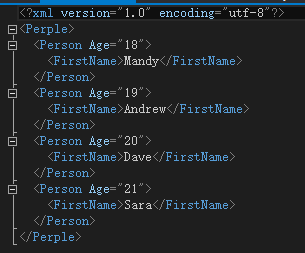
读取数据身材XElement(或XDocument).
//创建一个匿名类型的数组

            var people = new[]{

                 new {FirstName="Mandy",Age=},

                 new {FirstName="Andrew",Age=},

                 new {FirstName="Dave",Age=},

                 new {FirstName="Sara",Age=},

                };

            XElement peopleDoc = new XElement("Perple", from c in people select new XElement("Person", new XAttribute("Age", c.Age), new XElement("FirstName", c.FirstName))

                );

            //或者  都会得到相同的结果

            var arrayDataAdsXlements = from c in people select new XElement("Person", new XAttribute("Age", c.Age), new XElement("FirstName", c.FirstName));

            XElement peopleDoc2 = new XElement("People", arrayDataAdsXlements);

            peopleDoc.Save("one.xml");

            peopleDoc2.Save("two.xml");
加载和解析XML内容
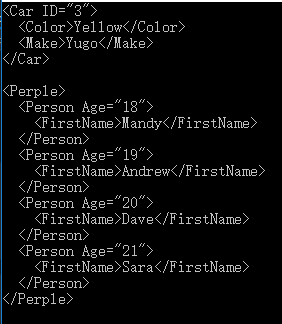
XElement和XDocument都支持Load()和Parse()方法,可以从包含XML数据的string对象或外部XML文件中获取XML对象模型。
 string myElement =

                @"<Car ID='3'>

                    <Color>Yellow</Color>

                    <Make>Yugo</Make>

                    </Car>";

            XElement newElement = XElement.Parse(myElement);

            Console.WriteLine(newElement);

            Console.WriteLine();

            XDocument myDoc = XDocument.Load("one.xml");

            Console.WriteLine(myDoc);
定义LINQ to XML辅助类
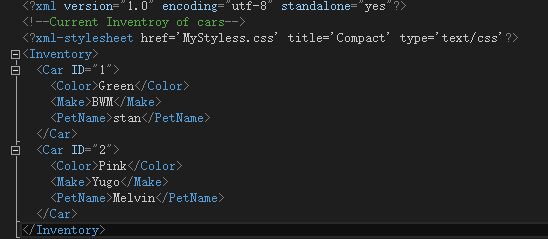
public static void InsertNewElement(string make, string color, string petName)   //一个添加的方法

        {

            XDocument inventoryDoc = XDocument.Load("test.xml");

            Random r = new Random();

            XElement newElement = new XElement("Car",

                new XAttribute("ID", r.Next()),

                    new XElement("Color", color),

                    new XElement("Make", make),

                    new XElement("PetName", petName));

            inventoryDoc.Descendants("Inventory").First().Add(newElement);

            inventoryDoc.Save("test.xml");

        }
原:
运行该方法:

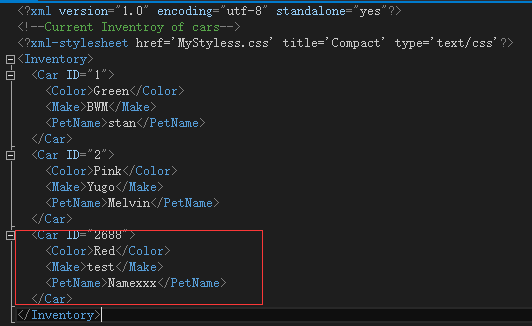
查询:

LINQ to XML简介的更多相关文章
- [原创]Linq to xml增删改查Linq 入门篇:分分钟带你遨游Linq to xml的世界
本文原始作者博客 http://www.cnblogs.com/toutou Linq 入门篇(一):分分钟带你遨游linq to xml的世界 本文原创来自博客园 请叫我头头哥的博客, 请尊重版权, ...
- LINQ系列:LINQ to XML类
LINQ to XML由System.Xml.Linq namespace实现,该namespace包含处理XML时用到的所有类.在使用LINQ to XML时需要添加System.Xml.Linq. ...
- LINQ系列:LINQ to XML操作
LINQ to XML操作XML文件的方法,如创建XML文件.添加新的元素到XML文件中.修改XML文件中的元素.删除XML文件中的元素等. 1. 创建XML文件 string xmlFilePath ...
- LINQ系列:LINQ to XML查询
1. 读取XML文件 XDocument和XElement类都提供了导入XML文件的Load()方法,可以读取XML文件的内容,并转换为XDocument或XElement类的实例. 示例XML文件: ...
- Linq to Xml读取复杂xml(带命名空间)
前言:xml的操作方式有多种,但要论使用频繁程度,博主用得最多的还是Linq to xml的方式,觉得它使用起来很方便,就用那么几个方法就能完成简单xml的读写.之前做的一个项目有一个很变态的需求:C ...
- c#操作xml文件(XmlDocument,XmlTextReader,Linq To Xml)
主界面
- Linq对XML的简单操作
前两章介绍了关于Linq创建.解析SOAP格式的XML,在实际运用中,可能会对xml进行一些其它的操作,比如基础的增删该查,而操作对象首先需要获取对象,针对于DOM操作来说,Linq确实方便了不少,如 ...
- LINQ to XML 编程基础
1.LINQ to XML类 以下的代码演示了如何使用LINQ to XML来快速创建一个xml: 隐藏行号 复制代码 ?创建 XML public static void CreateDocumen ...
- XML基础学习02<linq to xml>
Linq to XML的理解 1:这是一种比较好的操作Xml的工具. àXDocument 文档 àXElement 元素 àXAttribute 属性 àXText 文本 2:这里还是和我们之前创建 ...
随机推荐
- java线程中的 sleep() wait() yield()
sleep()方法是让线程休眠 可以指定时间 其实就是让线程进入阻塞状态 指定的时间过后 进入就绪状态 不释锁 相当于抱着锁睡觉 wait() 让线程进入等待状态 被唤醒后才会继续执行 ...
- 对while;do while;for三种循环语句的理解与区分。
while:先判断表达式的值,在表达式值为真的情况下执行循环语句,直到表达式值为假结束循环: while(循环条件) { 循环体. } do-while:先执行循环体语句一次,再判别表达式的值,在表达 ...
- 【JavaWeb】JSP九大内置对象
内置对象特点: 1. 由JSP规范提供,不用编写者实例化. 2. 通过Web容器实现和管理 3. 所有JSP页面均可使用 4. ...
- scss-@each指令
一.@each指令实例 在@each变量的定义,其中包含的每个项目的列表中的值. 语法: @each $var in <list or map> 语法简要说明如下. $var: 它代表了变 ...
- cf1064E. Dwarves, Hats and Extrasensory Abilities(二分 交互)
题意 题目链接 \(n\)次操作,每次你给出一个点的坐标,系统会返回该点的颜色(黑 / 白),程序最后输出一条直线把所有黑点和白点分隔开 Sol 一个很直观的想法:首先询问\((dx, 0)\),然后 ...
- day01-struts框架
一.框架概述 1.框架的意义与作用: 所谓框架,就是把一些繁琐的重复性代码封装起来,使程序员在编码中把更多的经历放到业务需求的分析和理解上面. 特点:封装了很多细节,程序员在使用的时候会非常简单. 2 ...
- 使用版本 1.0.0 的 Azure ARM SDK for Java 创建虚拟机时报错
问题描述 我们可以通过使用 Azure ARM SDK 来管理 Azure 上的资源,因此我们也可以通过 SDK 来创建 ARM 类型的虚拟机,当我们使用 1.0.0 版本的 Azure SDK fo ...
- Python 调度算法 死锁 静动态链接(七)
1 select poll epoll的区别 基本上select有3个缺点: 连接数受限 查找配对速度慢 数据由内核拷贝到用户态 poll改善了第一个缺点 epoll改了三个缺点. (1)select ...
- 【Leetcode】【Easy】Reverse Integer
Reverse digits of an integer. Example1: x = 123, return 321Example2: x = -123, return -321 Have you ...
- 【Spring实战】—— 4 Spring中bean的init和destroy方法讲解
本篇文章主要介绍了在spring中通过配置init-method和destroy-method方法来实现Bean的初始化和销毁时附加的操作. 在java中,我们并不需要去管理内存或者变量,而在C或C+ ...