
HorizontalScrollView水平滚动控件
HorizontalScrollView水平滚动控件
一、简介
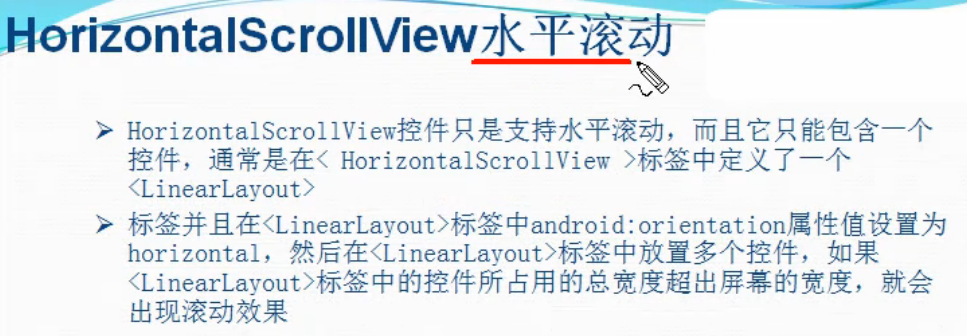
用法ScrollView大致相同
二、方法
1)HorizontalScrollView水平滚动控件使用方法
1、在layout布局文件的最外层建立一个HorizontalScrollView控件
2、在HorizontalScrollView控件中加入一个LinearLayout控件,并且把它的orientation设置为horizontal
3、在LinearLayout控件中放入多个装有图片的ImageView控件
2)HorizontalScrollView和ScrollView混合使用方法
以先垂直后水平为例
1、在layout布局文件的最外层建立一个ScrollView控件
2、在ScrollView控件中加入一个LinearLayout控件,并且把它的orientation设置为vertical
3、在这个LinearLayout中添加多个已经弄好的HorizontalScrollView水平滚动控件
三、代码实例
HorizontalScrollView水平滚动控件使用方法
1、水平滚动效果图:

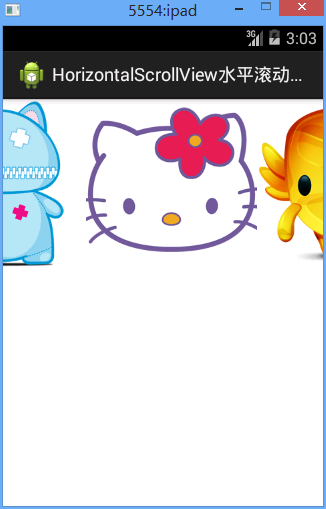
2、水平滚动代码:
/Ex27ScrollView/res/layout/activity02.xml
 <?xml version="1.0" encoding="utf-8"?>

 <HorizontalScrollView xmlns:android="http://schemas.android.com/apk/res/android"

     android:layout_width="match_parent"

     android:layout_height="match_parent"

     android:scrollbars="none"

     >

     <LinearLayout

         android:layout_width="match_parent"

         android:layout_height="match_parent"

         android:orientation="horizontal"

         >

         <ImageView

             android:layout_width="wrap_content"

             android:layout_height="wrap_content"

             android:src="@drawable/item1"

             />

         <ImageView

             android:layout_width="wrap_content"

             android:layout_height="wrap_content"

             android:src="@drawable/item2"

             />

         <ImageView

             android:layout_width="wrap_content"

             android:layout_height="wrap_content"

             android:src="@drawable/item3"

             />

         <ImageView

             android:layout_width="wrap_content"

             android:layout_height="wrap_content"

             android:src="@drawable/item4"

             />

         <ImageView

             android:layout_width="wrap_content"

             android:layout_height="wrap_content"

             android:src="@drawable/item5"

             />

     </LinearLayout>

 </HorizontalScrollView>
3、水平竖直混合滚动效果图
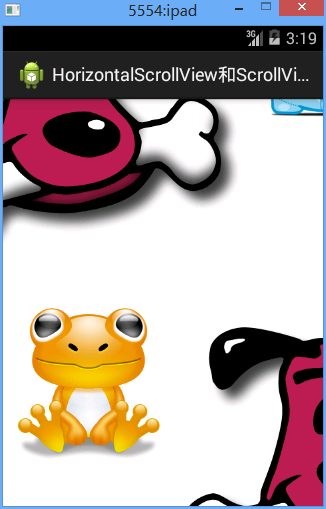
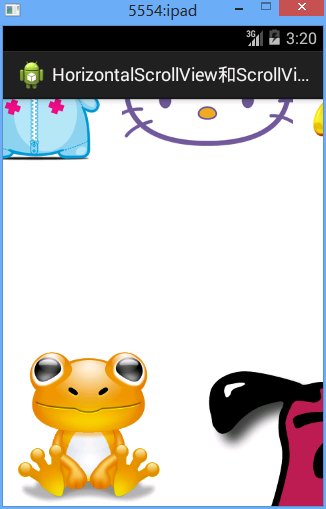
3、水平竖直混合滚动效果代码
/Ex27ScrollView/res/layout/activity03.xml
 <?xml version="1.0" encoding="utf-8"?>

 <ScrollView xmlns:android="http://schemas.android.com/apk/res/android"

     android:layout_width="match_parent"

     android:layout_height="match_parent"

     android:scrollbars="none" >

     <LinearLayout

         android:layout_width="match_parent"

         android:layout_height="match_parent"

         android:orientation="vertical" >

         <HorizontalScrollView

             android:layout_width="match_parent"

             android:layout_height="match_parent"

             android:scrollbars="none" >

             <LinearLayout

                 android:layout_width="match_parent"

                 android:layout_height="match_parent"

                 android:orientation="horizontal" >

                 <ImageView

                     android:layout_width="wrap_content"

                     android:layout_height="wrap_content"

                     android:src="@drawable/item1" />

                 <ImageView

                     android:layout_width="wrap_content"

                     android:layout_height="wrap_content"

                     android:src="@drawable/item2" />

                 <ImageView

                     android:layout_width="wrap_content"

                     android:layout_height="wrap_content"

                     android:src="@drawable/item3" />

                 <ImageView

                     android:layout_width="wrap_content"

                     android:layout_height="wrap_content"

                     android:src="@drawable/item4" />

                 <ImageView

                     android:layout_width="wrap_content"

                     android:layout_height="wrap_content"

                     android:src="@drawable/item5" />

             </LinearLayout>

         </HorizontalScrollView>

         <HorizontalScrollView

             android:layout_width="match_parent"

             android:layout_height="match_parent"

             android:scrollbars="none" >

             <LinearLayout

                 android:layout_width="match_parent"

                 android:layout_height="match_parent"

                 android:orientation="horizontal" >

                 <ImageView

                     android:layout_width="wrap_content"

                     android:layout_height="wrap_content"

                     android:src="@drawable/item1" />

                 <ImageView

                     android:layout_width="wrap_content"

                     android:layout_height="wrap_content"

                     android:src="@drawable/item2" />

                 <ImageView

                     android:layout_width="wrap_content"

                     android:layout_height="wrap_content"

                     android:src="@drawable/item3" />

                 <ImageView

                     android:layout_width="wrap_content"

                     android:layout_height="wrap_content"

                     android:src="@drawable/item4" />

                 <ImageView

                     android:layout_width="wrap_content"

                     android:layout_height="wrap_content"

                     android:src="@drawable/item5" />

             </LinearLayout>

         </HorizontalScrollView>

         <HorizontalScrollView

             android:layout_width="match_parent"

             android:layout_height="match_parent"

             android:scrollbars="none" >

             <LinearLayout

                 android:layout_width="match_parent"

                 android:layout_height="match_parent"

                 android:orientation="horizontal" >

                 <ImageView

                     android:layout_width="wrap_content"

                     android:layout_height="wrap_content"

                     android:src="@drawable/item1" />

                 <ImageView

                     android:layout_width="wrap_content"

                     android:layout_height="wrap_content"

                     android:src="@drawable/item2" />

                 <ImageView

                     android:layout_width="wrap_content"

                     android:layout_height="wrap_content"

                     android:src="@drawable/item3" />

                 <ImageView

                     android:layout_width="wrap_content"

                     android:layout_height="wrap_content"

                     android:src="@drawable/item4" />

                 <ImageView

                     android:layout_width="wrap_content"

                     android:layout_height="wrap_content"

                     android:src="@drawable/item5" />

             </LinearLayout>

         </HorizontalScrollView>

         <HorizontalScrollView

             android:layout_width="match_parent"

             android:layout_height="match_parent"

             android:scrollbars="none" >

             <LinearLayout

                 android:layout_width="match_parent"

                 android:layout_height="match_parent"

                 android:orientation="horizontal" >

                 <ImageView

                     android:layout_width="wrap_content"

                     android:layout_height="wrap_content"

                     android:src="@drawable/item1" />

                 <ImageView

                     android:layout_width="wrap_content"

                     android:layout_height="wrap_content"

                     android:src="@drawable/item2" />

                 <ImageView

                     android:layout_width="wrap_content"

                     android:layout_height="wrap_content"

                     android:src="@drawable/item3" />

                 <ImageView

                     android:layout_width="wrap_content"

                     android:layout_height="wrap_content"

                     android:src="@drawable/item4" />

                 <ImageView

                     android:layout_width="wrap_content"

                     android:layout_height="wrap_content"

                     android:src="@drawable/item5" />

             </LinearLayout>

         </HorizontalScrollView>

         <HorizontalScrollView

             android:layout_width="match_parent"

             android:layout_height="match_parent"

             android:scrollbars="none" >

             <LinearLayout

                 android:layout_width="match_parent"

                 android:layout_height="match_parent"

                 android:orientation="horizontal" >

                 <ImageView

                     android:layout_width="wrap_content"

                     android:layout_height="wrap_content"

                     android:src="@drawable/item1" />

                 <ImageView

                     android:layout_width="wrap_content"

                     android:layout_height="wrap_content"

                     android:src="@drawable/item2" />

                 <ImageView

                     android:layout_width="wrap_content"

                     android:layout_height="wrap_content"

                     android:src="@drawable/item3" />

                 <ImageView

                     android:layout_width="wrap_content"

                     android:layout_height="wrap_content"

                     android:src="@drawable/item4" />

                 <ImageView

                     android:layout_width="wrap_content"

                     android:layout_height="wrap_content"

                     android:src="@drawable/item5" />

             </LinearLayout>

         </HorizontalScrollView>

     </LinearLayout>

 </ScrollView>
四、注意点
1、始终注意HorizontalScrollView和ScrollView的直接儿子只有一个,一般都是LinearOut,保证了这个,怎么用也不会错
五、易错点
HorizontalScrollView水平滚动控件的更多相关文章
- UI控件之 ScrollView垂直滚动控件 和 HorizontalScrollView水平滚动控件的使用
1. ScrollView 垂直滚动控件的使用 ScrollView控件只是支持垂直滚动,而且在ScrollView中只能包含一个控件,通常是在< ScrollView >标签中定义了一个 ...
- 自己定义View实现水平滚动控件
前几天项目中须要使用到一个水平可滚动的选择条,类似下图效果(图片是从简书上一位作者那儿找来的,本篇也是在这位作者的文章的基础上改动的,站在大神的肩膀上,哈哈,因为原文没有提供demo,并且实现的效果跟 ...
- ScrollView垂直滚动控件
ScrollView垂直滚动控件 一.简介 二.方法 1)ScrollView垂直滚动控件使用方法 1.在layout布局文件的最外层建立一个ScrollView控件 2.在ScrollView控件中 ...
- Android文字跑马灯控件(文本自动滚动控件)
最近在开发一个应用,需要用到文本的跑马灯效果,图省事,在网上找,但老半天都找不到,后来自己写了一个,很简单,代码如下: import android.content.Context; import a ...
- Android自定义View,高仿QQ音乐歌词滚动控件!
最近在以QQ音乐为样板做一个手机音乐播放器,源码下篇博文放出.今天我想聊的是这个QQ音乐播放器中歌词显示控件的问题,和小伙伴们一起来探讨怎么实现这个歌词滚动的效果.OK,废话不多说,先来看看效果图: ...
- Android高级图片滚动控件,编写3D版的图片轮播器
转载请注明出处:http://blog.csdn.net/guolin_blog/article/details/17482089 大家好,好久不见了,最近由于工作特别繁忙,已经有一个多月的时间没写博 ...
- [android] 手机卫士自定义滚动控件
TextView控件设置单行显示 android:singleLine=”true” 设置TextView开始的位置显示省略号,android:ellipsize=”start” 设置滚动属性,and ...
- Android实现图片滚动控件,含页签功能,让你的应用像淘宝一样炫起来
首先题外话,今天早上起床的时候,手滑一下把我的手机甩了出去,结果陪伴我两年半的摩托罗拉里程碑一代就这么安息了,于是我今天决定怒更一记,纪念我死去的爱机. 如果你是网购达人,你的手机上一定少不了淘宝客户 ...
- 【Android】HorizontalScrollView内子控件横向拖拽
前言 网上ListView上下拖动的例子有,效果也很好,但是项目要横着拖的,只要硬着头皮自己写(主要是没找到合适的),参考文章1修改而来,分享一下. 声明 欢迎转载,但请保留文章原始出处:) 博客园 ...
随机推荐
- 移动端H5页面自适应手机屏幕宽度
1.由于本人使用的是sublime.text,使用rem就可以达到效果. 点击菜单中的preferences下的browse packages,选择cssrem-master,添加或者编写cssrem ...
- @tap的传参和对全局变量的修改 onTap方法的k-v参数同时传入;
小程序wepy <view class="weui-panel__bd" @tap="onTap(e)" data-tapkey="itemNa ...
- 客户端-服务器通信安全 sign key
API接口签名校验,如何安全保存appsecret? - 知乎 https://www.zhihu.com/question/40855191 要保证一般的客户端-服务器通信安全,可以使用3个密钥. ...
- MySql最左前缀原则
简单整理记录下,之前一直都没有关注过这个问题 最左前缀原则:顾名思义是最左优先,以最左边的为起点任何连续的索引都能匹配上, 注:如果第一个字段是范围查询需要单独建一个索引 注:在创建多列索引时,要根据 ...
- Python3.6全栈开发实例[011]
11.元素分类有如下值li= [11,22,33,44,55,66,77,88,99,90],将所有大于 66 的值保存至字典的第一个key中,将小于 66 的值保存至第二个key的值中.即: {'k ...
- 使用idea2016导出web项目war包
第一步配置Web Application:Exploded(已经配置的可以跳到第二步): 打开project structure(默认的快捷键是Ctrl+Alt+Shift+S),依次选择Artifa ...
- ajax json 异步请求
function ajaxTest(){ if (true) { $.ajaxSettings.async = false; var dataJson; $.getJSON("/univer ...
- iOS 结构简单清晰的 设置页面
这个是也是看了人家的代码,觉得甚是简单清晰,也是比较容易扩展.拿来学习一下 效果展示: 重点有以下2处: 1 .建立groupModel 列清组元素:当前组list 集合, 是否有header 或者 ...
- Linux Shell基础 Bash常见命令 echo命令
概述 shell中常见的命令echo. 输出命令:echo echo命令的输出内容如果没有特殊含义,则将原内容输出到屏幕:如果输出内容有特殊含义,则输出打印其含义. 命令格式如下: [root@loc ...
- 【HackerRank】Coin on the Table
题目链接:Coin on the Table 一开始想用DFS做的,做了好久都超时. 看了题解才明白要用动态规划. 设置一个三维数组dp,其中dp[i][j][k]表示在时间k到达(i,j)所需要做的 ...