
【spring boot】4.spring boot配置多环境资源文件
一个spring boot 项目在开发环境、测试环境、生产环境下,好多的配置都是不尽相同的。所以配置多分的资源文件,仅仅在部署在不同环境的时候,选择激活不同的资源文件就可以实现多环境的部署。
项目结构如下:
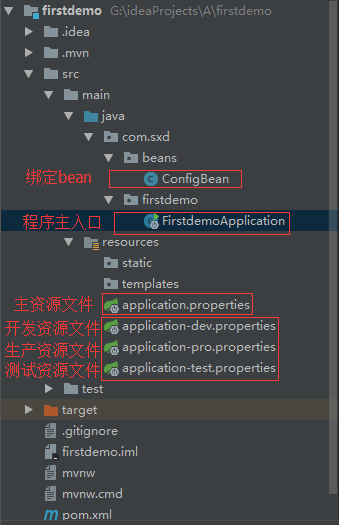
1.配置多个环境下的不同的资源文件
多个资源文件的格式如下:
application-{profile}.properties
{profile}自定义的不同环境标识,本项目中分别对应如下:
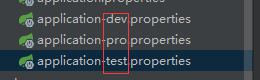
==========================================================================
列出各个环境下的资源文件内容:
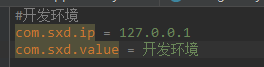
application-dev.properties 开发资源文件
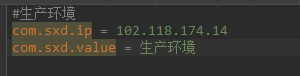
application-pro.properties 生产资源文件
application-test.properties 测试资源文件

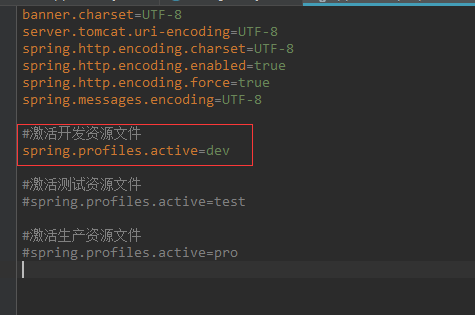
2.主资源文件中 选择激活一种环境下的资源文件
spring.profiles.active=dev
dev就是上面一种资源文件的自定义标识
3.绑定到一个bean,提供给程序中使用
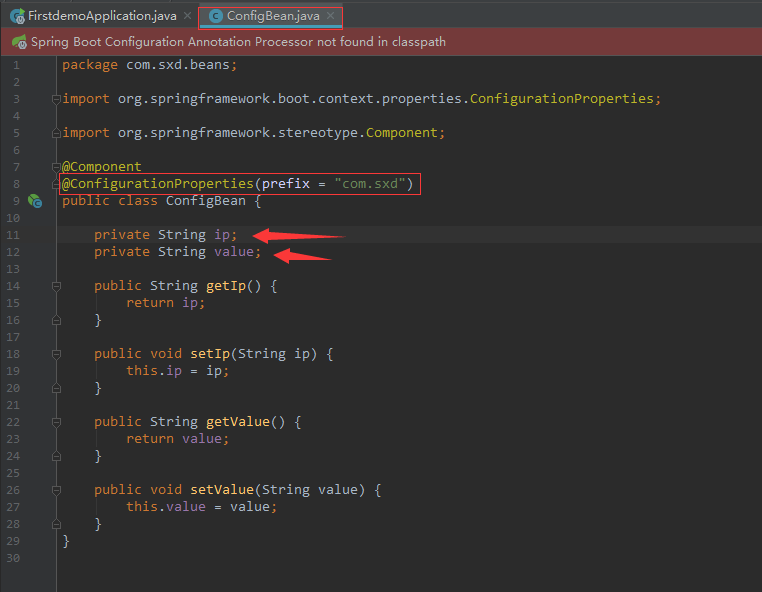
package com.sxd.beans;

import org.springframework.boot.context.properties.ConfigurationProperties;

import org.springframework.stereotype.Component;

@Component

@ConfigurationProperties(prefix = "com.sxd")

public class ConfigBean {

    private String ip;

    private String value;

    public String getIp() {

        return ip;

    }

    public void setIp(String ip) {

        this.ip = ip;

    }

    public String getValue() {

        return value;

    }

    public void setValue(String value) {

        this.value = value;

    }

}
4.程序主入口,激活绑定的bean,顺便使用了
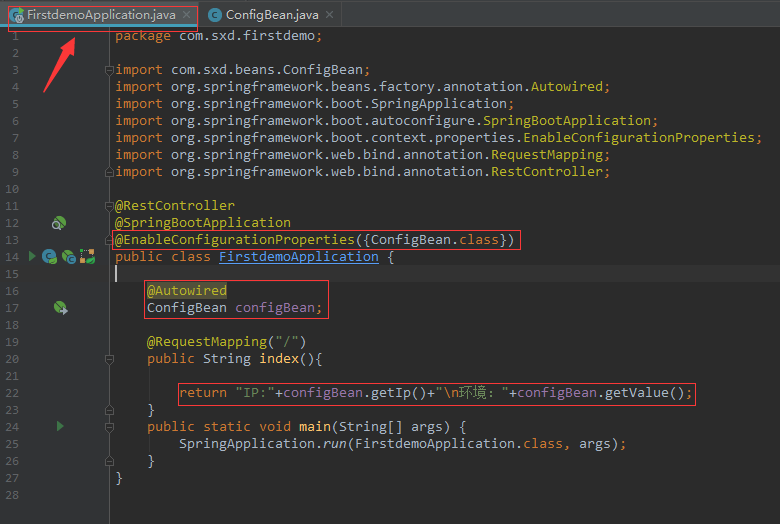
package com.sxd.firstdemo;

import com.sxd.beans.ConfigBean;

import org.springframework.beans.factory.annotation.Autowired;

import org.springframework.boot.SpringApplication;

import org.springframework.boot.autoconfigure.SpringBootApplication;

import org.springframework.boot.context.properties.EnableConfigurationProperties;

import org.springframework.web.bind.annotation.RequestMapping;

import org.springframework.web.bind.annotation.RestController;

@RestController

@SpringBootApplication

@EnableConfigurationProperties({ConfigBean.class})

public class FirstdemoApplication {

    @Autowired

    ConfigBean configBean;

    @RequestMapping("/")

    public String index(){

        return "IP:"+configBean.getIp()+"\n环境:"+configBean.getValue();

    }

    public static void main(String[] args) {

        SpringApplication.run(FirstdemoApplication.class, args);

    }

}
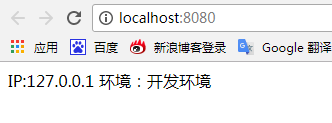
5.启动并访问 ,当前激活的是开发环境资源文件
==================================================================================================================
spring.profiles.active=dev
是选择一种资源文件
spring.profiles.include=dev,test,pro
可以叠加多个资源文件
【spring boot】4.spring boot配置多环境资源文件的更多相关文章
- 学记:为spring boot写一个自动配置
spring boot遵循"约定优于配置"的原则,使用annotation对一些常规的配置项做默认配置,减少或不使用xml配置,让你的项目快速运行起来.spring boot的神奇 ...
- Spring Boot 部署与服务配置
Spring Boot 其默认是集成web容器的,启动方式由像普通Java程序一样,main函数入口启动.其内置Tomcat容器或Jetty容器,具体由配置来决定(默认Tomcat).当然你也可以将项 ...
- Spring Boot 探索系列 - 自动化配置篇
26. Logging Prev Part IV. Spring Boot features Next 26. Logging Spring Boot uses Commons Logging f ...
- 十六、Spring Boot 部署与服务配置
spring Boot 其默认是集成web容器的,启动方式由像普通Java程序一样,main函数入口启动.其内置Tomcat容器或Jetty容器,具体由配置来决定(默认Tomcat).当然你也可以将项 ...
- Spring Boot 2.0 教程 | 配置 Undertow 容器
欢迎关注个人微信公众号: 小哈学Java, 文末分享阿里 P8 资深架构师吐血总结的 <Java 核心知识整理&面试.pdf>资源链接!! 文章首发于个人网站 https://ww ...
- spring boot +mybatis(通过properties配置) 集成
注:日常学习记录贴,下面描述的有误解的话请指出,大家一同学习. 因为我公司现在用的是postgresql数据库,所以我也用postgresql进行测试 一.前言 1.Spring boot 会默认读取 ...
- Spring Boot + Spring Cloud 实现权限管理系统 配置中心(Config、Bus)
技术背景 如今微服务架构盛行,在分布式系统中,项目日益庞大,子项目日益增多,每个项目都散落着各种配置文件,且随着服务的增加而不断增多.此时,往往某一个基础服务信息变更,都会导致一系列服务的更新和重启, ...
- Spring Boot之实现自动配置
GITHUB地址:https://github.com/zhangboqing/springboot-learning 一.Spring Boot自动配置原理 自动配置功能是由@SpringBootA ...
- spring boot 入门 使用spring.profiles.active来分区配置
很多时候,我们项目在开发环境和生成环境的环境配置是不一样的,例如,数据库配置,在开发的时候,我们一般用测试数据库,而在生产环境的时候,我们是用正式的数据,这时候,我们可以利用profile在不同的环境 ...
随机推荐
- 【BZOJ1419】 Red is good [期望DP]
Red is good Time Limit: 10 Sec Memory Limit: 64 MB[Submit][Status][Discuss] Description 桌面上有R张红牌和B张 ...
- bzoj 1050: [HAOI2006]旅行comf&&【codevs1001】
Description 给你一个无向图,N(N<=500)个顶点, M(M<=5000)条边,每条边有一个权值Vi(Vi<30000).给你两个顶点S和T,求 一条路径,使得路径上最 ...
- [bzoj3004][SDOI2012]吊灯——樹形DP
Brief Description 給定一棵樹, 判斷是否可以將其分成\(\frac{n}{k}\)個聯通塊, 其中每個聯通塊的大小均爲k. Algorithm Design 我們有一個結論: k可行 ...
- Django-csrf跨站请求伪造
方式一: 下列代码插入ajax提交之$.ajaxSetup({ data: {csrfmiddlewaretoken: '{{ csrf_token }}' }, }); 注意:该代码中包含模板渲染语 ...
- javascript 实现购物车页面
跟商城有关系的网站,难免会有购物车的结账界面. 我用javascript实现了增加数量/减少数量,实时计算总金额,删除该商品,选中商品/反选商品/全选/全反选...的操作. 欢迎指点!~ 效果如图:( ...
- golang之http
go获取html页面 package main import ( "fmt" "io/ioutil" "net/http" "ne ...
- linux awk学习笔记
awk学习笔记 awk语法格式 awk '{pattern + action}' {filenames} awk作用 awk的最基本功能是在文件或者字符串中基于指定规则浏览和抽取信息,awk抽取信息后 ...
- jquerycheckbox事件
https://stackoverflow.com/questions/7031226/jquery-checkbox-change-and-click-event $(document).ready ...
- spring报错 :java.lang.NoSuchMethodException: <init>()
Spring要求init-method是一个无参数的方法,如果init-method指定的方法中有参数,那么Spring将会抛出java.lang.NoSuchMethodException ...
- C# 调试程序时如何输入命令行参数
调试程序时如何输入命令行参数http://www.a769.com/archives/320.html 开发命令行程序时,我们会疑惑,从那里输入参数呢?请看下面的教程,让你摆脱困扰. 1.点击菜单栏: ...