
【aspnetcore】配置使用jwt验证
因为害怕token泄露出现问题,所以从未在项目中使用jwt。但这玩意现在真的很火,趁有空还是研究了一下。
在aspnetcore中实现jwt很简单,感觉微软把很多工作都做了,虽然开发效率上去了,但是使得c#的程序员变得很傻,很多事情都是知其然而不知其所以然,只能绑死在微软这条大船上越行越远,唉~~
jwt一般在webapi的项目使用比较多,但我下面的代码都是在MVC环境上测试的,用法上应该没什么区别。
一、添加和配置JWT
1、引入nuget包
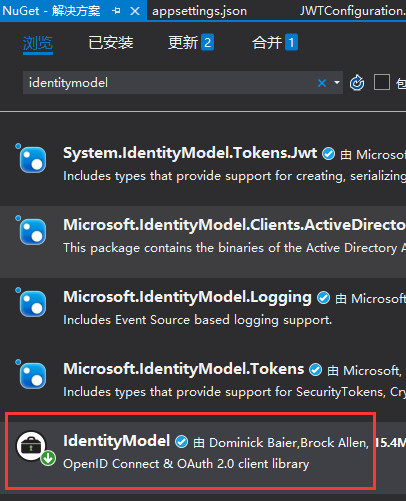
VS中点击 工具 > 管理解决方案 NuGet 程序包,搜索 IdentityModel,安装到项目
2、添加JWT配置项
打开 appsettings.json ,添加节点
"Authentication": {

    "JwtBearer": {

        "IsEnabled": "true",

        "SecurityKey": "JWTStudyWebsite_DI20DXU3",

        "Issuer": "JWTStudy",

        "Audience": "JWTStudyWebsite"

    }

}
3、新建 JWTConfiguration.cs 文件,内容如下:
using Microsoft.Extensions.Configuration;

using Microsoft.Extensions.DependencyInjection;

using Microsoft.IdentityModel.Tokens;

using System;

using System.Text;

namespace JWTStudent.Website.Extensions

{

    public static class JwtConfiguration

    {

        public static void AddJwtConfiguration(this IServiceCollection services, IConfiguration configuration)

        {

            if (bool.Parse(configuration["Authentication:JwtBearer:IsEnabled"]))

            {

                services.AddAuthentication(options => {

                    options.DefaultAuthenticateScheme = "JwtBearer";

                    options.DefaultChallengeScheme = "JwtBearer";

                }).AddJwtBearer("JwtBearer", options =>

                {

                    options.Audience = configuration["Authentication:JwtBearer:Audience"];

                    options.TokenValidationParameters = new TokenValidationParameters

                    {

                        // The signing key must match!

                        ValidateIssuerSigningKey = true,

                        IssuerSigningKey = new SymmetricSecurityKey(

                            Encoding.ASCII.GetBytes(configuration["Authentication:JwtBearer:SecurityKey"])),

                        // Validate the JWT Issuer (iss) claim

                        ValidateIssuer = true,

                        ValidIssuer = configuration["Authentication:JwtBearer:Issuer"],

                        // Validate the JWT Audience (aud) claim

                        ValidateAudience = true,

                        ValidAudience = configuration["Authentication:JwtBearer:Audience"],

                        // Validate the token expiry

                        ValidateLifetime = true,

                        // If you want to allow a certain amount of clock drift, set that here

                        ClockSkew = TimeSpan.Zero

                    };

                });

            }

        }

    }

}
4、在StartUp.cs的ConfigurationServices方法内,添加如下代码:
services.AddJwtConfiguration(Configuration);
二、创建AccessTokenController,用于申请和发放JWT
public IActionResult Post([FromBody]LoginModel model)

{

    var user = TempData.Users.FirstOrDefault(m => m.Account == model.Account && m.Pw == model.Pw);

    if (user != null)

    {

        var claims = new[]

        {

            new Claim(ClaimTypes.Name, user.Account),

            new Claim(ClaimTypes.Role, user.Role)

        };

        var key = new SymmetricSecurityKey(

            Encoding.UTF8.GetBytes(_configuration["Authentication:JwtBearer:SecurityKey"]));

        var credentials = new SigningCredentials(key, SecurityAlgorithms.HmacSha256);

        var token = new JwtSecurityToken(

            _configuration["Authentication:JwtBearer:Issuer"],

            _configuration["Authentication:JwtBearer:Audience"],

            claims,

            expires: DateTime.Now.AddMinutes(),

            signingCredentials: credentials

        );

        return Ok(new AccessTokenResult {Token = new JwtSecurityTokenHandler().WriteToken(token), Code = });

    }

    return Ok(new AccessTokenResult {Code = , Token = ""});

}
LoginModel是自定义的登录模型,很简单,仅包含用户名和密码两个字段。AccessTokenResult是自定义的返回结果,int类型的Code,登录成功则返回200,失败为0,Token是生成的JWT
三、测试
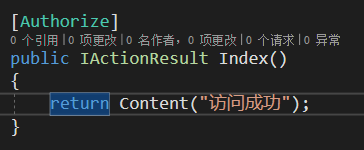
1、创建TestController,并为其添加 Authorization 描述
2、运行程序,打开Postman,访问 http://localhost:5000/test
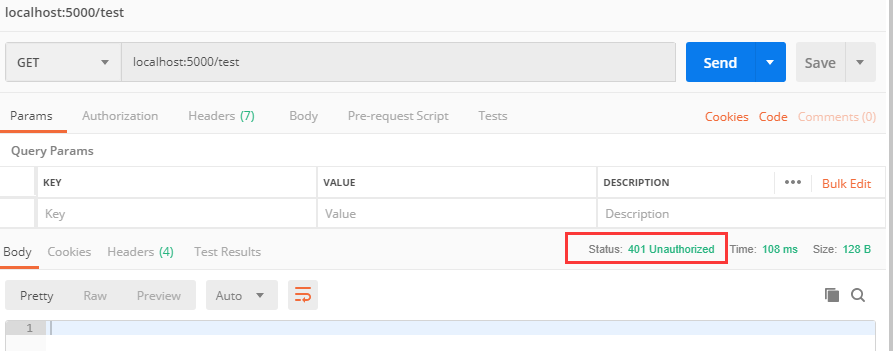
不出所料,访问被拒绝,提示没有授权。
3、获取JWT
访问 http://localhost:5000/api/accesstoken
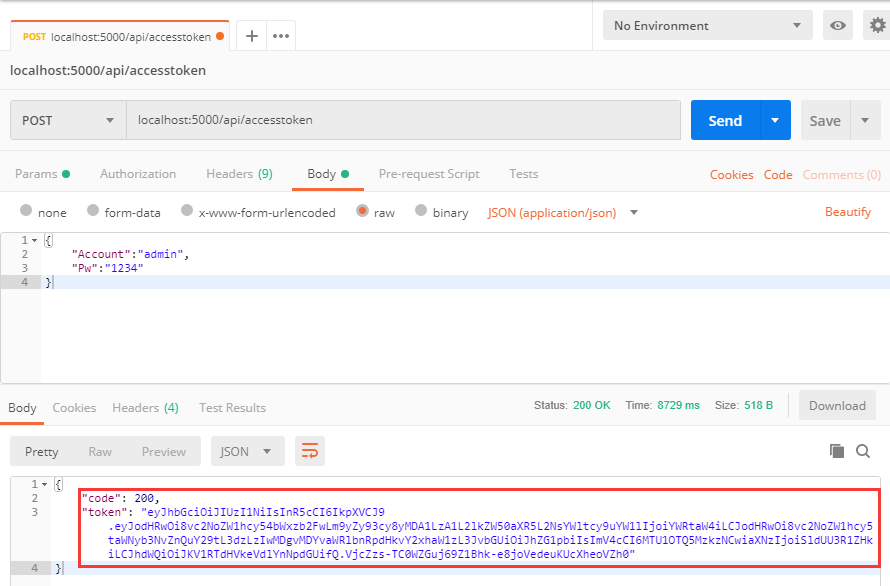
4、使用Token重新访问受限的Action
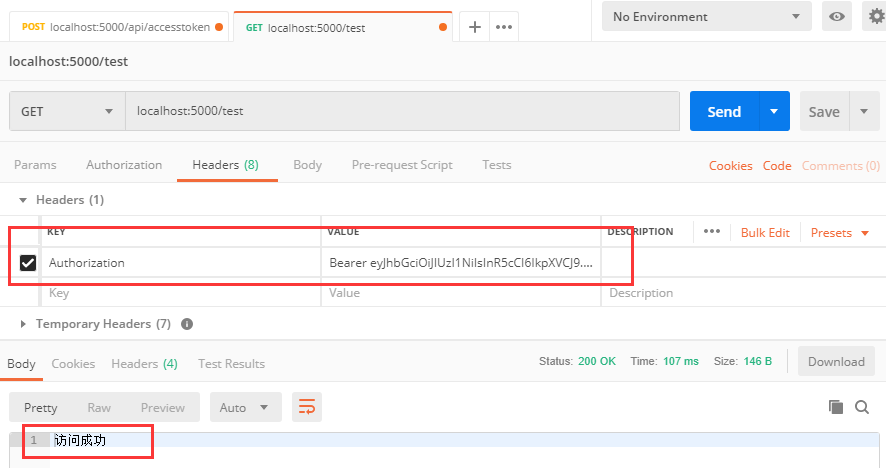
拷贝token的值,重新请求 http://localhost:5000/test,在Headers上添加一项,KEY 为 Authorization,VALUE 为 Bear+空格+token值
【aspnetcore】配置使用jwt验证的更多相关文章
- Jwt验证登录
练习模板:https://gitee.com/zh1446802857/swagger-multi-version-api.git Jwt在我的 认知里,是一套门锁.别人(用户)需要用到你的接口 的时 ...
- 踩坑之路---JWT验证
使用JWT验证客户的携带的token 客户端在请求接口时,需要在request的head中携带一个token令牌 服务器拿到这个token解析获取用户资源,这里的资源是非重要的用户信息 目前我的理解, ...
- webapi中使用token验证(JWT验证)
本文介绍如何在webapi中使用JWT验证 准备 安装JWT安装包 System.IdentityModel.Tokens.Jwt 你的前端api登录请求的方法,参考 axios.get(" ...
- Nginx实现JWT验证-基于OpenResty实现
介绍 权限认证是接口开发中不可避免的问题,权限认证包括两个方面 接口需要知道调用的用户是谁 接口需要知道该用户是否有权限调用 第1个问题偏向于架构,第2个问题更偏向于业务,因此考虑在架构层解决第1个问 ...
- nginx配置ssl双向验证 nginx https ssl证书配置
1.安装nginx 参考<nginx安装>:http://www.ttlsa.com/nginx/nginx-install-on-linux/ 如果你想在单IP/服务器上配置多个http ...
- nginx配置https双向验证(ca机构证书+自签证书)
nginx配置https双向验证 服务端验证(ca机构证书) 客户端验证(服务器自签证书) 本文用的阿里云签发的免费证书实验,下载nginx安装ssl,文件夹有两个文件 这两个文件用于做服务器http ...
- 如何为ASP.NET Core的强类型配置对象添加验证
原文: Adding validation to strongly typed configuration objects in ASP.NET Core 作者: Andrew Lock 译文: La ...
- centos6.5中部署Zeppelin并配置账号密码验证
centos6.5中部署Zeppelin并配置账号密码验证1.安装JavaZeppelin支持的操作系统如下图所示.在安装Zeppelin之前,你需要在部署的服务器上安装Oracle JDK 1.7或 ...
- golang学习笔记10 beego api 用jwt验证auth2 token 获取解码信息
golang学习笔记10 beego api 用jwt验证auth2 token 获取解码信息 Json web token (JWT), 是为了在网络应用环境间传递声明而执行的一种基于JSON的开放 ...
随机推荐
- 【转】 Pro Android学习笔记(二七):用户界面和控制(15):FrameLayout
FrameLayout FrameLayout通常只包含一个控件.如果我们在FrameLayout中设置多个控件,则第二个控件会堆叠在第一个控件上面,如此类推,一层一层地叠上去.下面的例子,我们在Fr ...
- 删除 char[10][10] 中的一行
1. 描述 删除二维字符数组其中一行,并用下一行进行填补 2. 代码 #include <iostream> #include <string.h> using namespa ...
- net start sql server (instance)
如何启动 SQL Server 实例(net 命令) 其他版本 可以使用 Microsoft Windows net 命令启动 Microsoft SQL Server 服务. 启动 SQL Se ...
- LAMP 1.8默认虚拟主机
默认虚拟主机是为了解决别人域名恶心绑定自己的服务器ip,可导致服务器上的网站排名靠后,即干扰seo优化 我们访问指定的两个网站可以直接访问,ip也可以访问 打开配置文件 vim /usr/local/ ...
- java.util.Date、java.sql.Date、java.sql.Time、java.sql.Timestamp区别和联系
java.util.Date.java.sql.Date.java.sql.Time.java.sql.Timestamp区别和联系 栏目:Java基础 作者:admin 日期:2015-04-19 ...
- mysql nginx redis 配置文件
https://github.com/superhj1987/awesome-config
- express搭建elasticsearch
1.首先,我们创建一个Express应用程序!我将使用express.js生成器. npm install -g express-generator express ./autocompleter c ...
- Spring Boot 高效数据聚合之道
项目地址和示例代码: https://github.com/lvyahui8/spring-boot-data-aggregator 背景 接口开发是后端开发中最常见的场景, 可能是RESTFul接口 ...
- 阶段2-新手上路\项目-移动物体监控系统\Sprint2-摄像头子系统开发\第2节-V4L2图像编程接口深度学习
参考资料: http://www.cnblogs.com/emouse/archive/2013/03/04/2943243.htmlhttp://blog.csdn.net/eastmoon5021 ...
- JSP错误页面
exception是JSP九大内置对象之一,其实例代表其他页面的异常和错误.只有当页面是错误处理页面时,即isErroePage为 true时,该对象才可以使用.对于C项,errorPage的实质就是 ...