
vue使用webpack压缩后体积过大要怎么优化
vue使用webPack压缩后存储过大,怎么优化
在生产环境去除developtool选项
在webpack.config.js中设置的developtool选项,仅适用于开发环境,这样会造成打包成的文件有几M,所以在生产环境需要去除此项配置分离CSS
安装npm插件
npm install extract-text-webpack-plugin --save
    var ExtractTextPlugin = require("extract-text-webpack-plugin");

    loaders:[

      {

          test: /\.css$/,

          loader: ExtractTextPlugin.extract("style-loader", "css-loader")

      },

      {

          test: /\.less$/,

          loader: ExtractTextPlugin.extract("style-loader", "css-loader!less-loader")

      },

    plugins: [

        new ExtractTextPlugin("bundle.css")

    ]
- 分离第三方库
使用CommonChunkPlugin插件
entry: {

app: './src/main.js'

vendors: ['vue','vue-router','moment']

}

plungins[

    new Webpack.optimize.CommonChunkPlugin({

        name: ['vendor', 'manifest'], // 如果有manifest 每次打包压缩后的文件不会改变hash

            minChunks: function (module, count) {

                // any required modules inside node_modules are extracted to vendor

                return (

                    module.resource &&

                    /\.js$/.test(module.resource) &&

                    module.resource.indexOf(

                        path.join(__dirname, '../node_modules')

                    ) === 0

                )

            }

    })

]
每次使用commonChunkPlugin插件进行build之后,都会重新设置hash,导致Etag不同,每次上线都会更新Etag,就无法利用浏览器缓存了
- 还有按需打包Loadash,也就是结合vue-router实现的懒加载
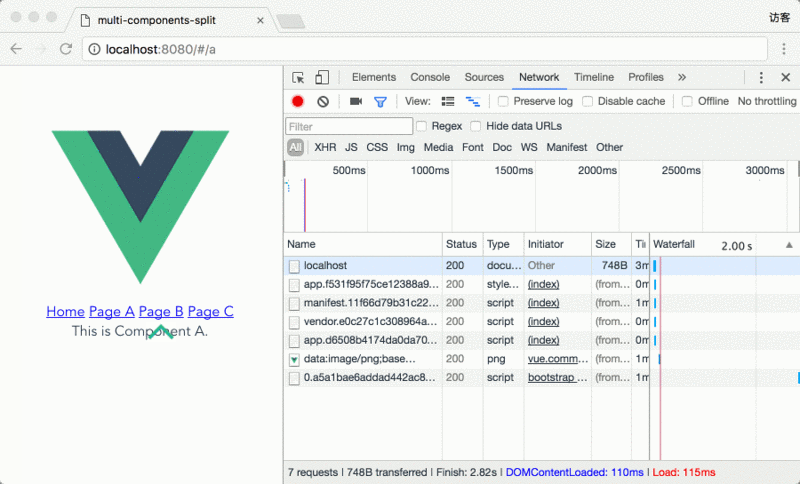
先看效果:
0.a5a1bae6addad442ac82.js文件是包含componentA,componentB,componentC三个vue组件的打包文件,当页面加载的时候并没有加载此文件,点击pageA的时候加载了一次,点击pageB,pageC的时候没有再次加载此文件。
实现步骤:
首先使用vue-cli创建一个包含vue-router的项目,如下:
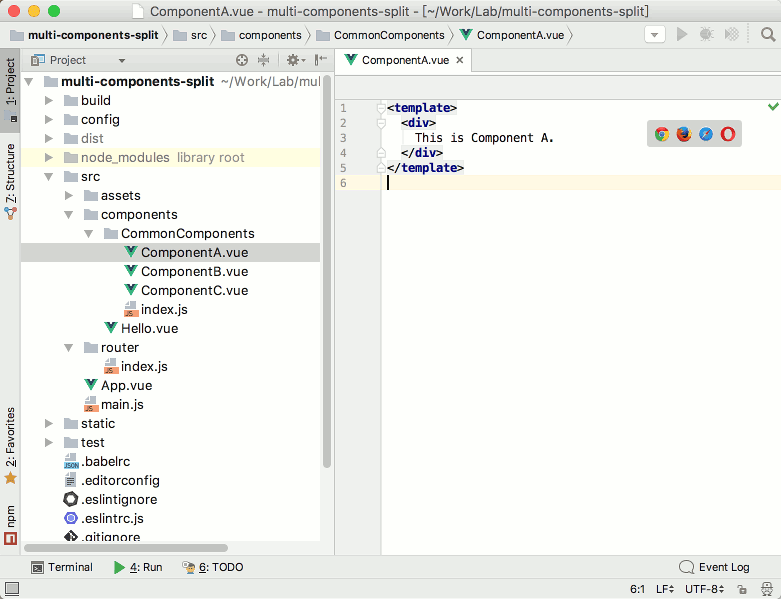
在CommonComponts下面创建index.js:
exports.ComponentA = require('./ComponentA')
exports.ComponentB = require('./ComponentB')
exports.ComponentC = require('./ComponentC')使用AMD风格callback-require语法实现异步加载
这时候在使用webpack打包是就可以实现将ABC这三个vue组件组合打包
require(['components/CommonComponents'],function(CommonComponents){
//do whatEver you want with CommonComponents
})
这时候模块加载成功是,回调函数中的CommonComponents参数就是一个包含ComponentA、ComponentB、 ComponentC 这三个组件选项的对象。在路由配置文件中添加组件的配置文件依赖
平时,我们使用工厂函数来加入vue组件文件的路由选项
工厂函数写法resolve => {require(['./my-vue-component'], resolve)}
这时候,如果我们添加componentA的路由项,只需要加载刚刚使用callback-require处理好的CommonComponets对象
let getCommonComponent = componentName => resolve => require(['components/CommonComponents'], components => resolve(components[componentName]))然后再组件中或者路由中可以使用
getCommonComponent('ComponentA')来调用其中的ComponentA组件
在路由中调用为例子:routes: [
{
path: '/a',
name: 'a',
component: getCommonComponent('ComponentA')
},
{
path: '/b',
name: 'B',
component: getCommonComponent('ComponentB')
},
{
path: '/c',
name: 'C',
component: getCommonComponent('ComponentC')
}
]
- 最终打包成的文件
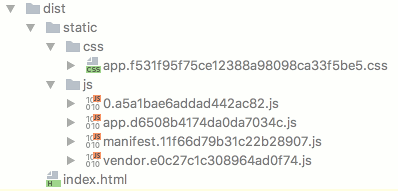
- 最终打包成的文件
vue使用webpack压缩后体积过大要怎么优化的更多相关文章
- vue 使用webpack打包后路径报错以及 alias 的使用
一.vue 使用webpack打包后路径报错(两步解决) 1. config文件夹 ==> index.js ==> 把assetsPublicPath的 '/ '改为 './' 2. b ...
- vue通过webpack打包后怎么运行
1. 成功使用webpack打包完成后会默认得到dist的文件夹 2. dist文件夹中有html与其他的静态文件 3. 在dist文件夹中打开命令窗口或者git,开一个服务器(像anywhere) ...
- vue项目 webpack打包后,图片路径是绝对路径
vue项目,使用webpack打包,虽然在全局把路径改成了相对的路径,但是图片引用的路径还是异常的,解决办法如下: 1.config文件夹下index.js中: assetsPublicPath:&q ...
- vue项目webpack打包后修改配置文件
从webpack打包结构中我们知道,vue中有一个存放外部资源的文件夹static,它里面的文件是不会被打包编译的,所以我们就可以利用外部引入js的方式将我们的想要的数据在index.html中以js ...
- vue项目webpack打包后图片路径错误
首先项目是vue-cli搭建的,项目结构如下: 然后发现在css里写的图片引用地址在开发时正常显示,但在打包扔上服务器之后报错 报的是404,路径前面多了/static/css,不知道为啥. 在自己慢 ...
- vue webpack打包后 iconfont引入路径不对
vue webpack打包后 iconfont引入路径不对 { test: /\.(woff2?|eot|ttf|otf)(\?.*)?$/, loader: 'url-loader', option ...
- Vue项目用webpack打包后,预览时资源路径出错(文末有vue项目链接分享)
最近用vue写了一些项目,项目写完之后需要打包之后才能放到网上展示,所以在这里记录一下项目打包的过程以及遇到的一些问题. --------------------------------------- ...
- webpack打包后不能调用,改用uglifyjs打包压缩
背景: 项目基于原生js,没用到任何脚手架和框架,但也需要打包压缩. 项目的js中声明了一些全局变量 供其他js调用. 这时候如果用webpack打包,基于webpack特性,会嵌套一层大函数,会将j ...
- Vue-loader 开启压缩后的一些坑
在使用vue-loader 配合webpack 对.vue文件进行加载的时候,如果开启了代码压缩会出来下面几种问题,做个记录. 丢失td结束标记,导致页面的布局错乱 input的属性type为text ...
随机推荐
- Android: 利用SurfaceView绘制股票滑动直线解决延迟问题
1.背景介绍 最近项目要绘制股票走势图,并绘制能够跟随手指滑动的指示线(Indicator)来精确查看股票价格和日期.如下图所示: 上图中的那条白色直线就是股票的指示线,用来跟随手指精确确定股票的时间 ...
- YNOI2016 这是我自己的发明
看到这个标题立刻想到:. “绝地科学家,八倍不屏息啊,八百里外把头打啊...” 首先我们发现如果只考虑第二个操作,这棵树就是假的,我们可以直接莫队解决 如果考虑换根的话...可以把一个操作换成小于等于 ...
- uoj279温暖会指引我们前行
暖气来啦~ 动态树维护最大生成树裸题 #include<iostream> #include<cstdio> #include<cstdlib> #include& ...
- 浅谈vue路由原理
Vue的路由实现:hash模式 和 history模式 hash模式:在浏览器中符号“#”,#以及#后面的字符称之为hash,用window.location.hash读取: 特点:hash虽然在UR ...
- 关于Snoop的用法
snoop是开发wpf应用程序的利器.用它可以观察WPF的可视树,监听事件,更改元素属性等. 下面我介绍下snoop一些用法. 1.获取指定应用程序的UI 打开snoop,选择"Drag ...
- SQL Server:sp_send_dbmail参数设置
sp_send_dbmail [ [ @profile_name = ] 'profile_name' ] [ , [ @recipients = ] 'recipients [ ; n ]' ...
- CentOS 7关闭firewalld启用iptables
在CentOS7中,有很多CentOS 6中的常用服务发生了变化. 其中iptables是其中比较大的一个.防火墙iptables被firewalld取代. 本文将介绍,如果采用systemctl关闭 ...
- HDOJ1181(简单DFS)(练习使用STL)
#include<iostream> #include<cstdio> #include<string> #include<map> #include& ...
- canvas实现平铺
代码: /** * Created by Administrator on 2016/1/30. */ function draw(id){ var canvas = document.getElem ...
- zabbix 系列 (1)安装
安装server http://blog.csdn.net/xiegh2014/article/details/54988548 安装 agent http://m.blog.csdn.net/wu2 ...