
(C)spring boot读取自定义配置文件时乱码解决办法
这是入门的第三天了,从简单的hello spring开始,已经慢慢接近web的样子。接下来当然是读取简单的对象属性了。
于是按照网上各位大神教的,简单写了个对象book,如上一篇(B),其他配置不需要做任何改动。
package com.example.bean;

import org.springframework.beans.factory.annotation.Value;

import org.springframework.boot.context.properties.ConfigurationProperties;

import org.springframework.context.annotation.PropertySource;

import org.springframework.stereotype.Component;

@Component

@ConfigurationProperties(prefix = "book")

@PropertySource("classpath:book.properties")

public class Book {

    private String name;

    private String author;

    private  String price;

     public Book () {};

     public Book(String name,String author,String price) {

         this.name = name;

         this.author = author;

         this.price = price;

     }

    public String getName() {

        return name;

    }

    public void setName(String name) {

        this.name = name;

    }

    public String getAuthor() {

        return author;

    }

    public void setAuthor(String author) {

        this.author = author;

    }

    public String getPrice() {

        return price;

    }

    public void setPrice(String price) {

        this.price = price;

    };

}
访问控制器controller如下:
@Controller

public class BookController {

    @Autowired

    private Book book;

    @RequestMapping("/book")

    @ResponseBody

    public String readBook() {

        return "emmmm..... The BookName is "

                    +book.getName()

                    +";and Book Author is "

                    +book.getAuthor()

                    +";and Book price is "

                    +book.getPrice();

    }

}
book的属性值在配置文件里面给出,我用了自定义配置文件,没有在application.properties里面配置,那样的话这个文件太臃肿了。
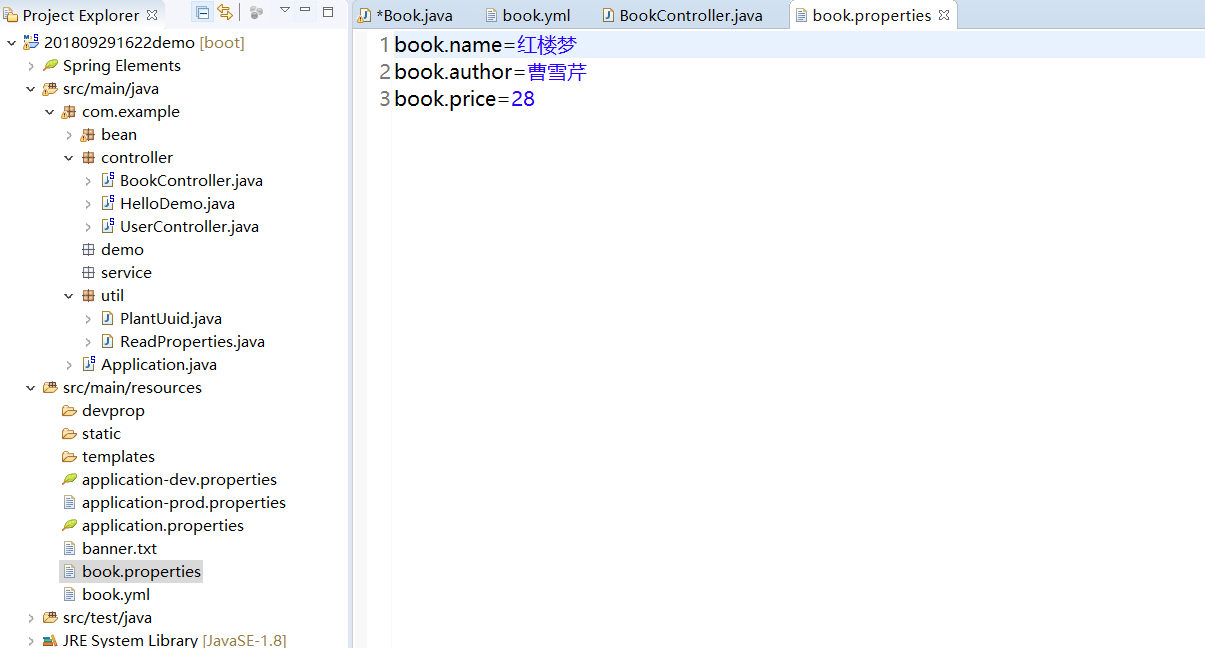
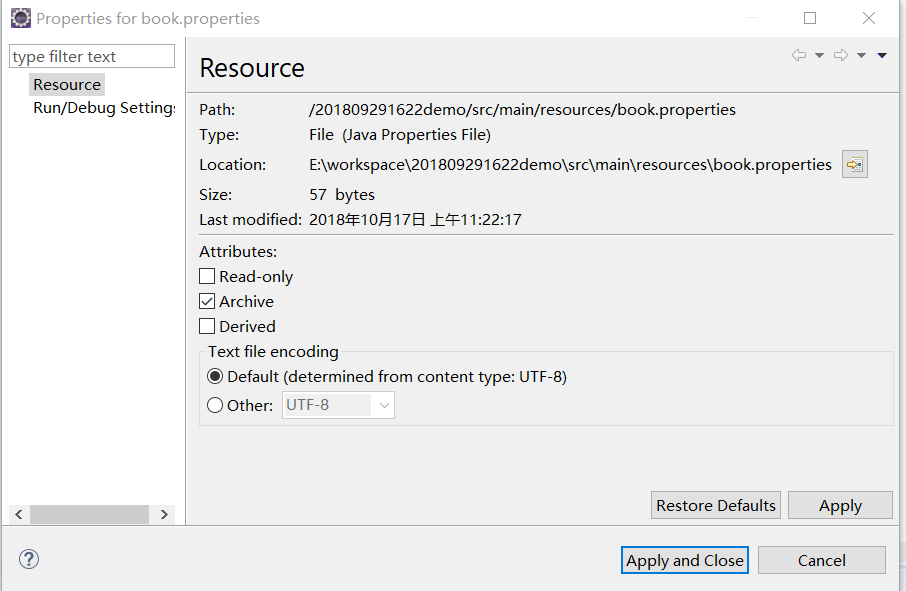
当然了文件的编码肯定是选的UTF-8不要怀疑,
然而遗憾的是,当我在浏览器输入http://localhost:9090/wow/book访问时,竟然乱码了!!!哦shit

然后就是各种找解决方案,顺便也了解到了原因,就是eclipse默认.properties文件的编码是ISO-8859-1,那么知道了编码的问题,按照以前的思路来解决乱码就比较顺畅了,
无非是优先指定服务器编码,这就是方案一,要么指定浏览器编码,然而因为不是jsp访问所以这个行不通,要么文件编码指定UTF-8,然而无效。
网上提供的解决方案也不外乎这几种:
方案一:在application里面指定tomcat的编码:
#设置中文字符的显示方式

#server.tomcat.uri-encoding=UTF-8

#spring.http.encoding.charset=UTF-8

#spring.http.encoding.enabled=true

#spring.http.encoding.force=true

#spring.messages.encoding=UTF-8
并无卵用!第一行直接就报错了!我的JDK1.8,spring boot2.0,可能是版本问题,反正就是报错不能用。
方案二:各种通过文件编码指定的,不可用。我eclipse默认指定所有文件编码是UTF-8,这个文件已经指定,并没有作用。
方案三:编写读取properties文件的类来控制输出流,特么的这个类在哪里调用?
方案四:嗯,eclipse需要一个读取properties文件的插件,对的就是插件,下载一个插件据说就能UTF-8输出了,然而我并不想因为一个文件就去下载一个插件。所以这种方案没有试。
方案五:据说yml可以输出中文不乱码???那还不简单,换个格式不就完了?
naive!
首先,将book.properties换成book.yml,各种链接给出的方案都是在默认配置文件里写简直了。。。。。。
然后根据指点,使用@value将属性注入,各大网站给出的注入位置几乎都在get set 方法上面,然而,
找不到文件啊衰。。。。依然乱码啊(′д` )…彡…彡
乱码:
package com.example.bean;

import org.springframework.beans.factory.annotation.Value;

import org.springframework.boot.context.properties.ConfigurationProperties;

import org.springframework.context.annotation.PropertySource;

import org.springframework.stereotype.Component;

@Component

@ConfigurationProperties(value = "book")

@PropertySource("classpath:book.yml")

public class BookYml {//仍然是乱码

    private String name;

    private String author;

    private  String price;

     public BookYml () {};

     public BookYml(String name,String author,String price) {

         this.name = name;

         this.author = author;

         this.price = price;

     }

     @Value("${book.name}")

    public String getName() {

        return name;

    }

    public void setName(String name) {

        this.name = name;

    }

    @Value("${book.author}")

    public String getAuthor() {

        return author;

    }

    public void setAuthor(String author) {

        this.author = author;

    }

    @Value("${book.price}")

    public String getPrice() {

        return price;

    }

    public void setPrice(String price) {

        this.price = price;

    };

}
嗯,既然仍然是乱码,说明yml并没有什么特权。有人说yml也是解析成properties文件运行的,嗯,这个解释我服。
难道真的只能下载插件了?NONONO不要轻言放弃。更换关键字继续搜索,终于找到了一篇:
终极大法来了:
方案六:
package com.example.bean;

import org.springframework.beans.factory.annotation.Value;

import org.springframework.boot.context.properties.ConfigurationProperties;

import org.springframework.context.annotation.PropertySource;

import org.springframework.stereotype.Component;

@Component

@PropertySource(value = "classpath:book.yml", ignoreResourceNotFound = true,encoding = "UTF-8" )

@ConfigurationProperties(prefix = "book")public class Book {

     @Value("${name}")

    private String name;

     @Value("${author}")

    private String author;

     @Value("${price}")

    private  String price;

     public Book () {};

     public Book(String name,String author,String price) {

         this.name = name;

         this.author = author;

         this.price = price;

     }

    public String getName() {

        return name;

    }

    public void setName(String name) {

        this.name = name;

    }

    public String getAuthor() {

        return author;

    }

    public void setAuthor(String author) {

        this.author = author;

    }

    public String getPrice() {

        return price;

    }

    public void setPrice(String price) {

        this.price = price;

    };

}
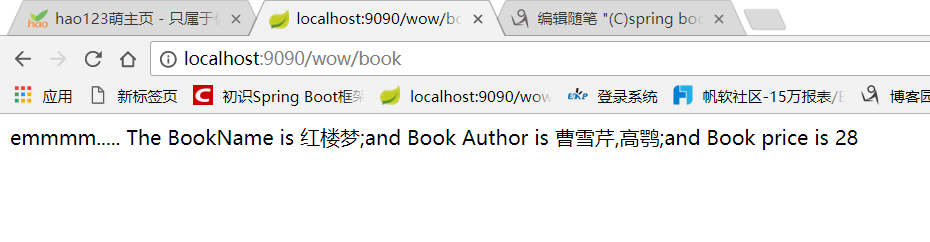
完美!
首先要在属性声明上引入注解@value,并不是在get set上面。其次,在读取数据源的@PropertySource里面指定文件编码方式。
这样访问就能正常显示中文了。
同理,properties文件也可以这样做,只要@PropertySource(value = "classpath:book.properties", ignoreResourceNotFound = true,encoding = "UTF-8" )就行了,根本不需要什么插件!
另,这个配置文件的路径也可以自定义而不需要在@PropertySource(value = "classpath:“)里面给出。
感谢 https://ask.csdn.net/questions/681857?sort=votes_count
(C)spring boot读取自定义配置文件时乱码解决办法的更多相关文章
- spring boot读取自定义配置文件时乱码解决办法
@PropertySource(value = "classpath:book.yml", ignoreResourceNotFound = true,encoding = &qu ...
- Spring Boot读取自定义外部属性
测试的环境:Spring Boot2 + Maven +lombok 准备需要用到的基础类: public class People { private String name; private St ...
- spring boot jpa 使用update 报错解决办法
在spring boot jpa 中自定义sql,执行update操作报错解决办法: 在@Query(...)上添加 @Modifying@Transactional注解
- spring boot中log4j冲突问题和解决办法
Spring Boot中自带了log4j日志管理.写法应该是: private static final Logger logger = Logger.getLogger(XXX.class); 而不 ...
- Spring boot读取application.properties中文乱码
解决方案 在IDEA环境下: File -> Settings -> Editor -> File Encodings 将Properties Files (*.properties ...
- spring mvc 的@PathVariable对应中文乱码解决办法
参考:https://www.aliyun.com/jiaocheng/800577.html
- spring boot 项目从配置文件中读取maven 的pom.xml 文件标签的内容。
需求: 将pom.xml 文件中的版本号读取到配置文件并打印到日志中. 第一步: 在pom.xml 中添加以下标签. 第二步: 将version 标签的值读取到配置文件中 这里使用 @@ 而不是 ...
- Spring Boot的properties配置文件读取
我在自己写点东西玩的时候需要读配置文件,又不想引包,于是打算扣点Spring Boot读取配置文件的代码出来,当然只是读配置文件没必要这么麻烦,不过反正闲着也是闲着,扣着玩了.具体启动过程以前的博客写 ...
- Springboot读取自定义配置文件的几种方法
一.读取核心配置文件 核心配置文件是指在resources根目录下的application.properties或application.yml配置文件,读取这两个配置文件的方法有两种,都比较简单. ...
随机推荐
- 洛谷 P1215 [USACO1.4]母亲的牛奶 Mother's Milk
题目描述 农民约翰有三个容量分别是A,B,C升的桶,A,B,C分别是三个从1到20的整数, 最初,A和B桶都是空的,而C桶是装满牛奶的.有时,农民把牛奶从一个桶倒到另一个桶中,直到被灌桶装满或原桶空了 ...
- 2月4号学习的一个SSM整合项目,第一课
本文引自:https://github.com/Sunybyjava/seckill 原作者:sunybyjava@gmail.com seckill 一个整合SSM框架的高并发和商品秒杀项目,学习 ...
- 2018.7.31 oracle rownum的理解
一.Rownum的描述: rownum是一个伪列,数据库中并不保存rownum的列值,它是oracle系统为返回的结果集顺序分配的行编号,rownum是随着结果集生成的,一旦生成,在同一个结果集中就不 ...
- 2017.10.9 JVM入门学习
1.什么是JVM JVM是Java Virtual Machine(Java虚拟机)的缩写,JVM是一种用于计算设备的规范,它是一个虚构出来的计算机,是通过在实际的计算机上仿真模拟各种计算机功能来实现 ...
- MySQL 主从同步 Slave_IO_Running: No
MariaDB [chen]> show slave status \G *************************** 1. row ************************* ...
- 第38章 I2S—音频播放与录音输入—零死角玩转STM32-F429系列
第38章 I2S—音频播放与录音输入 全套200集视频教程和1000页PDF教程请到秉火论坛下载:www.firebbs.cn 野火视频教程优酷观看网址:http://i.youku.com/ ...
- mac 开机白屏,卡进度条,无法进入系统
几个月前我的老Mac又一次的坏掉了,现在想起来就记录一下,哎,话说Apple的东西吧,好用是好用,一般都不会坏,质量保证,但是如果一旦坏了,那就是大问题!(坏了第一时间就应该打电话给apple客服小姐 ...
- 8、SpringBoot+Mybatis整合------参数取值方式
前言: 我们知道,在mybatis中,参数取值方式有两种: #{ } 和 ${ } 下面,我们来探讨下#{ }与${ }不同. 一.#{ } 例: select * from student wher ...
- H5新增的Web Storage本地存储
html5中的Web Storage包括了两种存储方式:sessionStorage和localStorage. sessionStorage用于本地存储一个会话(session)中的数据,这些数据只 ...
- NPM 学习笔记整理
NPM 学习笔记整理 阅读 550,2017年06月04日 发布,来源:blog.ihoey.com 什么是 NPM npm 之于 Node ,就像 pip 之于 Python , gem 之于 Ru ...