
Android弹出输入提示框--PopupWindow实现
前言 之前直接用Dialog实现了弹出对话框。现在尝试用更好地解决方案--PopupWindow类--来实现
1.首先搞一个弹出框布局,和之前类似。

这样的东西,它的布局是这样:
 1 <?xml version="1.0" encoding="utf-8"?>

 2 <LinearLayout xmlns:android="http://schemas.android.com/apk/res/android"

 3     android:id="@+id/create_user_dialog_view"

 4     android:layout_width="fill_parent"

 5     android:layout_height="300dp"

 6     android:background="@drawable/自己搞背景样式"

 7     android:minWidth="200dp"

 8     android:orientation="vertical"

 9     android:padding="10dp"

10     android:paddingBottom="30dp"

11     android:paddingTop="30dp"

12     android:layout_marginTop="250dp"

13     >

14

15     <EditText

16

17         android:id="@+id/text_name"

18         android:layout_width="fill_parent"

19         android:layout_height="wrap_content"

20         android:background="@drawable/自己搞背景样式"

21         android:hint="编辑框1"

22         android:minHeight="45dp"

23         android:textSize="18sp" />

24

25     <EditText

26         android:id="@+id/text_mobile"

27         android:layout_width="fill_parent"

28         android:layout_height="wrap_content"

29         android:layout_marginTop="5dp"

30         android:background="@drawable/自己搞背景样式"

31         android:hint="编辑框2"

32         android:minHeight="45dp"

33         android:textSize="18sp" />

34

35     <EditText

36         android:id="@+id/text_info"

37         android:layout_width="fill_parent"

38         android:layout_height="wrap_content"

39         android:layout_marginTop="5dp"

40         android:background="@drawable/自己搞背景样式"

41         android:gravity="top|left"

42         android:hint="编辑框3"

43         android:minHeight="145dp"

44         android:textSize="18sp" />

45

46     <Button

47         android:id="@+id/btn_save"

48         android:layout_width="fill_parent"

49         android:layout_height="wrap_content"

50         android:layout_marginTop="5dp"

51         android:background="@自己搞背景样式"

52         android:text="按钮" />

53

54 </LinearLayout>
2.然后搞一个对话框弹出类,就是重头戏了,这个东西设置了上面布局中的细节操作,如按钮监听啊,弹出窗口的特征什么的。用Kotlin实现。
 package com.example.jason_jan.自己的包名

 import com.example.jason_jan.自己的项目名.R

 import android.app.Activity

 import android.content.Context

 import android.view.Display

 import android.view.LayoutInflater

 import android.view.View

 import android.view.Window

 import android.view.WindowManager

 import android.widget.Button

 import android.widget.EditText

 import android.widget.PopupWindow

 import android.widget.RelativeLayout

 /**

  * Created by Jason_Jan on 2017/7/3.

  */

 class CreateUserPopWin(mContext: Activity, itemsOnClick: View.OnClickListener?) : PopupWindow() {

     private val mContext: Context

     private val view: View

     private val btn_save_pop: Button

     var text_name: EditText

     var text_mobile: EditText

     var text_info: EditText

     init {

         this.mContext = mContext

         this.view = LayoutInflater.from(mContext).inflate(R.layout.create_user_dialog, null)//这里的layout是之前设置的弹出框布局

         text_name = view.findViewById(R.id.text_name) as EditText

         text_mobile = view.findViewById(R.id.text_mobile) as EditText

         text_info = view.findViewById(R.id.text_info) as EditText

         btn_save_pop = view.findViewById(R.id.btn_save) as Button

         // 设置按钮监听

         btn_save_pop.setOnClickListener(itemsOnClick)

         // 设置外部可点击

         this.isOutsideTouchable = true

         /* 设置弹出窗口特征 */

         // 设置视图

         this.contentView = this.view

         // 设置弹出窗体的宽和高

         /*

          * 获取窗口对象及参数对象以修改对话框的布局设置, 可以直接调用getWindow(),表示获得这个Activity的Window

          * 对象,这样这可以以同样的方式改变这个Activity的属性.

          */

         val dialogWindow = mContext.window

         val m = mContext.windowManager

         val d = m.defaultDisplay // 获取屏幕宽、高用

         val p = dialogWindow.attributes // 获取对话框当前的参数值

         this.height = RelativeLayout.LayoutParams.WRAP_CONTENT

         this.width = (d.width * 0.8).toInt()

         // 设置弹出窗体可点击

         this.isFocusable = true

     }

 }
3.然后就是测试这个弹出框类能不能正确执行了。新建一个Activity--我就直接叫做MyDialogTest2
package 自己的项目名

import android.app.Activity

import android.support.v7.app.AppCompatActivity

import android.os.Bundle

import android.util.Log

import 自己的项目名.R

import android.view.Gravity

import android.view.View

import 要引用的自己创建的CreateUserPop路径

class MyDialogTest2 : Activity() {

    var createUserPopWin: CreateUserPopWin?=null

    override fun onCreate(savedInstanceState: Bundle?) {

        super.onCreate(savedInstanceState)

        setContentView(R.layout.activity_my_dialog_test2)

    }

   /* showEditPopWin*/

    fun showEditPopWin(view: View?) {

        /*Log.d("TAG","******0")*/

        createUserPopWin = CreateUserPopWin(this, onClickListener)

        createUserPopWin?.showAtLocation(findViewById(R.id.activity_my_dialog_test2), Gravity.CENTER, 0, 0)
                                           //这里的id时这个类对应的布局中的id,不然就像我一样入坑了,下面有具体的布局信息

       /* Log.d("TAG","******4")*/

    }

    private val onClickListener

            = object : View.OnClickListener {

        override fun onClick(v: View?) {

          /*  Log.d("TAG","******2")*/

            when (v?.getId()) {

                R.id.btn_save -> {

                    val name1 = createUserPopWin?.text_name?.getText().toString().trim()

                    val mobile1 = createUserPopWin?.text_mobile?.getText().toString().trim()

                    val info1 = createUserPopWin?.text_info?.getText().toString().trim()

                    println(name1 + "——" + mobile1 + "——" + info1)

                    createUserPopWin?.dismiss()

                }

            }

            /*Log.d("TAG","******3")*/

        }

    }

}
4.这里是对应的布局信息,就是两个按钮,点击按钮,弹出对话框
<?xml version="1.0" encoding="utf-8"?>

<RelativeLayout xmlns:android="http://schemas.android.com/apk/res/android"

    xmlns:app="http://schemas.android.com/apk/res-auto"

    xmlns:tools="http://schemas.android.com/tools"

    android:layout_width="match_parent"

    android:layout_height="match_parent"

    android:id="@+id/activity_my_dialog_test2"

    tools:context="对应的类路径--可以不写--">

    <Button

        android:layout_width="300dp"

        android:layout_height="wrap_content"

        android:layout_marginTop="100dp"

        android:layout_centerHorizontal="true"

        android:text="测试弹出框"

        android:onClick="showEditPopWin"

        android:background="@drawable/自己搞一个背景样式"

        />

    <Button

        android:layout_width="300dp"

        android:layout_height="wrap_content"

        android:layout_centerVertical="true"

        android:layout_centerHorizontal="true"

        android:text="测试弹出框"

        android:onClick="showEditPopWin"

        android:background="@drawable/自己搞一个背景样式"

        />

</RelativeLayout>
5.最后的测试结果如下

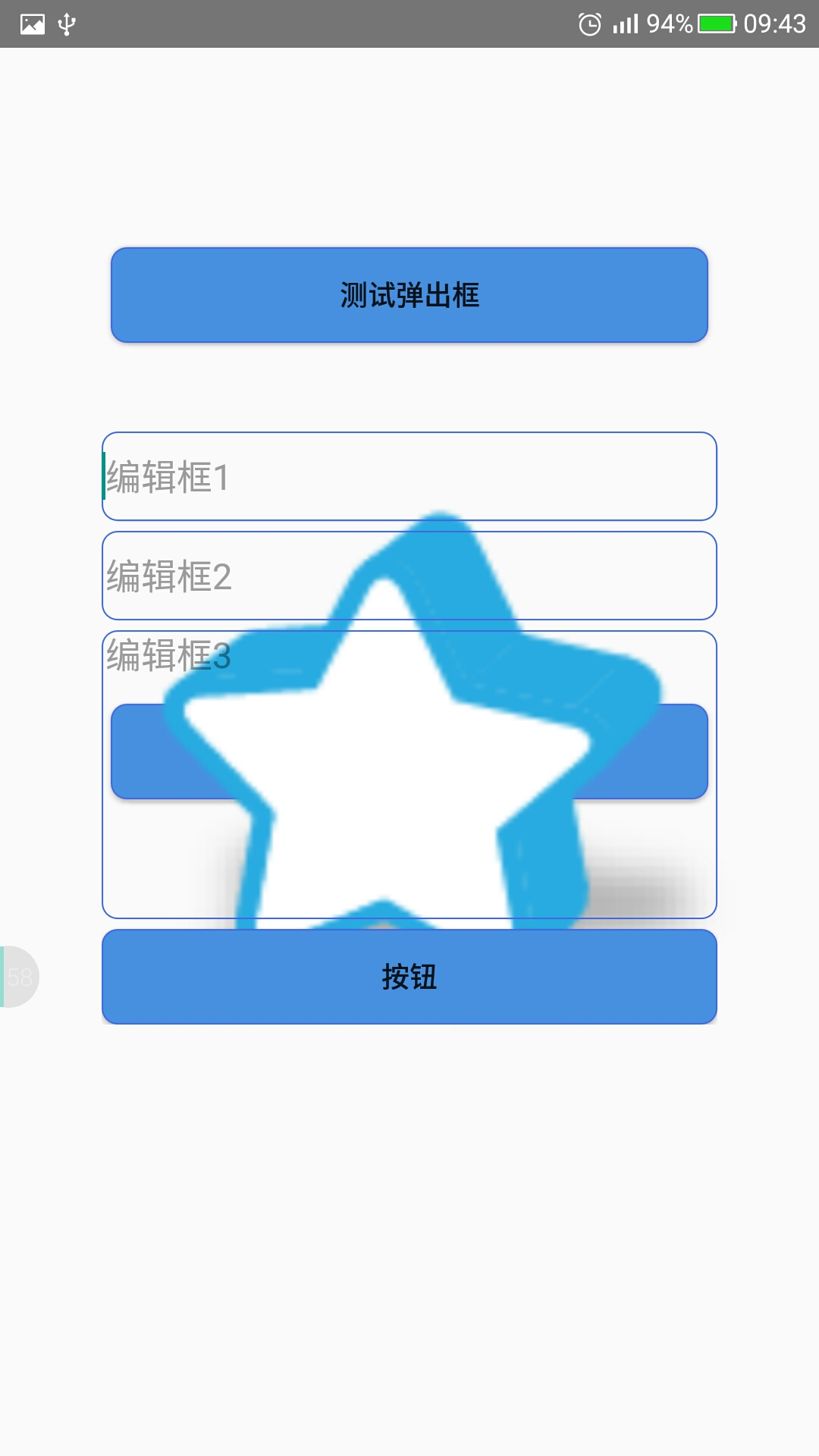
6.就是这么简单,背景当然是很难看了。习惯就好。
Android弹出输入提示框--PopupWindow实现的更多相关文章
- 解决PL/SQL Dev连接Oracle弹出空白提示框
第一次安装Oracle,装在虚拟机中,用PL/SQL Dev连接远程数据库的时候老是弹出空白提示框,网上找了很久,解决方法也很多,可是就是没法解决我这种情况的. 没办法,只能自己研究,经过大概一天时间 ...
- PL/SQL Dev连接Oracle弹出空白提示框的解决方法分享
第一次安装Oracle,装在虚拟机中,用PL/SQL Dev连接远程数据库的时候老是弹出空白提示框,网上找了很久,解决方法也很多,可是就是没法解决我这种情况的. 出现这种问题,解决方法大概有这几种: ...
- 弹出JS提示框
弹出JS提示框Page.ClientScript.RegisterStartupScript(typeof(string), "msg", "<script> ...
- Asp.Net下载页面,并弹出下载提示框
Asp.Net下载页面,并弹出下载提示框.在删除按钮里调用以下方法.
- IE中使用ajaxSubmit上传文件弹出下载提示框
使用jQuery的ajaxSubmit 上传文件时,在IE中会弹出下载提示框: 解决方法:让action返回String类型,而不是ActionView,
- asp.net导出excel并弹出保存提示框
asp.net导出excel并弹出保存提示框 2013-07-12 | 阅:1 转:78 | 分享 腾讯空间 人人网 开心网 新浪微博 腾讯微博 搜狐空间 推荐给朋友 举报 ...
- [UWP]在应用退出时弹出确认提示框
1. 需求 在应用退出时(点击右上角的关闭按钮)弹出一个确认按钮可以说是一个最常见的操作了,例如记事本的"你是否保存": 但这个功能在UWP上居然有点小复杂.这篇文章将解释如何实现 ...
- Android基础TOP4_1:点击物理按钮弹出退出提示框
JAVA: public class MainActivity extends Activity { @Override protected void onCreate(Bundle savedIns ...
- android 弹出日期选择框
DatePickerDialog 在很多时候需要用户去设定时间,不可能让用户去在一个文本框中去输入时间,所以就需要有个日期弹出选择框,而这个框就是DatePickerDialog. 1.在API中的D ...
随机推荐
- Linux 学习 三, linux 文件结构
linux 的文件结构 linux 下的bin 目录,包含了常用的命令应用程序 /bin: bin为binary的简写主要放置一些系统的必备执行档例如:cat.cp.dmesg.gzip.kill.l ...
- AWS ELB Sticky Session有问题?别忘了AWSELB cookie
我们的产品中有两个Module,分别部署在独立的Linux机器上,Module 1需要向Module 2发起Http请求来获得服务.由于Module 2有多台,因此我们会在Module 2前部署一台负 ...
- open ssh 常用的东西
清除已经存在的但是不同设备的连接信息 ssh-keygen -f "/users/he/.ssh/known_hosts" -R 192.168.1.118 无密码登录openss ...
- jq 操作select
添加option $("#ID option").each(function(){if($(this).val()==111){$(this).remove();}}); 移除op ...
- SharePoint 栏的三种名字Filed :StaticName、 InternalName、 DisplayName
SharePoint 的栏,有3个名字, StaticName InternalName DisplayName. 当在第一次创建栏的时候,这3个名字一起进行创建,并且都一样. <FIELD ...
- 怎样解决putty终端乱码的方法
原文地址:https://jingyan.baidu.com/article/3aed632e5f00ae701080913a.html?qq-pf-to=pcqq.c2c 终端输入:echo $LA ...
- Mysql学习第四天
1.跟用户相关的命令 (了解). DCL语句 1.1. 创建一个新的用户 CREATE USER 用户名@地址 IDENTIFIED BY '密码'; CREATE ...
- VOS落地网关前缀优先级
问题描述: 假如:A客户业务方向:酒水B客户业务方向:增值酒水业务网关前缀:9150增值业务网关前缀:660 公司原来落地全跑酒水量9150前缀,但B客户加入后公司又不想添加新的落地网关,计划在原来网 ...
- MySQL入门很简单: 12 MYSQL 用户管理
1. 权限表 安装MySQL会自动安装一个名为mysql的数据库,存储权限表: user表, db表,host表,table_priv表,columns_priv表,proc_priv表等. 1)us ...
- MySQL安装和简单操作
MySQL数据库安装与配置详解 MySQL的安装请参考下面这篇博客,讲述的非常详细,各种截图也很清晰.http://www.cnblogs.com/sshoub/p/4321640.html MySQ ...