
sharepoint2010列表的分页实现迅雷样式效果
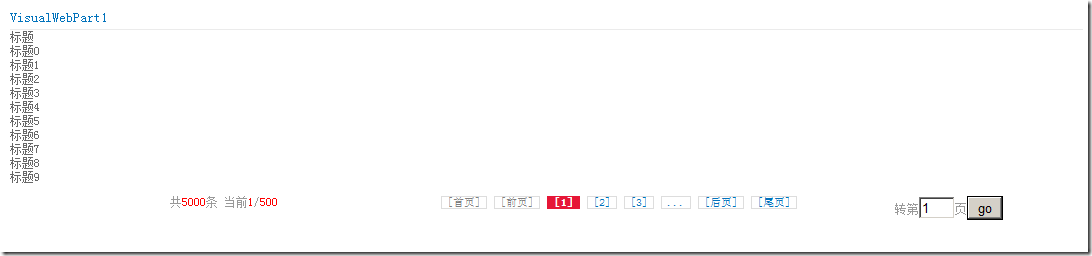
利用ListItemCollectionPosition和AspNetPage分页控件实现,效果图如下:

后台分页代码如下:
#region 私有方法
/// <summary>
/// 数据
/// </summary>
private void BindsData()
{
SPWeb m_objWeb = SPContext.Current.Web;
//
if (m_objWeb != null)
{
int _totalCount =0;
//
//
string listName = "测试列表";
//
SPList m_objList = m_objWeb.Lists[listName];
//
SPListItemCollection itemCollection = GetPageList(listName, this.AspNetPager_View.PageSize,
this.AspNetPager_View.CurrentPageIndex, out _totalCount, "", new string[] { "Title" });
//
this.Repeater1.DataSource = itemCollection;
this.Repeater1.DataBind();
this.AspNetPager_View.RecordCount = _totalCount;
}
}
/// <summary>
/// 根据列表得到首页ID
/// </summary>
/// <param name="listName">列表名称</param>
/// <param name="pageSize"></param>
/// <param name="strWhere">查询条件</param>
/// <param name="ViewField">查询的字段</param>
/// <returns></returns>
private int GetListID(string listName, int pageSize, int curPage, string strWhere, string[] ViewField)
{
try
{
//得到当前站点
SPWeb m_objWeb = SPContext.Current.Web;
//得到列表
SPList m_objList = m_objWeb.Lists[listName];
SPQuery query = new SPQuery();
//设置查询条件
query.Query = strWhere;
//查询的字段
if (ViewField.Length > 0)
{
query.ViewFields = BuildViewFields(ViewField);
}
//条数限制
query.RowLimit = (uint)((curPage - 1) * pageSize);
//查询
SPListItemCollection m_objListItemColl = m_objList.GetItems(query);
//得到分页信息
string strPageInfo = m_objListItemColl.ListItemCollectionPosition.PagingInfo;
string page = strPageInfo.Substring(strPageInfo.LastIndexOf('=') + 1);
return Convert.ToInt32(page);
}
catch
{
return 0;
}
}
/// <summary>
/// 列表分页
/// </summary>
/// <param name="listName">列表名称</param>
/// <param name="pageSize">每页大小</param>
/// <param name="curPage">当前页数</param>
/// <param name="recourdCount">总共记录数</param>
/// <param name="strWhere">查询条件</param>
/// <param name="ViewField">查询的字段</param>
/// <returns></returns>
public SPListItemCollection GetPageList(string listName, int pageSize, int curPage, out int recourdCount, string strWhere,string[] ViewField)
{
try
{
//得到当前站点
SPWeb m_objWeb = SPContext.Current.Web;
//得到列表
SPList m_objList = m_objWeb.Lists[listName];
//查询
SPQuery query = new SPQuery();
query.Query = strWhere;
//查询的字段
if (ViewField.Length>0)
{
query.ViewFields = BuildViewFields(ViewField);
}
//总共记录数
recourdCount = m_objList.GetItems(query).Count;
query = new SPQuery();
//设置每页大小
query.RowLimit = (uint)pageSize;
query.Query = strWhere;
//查询的字段
if (ViewField.Length > 0)
{
query.ViewFields = BuildViewFields(ViewField);
}
//分页信息
string pageinfo = string.Format("Paged=TRUE&p_ID={0}", GetListID(listName, pageSize, curPage, strWhere,ViewField));
query.ListItemCollectionPosition = new SPListItemCollectionPosition(pageinfo);
SPListItemCollection m_objListItemColl = m_objList.GetItems(query);
return m_objListItemColl;
}
catch
{
recourdCount = 0;
return null;
}
}
/// <summary>
/// 构建查询字段
/// </summary>
/// <param name="fieldNames"></param>
/// <returns></returns>
public string BuildViewFields(string[] fieldNames)
{
if (fieldNames ==null|| fieldNames.Length ==0)
return"";
string result ="";
foreach (string fieldName in fieldNames)
{
result = String.Format("{0}<FieldRef Name=\"{1}\" />", result, fieldName);
}
return result;
}
#endregion
页面HTML代码如下:
<%@ Assembly Name="$SharePoint.Project.AssemblyFullName$" %>
<%@ Assembly Name="Microsoft.Web.CommandUI, Version=14.0.0.0, Culture=neutral, PublicKeyToken=71e9bce111e9429c" %>
<%@ Register TagPrefix="SharePoint" Namespace="Microsoft.SharePoint.WebControls"
Assembly="Microsoft.SharePoint, Version=14.0.0.0, Culture=neutral, PublicKeyToken=71e9bce111e9429c" %>
<%@ Register TagPrefix="Utilities" Namespace="Microsoft.SharePoint.Utilities" Assembly="Microsoft.SharePoint, Version=14.0.0.0, Culture=neutral, PublicKeyToken=71e9bce111e9429c" %>
<%@ Register TagPrefix="asp" Namespace="System.Web.UI" Assembly="System.Web.Extensions, Version=3.5.0.0, Culture=neutral, PublicKeyToken=31bf3856ad364e35" %>
<%@ Import Namespace="Microsoft.SharePoint" %>
<%@ Register TagPrefix="WebPartPages" Namespace="Microsoft.SharePoint.WebPartPages"
Assembly="Microsoft.SharePoint, Version=14.0.0.0, Culture=neutral, PublicKeyToken=71e9bce111e9429c" %>
<%@ Control Language="C#" AutoEventWireup="true" CodeBehind="VisualWebPart1UserControl.ascx.cs"
Inherits="SharePointProject1.VisualWebPart1.VisualWebPart1UserControl" %>
<%@ Register Assembly="AspNetPager" Namespace="Wuqi.Webdiyer" TagPrefix="webdiyer" %>
<style type="text/css">
/*****************AspNetPager分页控件的样式:迅雷样式******************************/
.pages { color: #999; }
.pages a, .pages .cpb { text-decoration:none;float: left; padding: 0 5px; border: 1px solid #ddd;background: #ffff;margin:0 2px; font-size:11px; color:#000;}
.pages a:hover { background-color: #E61636; color:#fff;border:1px solid #E61636; text-decoration:none;}
.pages .cpb { font-weight: bold; color: #fff; background: #E61636; border:1px solid #E61636;}
/*****************AspNetPager分页控件的样式:迅雷样式******************************/
</style>
<asp:Repeater ID="Repeater1" runat="server">
<HeaderTemplate>
<table border="0">
<tr>
<td>
标题
</td>
</tr>
</HeaderTemplate>
<ItemTemplate>
<tr>
<td>
<%# Eval("Title")%>
</td>
</tr>
</ItemTemplate>
<FooterTemplate>
</table>
</FooterTemplate>
</asp:Repeater>
<br />
<webdiyer:AspNetPager ID="AspNetPager_View" runat="server" HorizontalAlign="Center"
NumericButtonCount="3" FirstPageText="[首页]" LastPageText="[尾页]" NextPageText="[后页]"
PrevPageText="[前页]" NumericButtonTextFormatString="[{0}]" TextAfterPageIndexBox="页"
CssClass="pages" CurrentPageButtonClass="cpb" TextBeforePageIndexBox="转第" AlwaysShow="True"
ShowPageIndexBox="Always" ShowCustomInfoSection="Left" CustomInfoHTML="共<font color=red>%RecordCount%</font>条 当前<font color=red>%CurrentPageIndex%</font>/<font color=red>%PageCount%</font>"
OnPageChanged="AspNetPager_View_PageChanged">
</webdiyer:AspNetPager>
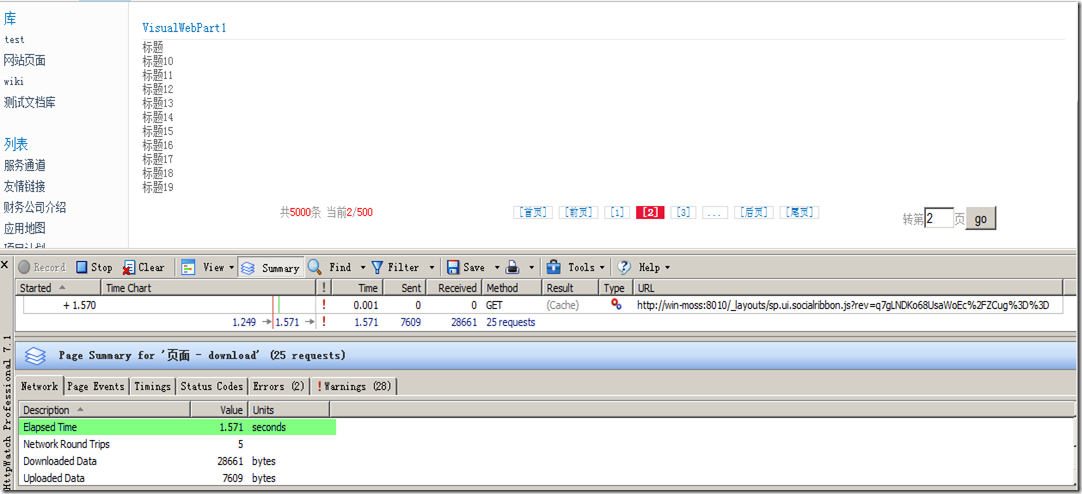
经过5000条列表的记录测试,每次翻页加载速度为1秒多点(说明:机器为本人笔记本,虚拟机内存2.5G)
最新修改,在网友的帮助下修改的。可以按照自己实际情况来排序。

 #region//分页

        #region//根据分页条数进行分页

        /// <summary>

        /// 列表分页

        /// </summary>

        /// <param name="listName">列表名称</param>

        /// <param name="pageSize">每页大小</param>

        /// <param name="curPage">当前页数</param>

        /// <param name="recourdCount">总共记录数</param>

        /// <param name="strWhere">查询条件</param>

        /// <param name="ViewField">查询的字段</param>

        /// <returns></returns>

        public static SPListItemCollection GetPageList(SPList list, int pageSize, int curPage, out int recourdCount, string strWhere, string[] ViewField)

        {

            try

            {

                //查询字段

                string viewFields = string.Empty;

                //查询

                SPQuery query = new SPQuery();

                query.Query = strWhere;

                //查询的字段

                if (ViewField.Length > )

                {

                    viewFields = BuildViewFields(ViewField);

                }

                //总共记录数

                recourdCount = list.GetItems(query).Count;

                //需要重新实例对象

                query = new SPQuery();

                //设置每页大小

                query.RowLimit = (uint)pageSize;

                query.Query = strWhere;

                query.ViewFields = viewFields;

                //分页信息

                string pageinfo = GetListID(list, viewFields, pageSize, curPage, strWhere, ViewField);

                query.ListItemCollectionPosition = new SPListItemCollectionPosition(pageinfo);

                SPListItemCollection m_objListItemColl = list.GetItems(query);

                return m_objListItemColl;

            }

            catch

            {

                recourdCount = ;

                return null;

            }

        }

        #endregion

        #region//构建查询字段

        /// <summary>

        /// 构建查询字段

        /// </summary>

        /// <param name="fieldNames">字段</param>

        /// <returns>返回构造好的查询字段</returns>

        public static string BuildViewFields(string[] fieldNames)

        {

            if (fieldNames ==null|| fieldNames.Length ==)

                return"";

            string result ="";

            foreach (string fieldName in fieldNames)

            {

                result = String.Format("{0}<FieldRef Name=\"{1}\" />", result, fieldName);

            }

            return result;

        }

        #endregion

        #region//返回分页的ID

        /// <summary>

        /// 根据列表得到首页ID

        /// </summary>

        /// <param name="listName">列表名称</param>

        /// <param name="pageSize"></param>

        /// <param name="strWhere">查询条件</param>

        /// <param name="ViewField">查询的字段</param>

        /// <returns></returns>

        public static string GetListID(SPList list, string viewFields, int pageSize, int curPage, string strWhere, string[] ViewField)

        {

            try

            {

                SPQuery query = new SPQuery();

                //设置查询条件

                query.Query = strWhere;

                //查询的字段

                query.ViewFields = viewFields;

                //条数限制

                query.RowLimit = (uint)((curPage - ) * pageSize);

                //查询

                SPListItemCollection m_objListItemColl = list.GetItems(query);

                //得到分页信息

                string strPageInfo = m_objListItemColl.ListItemCollectionPosition.PagingInfo;

                return strPageInfo;

            }

            catch

            {

                return string.Empty;

            }

        }

        #endregion

                #endregion
sharepoint2010列表的分页实现迅雷样式效果的更多相关文章
- PageHelper分页+前台BootStrap_pagination样式/BootStrap_table样式
一.PagerHelper分页+前台BootStrap_pagination样式: 效果: 1.引入pageHelper插件:2种方式 pageHelper所需jar包:pagehelper-5 ...
- 帝国cms 7.5版列表页分页样式修改笔记
最近在用帝国改版我的个人博客站点,这个也是我第一次尝试用帝国来做博客,之前用过wordpress,每用一个新的程序,都会有些新的收获,也会学到一些新的东西. 在改用帝国之前,我也在网上大概了解了一下, ...
- 帝国cms 列表页分页样式修改美化【2】
上一篇(帝国cms 列表页分页样式修改美化[1])中我们已经对分页说了一个大概,下面我们就自己动手弄一个分页把: 第一步:进入帝国cms后台,点击系统设置->系统参数设置->信息设置:里面 ...
- 帝国cms 列表页分页样式修改美化【1】
[1]自己修改帝国cms默认的分页样式(css),这样做的好处是你不用去改动帝国的核心文件,方便以后升级. [2]自己动手去修改帝国的分页(php+css),帝国的分页在e>class>下 ...
- springboot滚动分页展示列表(类似layui瀑布流效果)
背景: 公司项目要求获取用户关联的好友列表,要求分页查询,十条数据一页,滚动页面是点击加载更多,显示下一页列表. 示例图: 实现: 本项目采用的前端模板是freemaker,主要前端页面代码(没有 ...
- 如何快速开发树形列表和分页查询整合的WInform程序界面
我在做Winform界面的时候,一般都是统一化处理,界面顶部放置一些字段条件供查询,下面就是分页查询列表,展示相关的数据.但有时候碰到一些表字段内容分类比较多,有一些特别重要,如果放在一个树形列表来进 ...
- sharepoint 2010 列表数据分页控件介绍 pagination UserControl
转:http://blog.csdn.net/chenxinxian/article/details/8714391 这里主要是介绍下最近开发的一个sharepoint列表或者文档库的分页控件,并且把 ...
- 从后端到前端之Vue(四)小试牛刀——真实项目的应用(树、tab、数据列表和分页)
学以致用嘛,学了这么多,在真实项目里面怎么应用呢?带着问题去学习才是最快的学习方式.还是以前的那个项目,前后端分离,现在把前端换成vue的,暂时采用脚本化的方式,然后在尝试工程化的方式. 现在先实现功 ...
- GridView使用自带分页功能时分页方式及样式PagerStyle
// 转向地址:http://www.bubuko.com/infodetail-412562.html GridView分页,使用自带分页功能,类似下面样式: 在aspx页面中,GridView上的 ...
随机推荐
- react PropTypes 与 DefaultProps
PropTypes 与 DefaultProps import React ,{ Component } from 'react'; import PropTypes from 'prop-types ...
- eclipse gradle 找不到依赖解决办法
右击工程,选择gradle 在点击Refresh Gradle Project 即可,..不得不说,gradle 在eclipse 下真没maven 好用.....
- 07-图5 Saving James Bond - Hard Version (30 分)
This time let us consider the situation in the movie "Live and Let Die" in which James Bon ...
- JS函数调用分析过程
- 解决windows server 2008 r2 登录进入桌面只显示一片蓝色背景
非常高的可能性问题是:explorer.exe进程无法加载.请按ctrl+shift+esc调出任务管理器--文件-新任务-输入‘explorer’--确定即可.如无法解决,请进入安全模式关闭非必要的 ...
- spring aop execution用法
代码结构: 1. "execution(* com.ebc..*.*(..))" 与 "execution(* com.ebc..*(..))" 2019-0 ...
- yii1的后台分页和列表
控制器: public function actionIndex(){ $model = new Cases('search'); $model->unsetAttributes(); // c ...
- MongoDB系列—— Window 搭建Mongodb 集群
Mongodb的集群方式的搭建有三种:Replica Set / Sharding / Master-Slaver.这里只说明最简单的集群搭建方式(Replica Set) Replica Set M ...
- RTT之shell
两种shell的切换:如果打开了FINSH_USING_MSH而没有打开FINSH_USING_MSH_ONLY,finsh同时支持两种c-style模式与msh模式,但是默认进入c-style模式, ...
- 性能测试工具LoadRunner16-LR之Controller 负载运行时设置