
Selenium-鼠标操作
有些特殊的系统可能需要模拟键盘或者鼠标的操作才可以
鼠标的操作不仅仅是click()单击操作,还有很多包含在ActionChains类中
context_click(elem) 右击鼠标点击元素elem,另存为等行为
double_click(elem) 双击鼠标点击元素elem,地图web可实现放大
drag_and_drop(source,target) 拖动鼠标,源元素按下左键移动至目标元素释放
move_to_element(elem) 鼠标移动到一个元素上,也就是鼠标悬浮
click_and_hold(elem) 按下鼠标左键在一个元素上
perform() 再通过调用该函数执行AcitonChains中存储的行为
实例:
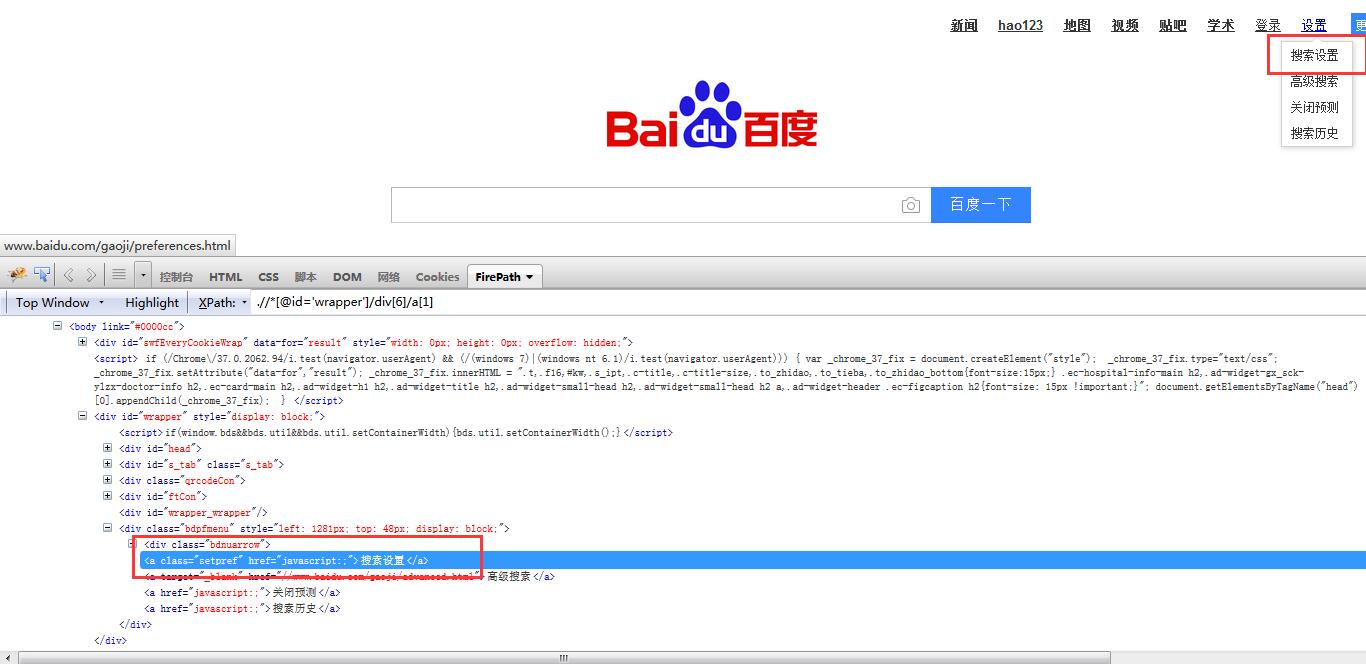
百度搜索首页:设置:搜索设置
设置是悬浮的,选中搜索设置
#! /usr/bin/env python

#coding=utf-8

from selenium import webdriver

from selenium.webdriver.common.action_chains import ActionChains

import time

'''

百度搜索首页:设置:搜索设置

'''

driver = webdriver.Firefox()

driver.get("https://www.baidu.com/")

time.sleep(3)

#利用链接,定位到"设置"元素

mm = driver.find_element_by_link_text("设置")

ActionChains(driver).move_to_element(mm).perform()

time.sleep(3)

driver.find_element_by_link_text("搜索设置").click()

time.sleep(5)

driver.quit()
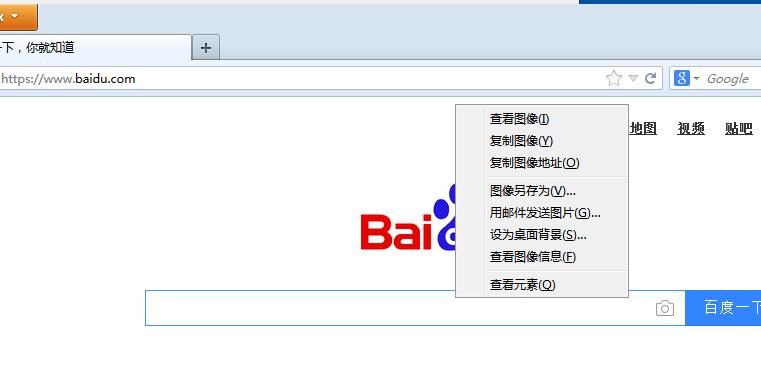
百度首页-百度log图片-右键点击

#! /usr/bin/env python

#coding=utf-8

from selenium import webdriver

from selenium.webdriver.common.action_chains import ActionChains

import time

driver = webdriver.Firefox()

driver.get("https://www.baidu.com/")

time.sleep(3)

#鼠标移动到图片上,右击

elem_pic = driver.find_element_by_xpath(".//*[@id='lg']/img")

print("图片资源地址:",elem_pic.get_attribute("src"))

action = ActionChains(driver).move_to_element(elem_pic)

action.context_click(elem_pic)

action.perform()

time.sleep(5)

driver.quit()
结果:图片资源地址: https://www.baidu.com/img/bd_logo1.png
Selenium-鼠标操作的更多相关文章
- selenium鼠标操作
#-*- coding:utf-8 -*- import time from selenium import webdriver from selenium.webdriver.common.acti ...
- Python+Selenium - 鼠标操作
鼠标操作类:action_chains模块的ActionChains类 使用组成:操作 + 执行(perform()) 导入代码 from selenium.webdriver.common.acti ...
- selenium鼠标操作 包含右击和浮层菜单的选择
感谢http://www.cnblogs.com/tobecrazy/p/3969390.html 博友的分享 最近在学习selenium的一些鼠标的相关操作 自己在百度的相关操作代码 /** * ...
- python selenium鼠标键盘操作(ActionChains)
用selenium做自动化,有时候会遇到需要模拟鼠标操作才能进行的情况,比如单击.双击.点击鼠标右键.拖拽等等.而selenium给我们提供了一个类来处理这类事件--ActionChains sele ...
- Selenium基础知识(二)鼠标操作
一.鼠标操作 这个需要使用webdriver下的ActionChains类,这个类是操作鼠标操作的: from selenium.webdriver import ActionChains 鼠标操作可 ...
- selenium自动化之鼠标操作
在做自动化测试的时候,经常会遇到这种情况,某个页面元素,你必须要把鼠标移动到上面才能显示出元素.那么这种情况,我们怎么处理呢?,selenium给我们提供了一个类来处理这类事件——ActionChai ...
- selenium - webdriver - ActionChains类(鼠标操作)
ActionChains 类提供了鼠标操作的常用方法: perform(): 执行所有 ActionChains 中存储的行为: context_click(): 右击: double_click() ...
- selenium + python(鼠标操作)
关于最近学习selenium自动化测试鼠标操作的一些总结 常见的鼠标操作
- python+selenium 鼠标事件操作
一.前言 除了可以使用 click( ) 来模拟鼠标的单击操作,现在Web产品中还提供了更丰富的鼠标交互方式,例如鼠标右键.双击.悬停.拖动等功能,在WebDriver中,将这些关于鼠标操作的方法都封 ...
- Selenium示例集锦--常见元素识别方法、下拉框、文本域及富文本框、鼠标操作、一组元素定位、弹窗、多窗口处理、JS、frame、文件上传和下载
元素定位及其他操作 0.常见的识别元素的方法是什么? driver.find_element_by_id() driver.find_element_by_name() driver.find_ele ...
随机推荐
- struts2中在Action中如何获取servlet的api?
1.通过ActionContext类(拿到的不是真正的servlet api,而是一个map) ActionContext context = ActionContext.getContext(); ...
- [转]mysqlx 同时使用 AND OR
- diamond源码阅读-目录监控
PathNode(Path)StandardWatchEventKind(WatchEvent)Watchable(WatchKey WatchService WatchEvent)WatchKey( ...
- WPF使用X:Static做多语言支持
让程序支持多语言,一般把需要显示的字符串保存在一个资源类的static属性中. <!--[if !supportLists]--> <!--[endif]--> 微软的WPF程 ...
- python第三方库地址
python第三方库的地址: requests: http://docs.python-requests.org/zh_CN/latest/user/quickstart.html beautifus ...
- 第5章 网页下载器和urllib2模块
网页下载器:将互联网上URL对应的网页下载到本地的工具 通过网页下载器将互联网中的url网页,存储到本地或内存字符串 python有哪几种网页下载器? 1.urllib2 python官方基础模块 ...
- python语言特性-------python2.7教程学习【廖雪峰版】(一)
开始学习廖雪峰的py2.7教程: 2017年6月5日12:54:28 笔记: 廖雪峰python2.7教程1.用任何编程语言来开发程序,都是为了让计算机干活. 2.Python是一种相当高级的语言. ...
- Java使用jmagick处理图片遇到的异常
java通过ImageMagick处理图片遇到问题: 下面异常都是我一个一个遇到的: 异常1: Exception in thread "main" java.lang.Unsat ...
- docker安装并配置加速
安装 旧版本的 Docker 称为 docker 或者 docker-engine,使用以下命令卸载旧版本: sudo apt-get remove docker \ docker-engine \ ...
- font awesome (图标字体库)
Font Awesome fa是什么? 图标字体库和CSS框架 怎么用? <link rel="stylesheet" href="https://cdn.boot ...