
创建 CSS3 下拉菜单
1. [图片] 菜单效果
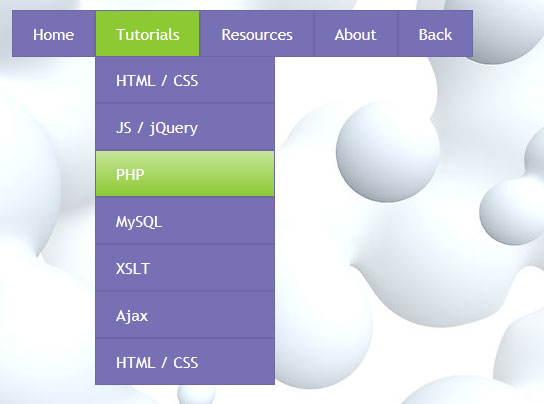
2. [代码]menu.html
<!DOCTYPE html PUBLIC "-//W3C//DTD XHTML 1.0 Strict//EN" "http://www.w3.org/TR/xhtml1/DTD/xhtml1-strict.dtd">
<html xmlns="http://www.w3.org/1999/xhtml" xml:lang="en">
<head>
<link rel="stylesheet" href="css/style.css" type="text/css" media="all">
<title>CSS3 drop down menu #4</title>
</head>
<body>
<div class="example">
<ul class="nav">
<li><a href="http://www.script-tutorials.com/">Home</a></li>
<li><a href="http://www.script-tutorials.com/">Tutorials</a>
<ul class="subs">
<li><a href="http://www.script-tutorials.com/category/html-css/">HTML / CSS</a></li>
<li><a href="http://www.script-tutorials.com/category/jquery/">JS / jQuery</a></li>
<li><a href="http://www.script-tutorials.com/category/php/">PHP</a></li>
<li><a href="http://www.script-tutorials.com/category/mysql/">MySQL</a></li>
<li><a href="http://www.script-tutorials.com/category/xslt/">XSLT</a></li>
<li><a href="http://www.script-tutorials.com/category/ajax/">Ajax</a></li>
<li><a href="http://www.script-tutorials.com/category/html-css/">HTML / CSS</a></li>
</ul>
</li>
<li><a href="http://www.script-tutorials.com/category/resources/">Resources</a>
<ul class="subs">
<li><a href="http://www.script-tutorials.com/category/php/">PHP</a></li>
<li><a href="http://www.script-tutorials.com/category/mysql/">MySQL</a></li>
<li><a href="http://www.script-tutorials.com/category/xslt/">XSLT</a></li>
<li><a href="http://www.script-tutorials.com/category/ajax/">Ajax</a></li>
<li><a href="http://www.script-tutorials.com/category/html-css/">HTML / CSS</a></li>
</ul>
</li>
<li><a href="http://www.script-tutorials.com/about/">About</a></li>
<li><a href="http://www.script-tutorials.com/creating-css3-dropdown-menu-4/">Back</a></li>
</ul>
<div ></div>
</div>
</body>
</html>
3. [代码]style.css
/* demo page styles */
body {
background:#eee;
margin:0;
padding:0;
font-family: "Trebuchet MS",Arial,Helvetica,sans-serif;
}http://www.huiyi8.com/yanjiangzhici/
.example {演讲致辞
position:relative;
background:#fff url(../images/background.jpg);
width:520px;
height:382px;
border:1px #000 solid;
margin:20px auto;
padding:15px;
border-radius:3px;
-moz-border-radius:3px;
-webkit-border-radius:3px;
}
/* main menu styles */
.nav,.nav ul {
list-style:none;
margin:0;
padding:0;
}
.nav {
position:relative;
}
.nav ul {
height:0;
left:0;
overflow:hidden;
position:absolute;
top:46px;
}
.nav li {
float:left;
position:relative;
}
.nav li a {
-moz-transition:0.5s;
-o-transition:0.5s;
-webkit-transition:0.5s;
background-color:#7770B4;
border:1px solid #6E67A6;
color:#FFF;
display:block;
font-size:16px;
line-height:35px;
padding:5px 20px;
text-decoration:none;
transition:0.5s;
}
.nav li:hover > a {
background:#8CCA33;
border-color:#6E67A6;
color:#fff;
}
.nav li:hover ul.subs {
height:auto;
width:180px;
}
.nav ul li {
-moz-transition:0.5s;
-o-transition:0.5s;
-webkit-transition:0.5s;
opacity:0;
transition:0.5s;
width:100%;
}
.nav li ul li {
-moz-transition-delay:0s;
-o-transition-delay:0s;
-webkit-transition-delay:0s;
transition-delay:0s;
}
.nav li:hover ul li {
opacity:1;
-moz-transition-delay:0.5s;
-o-transition-delay:0.5s;
-webkit-transition-delay:0.5s;
transition-delay:0.5s;
}
.nav ul li a {
background:#7770B4;
border-color:#6E67A6;
color:#fff;
line-height:1px;
-moz-transition:1.5s;
-o-transition:1.5s;
-webkit-transition:1.5s;
transition:1.5s;
}
.nav li:hover ul li a {
line-height:35px;
}
.nav ul li a:hover {
background:#8CCA33;
background-image: -webkit-gradient(linear, 0% 0%, 0% 95%, from(rgba(255, 255, 255, 0.5)), to(rgba(255, 255, 255, 0)));
background-image: -moz-linear-gradient(-90deg, rgba(255, 255, 255, 0.5), rgba(255, 255, 255, 0));
background-image: -o-linear-gradient(-90deg,rgba(255,255,255,0.5),rgba(255,255,25,0));
}
4. [图片] background.jpg

创建 CSS3 下拉菜单的更多相关文章
- 10个优秀的 HTML5 & CSS3 下拉菜单制作教程
下拉菜单是一个很常见的效果,在网站设计中被广泛使用.通过使用下拉菜单,设计者不仅可以在网站设计中营造出色的视觉吸引力,但也可以为网站提供了一个有效的导航方案.使用 HTML5 和 CSS3 可以更容易 ...
- 24个 HTML5 & CSS3 下拉菜单效果及制作教程
下拉菜单是一个很常见的效果,在网站设计中被广泛使用.通过使用下拉菜单,设计者不仅可以在网站设计中营造出色的视觉吸引力,但也可以为网站提供了一个有效的导航方案.使用 HTML5 和 CSS3 可以更容易 ...
- 11个优秀的HTML5 & CSS3下拉菜单制作教程
下拉菜单是一个很常见的效果,在网站设计中被广泛使用.通过使用下拉菜单,设计者不仅可以在网站设计中营造出色的视觉吸引力,但也可以为网站提供了一个有效的导航方案.使用HTML5和CSS3可以更容易创造视觉 ...
- 10个优秀的 HTML5 & CSS3 下拉菜单制作教程
下拉菜单是一个非经常见的效果.在站点设计中被广泛使用.通过使用下拉菜单.设计者不仅能够在站点设计中营造出色的视觉吸引力,但也能够为站点提供了一个有效的导航方案.使用 HTML5 和 CSS3 能够更e ...
- 在sharepoint 2010创建级联下拉菜单
SPServices是一个jQuery库,它提取SharePoint Web服务,并使其更容易使用.它可以使用不同的Web服务操作提供更有用且很酷的功能.它完全安装在客户端,不需要服务器. 用SPSe ...
- 在Android中创建一个下拉菜单
添加四个控件 TToolbar Alignment: alTop TSpeedButton Alignment: alRight StyleLookUp: detailstoolbutton Marg ...
- 推荐10个 CSS3 制作的创意下拉菜单效果
下拉菜单是一个很常见的效果,在网站设计中被广泛使用.通过使用下拉菜单,设计者不仅可以在网站设计中营造出色的视觉吸引力,但也可以为网站提供了一个有效的导航方案.使用 HTML5 和 CSS3 可以更容易 ...
- jQuery/CSS3大屏下拉菜单 自定义子菜单内容
这是一款样式很酷的jQuery/CSS3下拉菜单,首先这款CSS3菜单是宽屏的,主要是下拉菜单非常大气,更重要的是,下拉菜单的内容可以自己定义,也就是说,下拉菜单中可以定义菜单.图片等HTML元素,是 ...
- 纯CSS实现下拉菜单及下拉容器等(纯CSS实现导航条及导航下拉容器)
虽然网上类似甚至相同的案例有很多,但是我还是写下,以记下笔记,也可供大家参考 希望大家可以指导批评~~ 首先我们以列表ul li 来开始我们菜单也可以说导航条的制作: 在页面中我们首先构建以下XHTM ...
随机推荐
- 【拆分版】Docker-compose构建Elasticsearch 7.1.0集群
写在前边 搞了两三天了,一直有个问题困扰着我,ES集群中配置怎么能正确映射到主机上,这边经常报ClusterFormationFailureHelper master not discovered o ...
- (二)spark算子 分为3大类
transgormation的算子对key-value类型的数据有三种: (1)输入 与 输出为一对一关系 mapValue();针对key-value类型的数据并只对其中的value进行操作,不对 ...
- [译]GLUT教程 - 交换菜单
Lighthouse3d.com >> GLUT Tutorial >> Pop-up Menus >> Swapping Menus GLUT甚至可以在应用程序过 ...
- 下载yum安装的rpm包
方法一 通过yum自带的yumdownloader工具进行下载,这个工具是由yum-utils这个软件安装生成的 执行如下命令,检查yum-utils是否存在: rpm -qa |grep yum-u ...
- 创建有提示的ui组件
using UnityEditor; using UnityEngine; using System.Collections; using Edelweiss.CloudSystem; namespa ...
- 使用Swoole加速Laravel(正式环境中)
1 Laravel的速度瓶颈在哪? 1.1 已有的一些优化方法 1.1.1 laravel官方提供了一些优化laravel的优化方法 php artisan optimize php artisan ...
- Entity Framework(1)——Connections and Models
原文:https://msdn.microsoft.com/en-us/data/jj592674 应该选择CodeFirst.ModelFirst还是databaseFirst网上已经很多资料了,这 ...
- [原创]实现多层DIV叠加的js事件穿透
Flash里面有个很好的特性是,一个容器里,不存在实际对象的部分,不会阻拦鼠标事件穿透到下一层. 前端就不一样了,两个div层叠以后,上层div会接收到所有事件(即使这个div里面内容是空的,没有任何 ...
- iOS框架你了解多少?
1.iOS 系统可以分为以下四层,每个框架对应IOS系统里的一层,每层建立在它下面层的上面.应该尽量使用上层的框架来代替下面的框架.更高层次的框架是对底层框架基于对象的抽象.以下列出几个iOS开发的常 ...
- 广告 竞价排名 import Levenshtein as Le seqratio_res = Le.seqratio(chk_name_lsit, cmp_)
pip install python-Levenshtein from openpyxl import Workbook import xlrd import time import Levensht ...