
Idea操作ElasticSearch
前提:
1、ES服务成功启动

2、node.js成功启动

一、创建索引库
1、目录展示

2、导入依赖
<dependency>

      <groupId>org.elasticsearch</groupId>

      <artifactId>elasticsearch</artifactId>

      <version>5.6.8</version>

    </dependency>

    <dependency>

      <groupId>org.elasticsearch.client</groupId>

      <artifactId>transport</artifactId>

      <version>5.6.8</version>

    </dependency>

    <dependency>

      <groupId>org.apache.logging.log4j</groupId>

      <artifactId>log4j-to-slf4j</artifactId>

      <version>2.9.1</version>

    </dependency>

    <dependency>

      <groupId>org.slf4j</groupId>

      <artifactId>slf4j-api</artifactId>

      <version>1.7.24</version>

    </dependency>

    <dependency>

      <groupId>org.slf4j</groupId>

      <artifactId>slf4j-simple</artifactId>

      <version>1.7.21</version>

    </dependency>

    <dependency>

      <groupId>log4j</groupId>

      <artifactId>log4j</artifactId>

      <version>1.2.12</version>

    </dependency>
3、MyESTest代码
package com.zn;

import org.elasticsearch.action.admin.indices.mapping.put.PutMappingRequest;

import org.elasticsearch.client.Requests;

import org.elasticsearch.client.transport.TransportClient;

import org.elasticsearch.common.settings.Settings;

import org.elasticsearch.common.transport.InetSocketTransportAddress;

import org.elasticsearch.common.xcontent.XContentBuilder;

import org.elasticsearch.common.xcontent.XContentFactory;

import org.elasticsearch.transport.client.PreBuiltTransportClient;

import org.junit.jupiter.api.Test;

import java.io.IOException;

import java.net.InetAddress;

import java.net.UnknownHostException;

import java.util.concurrent.ExecutionException;

public class MyESTest {

    /**

     * 创建索引

     * @throws UnknownHostException

     */

    @Test

    public void creatIndex() throws UnknownHostException {

        //创建Client连接对象

        Settings settings = Settings.builder().put("cluster.name", "my-application").build();

        //设置IP地址和端口号

        TransportClient client = new PreBuiltTransportClient(settings).addTransportAddress(

                new InetSocketTransportAddress(InetAddress.getByName("127.0.0.1"), 9300));

        //创建名称为es_test1的索引

        client.admin().indices().prepareCreate("es_test1").get();

        //释放资源

        client.close();

    }

}
4、修改elasticsearch.yml配置文件
cluster.name与代码块中cluster.name必须一致!!

5、重启elasticsearch
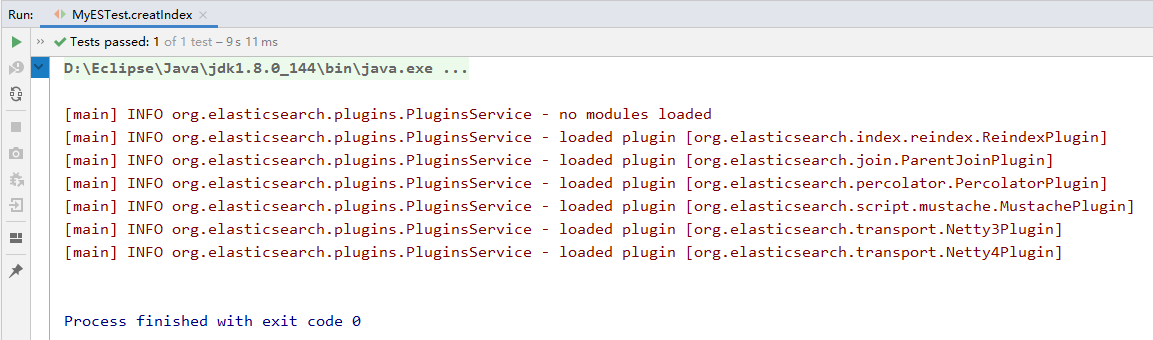
6、控制台效果
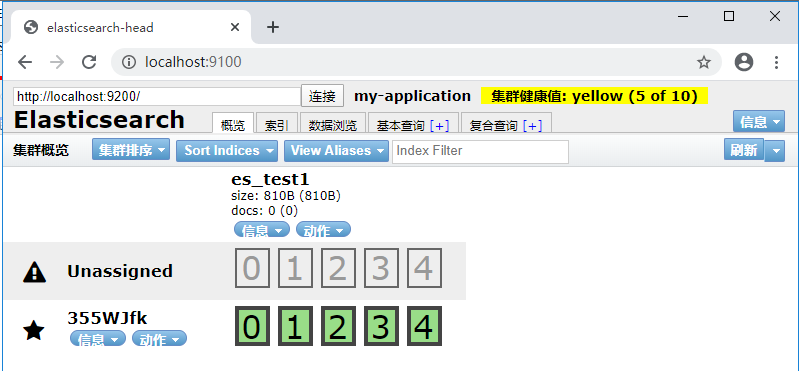
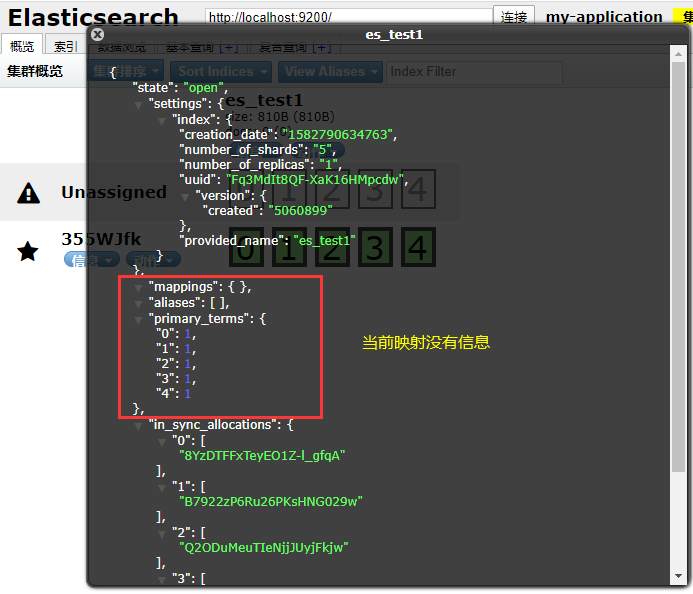
7、访问localhost:9100查看
二、创建映射mapping
1、MyESTest代码
package com.zn;

import org.elasticsearch.action.admin.indices.mapping.put.PutMappingRequest;

import org.elasticsearch.client.Requests;

import org.elasticsearch.client.transport.TransportClient;

import org.elasticsearch.common.settings.Settings;

import org.elasticsearch.common.transport.InetSocketTransportAddress;

import org.elasticsearch.common.xcontent.XContentBuilder;

import org.elasticsearch.common.xcontent.XContentFactory;

import org.elasticsearch.transport.client.PreBuiltTransportClient;

import org.junit.jupiter.api.Test;

import java.io.IOException;

import java.net.InetAddress;

import java.net.UnknownHostException;

import java.util.concurrent.ExecutionException;

public class MyESTest {

    /**

     * 创建映射mapping

     */

    @Test

    public void creatMapping() throws IOException, ExecutionException, InterruptedException {

        //创建Client连接对象

        Settings settings = Settings.builder().put("cluster.name", "my-application").build();

        //设置IP地址和端口号

        TransportClient client = new PreBuiltTransportClient(settings).addTransportAddress(

                new InetSocketTransportAddress(InetAddress.getByName("127.0.0.1"), 9300));

        //添加映射

        XContentBuilder builder= XContentFactory.jsonBuilder()

                .startObject()

                .startObject("article")

                .startObject("properties")

                .startObject("id")

                .field("type","integer").field("store","yes")

                .endObject()

                .startObject("title")

                .field("type","string").field("store","yes").field("analyzer","ik_smart")

                .endObject()

                .startObject("content")

                .field("type","string").field("store","yes").field("analyzer","ik_smart")

                .endObject()

                .endObject()

                .endObject()

                .endObject();

        //创建映射

        PutMappingRequest mappingRequest= Requests.putMappingRequest("es_test1").type("article").source(builder);

        client.admin().indices().putMapping(mappingRequest).get();

        //释放资源

        client.close();

    }

}
2、访问localhost:9100查看

3、查看mappings

三、创建索引库指定Mapping信息
1、MyESTest代码
package com.zn.myTest;

import com.fasterxml.jackson.core.JsonProcessingException;

import com.fasterxml.jackson.databind.ObjectMapper;

import com.zn.entity.Article;

import org.elasticsearch.action.admin.indices.mapping.put.PutMappingRequest;

import org.elasticsearch.action.search.SearchRequestBuilder;

import org.elasticsearch.action.search.SearchResponse;

import org.elasticsearch.client.Requests;

import org.elasticsearch.client.transport.TransportClient;

import org.elasticsearch.common.settings.Settings;

import org.elasticsearch.common.text.Text;

import org.elasticsearch.common.transport.InetSocketTransportAddress;

import org.elasticsearch.common.xcontent.XContentBuilder;

import org.elasticsearch.common.xcontent.XContentFactory;

import org.elasticsearch.common.xcontent.XContentType;

import org.elasticsearch.index.query.QueryBuilders;

import org.elasticsearch.search.SearchHit;

import org.elasticsearch.search.SearchHits;

import org.elasticsearch.search.fetch.subphase.highlight.HighlightBuilder;

import org.elasticsearch.transport.client.PreBuiltTransportClient;

import org.junit.jupiter.api.Test;

import java.io.IOException;

import java.net.InetAddress;

import java.net.UnknownHostException;

import java.util.Iterator;

import java.util.concurrent.ExecutionException;

public class MyESTest {

    /**

     * 创建索引库指定Mapping信息

     */

    @Test

    public void createIndexAndMapping() throws IOException {

        //创建Client连接对象

        Settings settings = Settings.builder().put("cluster.name", "my-application").build();

        //设置IP地址和端口号

        TransportClient client = new PreBuiltTransportClient(settings).addTransportAddress(

                new InetSocketTransportAddress(InetAddress.getByName("127.0.0.1"), 9300));

        //创建索引库

        client.admin().indices().prepareCreate("es_test2").get();

        //创建Mapping信息

        //创建一个XContentBuilder对象,用于拼接JSON格式字符串

        XContentBuilder xContentBuilder = XContentFactory.jsonBuilder();

        xContentBuilder.startObject().startObject("article1").startObject("properties")

                .startObject("id").field("type","integer").field("store","yes").field("index","not_analyzed")

                .endObject()

                .startObject("title").field("type","text").field("store","yes").field("index","analyzed").field("analyzer","ik_max_word")

                .endObject()

                .startObject("content").field("type","text").field("store","yes").field("index","analyzed").field("analyzer","ik_max_word")

                .endObject()

                .endObject().endObject().endObject();

        client.admin().indices().preparePutMapping("es_test2").setType("article1").setSource(xContentBuilder).get();

        //关闭资源

        client.close();

    }

}
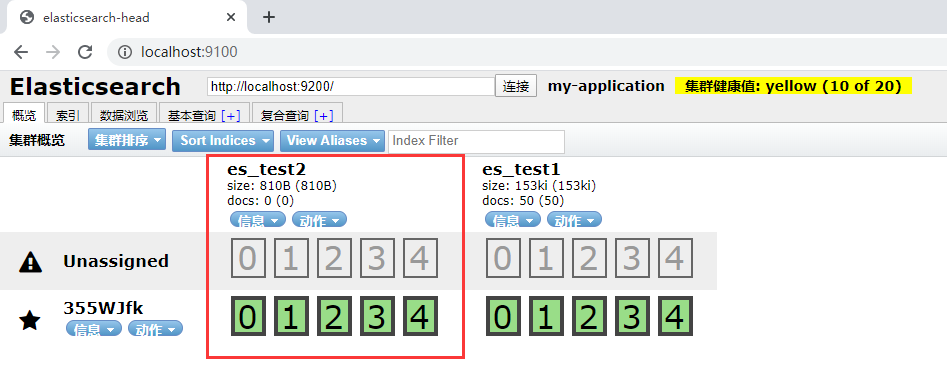
2、访问localhost:9100查看
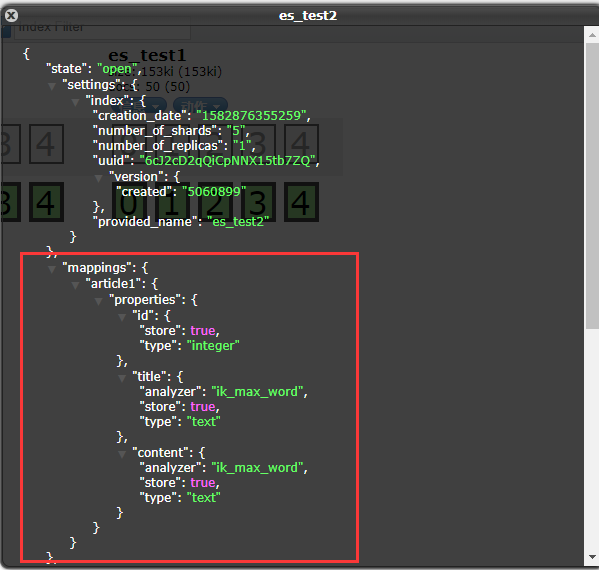
四、删除索引库
1、MyESTest代码
package com.zn.myTest;

import com.fasterxml.jackson.core.JsonProcessingException;

import com.fasterxml.jackson.databind.ObjectMapper;

import com.zn.entity.Article;

import org.elasticsearch.action.admin.indices.mapping.put.PutMappingRequest;

import org.elasticsearch.action.search.SearchRequestBuilder;

import org.elasticsearch.action.search.SearchResponse;

import org.elasticsearch.client.Requests;

import org.elasticsearch.client.transport.TransportClient;

import org.elasticsearch.common.settings.Settings;

import org.elasticsearch.common.text.Text;

import org.elasticsearch.common.transport.InetSocketTransportAddress;

import org.elasticsearch.common.xcontent.XContentBuilder;

import org.elasticsearch.common.xcontent.XContentFactory;

import org.elasticsearch.common.xcontent.XContentType;

import org.elasticsearch.index.query.QueryBuilders;

import org.elasticsearch.search.SearchHit;

import org.elasticsearch.search.SearchHits;

import org.elasticsearch.search.fetch.subphase.highlight.HighlightBuilder;

import org.elasticsearch.transport.client.PreBuiltTransportClient;

import org.junit.jupiter.api.Test;

import java.io.IOException;

import java.net.InetAddress;

import java.net.UnknownHostException;

import java.util.Iterator;

import java.util.concurrent.ExecutionException;

public class MyESTest {

    /**

     * 删除索引库

     */

    @Test

    public void deleteIndex() throws UnknownHostException {

        //创建Client连接对象

        Settings settings = Settings.builder().put("cluster.name", "my-application").build();

        //设置IP地址和端口号

        TransportClient client = new PreBuiltTransportClient(settings).addTransportAddress(

                new InetSocketTransportAddress(InetAddress.getByName("127.0.0.1"), 9300));

        //删除索引库

        client.admin().indices().prepareDelete("es_test2").get();

        //关闭资源

        client.close();

    }

}
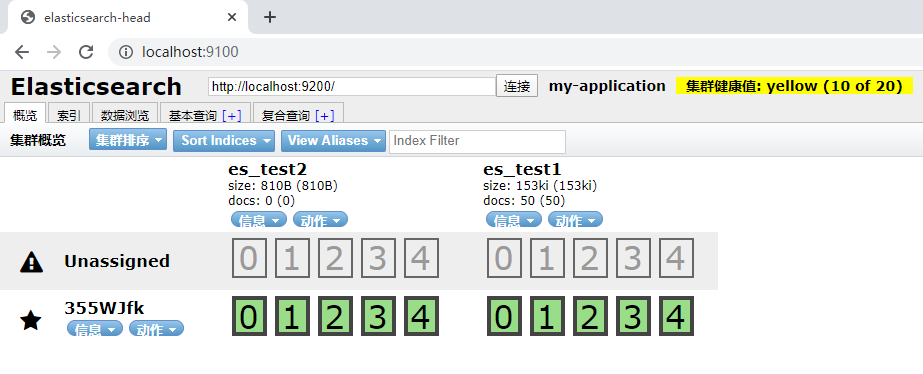
2、删除前
3、删除后
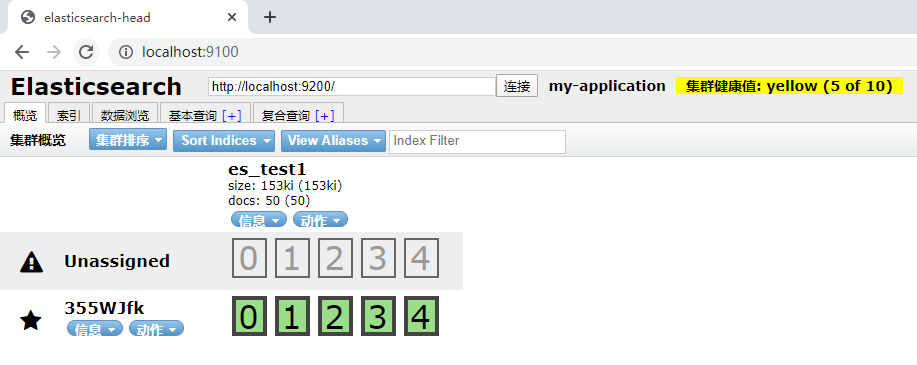
五、通过XContentBuilder建立文档document
1、MyESTest代码
package com.zn;

import org.elasticsearch.action.admin.indices.mapping.put.PutMappingRequest;

import org.elasticsearch.client.Requests;

import org.elasticsearch.client.transport.TransportClient;

import org.elasticsearch.common.settings.Settings;

import org.elasticsearch.common.transport.InetSocketTransportAddress;

import org.elasticsearch.common.xcontent.XContentBuilder;

import org.elasticsearch.common.xcontent.XContentFactory;

import org.elasticsearch.transport.client.PreBuiltTransportClient;

import org.junit.jupiter.api.Test;

import java.io.IOException;

import java.net.InetAddress;

import java.net.UnknownHostException;

import java.util.concurrent.ExecutionException;

public class MyESTest {

    /**

     * 通过XContentBuilder创建文档document

     */

    @Test

    public void createXContentBuilderDocument() throws IOException {

        //创建Client连接对象

        Settings settings = Settings.builder().put("cluster.name", "my-application").build();

        //设置IP地址和端口号

        TransportClient client = new PreBuiltTransportClient(settings).addTransportAddress(

                new InetSocketTransportAddress(InetAddress.getByName("127.0.0.1"), 9300));

        //创建文档信息

        XContentBuilder builder = XContentFactory.jsonBuilder()

                .startObject()

                .field("id", 1)

                .field("title", "ElasticSearch是一个基于Lucene的搜索服务器")

                .field("content",

                        "它提供了一个分布式多用户能力的全文搜索引擎,基于RESTful web接口。" +

                                "Elasticsearch是用 Java开发的,并作为Apache许可条款下的开放源码发布," +

                                "是当前流行的企业级搜索引擎。设计用于云计算中,能够达到 实时搜索,稳定,可靠,快速,安装使用方便。")

                .endObject();

        //创建文档对象

        //参数一:索引对象;参数二:类型;参数三:建立id

        client.prepareIndex("es_test1", "article", "1").setSource(builder).get();

        //释放资源

        client.close();

    }

}
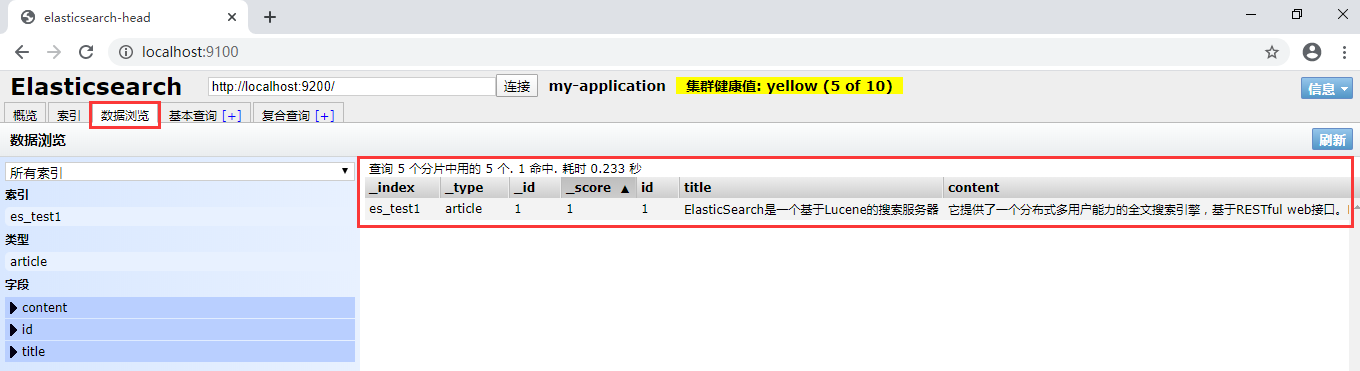
2、访问localhost:9100查看
六、使用Jackson转换实体建立文档document
1、目录展示

2、创建Article实体
package com.zn.entity;

public class Article {

    private Integer id;

    private String title;

    private String content;

    public Integer getId() {

        return id;

    }

    public void setId(Integer id) {

        this.id = id;

    }

    public String getTitle() {

        return title;

    }

    public void setTitle(String title) {

        this.title = title;

    }

    public String getContent() {

        return content;

    }

    public void setContent(String content) {

        this.content = content;

    }

}
3、添加jackson坐标 (导入依赖)
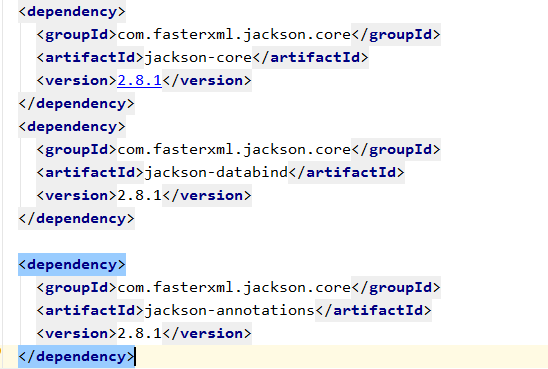
    <dependency>

      <groupId>com.fasterxml.jackson.core</groupId>

      <artifactId>jackson-core</artifactId>

      <version>2.8.1</version>

    </dependency>

    <dependency>

      <groupId>com.fasterxml.jackson.core</groupId>

      <artifactId>jackson-databind</artifactId>

      <version>2.8.1</version>

    </dependency>

    <dependency>

      <groupId>com.fasterxml.jackson.core</groupId>

      <artifactId>jackson-annotations</artifactId>

      <version>2.8.1</version>

    </dependency>
4、MyESTest代码
package com.zn.myTest;

import com.fasterxml.jackson.core.JsonProcessingException;

import com.fasterxml.jackson.databind.ObjectMapper;

import com.zn.entity.Article;

import org.elasticsearch.action.admin.indices.mapping.put.PutMappingRequest;

import org.elasticsearch.client.Requests;

import org.elasticsearch.client.transport.TransportClient;

import org.elasticsearch.common.settings.Settings;

import org.elasticsearch.common.transport.InetSocketTransportAddress;

import org.elasticsearch.common.xcontent.XContentBuilder;

import org.elasticsearch.common.xcontent.XContentFactory;

import org.elasticsearch.common.xcontent.XContentType;

import org.elasticsearch.transport.client.PreBuiltTransportClient;

import org.junit.jupiter.api.Test;

import java.io.IOException;

import java.net.InetAddress;

import java.net.UnknownHostException;

import java.util.concurrent.ExecutionException;

public class MyESTest {

    /**

     * 使用Jackson转换实体建立文档document

     */

    @Test

    public void creatJacksonDocument() throws UnknownHostException, JsonProcessingException {

        //创建Client连接对象

        Settings settings = Settings.builder().put("cluster.name", "my-application").build();

        //设置IP地址和端口号

        TransportClient client = new PreBuiltTransportClient(settings).addTransportAddress(

                new InetSocketTransportAddress(InetAddress.getByName("127.0.0.1"), 9300));

        //描述json 数据

        Article article = new Article();

        article.setId(2);

        article.setTitle("搜索工作其实很快乐");

        article.setContent("我们希望我们的搜索解决方案要快,我们希望有一个零配置和一个完全免费的搜索模式");

        ObjectMapper objectMapper=new ObjectMapper();

        //创建文档

        client.prepareIndex("es_test1","article",article.getId().toString())

                .setSource(objectMapper.writeValueAsString(article).getBytes(),

                        XContentType.JSON).get();

        //释放资源

        client.close();

    }

}
5、访问localhost:9100查看

七、关键词查询文档document
1、MyESTest代码
package com.zn.myTest;

import com.fasterxml.jackson.core.JsonProcessingException;

import com.fasterxml.jackson.databind.ObjectMapper;

import com.zn.entity.Article;

import org.elasticsearch.action.admin.indices.mapping.put.PutMappingRequest;

import org.elasticsearch.action.search.SearchRequestBuilder;

import org.elasticsearch.action.search.SearchResponse;

import org.elasticsearch.client.Requests;

import org.elasticsearch.client.transport.TransportClient;

import org.elasticsearch.common.settings.Settings;

import org.elasticsearch.common.transport.InetSocketTransportAddress;

import org.elasticsearch.common.xcontent.XContentBuilder;

import org.elasticsearch.common.xcontent.XContentFactory;

import org.elasticsearch.common.xcontent.XContentType;

import org.elasticsearch.index.query.QueryBuilders;

import org.elasticsearch.search.SearchHit;

import org.elasticsearch.search.SearchHits;

import org.elasticsearch.transport.client.PreBuiltTransportClient;

import org.junit.jupiter.api.Test;

import java.io.IOException;

import java.net.InetAddress;

import java.net.UnknownHostException;

import java.util.Iterator;

import java.util.concurrent.ExecutionException;

public class MyESTest {

    /**

     * 关键词查询文档document

     */

    @Test

    public void selectWordDocument() throws UnknownHostException {

        //创建Client连接对象

        Settings settings = Settings.builder().put("cluster.name", "my-application").build();

        //设置IP地址和端口号

        TransportClient client = new PreBuiltTransportClient(settings).addTransportAddress(

                new InetSocketTransportAddress(InetAddress.

                        getByName("127.0.0.1"), 9300));

        //设置搜索条件

        SearchResponse searchResponse = client.prepareSearch("es_test1")

                .setTypes("article")

                .setQuery(QueryBuilders.termQuery("content","搜索")).get();

        //获取命中次数,查询结果有多少对象

        SearchHits hits = searchResponse.getHits();

        System.out.println("查询结果有:"+hits.getTotalHits()+"条");

        //遍历搜索结果数据

        Iterator<SearchHit> iterator = hits.iterator();

        while (iterator.hasNext()){

            //每个查询对象

            SearchHit searchHit = iterator.next();

            //获取字符串格式打印

            System.out.println(searchHit.getSourceAsString());

            System.out.println("title:"+searchHit.getSource().get("title"));

        }

        //释放资源

        client.close();

    }

}
2、控制台

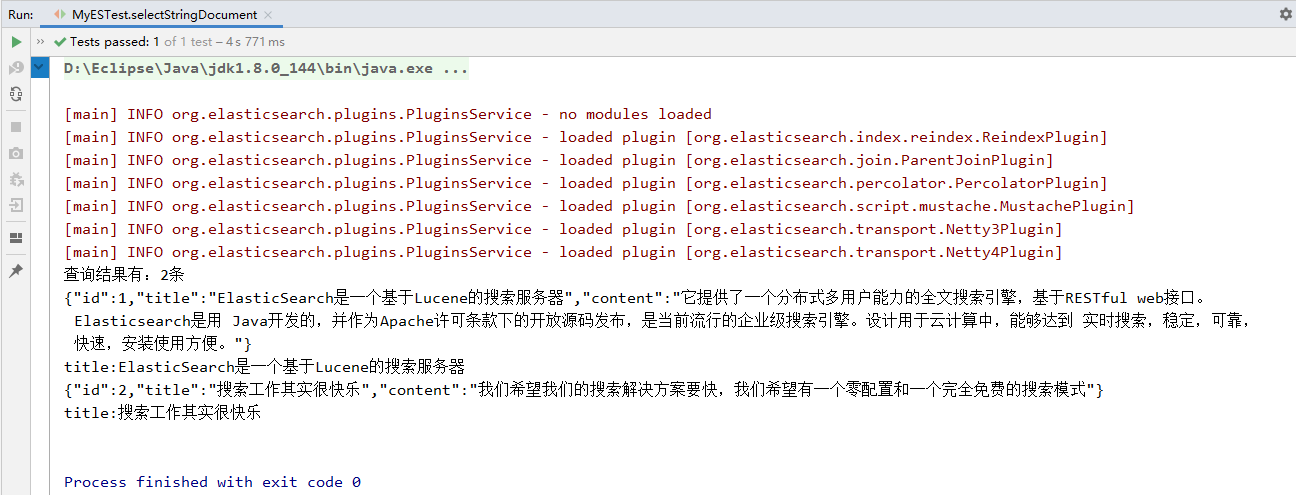
八、字符串查询文档document
1、MyESTest代码
package com.zn.myTest;

import com.fasterxml.jackson.core.JsonProcessingException;

import com.fasterxml.jackson.databind.ObjectMapper;

import com.zn.entity.Article;

import org.elasticsearch.action.admin.indices.mapping.put.PutMappingRequest;

import org.elasticsearch.action.search.SearchResponse;

import org.elasticsearch.client.Requests;

import org.elasticsearch.client.transport.TransportClient;

import org.elasticsearch.common.settings.Settings;

import org.elasticsearch.common.transport.InetSocketTransportAddress;

import org.elasticsearch.common.xcontent.XContentBuilder;

import org.elasticsearch.common.xcontent.XContentFactory;

import org.elasticsearch.common.xcontent.XContentType;

import org.elasticsearch.index.query.QueryBuilders;

import org.elasticsearch.search.SearchHit;

import org.elasticsearch.search.SearchHits;

import org.elasticsearch.transport.client.PreBuiltTransportClient;

import org.junit.jupiter.api.Test;

import java.io.IOException;

import java.net.InetAddress;

import java.net.UnknownHostException;

import java.util.Iterator;

import java.util.concurrent.ExecutionException;

public class MyESTest {

    /**

     * 字符串查询文档document

     */

    @Test

    public void selectStringDocument() throws UnknownHostException {

        //创建Client连接对象

        Settings settings = Settings.builder().put("cluster.name", "my-application").build();

        //设置IP地址和端口号

        TransportClient client = new PreBuiltTransportClient(settings).addTransportAddress(

                new InetSocketTransportAddress(InetAddress.getByName("127.0.0.1"), 9300));

        //设置搜索条件

        SearchResponse searchResponse = client.prepareSearch("es_test1")

                .setTypes("article")

                .setQuery(QueryBuilders.queryStringQuery("搜索")).get();

        //获取命中次数,查询结果有多少对象

        SearchHits hits = searchResponse.getHits();

        System.out.println("查询结果有:"+hits.getTotalHits()+"条");

        //遍历搜索结果数据

        Iterator<SearchHit> iterator = hits.iterator();

        while (iterator.hasNext()){

            //每个查询对象

            SearchHit searchHit = iterator.next();

            //获取字符串格式打印

            System.out.println(searchHit.getSourceAsString());

            System.out.println("title:"+searchHit.getSource().get("title"));

        }

        //释放资源

        client.close();

    }

}
2、控制台
九、使用文档id查询文档
1、MyESTest代码
package com.zn.myTest;

import com.fasterxml.jackson.core.JsonProcessingException;

import com.fasterxml.jackson.databind.ObjectMapper;

import com.zn.entity.Article;

import org.elasticsearch.action.admin.indices.mapping.put.PutMappingRequest;

import org.elasticsearch.action.search.SearchResponse;

import org.elasticsearch.client.Requests;

import org.elasticsearch.client.transport.TransportClient;

import org.elasticsearch.common.settings.Settings;

import org.elasticsearch.common.transport.InetSocketTransportAddress;

import org.elasticsearch.common.xcontent.XContentBuilder;

import org.elasticsearch.common.xcontent.XContentFactory;

import org.elasticsearch.common.xcontent.XContentType;

import org.elasticsearch.index.query.QueryBuilders;

import org.elasticsearch.search.SearchHit;

import org.elasticsearch.search.SearchHits;

import org.elasticsearch.transport.client.PreBuiltTransportClient;

import org.junit.jupiter.api.Test;

import java.io.IOException;

import java.net.InetAddress;

import java.net.UnknownHostException;

import java.util.Iterator;

import java.util.concurrent.ExecutionException;

public class MyESTest {

    /**

     * 使用文档id查询文档

     */

    @Test

    public void selectIdDocument() throws UnknownHostException {

        //创建Client连接对象

        Settings settings = Settings.builder().put("cluster.name", "my-application").build();

        //设置IP地址和端口号

        TransportClient client = new PreBuiltTransportClient(settings).addTransportAddress(

                new InetSocketTransportAddress(InetAddress.getByName("127.0.0.1"), 9300));

        //设置搜索条件

        SearchResponse searchResponse = client.prepareSearch("es_test1")

                .setTypes("article")

                .setQuery(QueryBuilders.idsQuery().addIds("2")).get();

        //获取命中次数,查询结果有多少对象

        SearchHits hits = searchResponse.getHits();

        System.out.println("查询结果有:"+hits.getTotalHits()+"条");

        //遍历搜索结果数据

        Iterator<SearchHit> iterator = hits.iterator();

        while (iterator.hasNext()){

            //每个查询对象

            SearchHit searchHit = iterator.next();

            //获取字符串格式打印

            System.out.println(searchHit.getSourceAsString());

            System.out.println("title:"+searchHit.getSource().get("title"));

        }

        //释放资源

        client.close();

    }

}
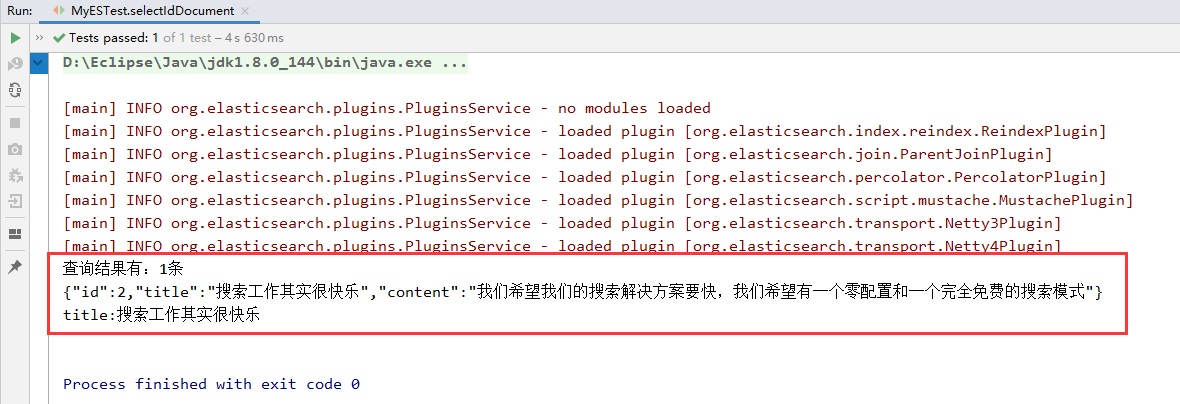
2、控制台
十、删除文档
1、MyESTest代码
package com.zn.myTest;

import com.fasterxml.jackson.core.JsonProcessingException;

import com.fasterxml.jackson.databind.ObjectMapper;

import com.zn.entity.Article;

import org.elasticsearch.action.admin.indices.mapping.put.PutMappingRequest;

import org.elasticsearch.action.search.SearchRequestBuilder;

import org.elasticsearch.action.search.SearchResponse;

import org.elasticsearch.client.Requests;

import org.elasticsearch.client.transport.TransportClient;

import org.elasticsearch.common.settings.Settings;

import org.elasticsearch.common.text.Text;

import org.elasticsearch.common.transport.InetSocketTransportAddress;

import org.elasticsearch.common.xcontent.XContentBuilder;

import org.elasticsearch.common.xcontent.XContentFactory;

import org.elasticsearch.common.xcontent.XContentType;

import org.elasticsearch.index.query.QueryBuilders;

import org.elasticsearch.search.SearchHit;

import org.elasticsearch.search.SearchHits;

import org.elasticsearch.search.fetch.subphase.highlight.HighlightBuilder;

import org.elasticsearch.transport.client.PreBuiltTransportClient;

import org.junit.jupiter.api.Test;

import java.io.IOException;

import java.net.InetAddress;

import java.net.UnknownHostException;

import java.util.Iterator;

import java.util.concurrent.ExecutionException;

public class MyESTest {

    /**

     * 删除文档

     */

    @Test

    public void deleteDocument() throws UnknownHostException, JsonProcessingException {

        //创建Client连接对象

        Settings settings = Settings.builder().put("cluster.name", "my-application").build();

        //设置IP地址和端口号

        TransportClient client = new PreBuiltTransportClient(settings).addTransportAddress(

                new InetSocketTransportAddress(InetAddress.getByName("127.0.0.1"), 9300));

        //删除文档

        client.prepareDelete("es_test1","article","14").get();

        client.close();

    }

}
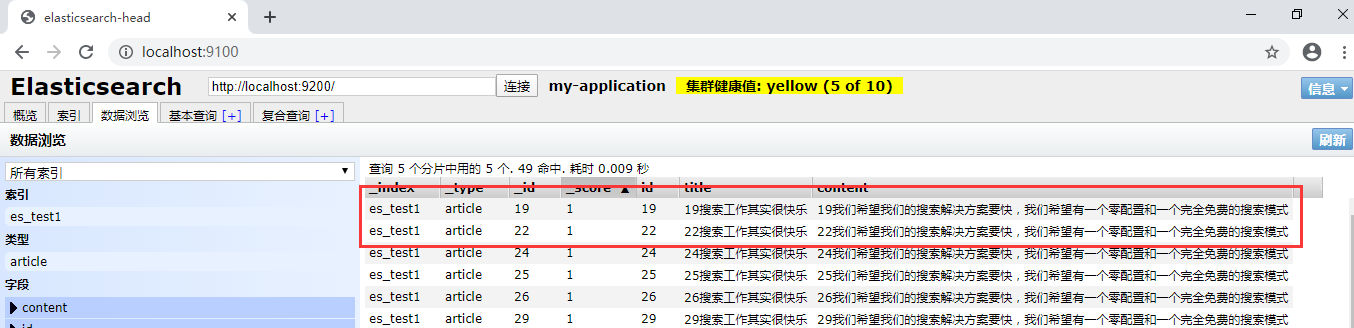
2、删除前
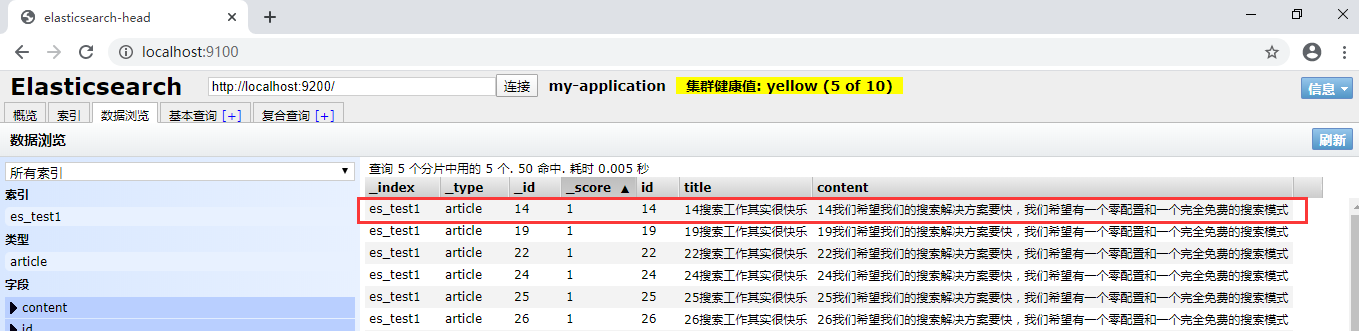
3、删除后
十一、查询文档分页操作
1、批量插入数据
package com.zn.myTest;

import com.fasterxml.jackson.core.JsonProcessingException;

import com.fasterxml.jackson.databind.ObjectMapper;

import com.zn.entity.Article;

import org.elasticsearch.action.admin.indices.mapping.put.PutMappingRequest;

import org.elasticsearch.action.search.SearchResponse;

import org.elasticsearch.client.Requests;

import org.elasticsearch.client.transport.TransportClient;

import org.elasticsearch.common.settings.Settings;

import org.elasticsearch.common.transport.InetSocketTransportAddress;

import org.elasticsearch.common.xcontent.XContentBuilder;

import org.elasticsearch.common.xcontent.XContentFactory;

import org.elasticsearch.common.xcontent.XContentType;

import org.elasticsearch.index.query.QueryBuilders;

import org.elasticsearch.search.SearchHit;

import org.elasticsearch.search.SearchHits;

import org.elasticsearch.transport.client.PreBuiltTransportClient;

import org.junit.jupiter.api.Test;

import java.io.IOException;

import java.net.InetAddress;

import java.net.UnknownHostException;

import java.util.Iterator;

import java.util.concurrent.ExecutionException;

public class MyESTest {

    /**

     * 查询文档分页操作---批量插入数据

     */

    @Test

    public void AddManyDocument() throws UnknownHostException, JsonProcessingException {

        //创建Client连接对象

        Settings settings = Settings.builder().put("cluster.name", "my-application").build();

        //设置IP地址和端口号

        TransportClient client = new PreBuiltTransportClient(settings).addTransportAddress(

                new InetSocketTransportAddress(InetAddress.getByName("127.0.0.1"), 9300));

        ObjectMapper objectMapper=new ObjectMapper();

        for (int i=1;i<=50;i++) {

            Article article = new Article();

            //描述json 数据

            article.setId(i);

            article.setTitle(i + "搜索工作其实很快乐");

            article.setContent(i + "我们希望我们的搜索解决方案要快,我们希望有一个零配置和一个完全免费的搜索模式");

            //创建文档

            client.prepareIndex("es_test1", "article", article.getId().toString())

                    .setSource(objectMapper.writeValueAsString(article).getBytes(),

                            XContentType.JSON).get();

        }

        //释放资源

        client.close();

    }

}
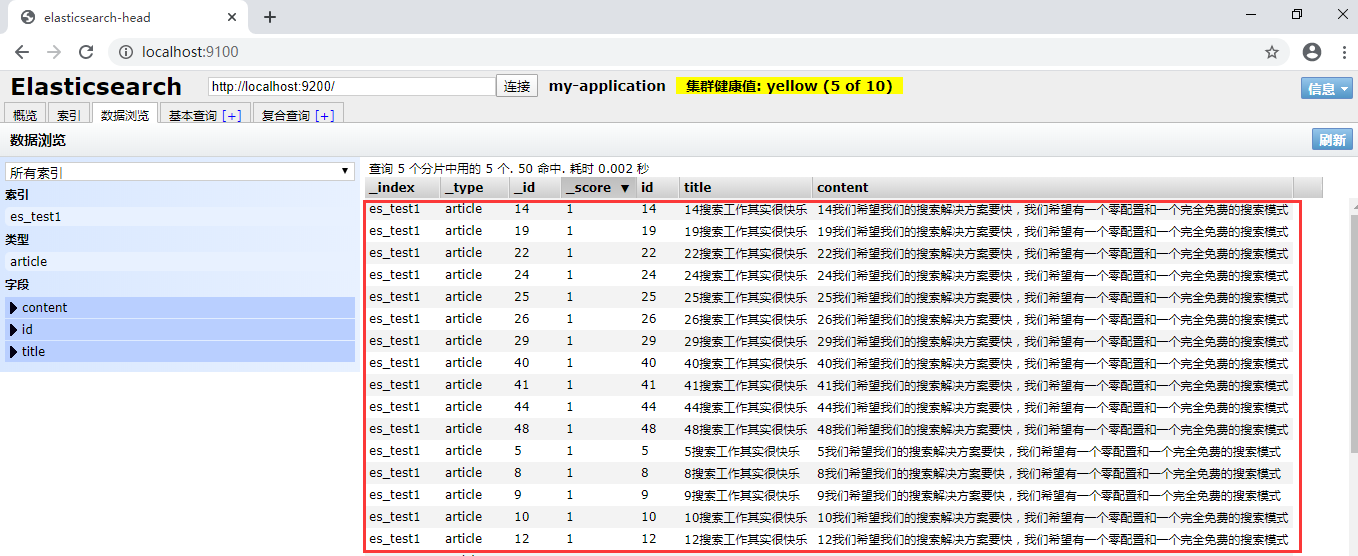
2、访问localhost:9100查看
3、分页查询
package com.zn.myTest;

import com.fasterxml.jackson.core.JsonProcessingException;

import com.fasterxml.jackson.databind.ObjectMapper;

import com.zn.entity.Article;

import org.elasticsearch.action.admin.indices.mapping.put.PutMappingRequest;

import org.elasticsearch.action.search.SearchRequestBuilder;

import org.elasticsearch.action.search.SearchResponse;

import org.elasticsearch.client.Requests;

import org.elasticsearch.client.transport.TransportClient;

import org.elasticsearch.common.settings.Settings;

import org.elasticsearch.common.transport.InetSocketTransportAddress;

import org.elasticsearch.common.xcontent.XContentBuilder;

import org.elasticsearch.common.xcontent.XContentFactory;

import org.elasticsearch.common.xcontent.XContentType;

import org.elasticsearch.index.query.QueryBuilders;

import org.elasticsearch.search.SearchHit;

import org.elasticsearch.search.SearchHits;

import org.elasticsearch.transport.client.PreBuiltTransportClient;

import org.junit.jupiter.api.Test;

import java.io.IOException;

import java.net.InetAddress;

import java.net.UnknownHostException;

import java.util.Iterator;

import java.util.concurrent.ExecutionException;

public class MyESTest {

    /**

     * 分页查询

     */

    @Test

    public void selectDocument() throws UnknownHostException {

        //创建Client连接对象

        Settings settings = Settings.builder().put("cluster.name", "my-application").build();

        //设置IP地址和端口号

        TransportClient client = new PreBuiltTransportClient(settings).addTransportAddress(

                new InetSocketTransportAddress(InetAddress.getByName("127.0.0.1"), 9300));

        //搜索数据  默认每页10条记录

        SearchRequestBuilder searchRequestBuilder = client.prepareSearch("es_test1")

                .setTypes("article")

                .setQuery(QueryBuilders.matchAllQuery());

        //从0条开始,每页5条数据

        //setFrom():从第几条开始检索,默认是0。

        //setSize():每页最多显示的记录数。

        searchRequestBuilder.setFrom(0).setSize(5);

        SearchResponse searchResponse=searchRequestBuilder.get();

        //获取命中次数,查询结果有多少对象

        SearchHits hits = searchResponse.getHits();

        System.out.println("查询结果有:"+hits.getTotalHits()+"条");

        //遍历搜索结果数据

        Iterator<SearchHit> iterator = hits.iterator();

        while (iterator.hasNext()){

            //每个查询对象

            SearchHit searchHit = iterator.next();

            //获取字符串格式打印

            System.out.println(searchHit.getSourceAsString());

            System.out.println("id:"+searchHit.getSource().get("id"));

            System.out.println("title:"+searchHit.getSource().get("title"));

            System.out.println("content:"+searchHit.getSource().get("content"));

            System.out.println("**************************************************");

        }

        //释放资源

        client.close();

    }

}
4、控制台

十二、查询结果高亮操作
1、高亮代码
package com.zn.myTest;

import com.fasterxml.jackson.core.JsonProcessingException;

import com.fasterxml.jackson.databind.ObjectMapper;

import com.zn.entity.Article;

import org.elasticsearch.action.admin.indices.mapping.put.PutMappingRequest;

import org.elasticsearch.action.search.SearchRequestBuilder;

import org.elasticsearch.action.search.SearchResponse;

import org.elasticsearch.client.Requests;

import org.elasticsearch.client.transport.TransportClient;

import org.elasticsearch.common.settings.Settings;

import org.elasticsearch.common.text.Text;

import org.elasticsearch.common.transport.InetSocketTransportAddress;

import org.elasticsearch.common.xcontent.XContentBuilder;

import org.elasticsearch.common.xcontent.XContentFactory;

import org.elasticsearch.common.xcontent.XContentType;

import org.elasticsearch.index.query.QueryBuilders;

import org.elasticsearch.search.SearchHit;

import org.elasticsearch.search.SearchHits;

import org.elasticsearch.search.fetch.subphase.highlight.HighlightBuilder;

import org.elasticsearch.transport.client.PreBuiltTransportClient;

import org.junit.jupiter.api.Test;

import java.io.IOException;

import java.net.InetAddress;

import java.net.UnknownHostException;

import java.util.Iterator;

import java.util.concurrent.ExecutionException;

public class MyESTest {

    /**

     * 查询结果高亮操作

     */

    @Test

    public void selectDocumentRed() throws UnknownHostException {

        //创建Client连接对象

        Settings settings = Settings.builder().put("cluster.name", "my-application").build();

        //设置IP地址和端口号

        TransportClient client = new PreBuiltTransportClient(settings).addTransportAddress(

                new InetSocketTransportAddress(InetAddress.getByName("127.0.0.1"), 9300));

        //设置搜索条件

        SearchRequestBuilder searchRequestBuilder = client.prepareSearch("es_test1")

                .setTypes("article")

                .setQuery(QueryBuilders.termQuery("title","搜索"));

        //设置高亮数据

        HighlightBuilder highlightBuilder=new HighlightBuilder();

        highlightBuilder.preTags("<font style='color:red'>");

        highlightBuilder.postTags("</font>");

        highlightBuilder.field("title");

        searchRequestBuilder.highlighter(highlightBuilder);

        //获取查询结果数据

        SearchResponse searchResponse = searchRequestBuilder.get();

        //获取查询结果集

        SearchHits hits = searchResponse.getHits();

        System.out.println("共搜到:"+hits.getTotalHits()+"条数据");

        //遍历结果

        for (SearchHit hit:hits){

            System.out.println("String方式打印文档搜索内容:");

            System.out.println(hit.getSourceAsString());

            System.out.println("Map方式打印高亮内容");

            System.out.println(hit.getHighlightFields());

            System.out.println("遍历高亮集合,打印高亮片段:");

            Text[] text = hit.getHighlightFields().get("title").getFragments();

            for (Text str:text){

                System.out.println(str);

            }

            System.out.println("**********************************************************8");

            //释放资源

            client.close();

        }

    }

}
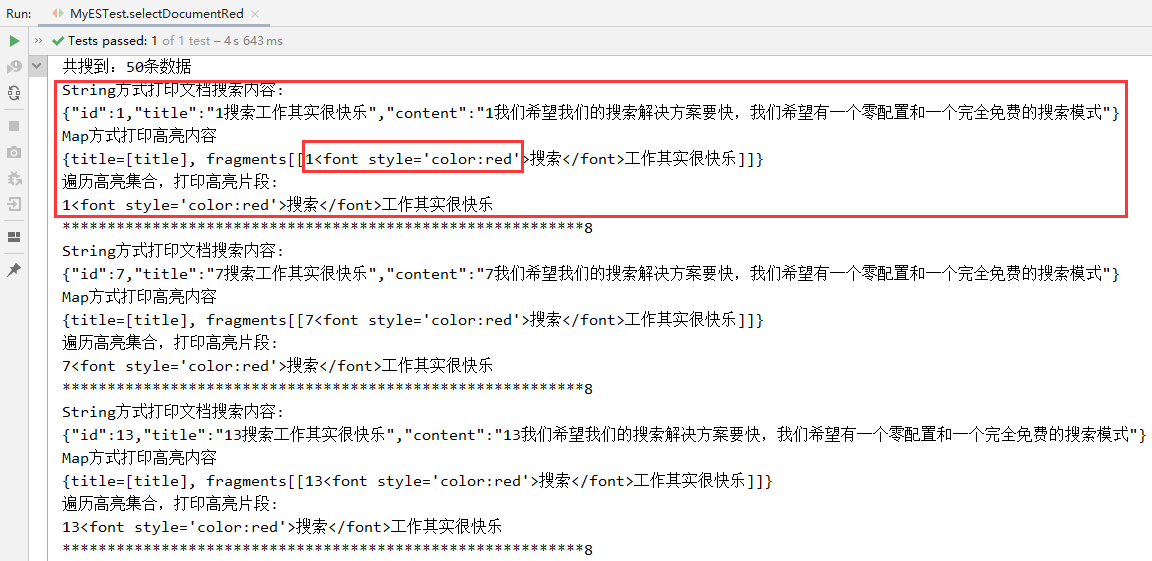
2、控制台
Idea操作ElasticSearch的更多相关文章
- 使用curl命令操作elasticsearch
使用curl命令操作elasticsearch 大岩不灿 发表于 2015年4月25日 浏览 7,426 次 第一:_cat系列_cat系列提供了一系列查询elasticsearch集群状态的接口.你 ...
- 使用Java客户端操作elasticsearch(二)
承接上文,使用Java客户端操作elasticsearch,本文主要介绍 常见的配置 和Sniffer(集群探测) 的使用. 常见的配置 前面已介绍过,RestClientBuilder支持同时提供一 ...
- java操作elasticsearch实现组合桶聚合
1.terms分组查询 //分组聚合 @Test public void test40() throws UnknownHostException{ //1.指定es集群 cluster.name 是 ...
- java操作elasticsearch实现query String
1.CommonTersQuery: 指定字段进行模糊查询 //commonTermsQuery @Test public void test35() throws UnknownHostExcept ...
- java操作elasticsearch实现聚合查询
1.max 最大值 //max 求最大值 @Test public void test30() throws UnknownHostException{ //1.指定es集群 cluster.name ...
- java操作elasticsearch实现前缀查询、wildcard、fuzzy模糊查询、ids查询
1.前缀查询(prefix) //prefix前缀查询 @Test public void test15() throws UnknownHostException { //1.指定es集群 clus ...
- java操作elasticsearch实现条件查询(match、multiMatch、term、terms、reange)
1.条件match query查询 //条件查询match query @Test public void test10() throws UnknownHostException { //1.指定e ...
- java操作elasticsearch实现查询删除和查询所有
后期博客本人都只给出代码,具体的说明在代码中也有注释. 1.查询删除 //查询删除:将查询到的数据进行删除 @Test public void test8() throws UnknownHostEx ...
- java操作elasticsearch实现批量添加数据(bulk)
java操作elasticsearch实现批量添加主要使用了bulk 代码如下: //bulk批量操作(批量添加) @Test public void test7() throws IOExcepti ...
- 学习用Node.js和Elasticsearch构建搜索引擎(3):使用curl命令操作elasticsearch
使用Elasticsearch不免要提到curl工具,curl是利用URL语法在命令行方式下工作的开源文件传输工具.官网地址:https://curl.haxx.se/ 因为elasticsearch ...
随机推荐
- Java入门 - 高级教程 - 09.文档注释
原文地址:http://www.work100.net/training/java-documentation.html 更多教程:光束云 - 免费课程 文档注释 序号 文内章节 视频 1 概述 2 ...
- 嗯 想写个demo 苦于没数据
step 1: 来点数据: 各种数据 随你便了. step 2: 来个 服务端 step 3 : 客户端 调用
- livego+obs+flv.js 搭建视频直播
一.流程 主播通过 obs软件通过直播 ->推流到->直播服务器 客户通过浏览器 访问站点->flv.js拉取直播服务器视频流并播放 二.环境 centos7 直播服务器 https ...
- UML--> plantUML安装
plantUML安装 因为基于intellid idea,所以第一步自行安装. setting->plugins 搜索plantUML 安装完成后,重启idea 会有如下显示 安装Graphvi ...
- Linux 常用工具sysstat之iostat
命令解释 用于输出CPU和磁盘I/O相关的统计信息:iostat依赖于sysstat软件包 命令格式 iostat [ 选项 ] [<时间间隔> [<次数>]] 常用选项 -c ...
- Asp.net core 2.x/3.x 的 Globalization 和 localization 的使用 (一) 使用方法
由于Api的接口需要返回多语言,因此参考了网上很多篇文章,,有些文章写的太过于理论,看起来比较费劲,今天下午搞了一个下午,总结了一下经验,, 做这个功能时,主要参考了两篇文章: https://blo ...
- VMware Workstation 14 Pro 安装 CentOS 7 Linux 虚拟机
CentOS 7 下载地址:http://isoredirect.centos.org/centos/7/isos/x86_64/ ,选择 CentOS-7-x86_64-DVD-1908.iso : ...
- Python中zip()函数的解释和可视化
zip()的作用 先看一下语法: zip(iter1 [,iter2 [...]]) -> zip object Python的内置help()模块提供了一个简短但又有些令人困惑的解释: 返回一 ...
- Go语言实现:【剑指offer】二叉树的下一个结点
该题目来源于牛客网<剑指offer>专题. 给定一个二叉树和其中的一个结点,请找出中序遍历顺序的下一个结点并且返回. 注意,树中的结点不仅包含左右子结点,同时包含指向父结点的指针. Go语 ...
- 小白学 Python 数据分析(5):Pandas (四)基础操作(1)查看数据
在家为国家做贡献太无聊,不如跟我一起学点 Python 人生苦短,我用 Python 前文传送门: 小白学 Python 数据分析(1):数据分析基础 小白学 Python 数据分析(2):Panda ...